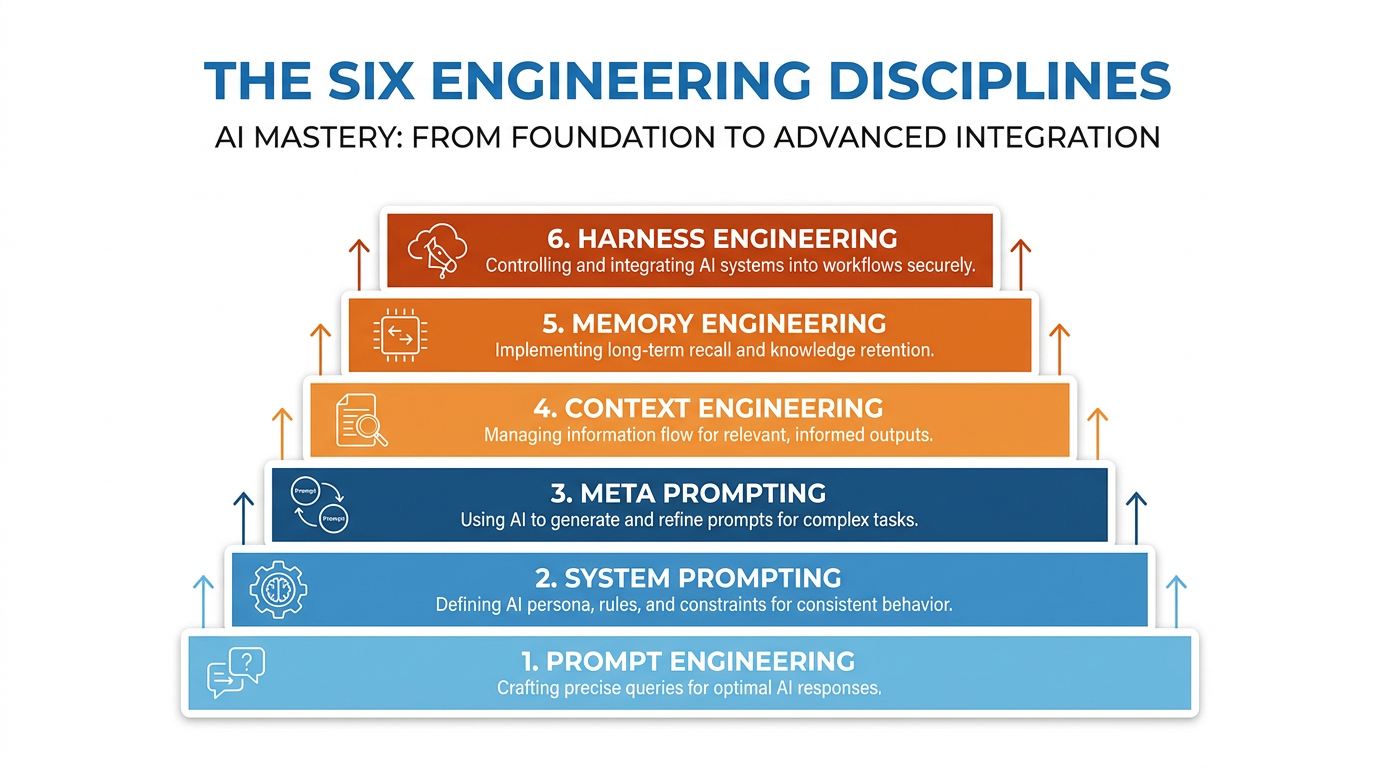
Figure 1:The Six Disciplines — Prompt engineering is where most people stop. The professionals who build real leverage have mastered all six.
In 2023, “prompt engineer” became one of the hottest job titles in technology.
Companies were posting positions at $300,000 a year. The media ran breathless profiles of people who had figured out the magic words that made AI do impressive things. LinkedIn flooded with self-proclaimed prompt engineers. Universities started teaching prompt engineering courses. Entire books were written on the subject.
And almost none of it addressed what actually matters.
Here is the thing about prompt engineering: it is real, it is valuable, and it is the least powerful of the six disciplines that determine how much value you actually extract from AI.
If all you know how to do is write a good prompt, you are standing in the lobby of a six-story building. You know how to open the front door. But the leverage — the compounding, structural, career-defining leverage — lives on the floors above you. And most people never go up.
This chapter is the elevator.
Why Six Disciplines?
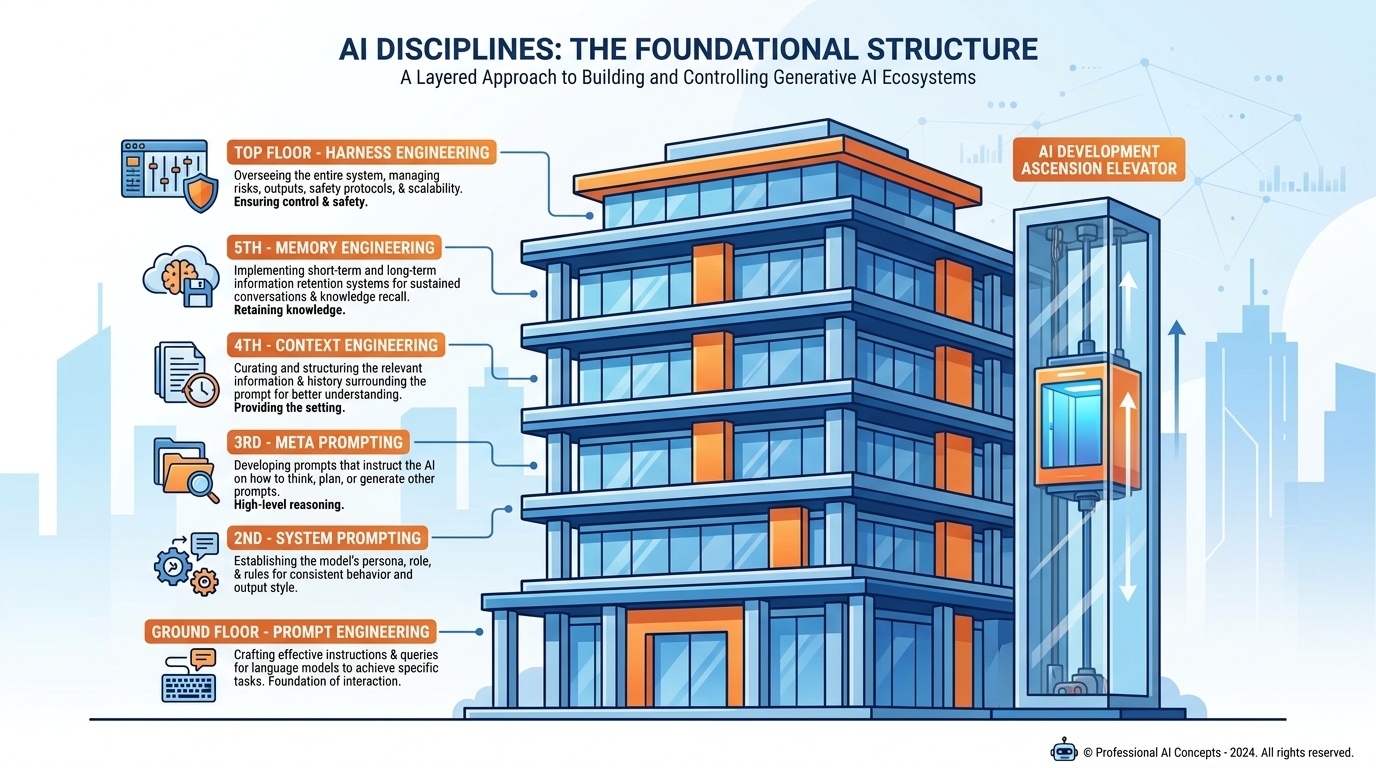
Figure 2:Six Floors — Most professionals never leave the lobby. The ones who do build capabilities that are genuinely difficult to replicate.
Here is something counterintuitive.
Two people can have access to exactly the same AI model. Same version. Same subscription. Same raw capability sitting inside the tool. And one of them produces output that is twice as good, in half the time, with results that hold up under scrutiny — while the other produces output that requires significant rework and sometimes misses the point entirely.
The difference is not intelligence. It is not effort. It is not even experience with AI.
It is which disciplines they have mastered.
The six disciplines are not six separate skills you learn independently. They are six layers that build on each other. Each one multiplies the value of everything below it. Master only the first, and you are competent. Master all six, and you have built something that works for you even when you are not in the room.
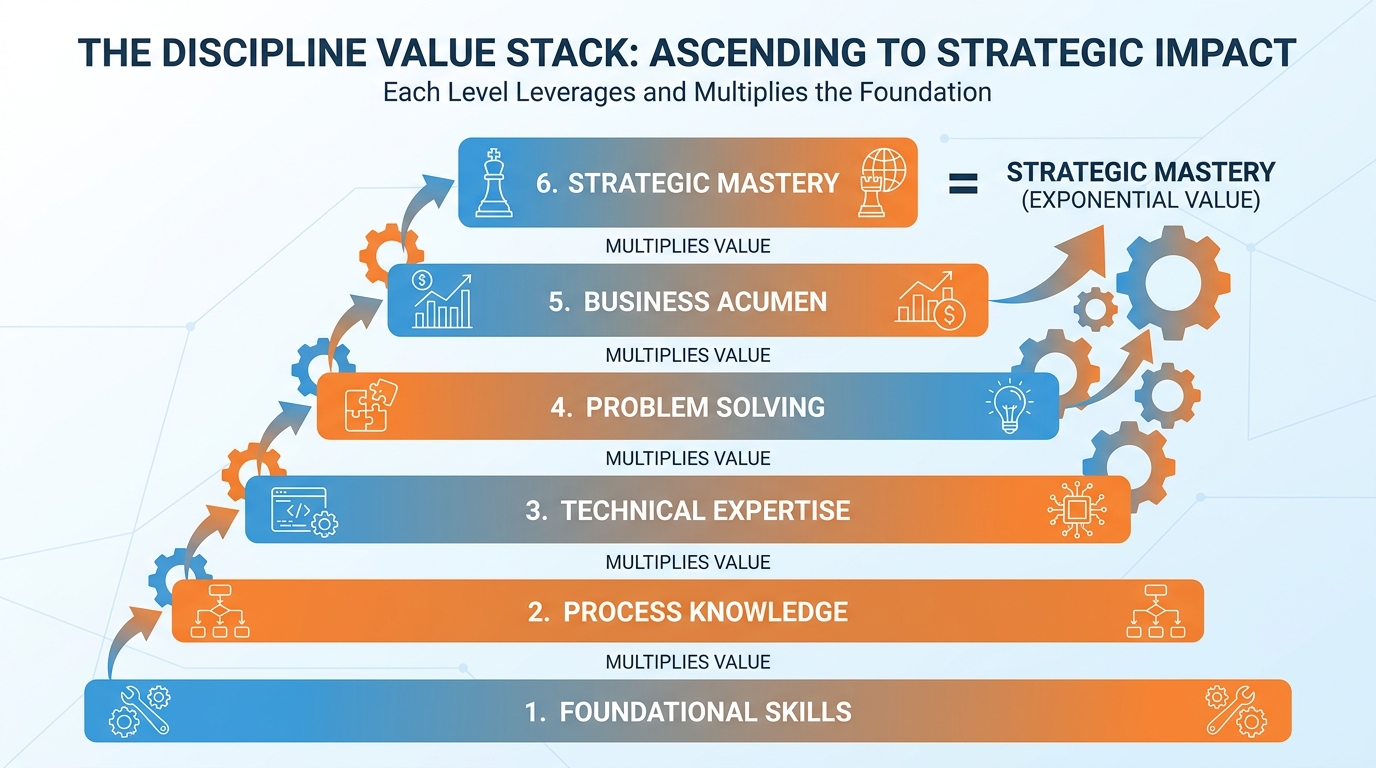
Figure 3:The Stack — Each discipline multiplies the value of the one below it. This is not linear progress. It is compounding leverage.
Let us go floor by floor.
Discipline One: Prompt Engineering
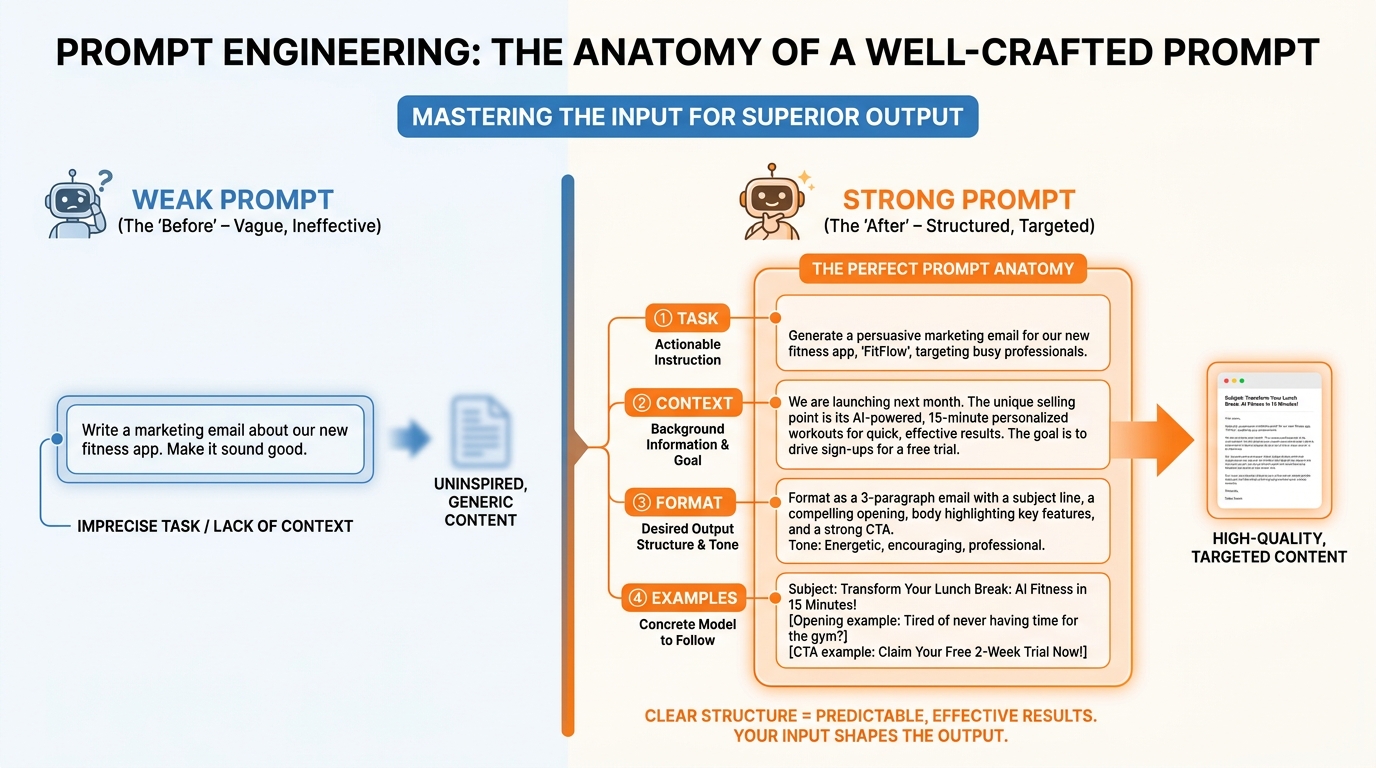
Figure 4:Prompt Engineering — The foundation. Not the ceiling. A well-crafted prompt is the difference between a useful response and a generic one.
Prompt engineering is the skill of crafting individual instructions that produce high-quality outputs.
It is the foundation. Everything else depends on being able to communicate clearly with an AI in a single exchange. If you cannot write a good prompt, nothing above this level works well.
The core insight of prompt engineering is this: AI responds to specificity. Vague inputs produce vague outputs. The more precisely you describe what you want — the task, the format, the audience, the constraints, the tone — the more precisely the AI delivers it.
Most people write prompts the way they would send a quick text message. Casual, brief, assumption-laden. “Summarize this.” “Write me an email.” “Help me with my presentation.”
A well-engineered prompt sounds more like a brief to a very capable but very literal new hire on their first day. It does not assume the AI knows your preferences, your audience, your standards, or your context. It states all of those things explicitly.
The four components of a strong prompt:
Task — What exactly do you want produced? Not the category of thing, but the specific thing. Not “write an email” but “write a 150-word follow-up email to a prospect who attended my webinar but has not yet booked a call.”
Context — What does the AI need to know to do this well? Who is the audience? What is the situation? What has already happened? What constraints exist?
Format — How should the output be structured? Bullet points or prose? How long? With headers or without? Formal or conversational?
Examples — When precision matters, show one. The fastest way to calibrate an AI’s output to your exact standard is to give it a sample that meets that standard.
Prompt engineering is the skill you practice most visibly — because you use it in every single conversation. But it is only the beginning.
Discipline Two: System Prompting
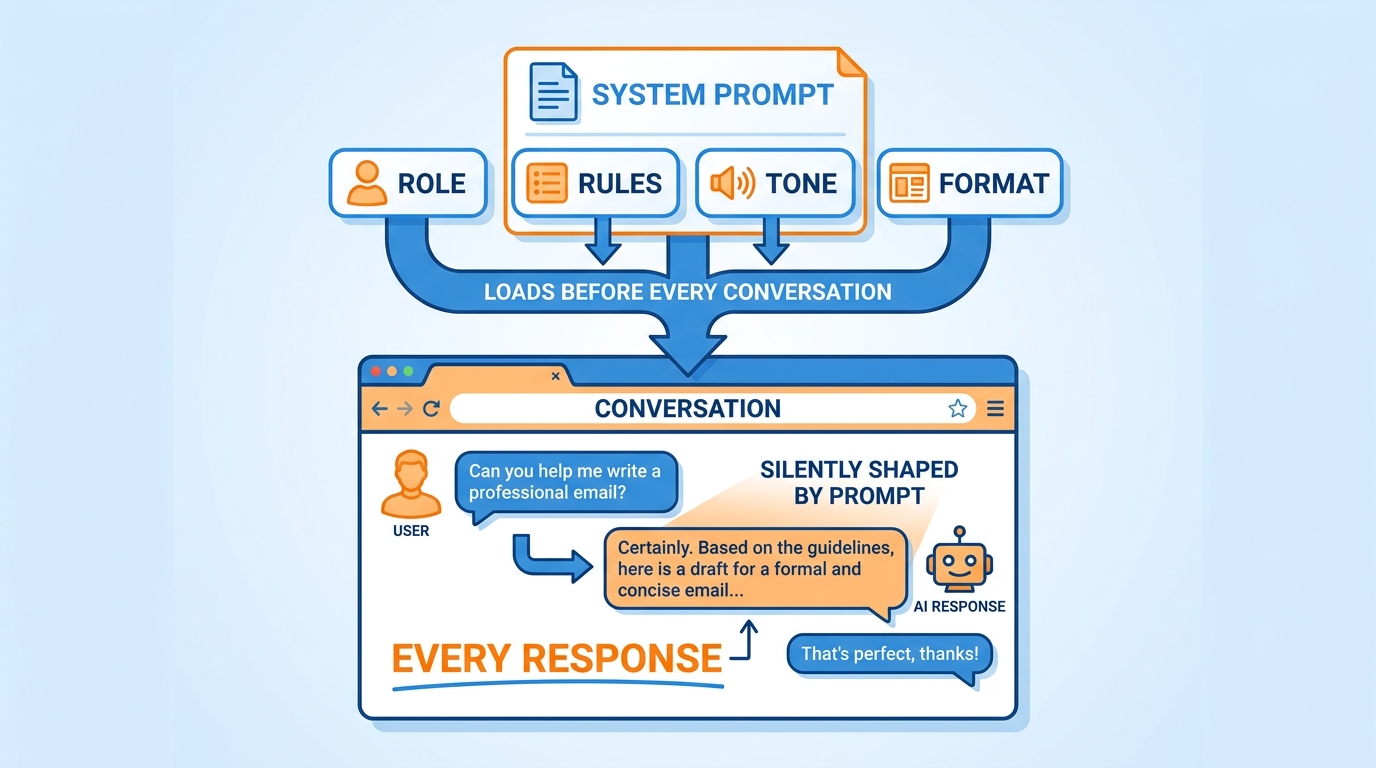
Figure 5:System Prompting — The silent instruction that loads before every conversation. You write it once. It shapes everything that follows.
If prompt engineering is what you say in a conversation, system prompting is who you are before the conversation begins.
A system prompt is a standing instruction that loads silently before every exchange. It defines the AI’s role, its rules, its tone, its boundaries, and its understanding of who it is working for. The AI reads it first, every time, before it reads your message.
Think of it like this. Imagine you hire an executive assistant. On their first day, you spend two hours briefing them: here is who I am, here is how I work, here is what matters to me, here is what I hate, here is how I want information delivered, here is how I talk to clients versus how I talk internally. After that briefing, every interaction you have with that assistant is shaped by it. You do not have to re-explain yourself constantly. The context is already there.
Your system prompt is that briefing. Permanent, persistent, and invisible to you in the moment — but shaping every response you receive.
The difference between working with a well-configured system prompt and working without one is not subtle. It is the difference between an AI that sounds like a generic tool and one that sounds like a specialist who knows your work.
What belongs in a system prompt:
Your professional role and industry
The kind of work you do day to day
How you want information structured and delivered
The tone you prefer — direct, formal, conversational
Things you always want included in responses
Things you never want included
Your standards for quality
You wrote your first system prompt in Chapter 2. This discipline is about understanding why it works — and how to make it better over time.
Discipline Three: Meta Prompting
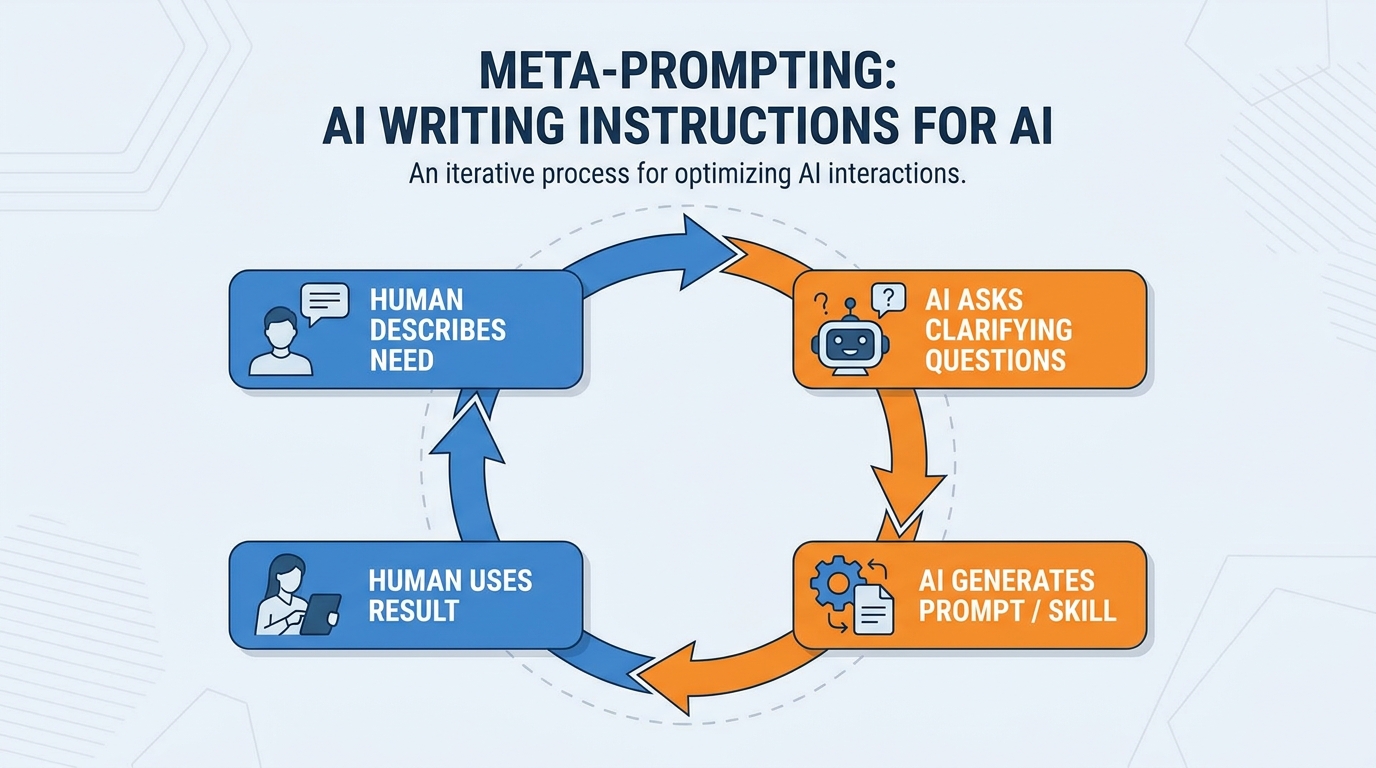
Figure 6:Meta Prompting — Using AI to write the instructions AI will follow. It sounds circular. It is actually one of the most powerful techniques in this book.
Here is where most people’s heads tilt slightly.
Meta prompting is the practice of using AI to write the instructions that AI will use. You are not writing the prompt. You are asking AI to write the prompt — and then using that prompt to do the actual work.
This sounds strange until you try it once. And then it becomes the way you do almost everything.
Why does this work? Because the hardest part of writing good instructions is knowing what to include. Most people omit crucial context, make vague assumptions, and write instructions that make sense to them but leave important gaps for the AI. A meta-prompting session surfaces those gaps. When Claude interviews you — asking clarifying questions, probing for specifics, pushing back on vagueness — the output it produces is almost always more complete and more precise than anything you would have written yourself.
You already used meta prompting in Chapter 2 when you asked Claude to interview you and write your system prompt. You used it in Chapter 4 when you asked Claude to design your skills.
The discipline is recognizing that this approach — describe what you want to achieve, let AI generate the instructions for how to achieve it — applies to almost everything:
Writing a system prompt → meta prompt
Creating a Gem → meta prompt
Building a new skill → meta prompt
Designing a workflow → meta prompt
Writing a complex prompt for a recurring task → meta prompt
The rule of thumb: if you are about to write instructions that will be used more than once, do not write them yourself. Let Claude write them. You will get better instructions faster, and you will learn from the process what good instructions look like.
Discipline Four: Context Engineering
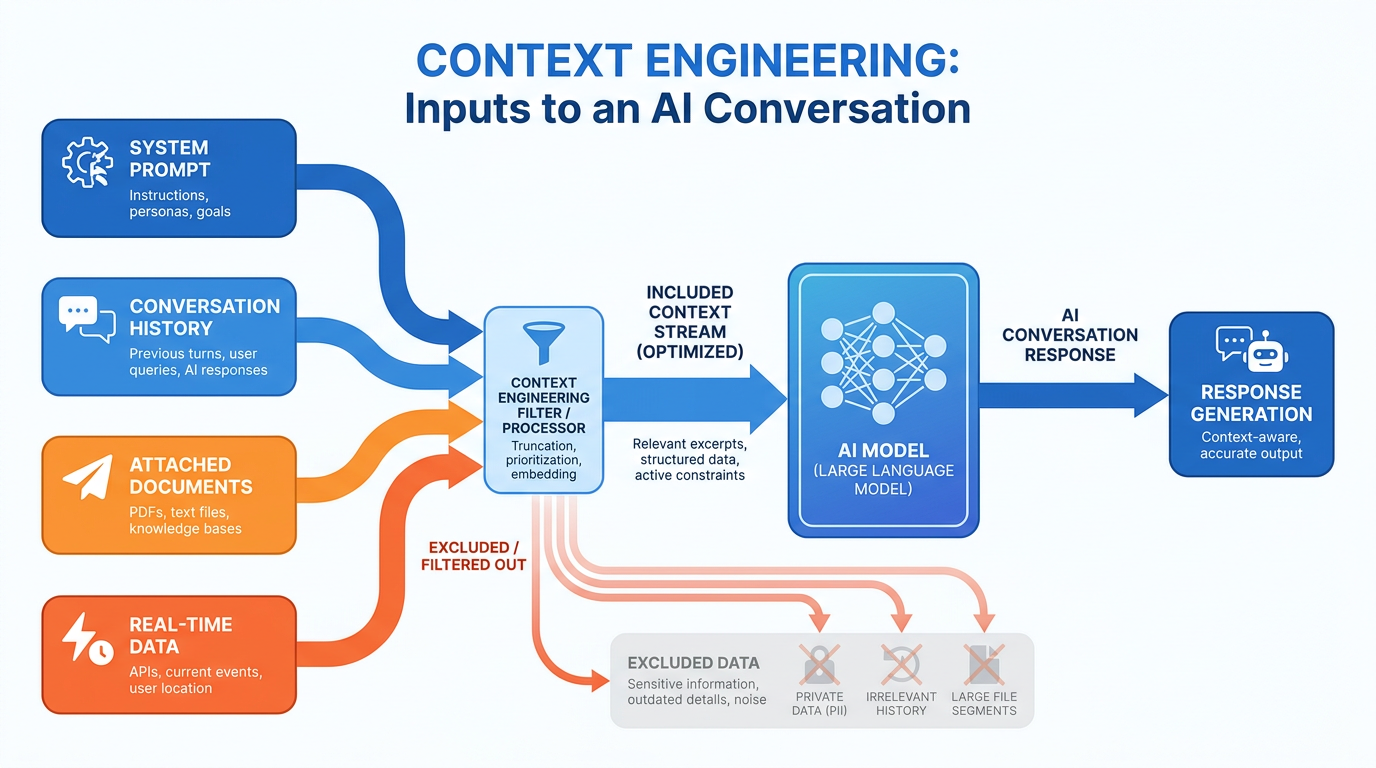
Figure 7:Context Engineering — AI is only as good as the information it has access to. This discipline is about deliberately managing that information.
Here is a truth that most people do not sit with long enough.
Your AI does not have opinions. It has context. Every output it produces is a function of the information it was given — the system prompt, the conversation history, the documents you attached, the question you asked. Change any of those inputs and you change the output. Dramatically.
Context engineering is the practice of deliberately designing what information enters an AI conversation, how it is structured, and when it appears.
This matters for three reasons.
First: more context is not always better. The AI’s working memory — the context window we covered in Chapter 1 — is finite. Fill it with irrelevant information and the AI has less room for what matters. A conversation that begins with a 40-page document the AI does not need is a conversation where the AI is working with less capacity for your actual question. Good context engineering means giving the AI exactly what it needs — and nothing else.
Second: the order of context matters. Information placed early in a conversation has more influence on the AI’s framing than information placed late. If you want the AI to approach a problem from a specific angle, that framing should come first, not buried in paragraph seven of your message.
Third: context degrades over a long conversation. As a conversation grows — more messages, more back-and-forth — the early context gets proportionally smaller relative to the total. The AI starts to lose the thread. Experienced users know when to start a fresh conversation rather than continuing one that has drifted too far from its original purpose.
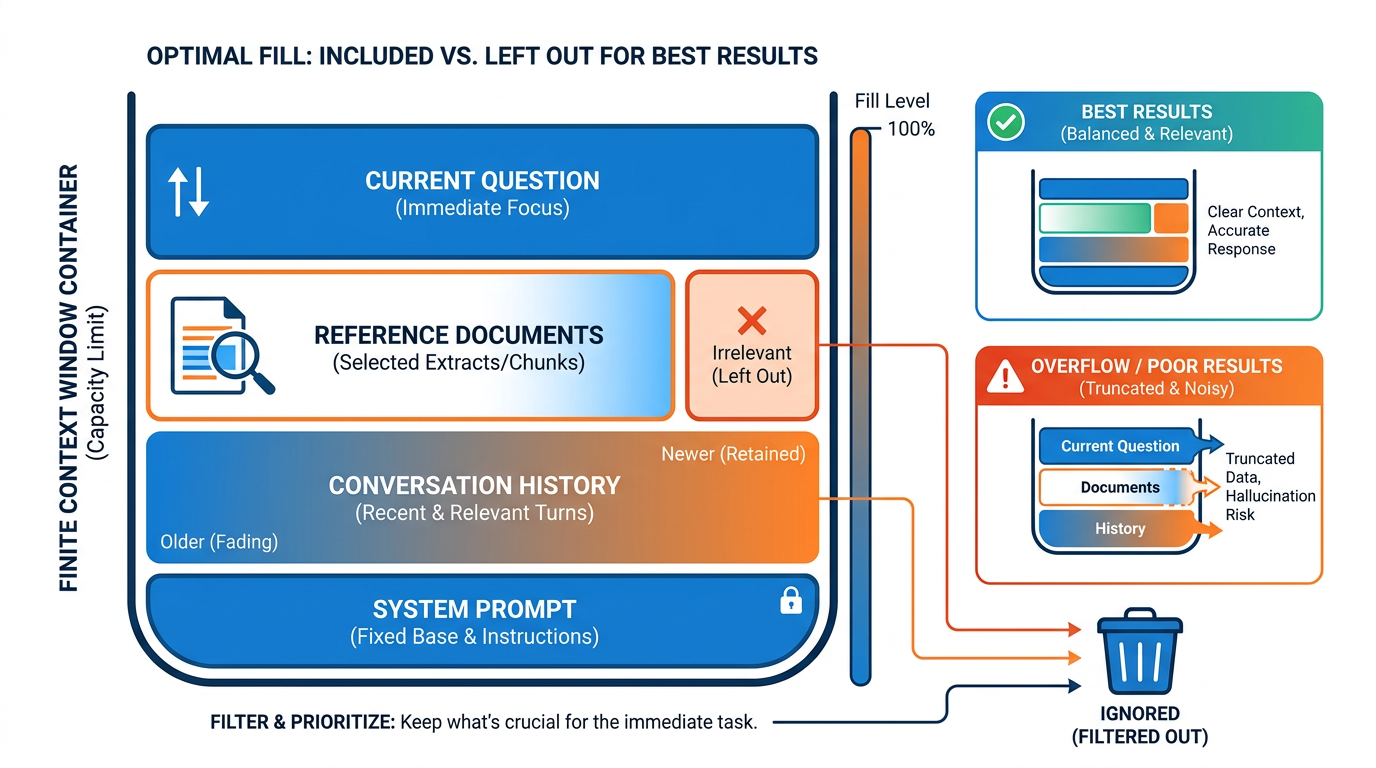
Figure 8:Context Window Management — The finite space of an AI’s working memory. Fill it deliberately, not accidentally.
Context engineering is invisible when done well. The AI just seems to get it — responding with exactly the right focus, the right framing, the right depth. That is not luck. That is deliberate design of what the AI was given to work with.
Discipline Five: Memory Engineering
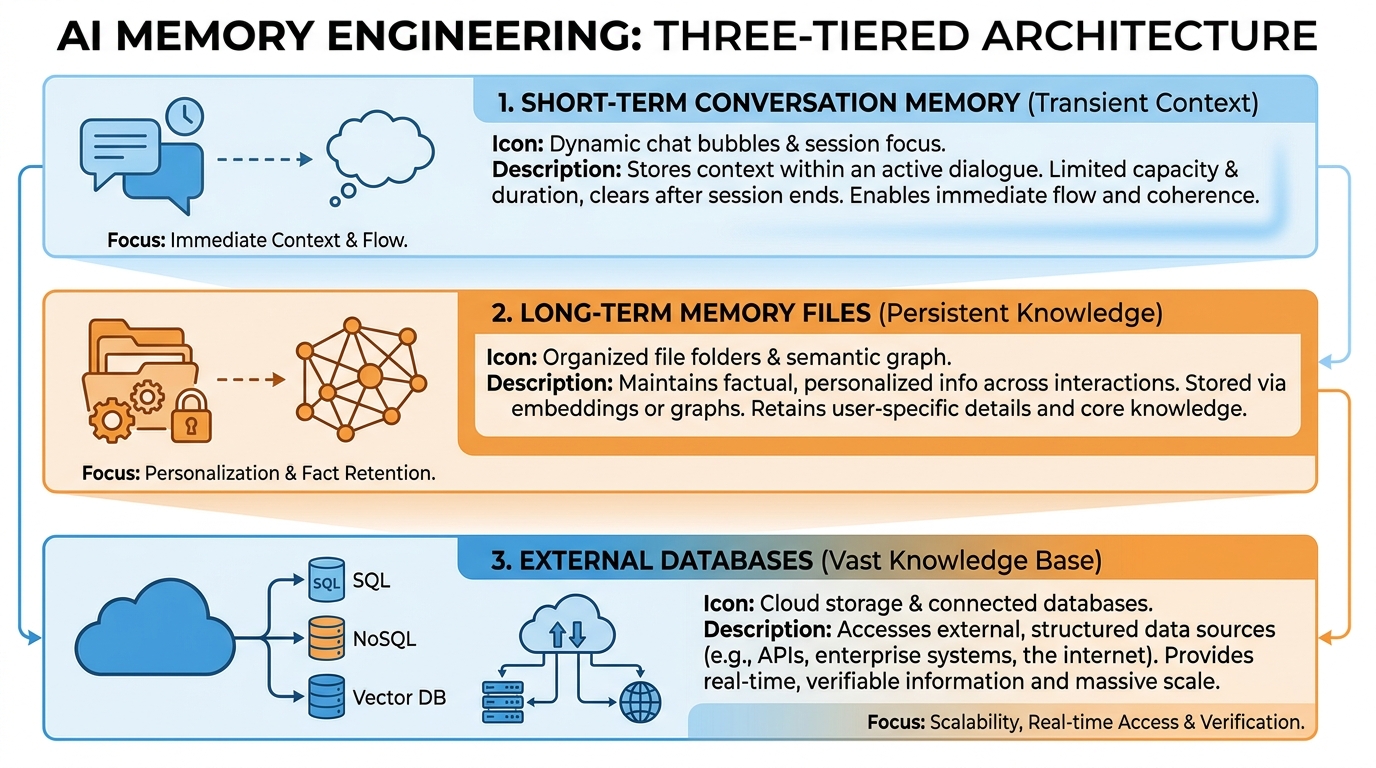
Figure 9:Memory Engineering — AI has no native long-term memory. This discipline is about building it deliberately.
AI has a dirty secret.
It does not remember you.
Every conversation begins at zero. Close a chat window, open a new one, and the model has no idea who you are, what you have talked about, what decisions you have made, or what you are working on. Whatever felt like a productive working relationship in yesterday’s session is completely gone today.
This is not a bug. It is the design. But it is a design you can work around — and the professionals who do have a significant advantage over those who do not.
Memory engineering is the discipline of deliberately building and managing the information that persists between sessions. It is how you give an AI continuity.
There are three layers:
Conversation memory is what the AI knows within a single session. This is automatic — the AI sees everything that has been said in the current conversation. No engineering required, but it disappears when the session ends.
File-based memory is what you explicitly save and inject into future conversations. A document that describes you, your preferences, your current projects, your decisions. When you start a new session and provide that document, the AI has continuity. Many professionals maintain a living document called something like “My Context” or “Working Brief” — updated weekly — that they paste or attach at the start of important sessions.
Database memory is what tools like Supabase (Chapter 3) provide: structured, queryable, persistent storage that your AI can read from and write to across any number of conversations. This is the most powerful layer, and the one that enables genuinely autonomous AI workflows that accumulate knowledge over time.
The minimum viable practice is a file. Write a one-page document about yourself — your role, your current priorities, your key relationships, your ongoing projects — and make a habit of attaching it or pasting it at the start of sessions where continuity matters. You will be astonished at the difference it makes.
Discipline Six: Harness Engineering
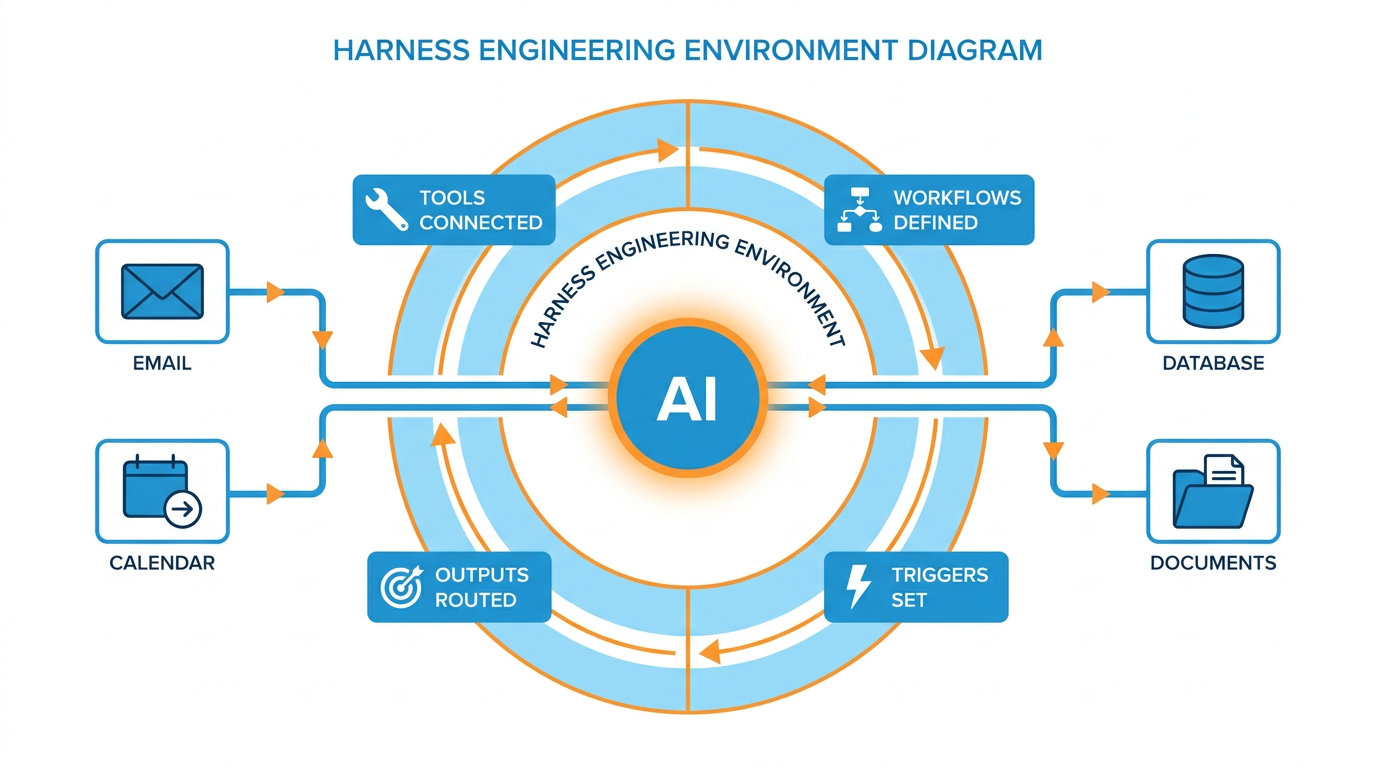
Figure 10:Harness Engineering — Designing the world your AI operates in. The tools it can reach. The workflows it follows. The triggers that set it in motion.
This is the floor where everything comes together.
Harness engineering is the discipline of designing the environment your AI operates within. Not a single prompt. Not a single conversation. The entire ecosystem: the tools connected, the workflows defined, the triggers that set things in motion, the outputs that route to the right places.
If the previous five disciplines are about making individual AI interactions excellent, harness engineering is about making AI work for you when you are not actively working with it.
Think about everything you have built so far in this book. Your system prompt configures how your AI behaves. Your skills give it reusable capabilities. Your MCP connections give it access to your real-world data. Your memory engineering gives it continuity. Harness engineering is the practice of wiring all of those things together into workflows that operate with minimal ongoing input from you.
A simple example: you get an email from a prospective client. Your harness — a set of rules you have defined — triggers automatically. Your AI reads the email via the Gmail connector. It searches your Drive for any prior documents related to this contact. It checks your calendar for availability. It drafts a reply in your voice. It places that draft in your Gmail drafts folder, flagged for your review. You review, adjust if needed, and send.
You were not in that loop. You appeared at the end, for thirty seconds, to confirm and send.
That is harness engineering.
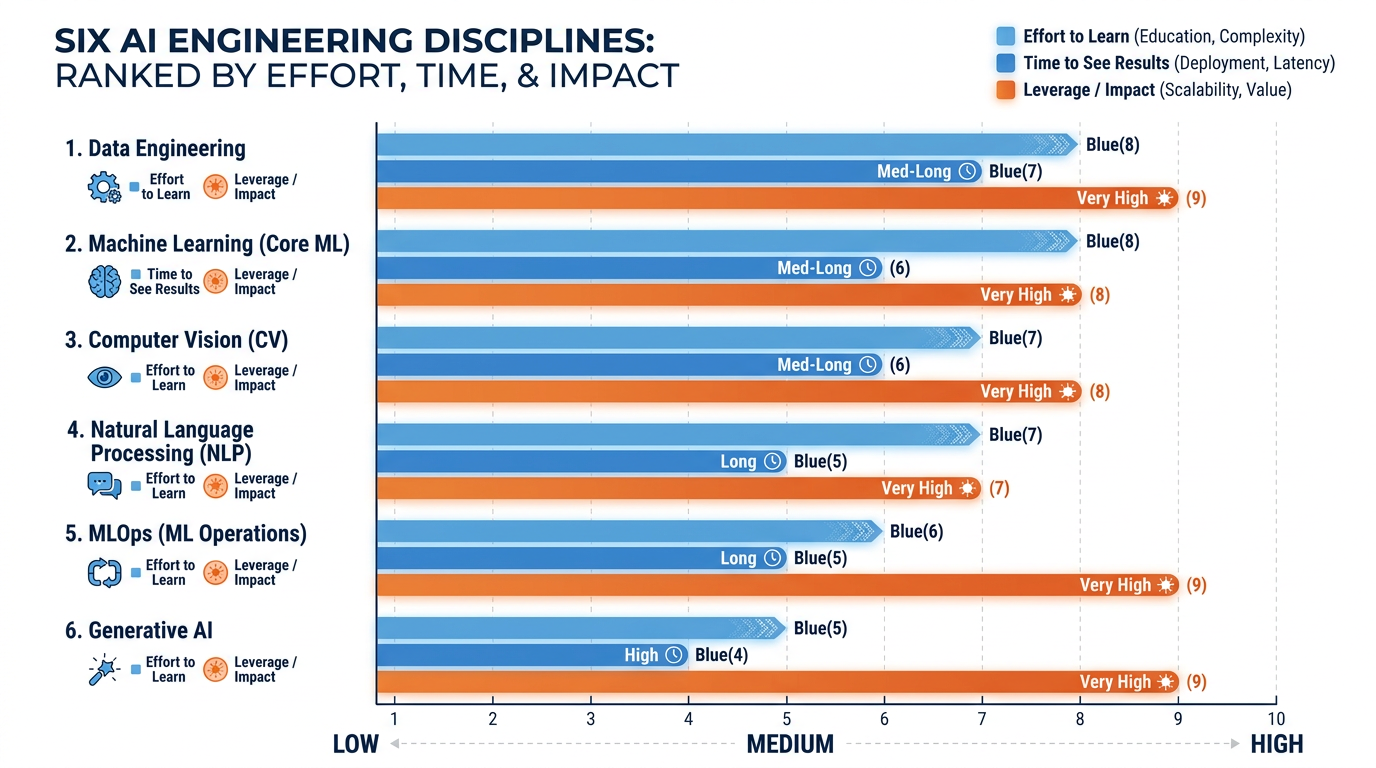
Figure 11:Discipline Comparison — Harness engineering takes the most effort to set up. It also delivers the most leverage by a significant margin.
Building a harness takes more effort than writing a prompt. It requires thinking through the full sequence of a workflow: what triggers it, what data it needs, what it produces, where that output goes, and what human review looks like. But once it is built, it runs. Every time. Without you having to think about it.
This is the closest thing to a genuine force multiplier in knowledge work. A well-designed harness does not just save time. It changes the fundamental ratio of your time to your output.
The Disciplines at Full Stretch: Deep Research Modes
Here is a question that tests everything you just learned.
What happens when you hand an AI a hard question and thirty minutes of unsupervised time?
Not a prompt-and-response exchange. Not a conversation. A commission: the AI writes its own research plan, runs dozens or hundreds of web searches, reads what it finds, notices gaps, searches again, cross-references its own findings — and returns with a structured, cited report that can run to several thousand words.
That is deep research — the long-running autonomous research mode that is now standard equipment in every major AI product:
Claude research mode (Anthropic) — a Research toggle on the chat input at claude.ai; requires a paid plan. Claude runs multi-pass searches across the web and, if you have connected them, your Google Workspace data — the connectors from Chapter 3 feeding the disciplines of Chapter 5.
Gemini Deep Research (Google) — selectable in the Gemini prompt bar; shows you its research plan before it runs and lets you edit the plan. Typically the fastest of the three.
ChatGPT deep research (OpenAI) — a Deep research option in ChatGPT’s composer tools; the slowest and often the most exhaustive, with runs that can take ten to thirty minutes.
Why does this belong in the six-disciplines chapter? Because a deep research run is the six floors compressed into a single transaction. There is no conversation to steer, no follow-up to clarify, no mid-course correction. Everything the AI will know about your intent must be engineered into the brief, up front. Prompt engineering, context engineering, and a dash of memory engineering — spent in five minutes of writing, leveraged across thirty minutes of autonomous work.

Figure 12:One Brief, Hundreds of Searches — In a conversation, you steer as you go. In a deep research run, all your steering happens before it starts. The brief is the whole game.
When extended autonomous research is the right tool. Use deep research when the question is genuinely open-ended, spans many sources, and would cost you two-plus hours of manual reading: market landscapes, competitor analyses, regulatory overviews, vendor comparisons, literature scans. Do not use it for questions with one findable answer (ordinary search is faster), for questions about your private data alone (a connector conversation handles that), or for anything you need in the next ninety seconds.
How to brief it. A deep research brief is a scope-of-work document, not a question. The four components of a strong prompt from Discipline One still apply — but three additions matter at this scale:
Boundaries — what is in scope and, explicitly, what is out. “US market only. Exclude enterprise vendors above $1B revenue. Last 24 months only.”
Source guidance — what counts as credible for this question. “Prefer primary sources: company filings, pricing pages, regulatory documents. Flag anything sourced only from blogs.”
Decision context — what you will do with the report. An AI that knows you are choosing between three CRM vendors writes a different report than one that thinks you want a CRM overview.
How to audit what comes back. This is the discipline most people skip, and it is where deep research either becomes a superpower or a liability. A deep research report arrives looking authoritative: confident prose, numbered citations, professional structure. Some of those citations will not say what the report claims they say. A few may not support the claim at all. The verification discipline from Chapter 1 — check the citation, read the source, confirm the claim — is not optional here; it is the price of admission. The rule: a deep research report is a draft by a fast, tireless, occasionally overconfident junior analyst. You are the senior partner. Partners check the footnotes.
Try It: Commission and Audit One Deep Research Run (60–75 minutes, most of it unattended)
What you need: a paid account on any one of Claude (claude.ai), Gemini (gemini.google.com), or ChatGPT (chatgpt.com) — and one real business question you actually care about. Not a test question. Something whose answer you would genuinely use: a market you are considering, a tool your team might buy, a competitor you need to understand.
Part 1 — Find the mode (2 minutes)
In Claude: open claude.ai, start a new chat, and look at the row of icons on the prompt input box. Click the tools/settings icon and toggle Research on. The input area will indicate research mode is active. (If you do not see it, check that you are on a paid plan — the label and icon placement may vary by version.)
In Gemini: open gemini.google.com and look at the prompt bar. Select Deep Research — it appears either as a chip below the input box or in the model/tools selector. You will know it is active when the interface says so above or inside the input.
In ChatGPT: open chatgpt.com, click the + or tools icon in the message composer, and choose Deep research from the menu.
Part 2 — Write the brief (10 minutes; do not rush this)
In a separate document, draft your brief using this skeleton, then paste it in:
"Research question: [one sentence — the decision-relevant question]. Why I am asking: [one sentence — the decision this feeds]. In scope: [markets, timeframes, segments]. Out of scope: [explicitly excluded]. Sources: prefer [primary sources relevant to your question]; flag any claim supported only by low-quality sources. Deliverable: a structured report with an executive summary, a findings section organized by [your preferred structure], and a full citation list. Cite a source for every factual claim."
Submit it. In Gemini specifically: before running, Gemini shows you its research plan — a numbered list of what it intends to investigate. Read it, click Edit plan if it missed something, then approve. (Claude and ChatGPT may ask one or two clarifying questions instead — answer them; those answers are the last steering input you get.)
Part 3 — Wait, then read (5–30 minutes of waiting)
Expect Gemini to finish in roughly 5–15 minutes, Claude in a similar window, and ChatGPT in 10–30. You will see a progress indicator; you do not need to keep the tab focused. Go do something else.
When the report arrives, read the executive summary first, then skim the structure, then read in full. Note how many sources it consulted — the report will list them, often dozens.
Part 4 — The citation audit (20 minutes; this is the actual exercise)
Pick the five most decision-relevant claims in the report — the ones you would act on. For each, open the cited source and apply the Chapter 1 verification discipline: Does the source exist? Does it actually contain the claim? Is it primary or secondhand? Is it current?
Build this audit table:
| # | Claim in report | Cited source | Source says this? (Yes / Partly / No) | Source quality (Primary / Secondary / Weak) | Verdict |
|---|
Fill in all five rows. Expect at least one “Partly.” If all five come back clean, audit three more — a 100% clean audit on the first five is worth confirming, not assuming.
Your deliverable: Submit three things: (1) the full deep research report, (2) your completed citation audit table, and (3) exactly two sentences on what the report got wrong or overstated — and if the audit found nothing wrong, two sentences on which claim you trust least and why.
Fallback: If you have no paid plan on any of the three, Perplexity’s research mode (perplexity.ai) offers a free tier with a limited number of deep research runs per day — the brief, the wait, and the audit work identically.
Case Study: The Six-Floor Audit — How a Wealth Management Firm Rebuilt Its AI Strategy From the Ground Up
Background
Meridian Wealth Partners is a mid-sized registered investment advisory (RIA) firm headquartered in Charlotte, North Carolina, managing approximately $4.2 billion in assets under management across 1,800 high-net-worth client relationships. In early 2024, the firm’s Chief Operating Officer, Sandra Reyes, championed an internal initiative to integrate generative AI into the advisory workflow — specifically targeting the time-intensive work of producing client-facing investment commentaries, portfolio review summaries, and prospecting materials. The initiative had executive sponsorship, a modest implementation budget, and genuine enthusiasm from the advisory team. By all appearances, it was well-positioned to succeed.
Six months later, the adoption data told a different story. Usage of the firm’s Claude enterprise subscription had plateaued at roughly 22% of the licensed advisor seats. The advisors who had tried the tool and abandoned it cited a consistent complaint: the outputs were generic, required extensive rewriting, and did not reflect the firm’s voice, the client’s specific situation, or the advisor’s professional judgment. Several senior advisors — the very professionals the initiative most needed to convert — had quietly concluded that the AI was “not ready” and returned to dictating memos and writing emails by hand. Sandra commissioned a usage audit to understand what was going wrong.
What the audit revealed was not a technology problem. The firm had deployed AI the way most organizations do: they gave advisors access to the model, provided a two-hour onboarding session on “how to write prompts,” and expected results. The advisors who were using the tool effectively — the 22% who had stuck with it — turned out to be doing something structurally different from those who had abandoned it. They had, largely by trial and error, discovered pieces of the six-discipline stack. One senior advisor had built a detailed system prompt. Two others had developed reusable prompt templates for their most common tasks. A junior associate had figured out that attaching the client’s most recent quarterly statement dramatically improved the relevance of portfolio commentary. But these were individual discoveries, not organizational knowledge — and they were not being taught, standardized, or scaled.
The firm’s Head of Advisor Technology, Marcus Webb, brought in an outside consultant to design a structured AI capability-building program. That consultant’s recommendation came with an unexpected framing: the firm’s problem was not that its advisors were bad at prompting. It was that the firm had stopped at Floor 1 in a six-floor building — and the value they were looking for was on Floors 3 through 6.
The Situation
The consultant proposed a phased rollout built around the six engineering disciplines. The first phase — prompt engineering — would be a rapid refresh: a one-page guide replacing the vague advice to “be specific” with a concrete four-component framework (task, context, format, examples). But the real work would begin in Phase 2, where the firm would develop a standardized system prompt for all advisory staff, encoding Meridian’s voice, compliance constraints, preferred communication style, and the client segmentation model the firm used internally. Phase 3 would introduce meta prompting: rather than individual advisors improvising new prompts from scratch for each recurring task, they would work with the AI to design and refine a library of Skills for the firm’s highest-frequency use cases — client meeting prep, portfolio commentary, prospecting outreach, and regulatory disclosure summaries. Phases 4 and 5 would address context and memory engineering, respectively, with structured protocols for attaching client documents, standardizing what “working brief” documents advisors should maintain for their top-tier relationships, and building a lightweight client context library accessible at the start of each session. Phase 6 — harness engineering — would be piloted with a small group of power users: a partially automated workflow in which incoming client emails triggered a draft response pipeline, pulling prior correspondence and account data, generating a structured brief, and routing a draft to the advisor for review and approval.
Sandra and Marcus faced a genuine strategic tension in deciding how to sequence this work. The phases closest to existing advisor habits — Floors 1 and 2 — were the easiest to implement and would show the fastest visible improvement, which was important for maintaining executive confidence in the initiative. But the consultant was explicit: without Floors 4 through 6, the firm would eventually reach the ceiling of what better prompting could deliver. The outputs might improve, but the fundamental problem — that the AI had no continuity, no access to client history, no ability to operate between advisor interactions — would remain unsolved. The firm was being asked to invest in infrastructure that would not show its full return for 12 to 18 months. At the same time, attempting to build the full six-floor stack at once risked overwhelming advisors, stalling adoption further, and losing the executive sponsorship the initiative depended on.
Discussion Prompt
Using the six-discipline framework introduced in this chapter, analyze the root causes of Meridian’s initial AI adoption failure — specifically diagnosing which disciplines were absent and how each absence compounded the others. Then evaluate the consultant’s phased implementation strategy: does the proposed sequencing reflect sound thinking about how the disciplines layer and multiply each other’s value, or does it create risks of its own? Drawing on the chapter’s distinction between one-off prompting and engineered AI workflows, what would you recommend to Sandra Reyes as the firm’s highest-leverage next step — and how would you make the case for it to a skeptical senior advisor who has already decided the AI is “not ready”?
Discussion Guidelines
Initial Post (due before class)
Minimum 400 words
Directly address the discussion prompt using concepts from this chapter
Include at least one APA-formatted citation — from the course text or a peer-reviewed source
Avoid summary; demonstrate analysis and original thinking
Peer Responses (minimum 2)
Minimum 250 words each
Each response must include at least one APA-formatted citation
Engage substantively — build on, challenge, or offer a contrasting perspective grounded in evidence
“I agree” or “Great post” responses do not meet the requirement
Maintain a professional and respectful academic tone
Applied Exercise: Build Across All Six Disciplines
This exercise takes you through one complete task — from raw prompt to full harness — to give you the experience of what each discipline adds.
Choose your task: Pick one recurring piece of work. Something you do at least weekly. Something with real professional stakes. For the purposes of this exercise, let us use: preparing for a client meeting.
Track A — Claude Desktop
Floor 1 — Prompt Engineering: Write a prompt from scratch asking Claude to help you prepare for a client meeting. Do not overthink it. Just write what you would normally write.
Now evaluate it honestly. Is it specific enough? Does it tell Claude who the client is, what you know about them, what the meeting is for, what outcome you need? Rewrite it with those specifics. Compare the two outputs. The difference is prompt engineering.
Floor 2 — System Prompting: Go to your Claude system prompt (Settings → Custom Instructions). Read it. Does it tell Claude what kind of client relationships you manage? What industry you are in? How you prefer to receive pre-meeting briefings — format, depth, focus areas? If not, add that information. Now run the same meeting prep prompt. Notice how the output changes when the standing context is richer.
Floor 3 — Meta Prompting: Ask Claude to design a reusable Meeting Prep Skill for you:
“Design a skill for preparing me for client meetings. I will give you the client’s name and the meeting objective. The skill should produce a structured brief covering: what I know about them, potential concerns they may have, the questions I should ask, and the outcome I am trying to achieve. Write the full skill instruction set.”
Save that skill as a Gem. Test it on three upcoming meetings.
Floor 4 — Context Engineering: Before your next real meeting prep session, deliberately assemble the context: the client’s last email, any prior proposal or document, notes from the last interaction. Attach all of it. Compare the output to a session where you only provided the client’s name. The difference is context engineering — and it will be substantial.
Floor 5 — Memory Engineering: Write a one-page Working Brief about yourself today. Include: your current role, your most important active relationships, the three things you are focused on this quarter, and your preferred working style. Save it. Attach it at the start of your next five important Claude sessions. After a week, assess whether your interactions feel more continuous and contextually aware.
Floor 6 — Harness Engineering: Design a harness for meeting prep on paper — even if you do not build it today. Map out: what triggers it (calendar event created? Email from client?), what data it pulls (Drive for past documents, Gmail for recent messages, Calendar for the event details), what it produces (a structured brief in a specific format), where that output goes (a document in Drive? An email draft? A note in your project?). Drawing the harness makes it real. Building it — even partially — makes it transformative.
Track A Your Submission: Your submission is five artifacts representing Floors 1–5, plus a Floor 6 description. Compile into one document: (1) your raw prompt and improved prompt side by side, (2) your system prompt from Custom Instructions, (3) the reusable Meeting Prep skill instructions Claude wrote for you, (4) your one-page Working Brief, (5) one paragraph describing your ideal harness for meeting prep. Submit all five.
Track B — Claude Code inside Antigravity IDE
Open Antigravity 2.0 IDE → Editor surface → integrated terminal (Control+backtick on Mac, Ctrl+backtick on Windows) → Claude Code session (claude> prompt). You will work through all six floors in this environment.
Floor 1 — Prompt Engineering. At the claude> prompt, type a quick first-pass meeting-prep prompt: “Help me prep for a client meeting.” Read the output. Now type a second, fully specific version — client name, what you know about them, meeting objective, desired outcome, any concerns you have. Compare both outputs. The gap between them is prompt engineering in action.
Floor 2 — System Prompting. In the Antigravity IDE file browser on the left, locate your CLAUDE.md file from Chapter 2. Open it and add your professional context for client meetings: your industry, the kinds of clients you work with, how you prefer briefings formatted, what you always and never want included. Save the file. Type “exit” at the terminal, then reopen Claude Code in the same folder. The CLAUDE.md loads automatically — run the same meeting-prep prompt again without restating your context. Notice what you no longer have to say.
Floor 3 — Meta Prompting. At the claude> prompt, type “/agents” and create a new Meeting Prep specialist. When Claude Code asks for a description, say: “This agent prepares me for client meetings. I give it the client name and meeting objective. It produces a one-page brief covering what I know about this client, their likely concerns or objections, the three questions I should ask in the meeting, and the specific outcome I am trying to achieve.” Let Claude Code generate the full specialist. Save it.
Floor 4 — Context Engineering. Before your next real meeting prep, use the Antigravity IDE file browser to navigate to a folder containing real documents about the client — a past proposal, a meeting note, a contract. In the terminal, reference those files by path in your meeting-prep request. Ask Claude Code: “Using the documents at [path], prepare me for a meeting with [client name] about [objective].” Compare this output to the bare-name output from Floor 1. The difference is context engineering.
Floor 5 — Memory Engineering. Your CLAUDE.md is the memory layer. Test it: open it in the IDE file browser and add one sentence about a client you meet with regularly — their priorities and your relationship. Save the file. Start a fresh Claude Code session and ask about that client without quoting what you just wrote. Claude Code reads the CLAUDE.md automatically. The relevant context appears without you having to supply it.
Floor 6 — Harness Engineering. Ask Claude Code: “Design a harness for my meeting prep workflow. It should fire when a new calendar event is created with an external contact, pull the contact name and any prior documents about them, run my Meeting Prep specialist, and save the briefing as a file in my workshop folder. Describe each step in plain English and identify what tool connections the harness would require.” Claude Code will produce a detailed harness specification as a file you can see in the IDE file browser.
Save the outputs from all six floors as files in your workshop folder. Use the Antigravity IDE file browser to organize them.
Your Submission: Compile into one document: (1) raw vs. improved prompt pair from Floor 1, (2) your updated CLAUDE.md from Floor 2, (3) Meeting Prep specialist definition from Floor 3, (4) the context-rich output from Floor 4 alongside the bare-name output, (5) the harness specification from Floor 6. Write one sentence: what is the cumulative weekly time savings if all six floors are fully operational for meeting prep? Submit all five items + one sentence.
Track C — Gemini + Antigravity 2.0 IDE
Open Gemini (gemini.google.com) and sign in. Open Antigravity 2.0 IDE and press CMD+E (Mac) / CTRL+E (Windows) to switch to Agent Manager. You will use both surfaces through all six floors.
Floor 1 — Prompt Engineering (Gemini). Start a new Gemini conversation. Type a quick first-pass meeting-prep prompt. Read the response. Start a second conversation and write a fully specific version — client name, what you know, objective, desired outcome. Compare both responses. The gap is prompt engineering.
Floor 2 — System Prompting (Gemini Gem). Open Gem Manager → New Gem. Name it “Meeting Prep.” In the instructions field, write your professional context: your role, the type of clients you work with, how you want briefings formatted, what you always and never want. Save the Gem. Open it and run the same meeting-prep prompt from inside the Gem. The instructions load silently — notice what you no longer have to explain.
Floor 3 — Meta Prompting (Gemini). Inside your Meeting Prep Gem, ask: “Improve the instructions for this Gem. I want it to always produce: a section on what I know about the client, a section on their likely concerns, three specific questions I should ask, and one sentence stating my desired outcome. Write me the complete updated Gem instructions.” Copy the result back into the Gem’s instruction field and save.
Floor 4 — Context Engineering (Gemini). Run a meeting prep request in your Gem twice. First, just the client name and meeting objective — nothing else. Then, with a real context attachment: paste in the client’s last email, a past proposal summary, or any prior notes. Compare the two outputs. The richer context produces dramatically more specific and useful output.
Floor 5 — Memory Engineering (Agent Manager). In Antigravity Agent Manager, create a new Project called “Professional Context.” In the Project Description field, write your Working Brief: your role, your three most important current priorities, your five key relationships, your active projects, and how you prefer outputs formatted. Save it. Start a test Agent task inside this Project and ask about one of your current projects without re-explaining any context. The Project Description is the memory layer — it loads automatically.
Floor 6 — Harness Engineering (Agent Manager). Create a new recurring Agent task in the Agent Manager. In the task description, write: “Every Monday at 7:30 AM, prepare one-page briefings for all client meetings on my calendar this week. For each meeting: search the web for any recent news about the client’s company, summarize what I know about them from the project context, and produce a briefing in the standard format.” Submit it as a scheduled task. That is the harness — a standing workflow that fires automatically.
You have now used both surfaces across all six floors: Gemini for conversations and prompt layers, Agent Manager for memory and harness.
Your Submission: Compile into one document: (1) raw vs. improved prompt pair from Floor 1, (2) your Meeting Prep Gem instructions after Floor 3 improvements, (3) the two context-engineering outputs side by side from Floor 4, (4) your Project Description (Working Brief) from Floor 5, (5) the harness task description from Floor 6. Write one sentence: which of the six floors produced the single biggest improvement in output quality for you? Submit all five items + one sentence.
Reflection
After completing the six floors in one of the three tracks, answer:
Where did you spend the most mental energy before this exercise — and how much of that energy can now be handled by the system you just built?
That gap — between the energy you were spending and the energy the system now handles — is the measure of what these six disciplines are worth.
Bonus reflection if you ran more than one track: Which surface felt right for which floor? Most professionals find prompting and context engineering feel native in a conversational tool (Desktop or Gemini), while harnesses feel right in an IDE-class environment (Claude Code or the Agent Manager). Your team’s adoption pattern is probably hiding inside that preference.