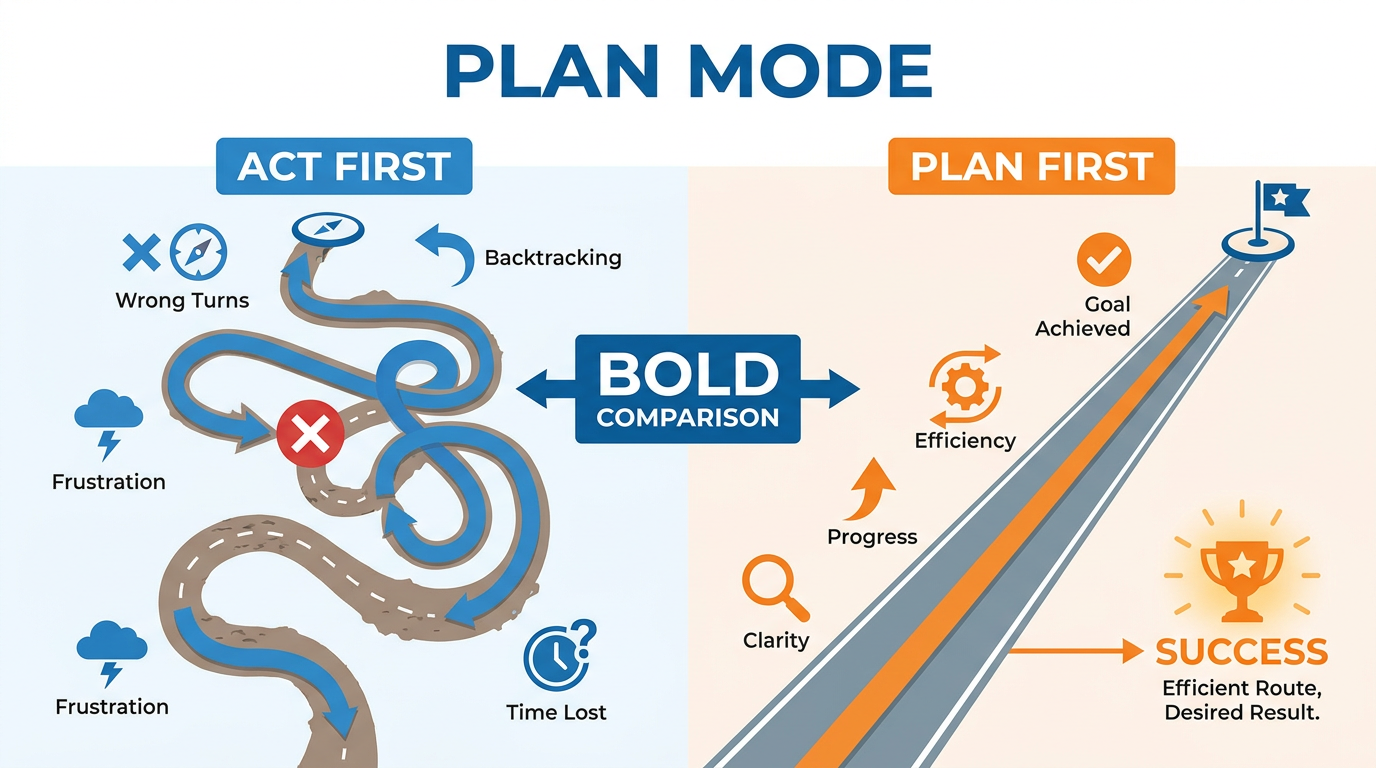
Figure 1:Plan Mode — The most counterintuitive discipline in this book. It feels slower. It is dramatically faster.
Here is something that will seem obvious once you hear it — but that almost no one actually does.
The more capable your AI is, the more damage it does when it heads in the wrong direction.
Think about that for a moment.
A slow, limited tool that starts going wrong wastes a little of your time before you notice and correct it. A fast, highly capable tool that starts going wrong produces a tremendous amount of work — sophisticated, well-formatted, convincing work — in entirely the wrong direction before you realize what happened. By the time you see the problem, you have a polished output built on a flawed foundation. And tearing that down to start over costs more than if you had never started.
This is the compounding error problem. And it is the single most common reason professionals feel frustrated with AI results despite using excellent tools.
The solution is not to use AI less. It is to think before you use it.
That is Plan Mode.
The Compounding Error Problem
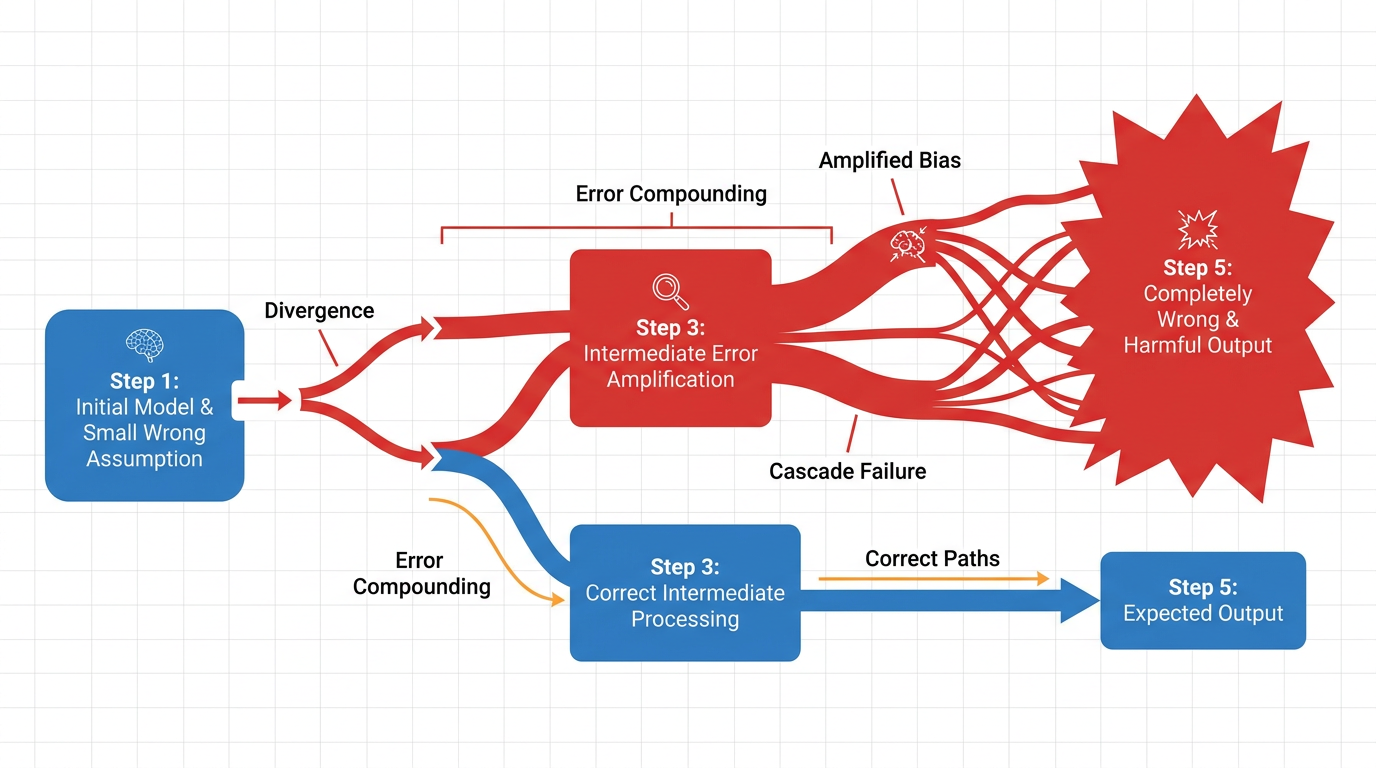
Figure 2:Compounding Errors — A small misalignment at the start of a complex task becomes an enormous one by the end. The AI never knew it was off course.
Imagine you ask an AI to write a comprehensive marketing strategy for your business. You give it some context — your industry, your product, your target market. It gets to work.
An hour later, you have 3,000 words of polished marketing strategy. Beautifully organized. Confidently written. Full of specific recommendations.
And it is built around the assumption that your primary customer is a 35-year-old middle manager at a mid-size company — because that is what “business professional” typically means, and you did not specify otherwise. Your actual customer is a 55-year-old C-suite executive at an enterprise company. The strategy, the channels, the messaging, the tone — all of it is calibrated to the wrong person.
That is not a small error. It is a foundational error that requires throwing out most of the work and starting again.
The AI did not fail. It succeeded at the wrong task. The failure happened before a single word was written — in the gap between what you asked for and what the AI assumed you meant.
Plan Mode closes that gap.
What Plan Mode Actually Is
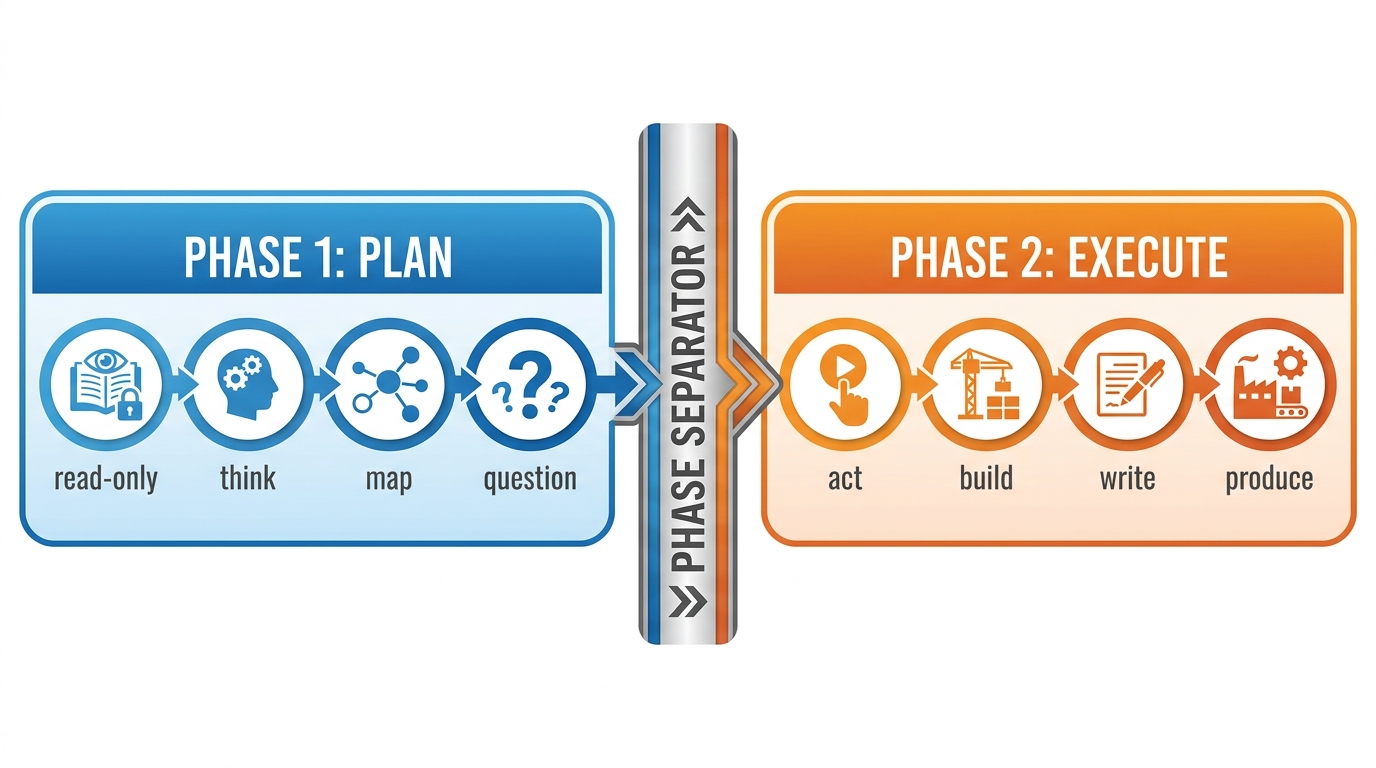
Figure 3:Two Phases — Planning and execution are separate. The AI does not touch the work until the plan is reviewed and approved.
Plan Mode is not a feature you turn on. It is a practice — a deliberate separation of the thinking phase from the doing phase.
Here is how it works.
Before you ask an AI to do anything significant, you first ask it to plan. Not execute. Not produce. Just think through the task and show you its thinking before it acts.
The instruction is simple. You say something like:
“Before you do anything, I want you to think through this task out loud. What are you going to do, in what order, and why? What assumptions are you making? What would you need to know to do this well? Show me your plan and wait for my approval before you begin.”
What happens next is one of the most useful things AI can do: it externalizes its reasoning. You see exactly how it understood your request, what it plans to do about it, and — critically — where its assumptions might be wrong.
You review the plan. You correct the misalignments. You add the context it was missing. You approve. Then it executes.
The output, when it comes, is dramatically better. Not because the AI got smarter. Because it was working from a correct foundation.
The Read-Only Toolkit
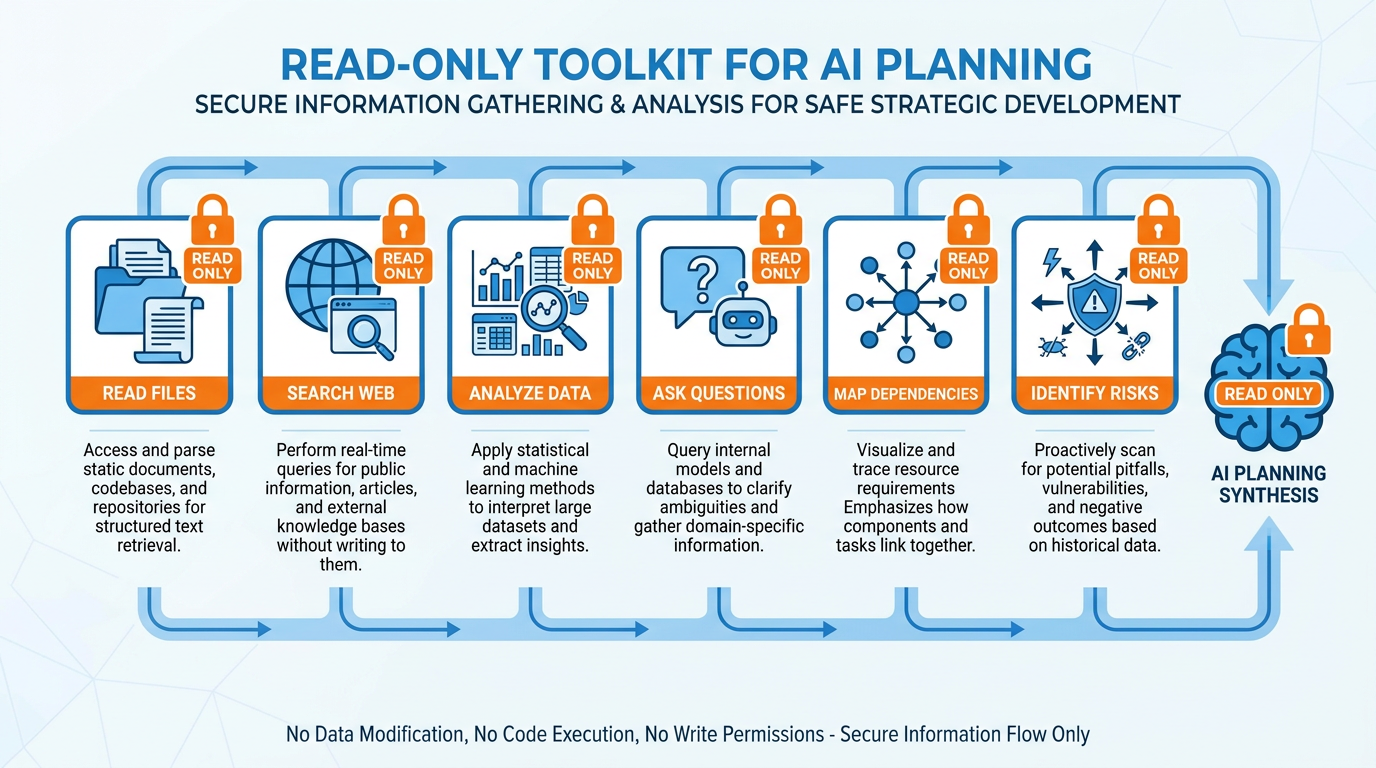
Figure 4:The Read-Only Toolkit — During the planning phase, the AI reads, analyzes, and questions. It does not write, build, or produce. Not yet.
During the planning phase, the AI has one rule: it can look, but it cannot touch.
It can read your documents. It can search the web. It can analyze data. It can map dependencies. It can identify risks. It can ask clarifying questions. It can propose a sequence of steps. It can flag what it does not know.
What it cannot do is produce the actual output. No drafting. No building. No deciding. The planning phase is pure thinking — externalizing the reasoning process so you can inspect it before committing to the direction.
This matters because most of the damage in a bad AI output happens invisibly. The AI makes assumptions, fills gaps, and makes choices — all without flagging them to you. By the time you see the output, those invisible decisions are baked in. The read-only constraint forces those decisions into the open where you can evaluate them before they become embedded in the work.
Think of it the way a surgeon thinks about preparation. The time spent planning — reviewing scans, mapping the procedure, identifying complications, confirming the approach — is not wasted time. It is the work that makes everything that follows go right. The surgeon who skips preparation to get to the operating table faster is not being efficient. They are being reckless.
The Plan as a Contract
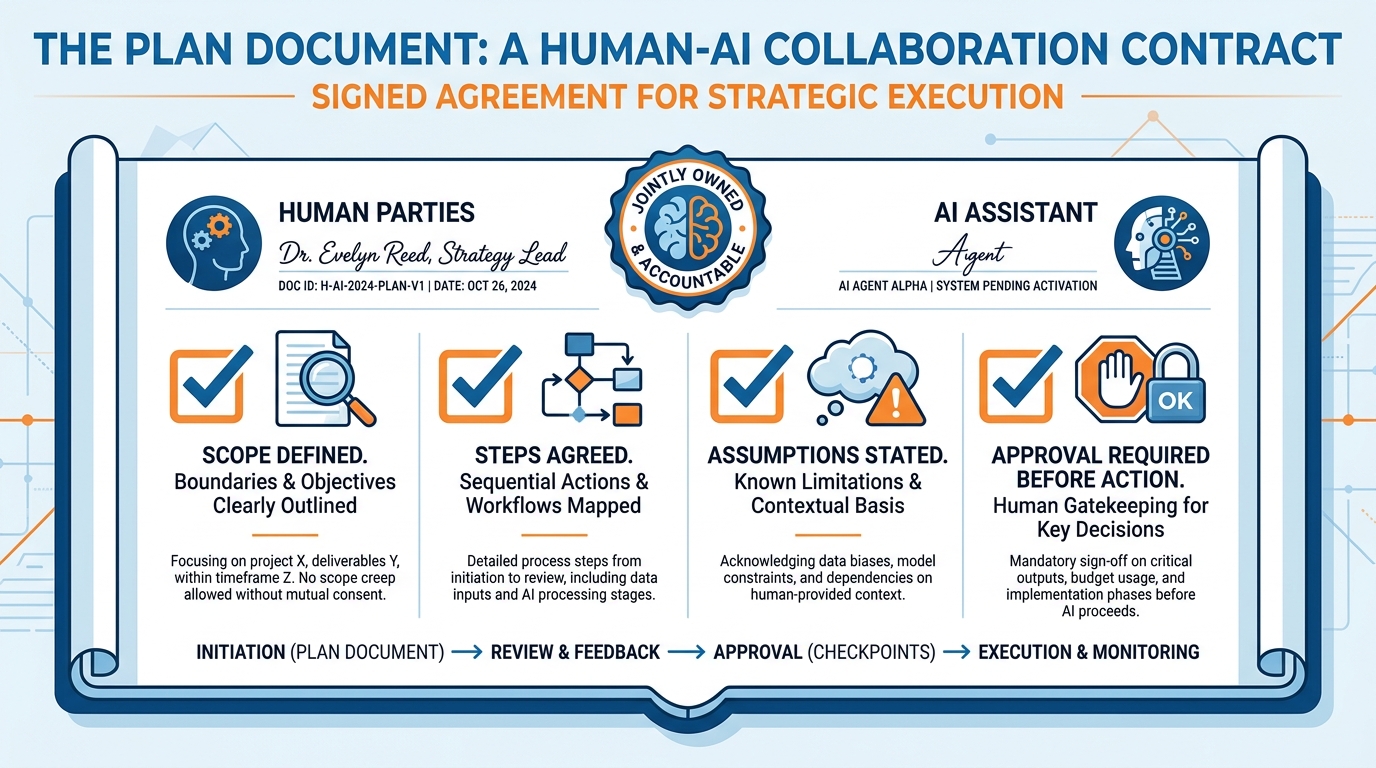
Figure 5:The Plan as Contract — When you approve a plan, you are not just saying “proceed.” You are agreeing on scope, sequence, assumptions, and what success looks like.
When you approve a plan, you are not just saying “looks good, go ahead.”
You are entering into an agreement.
The plan defines the scope of the work — what is included and, just as importantly, what is not. It defines the sequence — what happens first, second, third, and why. It makes assumptions explicit — the things the AI is treating as true that you may or may not agree with. It establishes what success looks like — the format, the depth, the audience, the outcome.
By approving that plan, you are confirming: yes, these are the right assumptions. Yes, this is the right approach. Yes, this is the scope. Now go.
If something goes wrong after that point, you have a reference. You can go back to the plan and say — here is where the execution diverged from the agreement. That is useful information. It tells you whether the problem was in the planning or the execution, which tells you exactly what to fix.
A plan without your explicit approval is just a plan. A plan you approved is a contract. That distinction sounds small. Its effect on the quality and accountability of AI work is significant.
When to Use Plan Mode — and When to Skip It
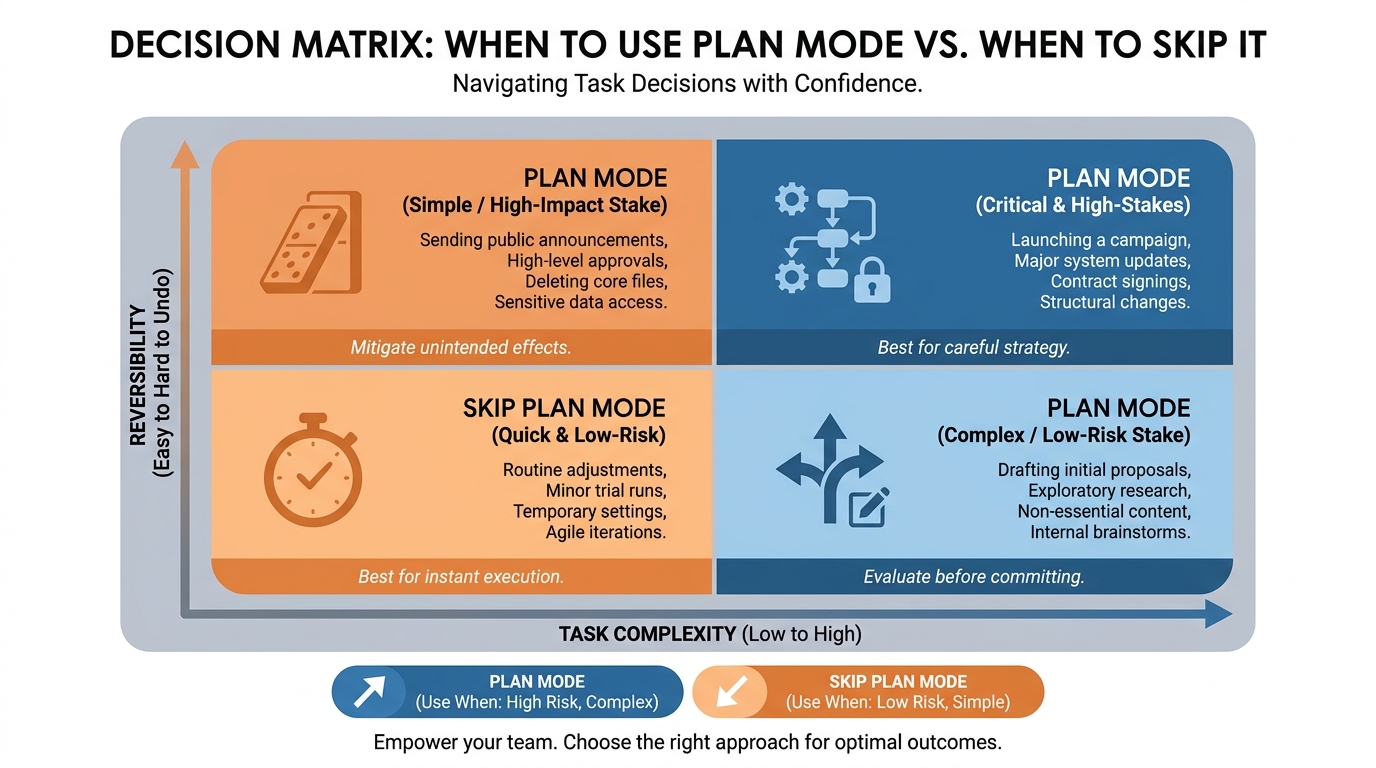
Figure 6:When to Plan — Two variables determine whether Plan Mode is worth the investment: how complex the task is, and how hard it would be to undo the result.
Plan Mode is not for everything.
If you ask your AI to summarize a paragraph, you do not need a plan. If you ask it to fix a typo, skip the planning phase. If the task is simple, fast, and completely reversible — just do it.
Plan Mode is worth the investment when two conditions are present:
Complexity. The task involves multiple steps, multiple decisions, or multiple dependencies. The more moving parts, the more ways the execution can go wrong — and the more value a good plan delivers.
Irreversibility. Some outputs are easy to throw away if they are wrong. Others are difficult. A strategic document that gets sent to your board. A proposal that goes to a client. A communication that shapes a relationship. A decision that commits resources. When the cost of being wrong is high, the cost of planning is trivial by comparison.
When both conditions are present — complex and hard to undo — Plan Mode is not optional. It is the professional standard.
When neither condition is present — simple and easy to redo — skip the plan. Move fast.
The judgment call is when only one condition is present. A complex task with easy reversibility — draft away and see what you get. A simple task with high stakes — a quick review of the approach before acting is worth thirty seconds.
The Opus-Plus-Sonnet Pattern
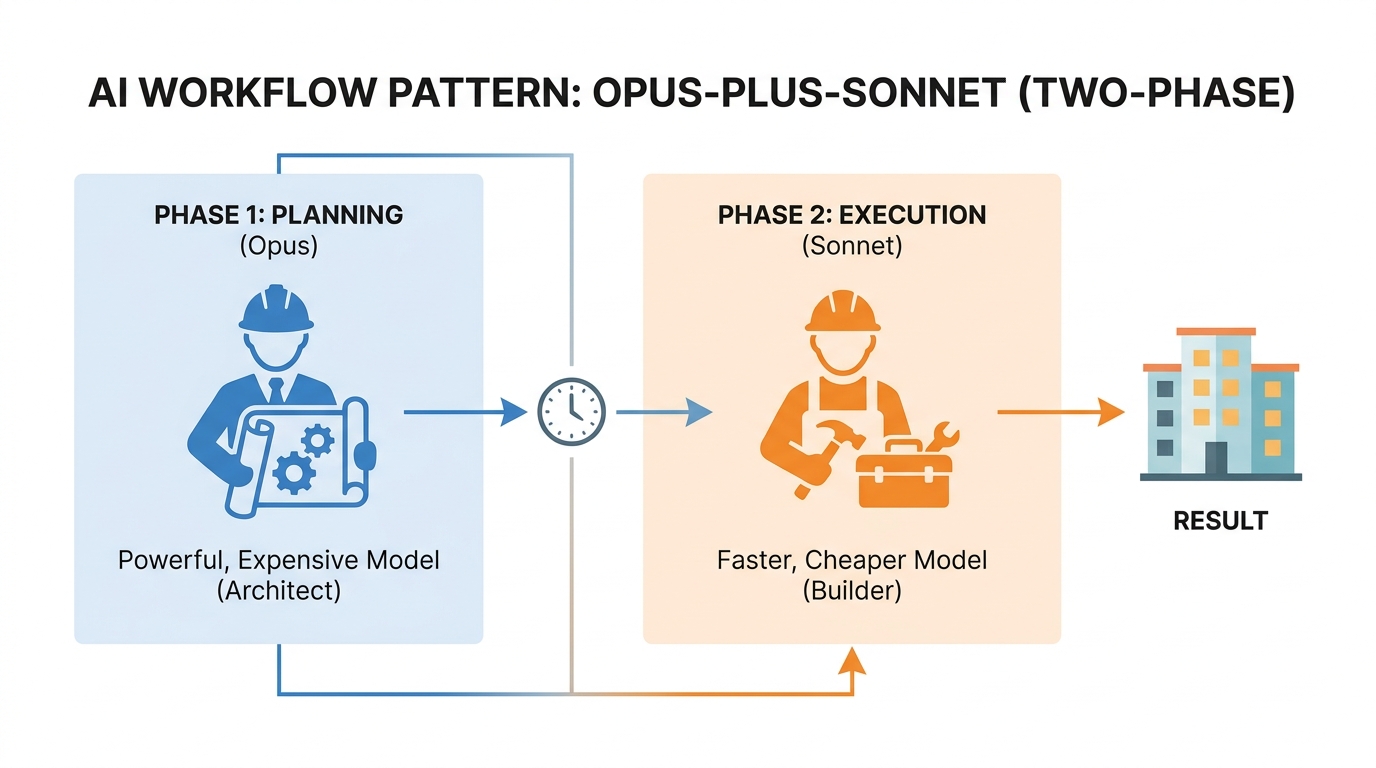
Figure 7:The Opus-Plus-Sonnet Pattern — Use your most powerful model to think. Use your fastest model to produce. Get the best of both.
Here is a technique used by professionals who take AI seriously.
Use a more powerful model for the planning phase. Use a faster, more efficient model for the execution phase.
The reasoning is straightforward. Planning requires deep reasoning — holding multiple considerations in mind simultaneously, identifying second-order effects, surfacing hidden assumptions, anticipating what could go wrong. This is where the difference between models is most pronounced. Claude Opus 4.7, for instance, thinks more carefully, considers more angles, and catches more problems than a lighter model.
Execution, once the plan is solid, requires mostly consistent, reliable output — applying a clear set of instructions to a defined task. A capable but faster model handles this well at lower cost and higher speed.
The workflow is: open a conversation with your most powerful available model. Work through the planning phase until you have a plan you are confident in. Then take that plan — copy the key decisions, the scope, the structure, the assumptions — and open a new conversation with your execution model. Give it the plan and tell it to build.
The result is planning-quality thinking with execution-speed output. You get the judgment of the architect and the throughput of the builder. Each at the appropriate cost.
Plans That Compound
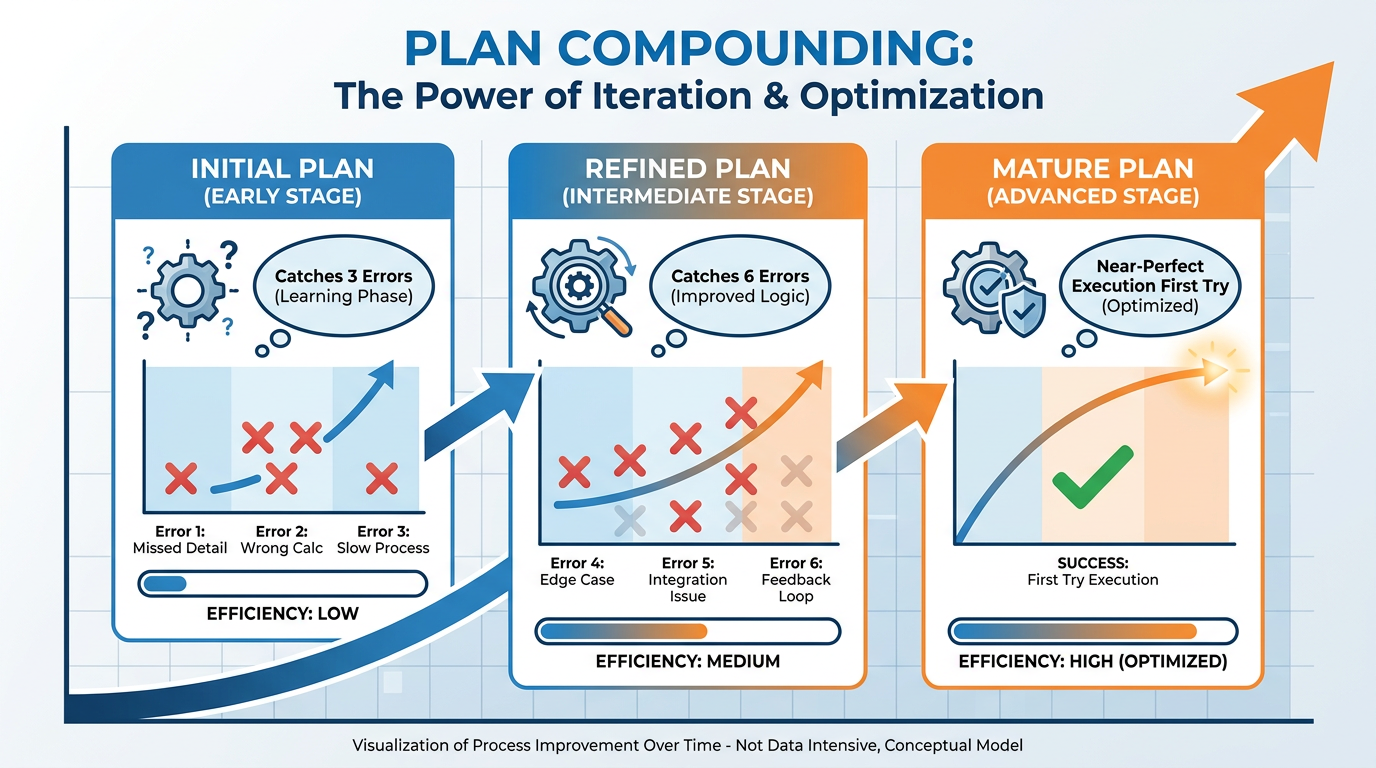
Figure 8:Plans That Compound — The first time you plan a recurring task, the plan is good. The fifth time, it is excellent. After a year, it is institutional knowledge.
Here is something that takes most people by surprise.
The plans you create for recurring tasks get better over time — and the improvement compounds.
The first time you use Plan Mode for, say, a client proposal, the plan surfaces three things you had not thought about and prevents two mistakes. You refine the plan based on what you learned. The second proposal, the plan surfaces two things. You refine again. By the fifth proposal, the plan is nearly perfect — because it has been tested and improved five times against real work.
After a year of using Plan Mode for your most important recurring tasks, you do not have five good plans. You have five institutional knowledge bases — refined frameworks that capture the collective intelligence of dozens of executions. Plans that work the first time, every time, because they have been battle-tested.
This is how individual professionals build organizational-level intelligence. Not by working harder. By systematically capturing what they learn and letting it compound.
Ultraplan: When the Stakes Are High
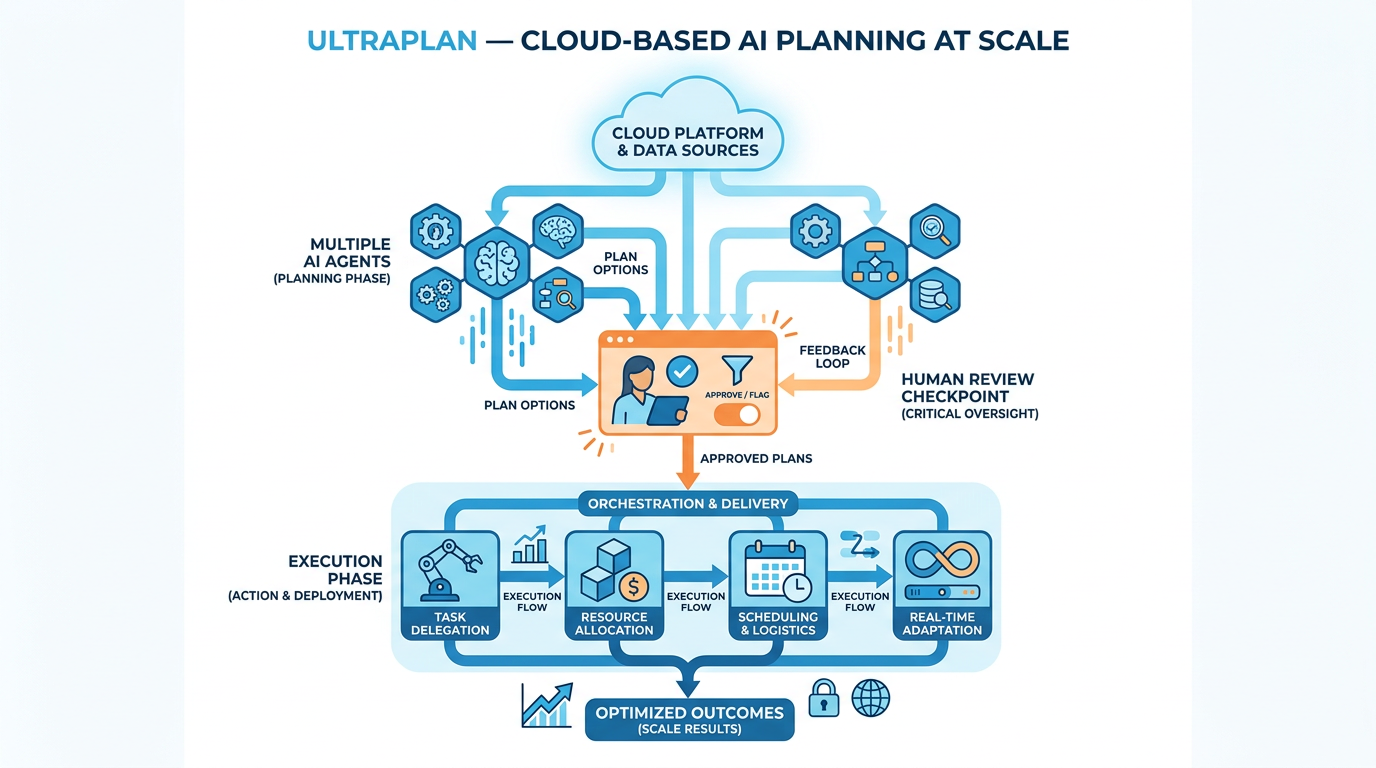
Figure 9:Ultraplan — For the decisions that matter most, the planning phase itself deserves its own resources, its own time, and its own review process.
For most tasks, a planning conversation in Claude Desktop is sufficient. You ask for a plan, review it, approve it, move to execution.
But for genuinely high-stakes, high-complexity work — a major strategic initiative, a significant proposal, a decision with long-term consequences — there is a more powerful approach.
Ultraplan separates the planning phase into its own project. You do not plan and execute in the same conversation or the same day. You plan deliberately, over a longer window, with multiple rounds of review.
The process: state the objective and all available context. Ask the AI to produce a comprehensive plan — scope, steps, assumptions, risks, dependencies, success criteria. Review it carefully. Push back on the assumptions you disagree with. Ask it to revise. Sleep on it. Return the next day and review it again with fresh eyes. Only when the plan holds up under repeated scrutiny do you commit to execution.
This is how architects work. How surgeons work. How the best lawyers and consultants work. The ratio of planning time to execution time on their highest-stakes engagements is often one to one or higher.
The professionals who produce the most reliable, highest-quality AI outputs have internalized the same ratio — because they understand that the planning phase is not overhead. It is the work.
Multi-Agent Planning
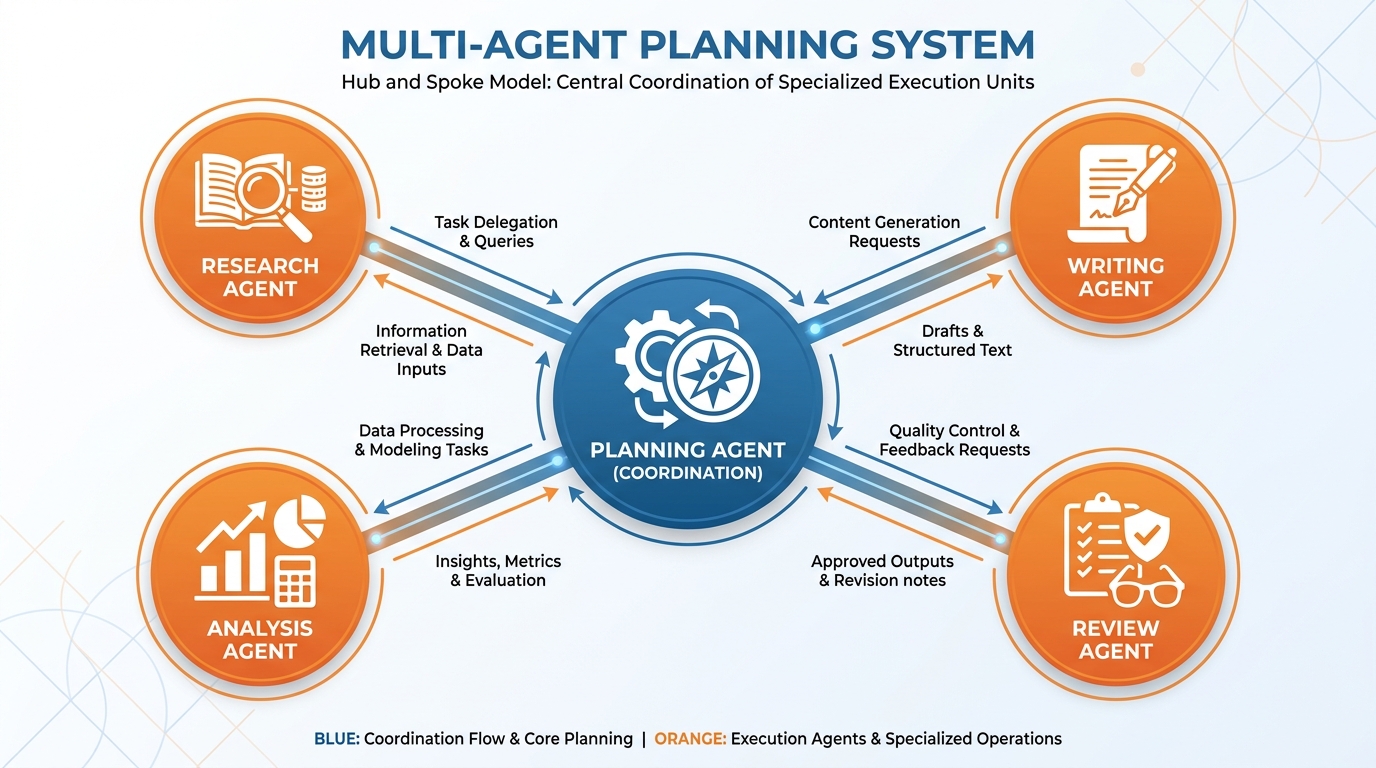
Figure 10:Multi-Agent Planning — Complex tasks benefit from specialized execution. The plan defines who does what, in what order, with what inputs and outputs.
When a task is complex enough that it benefits from specialization — different components requiring different capabilities — Plan Mode extends naturally into multi-agent planning.
The idea is simple. Your plan defines not just the steps, but who executes each step. A research agent gathers information. A writing agent drafts. An analysis agent reviews and critiques. A formatting agent produces the final output. Each agent is given a clear scope, clear inputs, and clear deliverables — defined by the plan.
You do not need to build this as an automated system to benefit from it today. You can run it manually — using different Gems, different Claude Projects, or different conversations — each configured for its specific role, each receiving the handoff from the previous step.
The plan makes this possible because it defines the handoffs. What does the research agent produce? Exactly what format and content does the writing agent receive? What criteria does the analysis agent apply? Without a plan, multi-step work becomes chaos. With one, it becomes a production system.
The Business Analogy That Makes This Stick
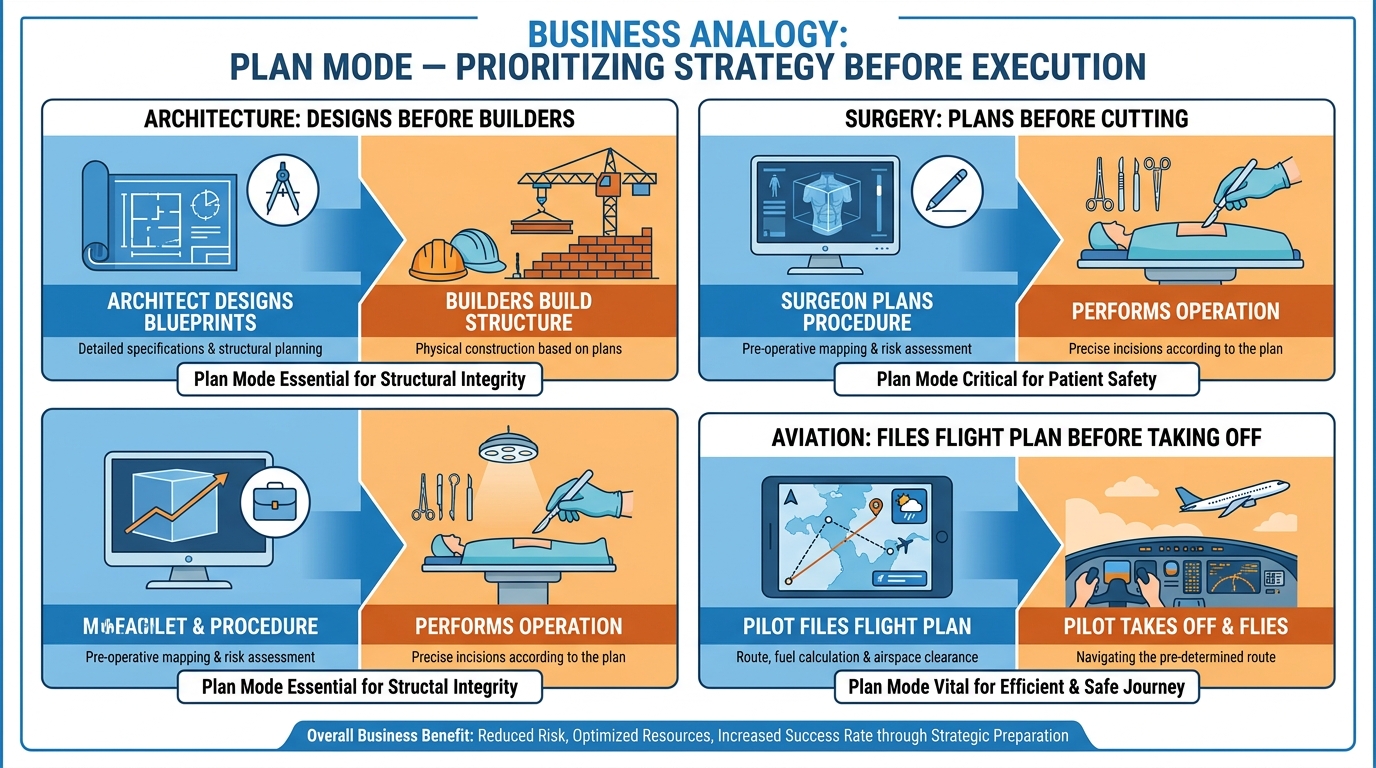
Figure 11:Why Every High-Stakes Profession Plans First — It is not a coincidence that architects, surgeons, and pilots all spend more time preparing than executing.
No serious architect hands their drawings to the construction crew and says “figure it out as you go.”
No surgeon walks into an operating room and decides the approach on the fly.
No commercial pilot pushes back from the gate without a filed flight plan reviewed by air traffic control.
In every profession where the cost of being wrong is high and the complexity of execution is significant, planning is not optional. It is the professional standard. It is what separates the competent from the excellent and the excellent from the ones people fight to work with.
AI does not change this equation. It intensifies it — because AI can go further, faster, in the wrong direction than any human assistant ever could.
Plan Mode is how you make sure the direction is right before the speed matters.
Case Study: The $2.3 Million Plan That Was Never Written
Background
Meridian Capital Advisors is a mid-sized investment advisory firm headquartered in Atlanta, Georgia, managing approximately $4.8 billion in assets under management for institutional clients — primarily university endowments, municipal pension funds, and family offices. The firm employs roughly 280 people across research, portfolio management, compliance, and client services. In early 2024, Meridian’s Chief Operating Officer, Dana Whitfield, and her Director of Strategic Initiatives, Marcus Reyes, were tasked with piloting AI-assisted workflows across the firm’s investment research division.
The pilot’s stated goal was to reduce the time required to produce quarterly client investment reports — a process that historically consumed three to four weeks per reporting cycle and involved twelve analysts, two senior portfolio managers, and a compliance review team. Whitfield and Reyes had attended an industry conference where two peer firms described meaningful time savings through AI-assisted drafting. They returned with board approval to run a 90-day pilot before the Q2 2024 reporting cycle, using a large language model integrated into the firm’s document management environment.
The implementation moved quickly. Reyes worked with a vendor to configure the AI system and briefed the analyst team in a single two-hour session. By the third week, analysts were using the tool daily — generating market commentary, summarizing earnings reports, and drafting narrative sections of client deliverables. Early feedback was positive. Draft time appeared to be dropping. The team felt productive. Whitfield reported to the board that the pilot was “exceeding expectations.”
The problem surfaced six weeks in, during the first compliance review of AI-assisted content. The firm’s Chief Compliance Officer, Sandra Park, flagged seventeen instances across eight draft reports where the AI had made implicit assumptions about client risk tolerance, portfolio benchmark selection, and regulatory disclosure language — assumptions that were either outdated, incorrect, or inconsistent with each client’s investment policy statement. In two cases, the AI had drafted language suggesting performance attribution frameworks that Meridian did not use and had never represented to clients. The drafts looked professional. They were confidently written. And they were, in material respects, wrong.
The Situation
The compliance findings placed Whitfield and Reyes in a difficult position. Sixteen of the twenty-two client reports in the pilot cycle had already been partially drafted using the AI-assisted workflow. Some had been shared informally with relationship managers who had begun using them in client conversations. Correcting the errors required not only redrafting the affected sections but auditing every AI-generated passage to determine where the model had filled gaps in its context with assumptions rather than explicit instructions. The audit alone consumed eleven analyst-days — nearly offsetting all the time savings the pilot had generated.
The root cause, when examined carefully, was not a failure of the AI tool itself. The model had performed exactly as designed — generating fluent, well-organized text from the prompts it received. The failure was structural: the workflow had been designed to move directly from prompt to output, with no deliberate planning phase between them. Analysts were asking the AI to “write the Q2 market commentary section for Client X” without first establishing, in explicit terms, which benchmark the client used, what their stated risk posture was, what regulatory disclosures applied to their account type, and what the firm’s approved language was for describing attribution. The AI filled those gaps the only way it could — with statistically plausible defaults drawn from its training data. Across sixteen reports, those defaults compounded into a compliance problem that cost the firm significantly more to remediate than the pilot had ever promised to save.
Discussion Prompt
Using the frameworks introduced in this chapter — compounding error, the read-only planning phase, plan as contract, and the conditions under which planning is non-negotiable — analyze the structural failure in Meridian Capital Advisors’ AI pilot. What specific workflow design choices would have prevented the compliance findings, and how do the business analogies of the architect, surgeon, and pilot illuminate why a “plan then execute” discipline is not merely a best practice but a professional obligation in high-stakes AI deployments? Additionally, consider whether the Opus-Plus-Sonnet model routing pattern described in the chapter would have been appropriate for this workflow, and what the multi-agent planning structure might have looked like if Meridian had designed the workflow correctly from the start.
Discussion Guidelines
Initial Post (due before class)
Minimum 400 words
Directly address the discussion prompt using concepts from this chapter
Include at least one APA-formatted citation — from the course text or a peer-reviewed source
Avoid summary; demonstrate analysis and original thinking
Peer Responses (minimum 2)
Minimum 250 words each
Each response must include at least one APA-formatted citation
Engage substantively — build on, challenge, or offer a contrasting perspective grounded in evidence
“I agree” or “Great post” responses do not meet the requirement
Maintain a professional and respectful academic tone
Applied Exercise: Run a Real Task Through Plan Mode
This exercise takes one piece of work you actually need to do this week and runs it through the full Plan Mode sequence.
Step 1: Choose the task. Pick something real. Something with actual stakes — a document someone will read, a decision someone will act on, a communication that shapes a relationship. Not a practice exercise. Real work.
Track A — Claude Desktop
Step 2: State the objective without specifying the approach. Open Claude Desktop and describe what you need to achieve — not how you want it done. The goal, the audience, the context, the constraints. Then say:
“Before you do anything, think through this task out loud. Tell me your plan: what you will do, in what order, what assumptions you are making, what you would need to know to do this well, and what could go wrong. Do not begin the actual work until I have reviewed and approved your plan.”
Step 3: Read the plan critically. When Claude returns a plan, read it as a skeptic. Ask yourself:
What assumptions is it making that I have not explicitly confirmed?
Is the scope correct — not too narrow, not too broad?
Is the sequence logical? Are there steps out of order?
What is it not planning to do that it probably should?
Does it know enough about the audience to produce something they will actually use?
Step 4: Push back. This is the step most people skip. Do not just approve the plan because it looks reasonable. Challenge at least one assumption. Add context it was missing. Ask it to revise the approach to something you disagree with. See how it responds.
A good plan improves under scrutiny. A weak plan falls apart. You want to know which one you have before you commit to execution.
Step 5: Approve and execute. Once the plan holds up — once you have pushed back, it has revised, and you are genuinely confident in the direction — give your explicit approval:
“The plan looks right. Proceed with execution.”
Then watch what happens. The output, built on a scrutinized and approved foundation, will be qualitatively different from what you would have gotten if you had just asked for the result directly.
Track A Your Submission: Your submission is the real task you ran through Plan Mode — four parts in one document: (1) Claude’s original plan, (2) your pushback (what you challenged and why), (3) Claude’s revised plan, (4) the final output after execution. Write one sentence at the top: what did the planning phase surface that you would not have caught until the output was already wrong? Submit the one sentence + four-part document.
Track B — Claude Code inside Antigravity IDE
Open Antigravity 2.0 IDE → Editor surface → integrated terminal (Control+backtick) → Claude Code (claude> prompt ready).
Create a new file in the IDE file browser called “plan-review.txt.” You will use this to take notes as you review Claude Code’s plan.
Choose a real task you need to complete this week — something with actual stakes. Write down its objective, audience, and key constraints in plain English before you type anything.
At the claude> prompt, describe the task objective without specifying the approach — tell Claude Code what outcome you need, who it is for, and what constraints apply. Then add this exact instruction: “Before you start any work, give me your plan. Tell me what you will do in what order, what assumptions you are making, what information you still need, and what could go wrong. Do not begin executing until I explicitly approve the plan.”
When Claude Code returns the plan, open your plan-review.txt file in the IDE editor pane and write down three things: (a) one assumption in the plan that is wrong or needs confirmation, (b) one step that is out of order or missing entirely, (c) one piece of context Claude Code does not have that would change the output significantly.
Return to the terminal and push back on all three issues. Give Claude Code the corrections and missing context. Ask it to revise the plan to address your feedback.
Read the revised plan. If it is now solid — if you cannot find a significant remaining flaw — type: “The plan looks right. Proceed with execution.”
Watch Claude Code execute in the terminal. In the Antigravity IDE file browser, you will see files being created or modified as Claude Code works through each step of the plan. The IDE’s diff viewer shows you exactly what changed in any file.
When execution is complete, compare the final output to what you would have gotten with no plan step — you can test this by starting a second Claude Code session and asking for the same output directly without invoking Plan Mode.
Save the plan, your plan-review.txt critique, the revised plan, and the final output as four files in your workshop folder.
Your Submission: Compile into one document: (1) Claude Code’s original plan, (2) your plan-review.txt critique, (3) the revised plan after your pushback, (4) the final execution output. Write one sentence: what specifically did Plan Mode catch that a direct request would have gotten wrong? Submit the one sentence + four-part document.
Track C — Antigravity 2.0 IDE Agent Manager
Open Antigravity 2.0 IDE and press CMD+E (Mac) or CTRL+E (Windows) to switch to Agent Manager.
Choose the same real task you would use in Track A or B — something with genuine professional stakes.
You will run the task twice in two separate workspaces so you can compare the results directly. This comparison is the core of the exercise.
Run 1 — No Plan: Click to create a new workspace (or new Project). Start a new Agent task. Give the agent the full task description — objective, audience, constraints — and submit it immediately, with no instruction to plan first. Let it run to completion without interruption.
When the Run 1 Artifact appears, click into it and review the output carefully. Open a note or document and write down: two or three places where the agent made an assumption you did not want, or produced something slightly off from what you needed.
Run 2 — With Plan: Create a second new workspace. Start a new Agent task. Begin your task description with this instruction: “Before you begin any work on this task, produce a Plan Artifact first. The plan must include: your approach in bullet points, the steps you will take in order, the assumptions you are making, and any questions you have for me. After producing the plan, stop and wait for my written approval before proceeding to execution.”
When the Plan Artifact appears, read it as a skeptic. Type a message pushing back on at least one assumption or requesting one specific change. The agent will revise the Plan Artifact.
Once the revised plan looks accurate, type: “Plan approved. Proceed to execution.” The agent continues and produces the final output Artifact.
Place the two final Artifacts side by side — Run 1 (no plan) and Run 2 (plan approved). Compare them on three dimensions: specificity to your actual requirements, accuracy of assumptions, structural quality of the output.
Also compare the Artifacts against the critique notes you wrote in Step 5 — did the Run 2 Artifact avoid the mistakes you identified in Run 1?
Your Submission: Submit a document containing: (1) the Run 1 Artifact with your critique notes from Step 5 annotated, (2) the Run 2 Plan Artifact (what the agent planned), (3) your pushback message from Step 7, (4) the Run 2 final Artifact. Write two sentences: (1) what the no-plan run got wrong that the plan-approved run got right, and (2) what category of professional tasks do you think benefits most from Plan Mode? Submit the four-part document + two sentences.
Reflection
What did the planning phase surface that you would not have caught until the output was already wrong?
Write it down. That specific thing — whatever it was — is the value of Plan Mode. And it will happen every time.
If you ran more than one track: Which surface made you push back the hardest on the plan — the conversational thread, the terminal output, or the formal plan Artifact? The surface that produces the most friction in your reviewing eye is the surface that will catch the most mistakes.