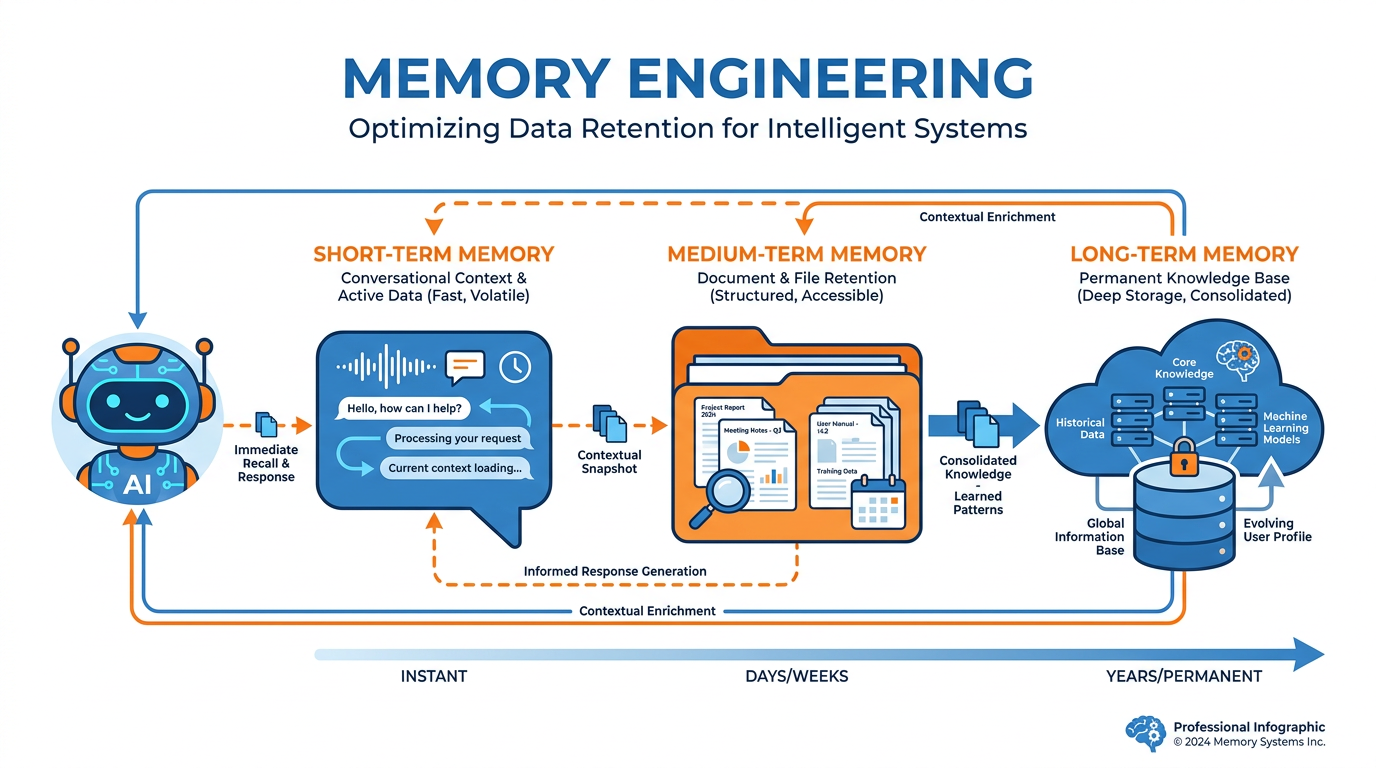
Figure 1:Memory Engineering — The discipline of building continuity into a system that has none by default.
Every morning, your AI forgets you.
Not because something went wrong. Not because of a technical glitch. Because that is how it works. Each new session begins with a completely blank slate. No memory of your name, your job, your priorities, your ongoing projects, your communication style, or the conversation you had yesterday that felt so productive. You are, every single time, a stranger.
This is one of the most disorienting things about working with AI — especially once you have had a few sessions that felt genuinely collaborative. You build something together. You find a rhythm. The AI starts to feel like it understands you. And then you close the window.
The next day, you type hello and it responds like it has never heard of you.
This is not a flaw in the technology. It is a design constraint with a very practical solution. And the professionals who understand that solution work with AI in a way that feels fundamentally different — more continuous, more personal, more like a working relationship that deepens over time rather than a series of cold starts.
This chapter is about building that solution.
Why AI Has No Memory
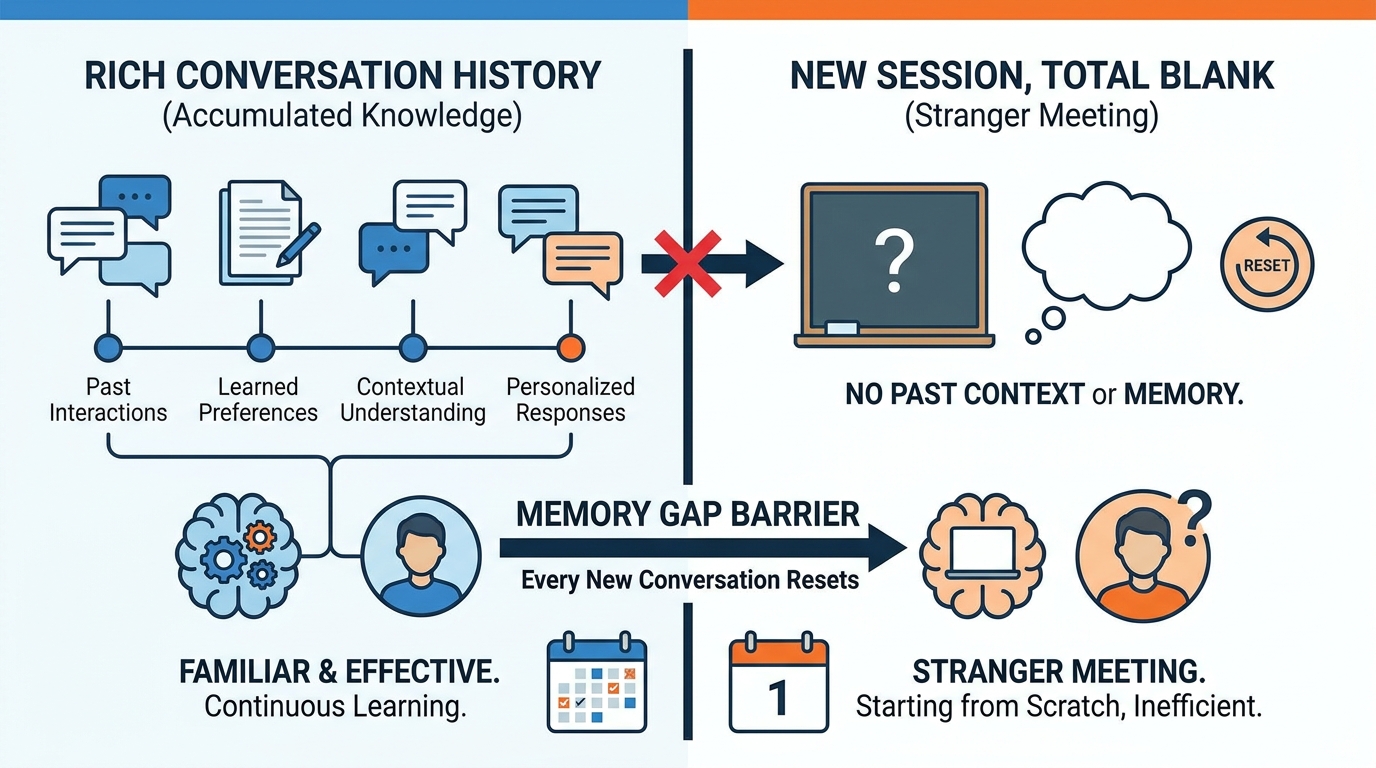
Figure 2:The Blank Slate — Everything you built in the last session is gone. The AI is not being forgetful. It is doing exactly what it was designed to do.
Understanding why AI has no persistent memory makes it easier to work around.
Large language models do not store information between conversations because they are designed as stateless systems. Each conversation is a self-contained context window — a finite space that holds everything the AI knows about the current exchange. When the conversation ends, that context window is cleared. The model itself — the weights, the parameters, the intelligence — is unchanged. But the specific content of that conversation is gone.
This is actually a feature, not a failure. Persistent memory across all conversations would raise serious privacy concerns. If your AI remembered every conversation with every user, sensitive information would accumulate in ways that are difficult to control, audit, or delete. The stateless design keeps each conversation isolated and private.
But it creates a problem for serious professional use: every session starts from scratch. Every time you open Claude, it needs to be re-briefed on who you are and what you are working on. Without a solution, you spend the first minutes of every productive session re-establishing context that should already be there.
The solution is not to change how the AI works. It is to build a memory system on top of it — one that you control, that you curate, and that loads the right context into each session automatically.
The Three Tiers of Memory
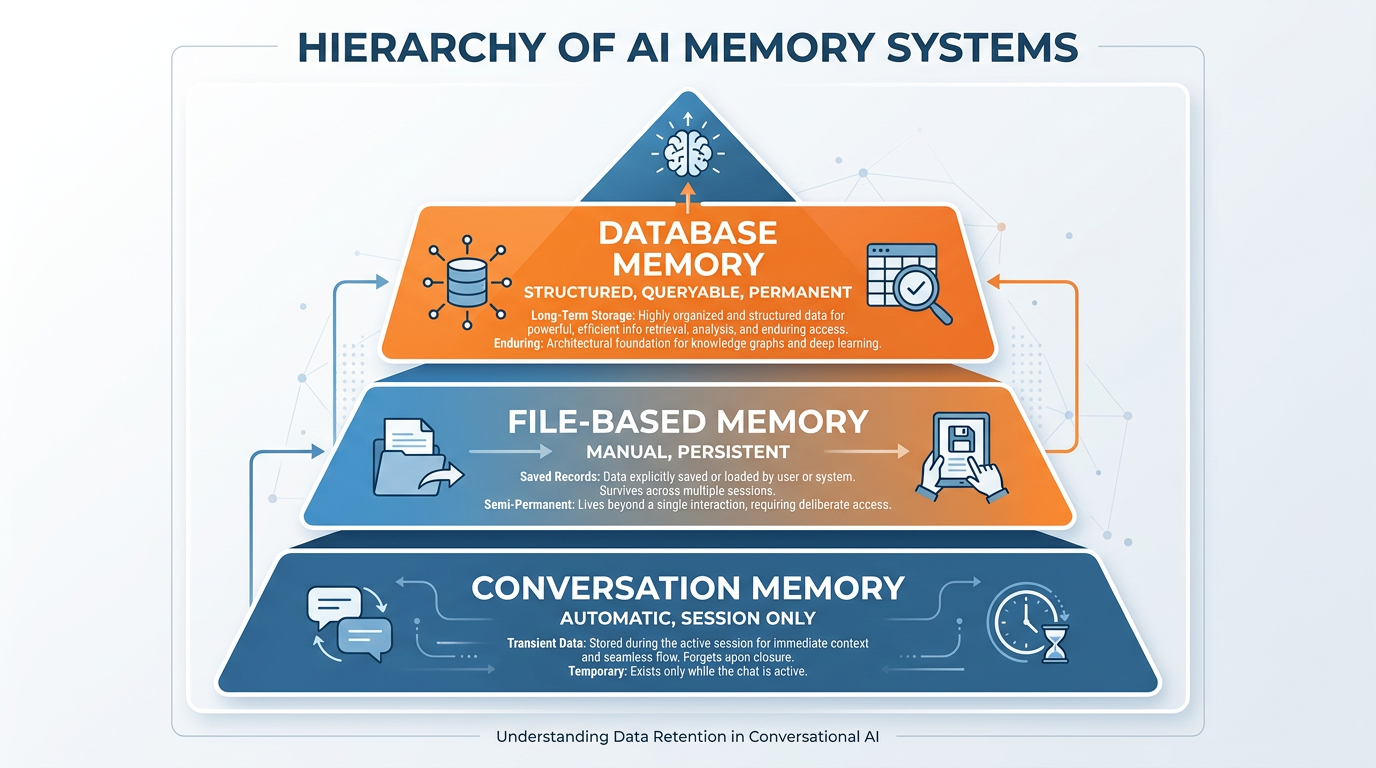
Figure 3:Three Tiers — Each tier handles a different kind of memory. Together, they give you something that approaches genuine continuity.
Memory engineering works across three tiers, each serving a different purpose.
Tier One: Conversation Memory
This is automatic. Everything said within a single conversation is available to the AI throughout that session. You do not manage this — it just works. The limitation is that it disappears the moment the session ends, and it is bounded by the context window. A very long conversation begins to lose its early context as the window fills.
Use this tier for: working through a problem in one sitting, building on ideas within a session, maintaining coherence across a long document you are drafting together.
Tier Two: File-Based Memory
This is where your intentional memory engineering begins. A memory file — often called a working brief, a context document, or simply a memory file — is a document you maintain about yourself and your work. You attach or paste it at the start of sessions where continuity matters. The AI reads it and has immediate context without you having to re-explain everything.
This tier is manual but powerful. You control exactly what the AI knows about you. You update it as your work evolves. And because it is just a document, it works with any AI tool, on any platform, in any context.
Tier Three: Database Memory
This is the most sophisticated tier — and the one that enables genuinely autonomous AI workflows. A connected database (like Supabase, from Chapter 3) gives your AI a place to store and retrieve structured information that persists permanently across all sessions. Your AI can write a note during one conversation and read it back three weeks later in a completely different one.
This tier requires the MCP connection you set up in Chapter 3. Once connected, your AI can accumulate knowledge about your clients, your projects, your decisions, and your preferences in a way that grows more valuable over time.
The Memory File: Your Most Important Document
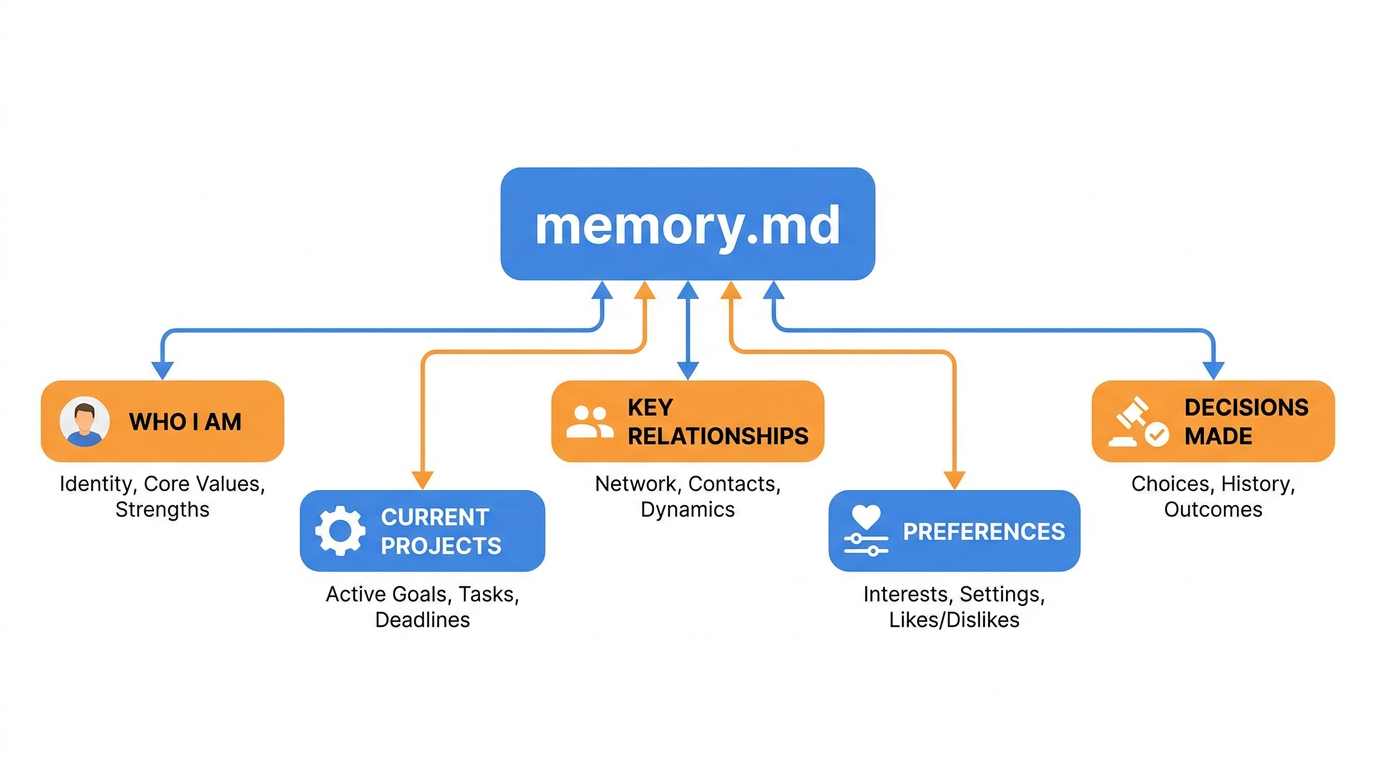
Figure 4:The Memory File — A living document about you. One page. Always current. The difference between an AI that feels generic and one that feels like it knows your world.
The memory file is the minimum viable memory system — and for most professionals, it is the one that delivers the most immediate value.
Here is what makes a memory file effective.
It is short. One page is ideal. Two pages maximum. The goal is to give the AI the most important context as efficiently as possible. A ten-page document full of every detail about your life and career is not a memory file. It is a burden. The AI has to process all of it before it can focus on your actual question.
It is structured. Not a narrative essay about yourself, but clear sections that the AI can quickly parse: who you are, what you are working on, who matters to you, how you prefer to work.
It is current. A memory file from three months ago that describes projects you have finished and priorities you have moved past is actively misleading. It takes the AI in the wrong direction. Update it regularly — at minimum, monthly.
It is yours. The memory file is not a template to fill in. It is a calibration of your specific context, in your specific words, reflecting your specific reality. Two people with the same job title should have very different memory files.
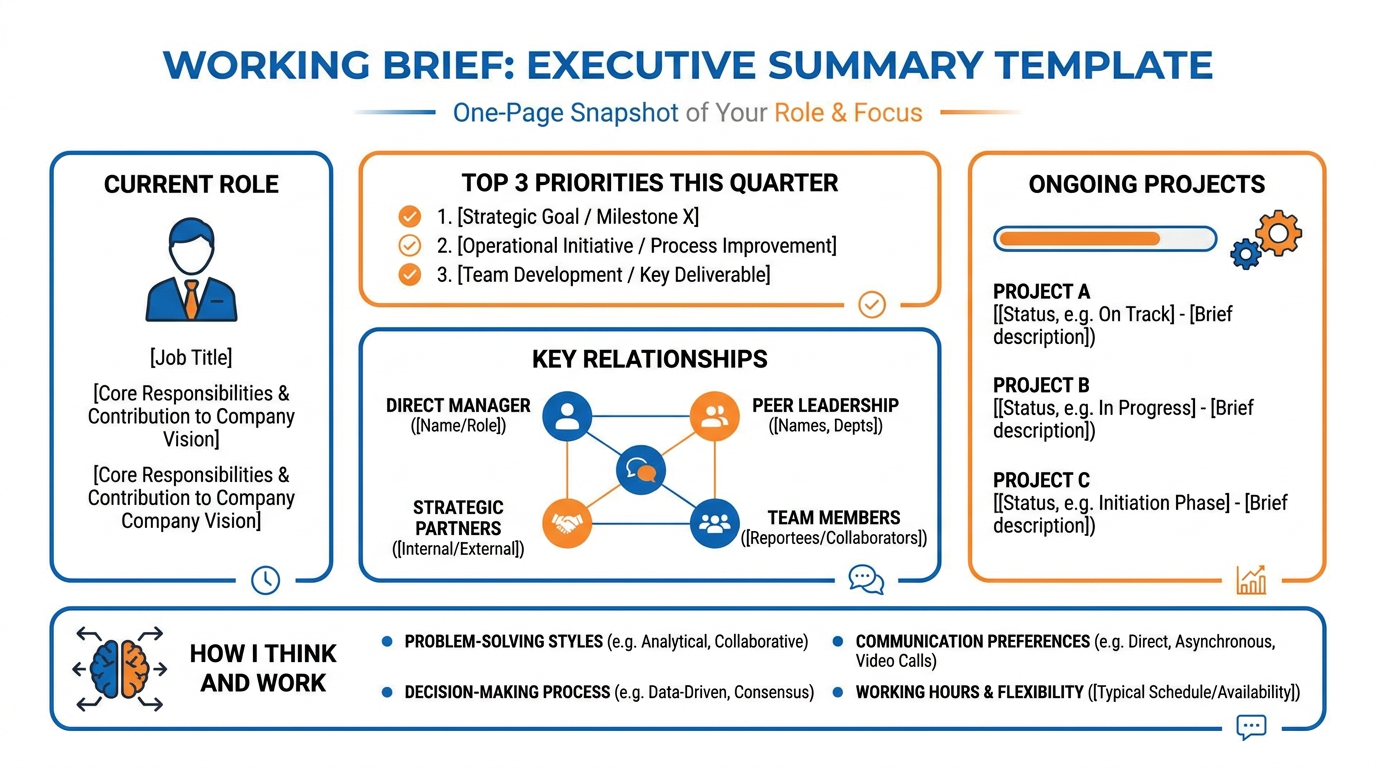
Figure 5:The Working Brief — What a well-structured memory file looks like. Not everything about you. The specific things your AI needs to work well on your behalf.
What belongs in a memory file:
Your role and context — Your title, your industry, the kind of work you do, the organization you work within. Not a resume. A quick orientation.
Current priorities — The three to five things that matter most to you right now, this quarter. Not a complete task list. The things that should inform how the AI frames its help.
Key relationships — The people who matter in your professional world. Not everyone — the ones who come up often enough that the AI should know who they are and why they matter.
Ongoing projects — Active work with enough context that the AI can pick up where you left off without re-briefing. Project name, current state, next milestone.
Working preferences — How you like information delivered. Tone, format, level of detail, things you hate. This is where you save yourself from re-explaining your preferences in every session.
What Memory Engineering Is Not
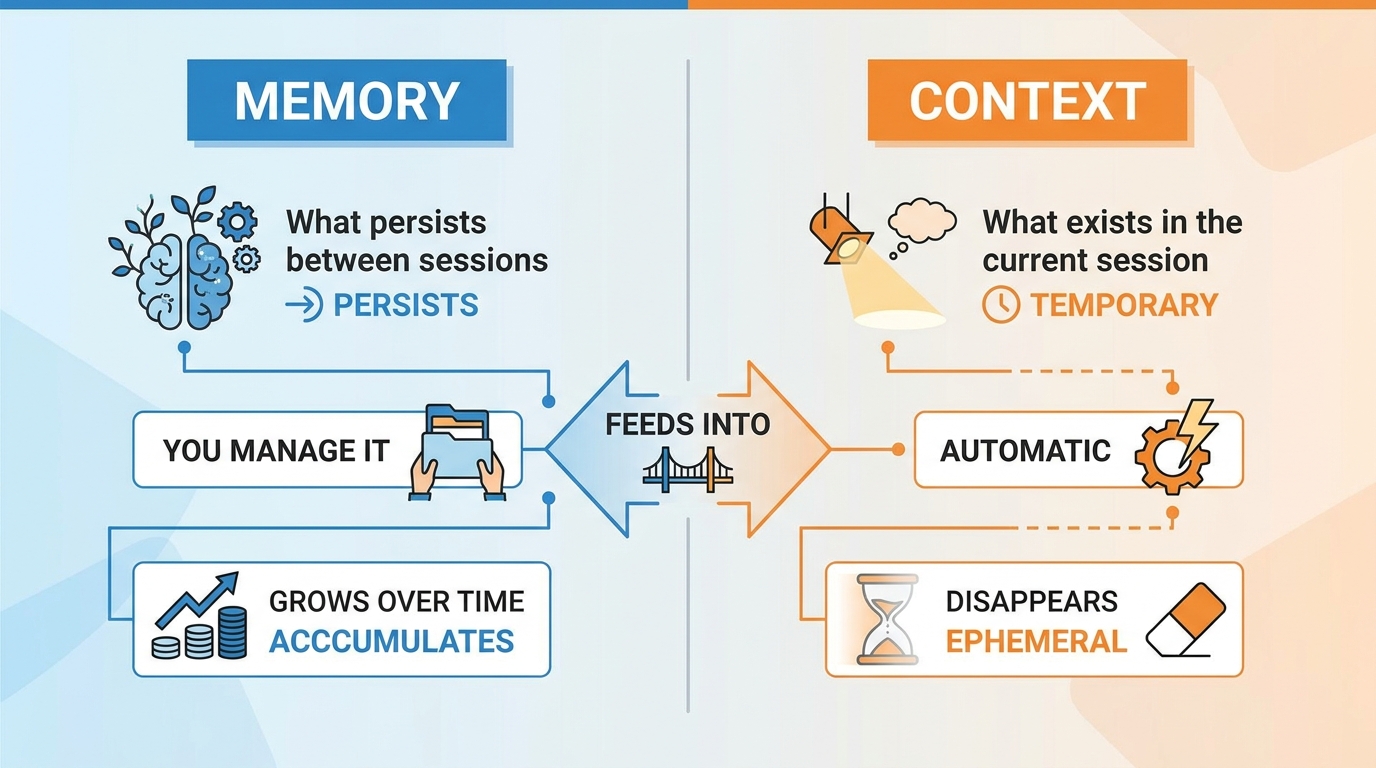
Figure 6:Memory vs. Context — Memory is what you build between sessions. Context is what exists within one. Both matter. Neither replaces the other.
Memory and context are not the same thing, and confusing them leads to bad habits.
Context is what you provide in a specific conversation — the documents you attach, the information you share, the question you ask. It exists within the session. It is targeted to the task at hand.
Memory is what persists between sessions — the standing brief about who you are and what you are working on. It is broader and less task-specific. It gives the AI a foundation to work from, not a set of instructions for a specific task.
The mistake is trying to make your memory file do the work of context. You cannot paste every relevant document into your memory file and expect the AI to use all of it effectively. A memory file that is 20 pages of everything is not a memory system. It is noise.
The professional habit is to maintain a concise memory file that provides the standing context, and then provide task-specific context at the start of each session as needed. Memory is the foundation. Context is the specific material for the work at hand.
Curating What Gets Remembered
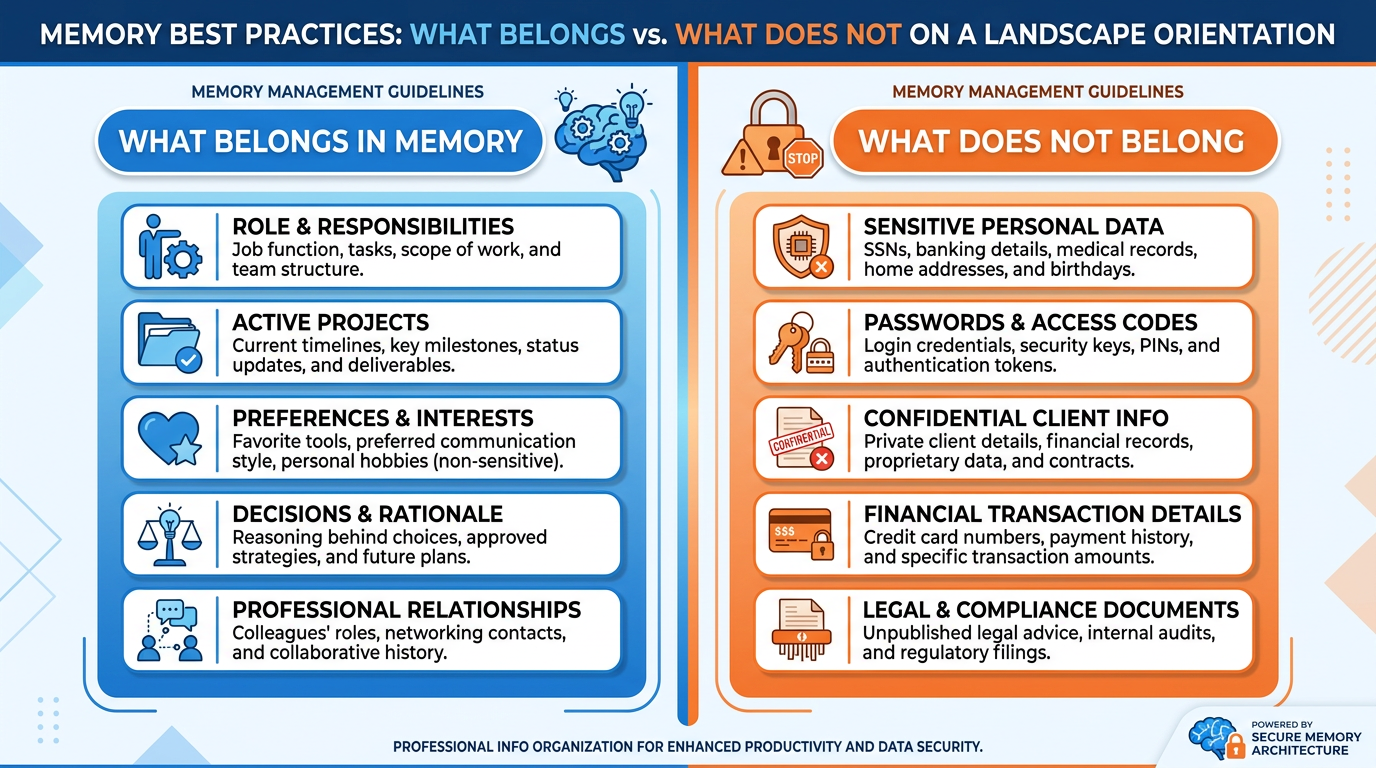
Figure 7:Curating Memory — Not everything that happened deserves to be remembered. And some things should never be written down at all.
The most important skill in memory engineering is not what to put in your memory file. It is what to leave out.
After a productive AI session, the instinct is to capture everything — every insight, every decision, every interesting direction the conversation took. That instinct is wrong. A memory file that grows unchecked becomes cluttered and eventually useless.
The curation question is: does the AI need to know this to work effectively with me on future tasks? If yes, it belongs. If it is interesting but not operationally useful — if it is context about a one-time situation, detail that will not recur, or nuance that applies only to the specific task you just finished — it does not belong.
Update your memory file when:
Your role or responsibilities change significantly
A new project becomes a major focus
A key relationship becomes important enough that the AI should know who this person is
You discover a preference or frustration that you keep having to re-explain
A decision gets made that will affect how you approach future work
Archive or remove from your memory file when:
A project is complete
A priority has shifted
A relationship is no longer active
Preferences have evolved
The memory file should always reflect your current reality — not the accumulation of everything that has ever been true.
The Privacy Question
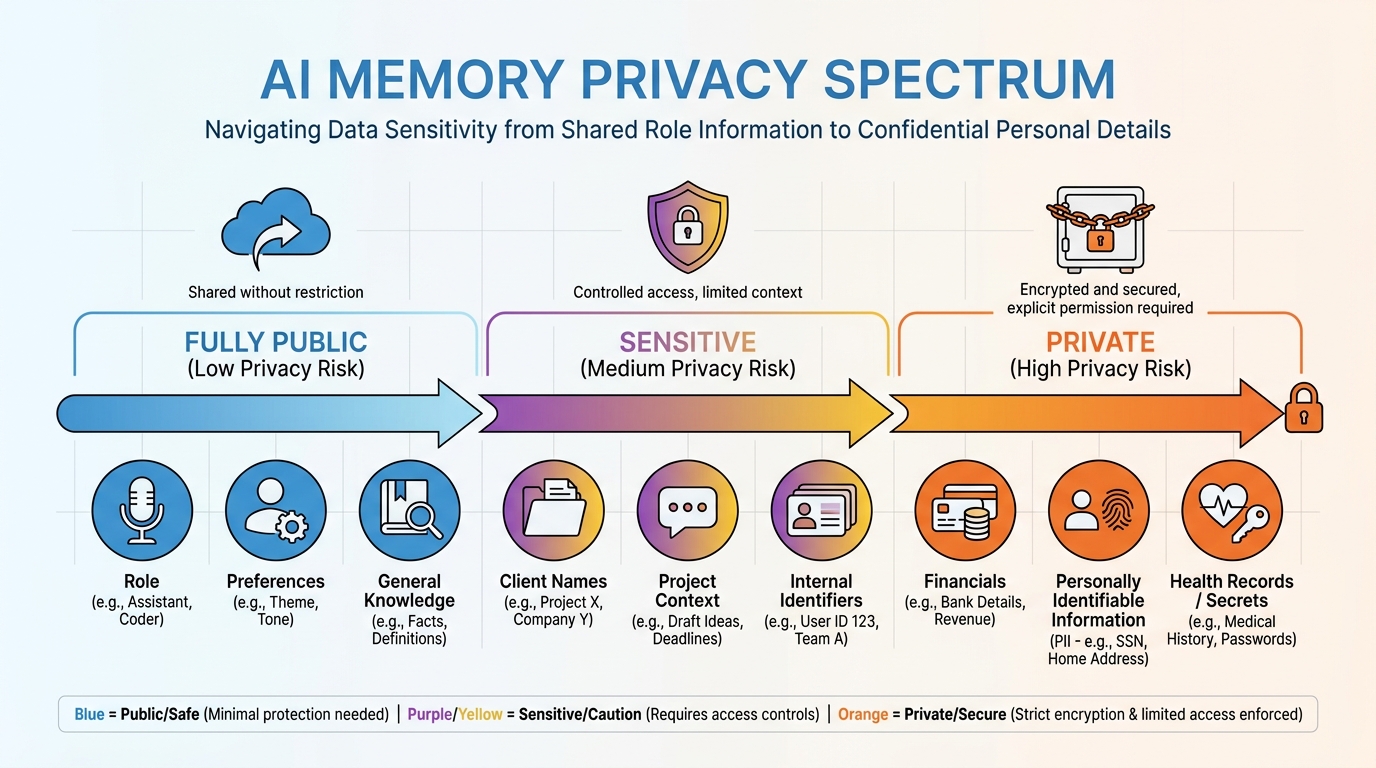
Figure 8:The Privacy Spectrum — Some things are appropriate to put in a memory file. Others belong nowhere near one.
This is the question nobody asks until something goes wrong.
Your memory file is a document. Like any document, it can be seen by others, stored on servers, and potentially accessed in ways you did not intend. Before you write something into your memory file, ask yourself: would I be comfortable if this document were seen by someone I did not intend?
What is generally appropriate: your professional role, your general priorities, your working style, your communication preferences. This is the kind of information you would share in a professional introduction.
What requires more careful thought: client names and details, sensitive business information, confidential strategic plans, financial specifics. Some of this may be appropriate to include — particularly in tools with strong privacy commitments like Claude, which has clear data policies. But you should make this decision deliberately, not by default.
What should never be in a memory file: passwords, authentication credentials, truly sensitive personal information, anything you would not want a colleague to see.
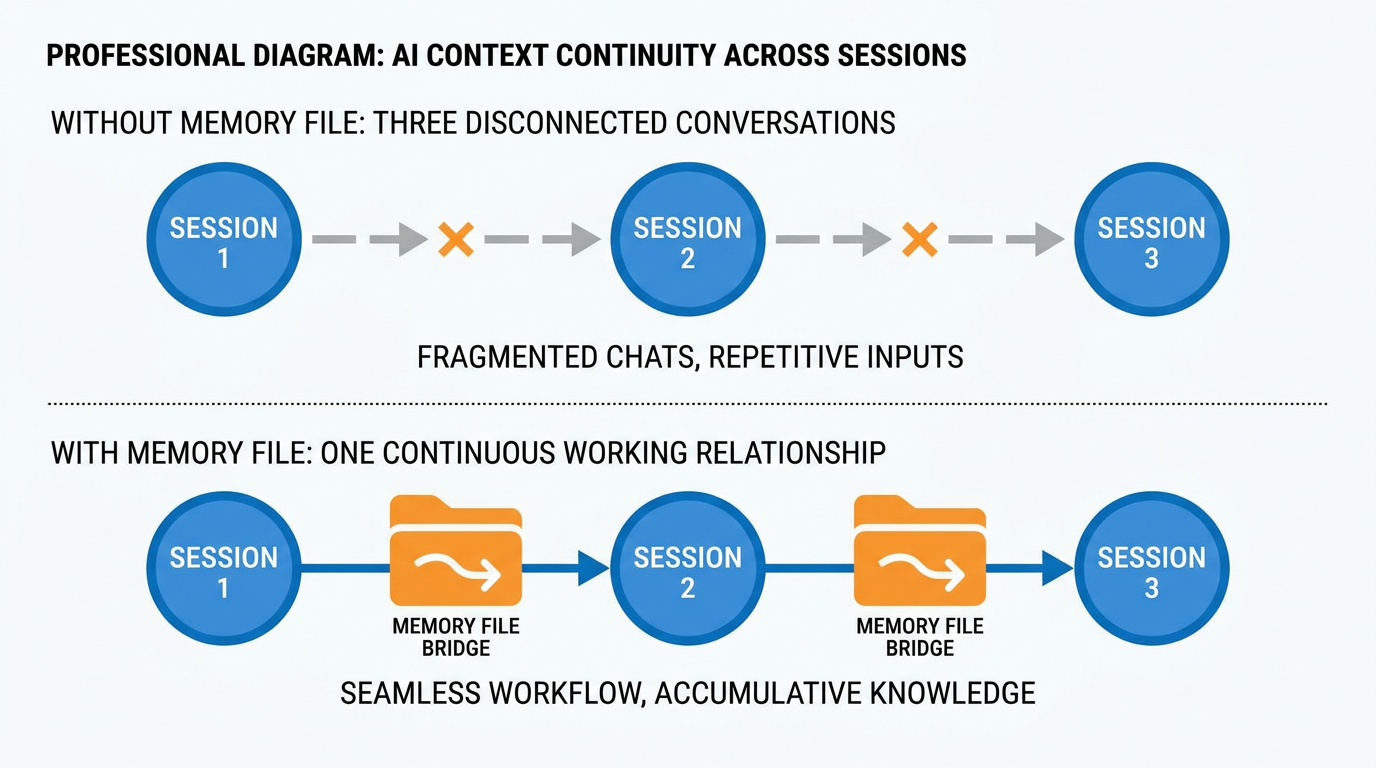
Figure 9:Context Continuity — With a well-maintained memory file, three separate sessions feel like one ongoing conversation. Without it, three sessions feel like three cold starts.
The professional practice is to build two memory files if needed: a work memory file that contains everything appropriate for professional use, and a more careful version for contexts where you are less certain about data handling. Know what each tool does with what you give it. And when in doubt, err on the side of less.
The Compounding Value of Memory
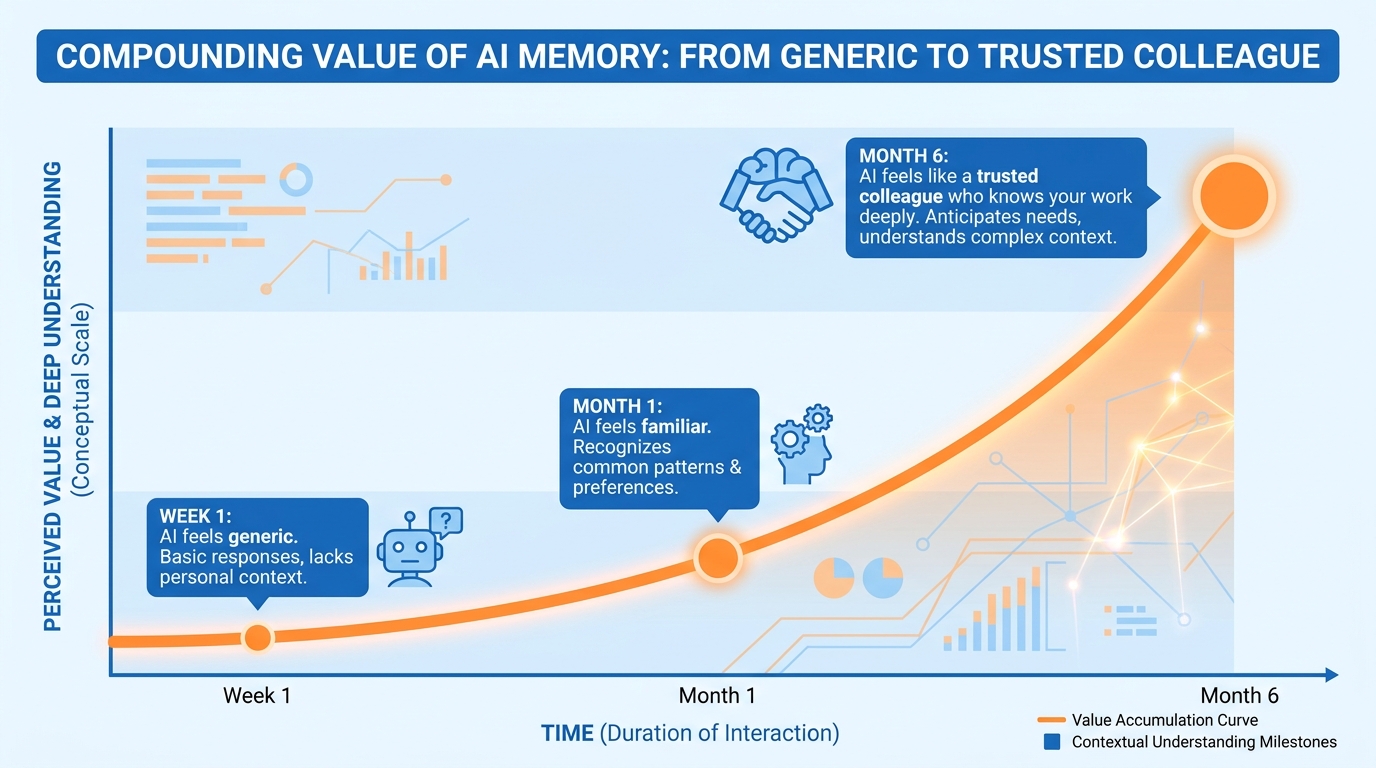
Figure 10:The Compounding Value — Week one, your AI feels like a smart stranger. Month six, it feels like a trusted colleague who knows your work deeply. The difference is memory.
Here is what happens over time when you maintain a living memory file consistently.
In the first week, you notice you are spending less time re-explaining yourself at the start of sessions. The AI already knows who you are and what you are working on. Sessions start faster and stay on track.
By the end of the first month, you notice the AI’s outputs are calibrated to your actual situation — not generic advice, but specific recommendations that account for your real context, your real constraints, your real relationships.
By the end of the sixth month, you have a working relationship that has genuine depth. Your memory file has been refined through dozens of sessions. It reflects the accumulated learning about how you think, how you work, and what kinds of help you actually need. The AI has not gotten smarter. Your use of it has become dramatically more sophisticated.
This is the compounding value of memory engineering. It does not deliver a big win on day one. It delivers an ever-growing advantage that is very difficult for someone starting from scratch to replicate.
Retrieval and RAG: The Design Pattern Behind Every Memory System
There is a question hiding underneath everything in this chapter, and once you see it you will see it everywhere: how does knowledge actually get in front of the model at the moment it needs it?
Every memory system — your memory file, project knowledge, a connected database — is an answer to that question. And it turns out there are exactly three answers, and knowing which one to reach for is one of the most practically useful design skills in this entire book.
Answer one: stuff it into the context window. You paste the document into the chat, or attach it, and the entire thing rides along with your question. The model reads all of it, every time. This is the simplest possible approach, and for small amounts of material it is also the best one — nothing is summarized away, nothing is skipped, the model sees every word. Your memory file works this way. So does every document you have attached to a conversation so far. The limit is the context window itself (Chapter 1): stuff too much in and you pay in cost, speed, and — as the window fills — attention. A model reading 400 pages to answer a question about one paragraph is doing a lot of expensive, distracting work.
Answer two: retrieve. Instead of the model reading everything, a search step runs first: your question is used to find the handful of passages most likely to contain the answer, and only those passages are placed into the context window alongside your question. This pattern has a name you will hear constantly in professional AI conversations: RAG — Retrieval-Augmented Generation. Retrieval finds the relevant pieces; generation writes the answer from them. RAG is how an AI can work against a body of knowledge far larger than any context window — thousands of pages, entire document libraries — without reading all of it for every question.
Here is the part most people miss: you are already using RAG, and you did not have to build anything. Claude Projects are consumer RAG. When you load documents into a Project’s knowledge (the way you did in Chapter 2), Claude handles the strategy for you: while the corpus is small enough, it simply loads everything into context — answer one. When the corpus grows past what the context window can hold, the Project automatically switches into RAG mode — Claude uses a project knowledge search tool to retrieve the relevant passages instead, and the Project’s capacity expands to roughly ten times what the window alone could hold. You will see the search tool being invoked in the response when this happens. That is the retrieval pattern, running quietly under a consumer interface, with the switch made for you. NotebookLM, Gemini’s file-grounded answers, and enterprise “chat with your documents” tools are all the same pattern wearing different clothes.
Answer three: go live. Sometimes the knowledge should not be stored at all — because it changes faster than you could keep any stored copy current. Today’s prices, this morning’s news, the current contents of your inbox, the live state of a CRM record. For these, the right move is a live connector: web search, or an MCP connection (Chapter 3), or a plugin (Chapter 8) that fetches the answer from the source system at the moment you ask. Nothing is pre-loaded and nothing is indexed; the freshness is the point.

Figure 11:Three Ways In — Small and stable: paste it. Large and stable: retrieve it. Changing constantly: connect to it live. Most real workflows combine at least two.
The decision framework. Four questions settle almost every case:
How big is the material? If it comfortably fits in the context window — a report, a contract, a handful of meeting notes — paste or attach it. Whole-document reading beats retrieval when whole-document reading is affordable. If it is a corpus — a year of notes, a policy library, hundreds of files — retrieval is the only sane option, and project knowledge gives it to you for free.
How fresh does it need to be? Anything that changes daily or hourly should come through a live connector, not a stored copy. A stored copy of a fast-moving source is not memory; it is a slowly-expiring lie.
How much does provenance matter? When you must know where an answer came from — compliance, client work, anything you will be asked to defend — retrieval and live connectors have an edge: they can point to the specific document, passage, or URL they drew from. A model answering from its general training cannot. If you cannot trace it, treat it with Chapter 1’s verification discipline.
What does it cost? Stuffing a large document into every message re-sends (and re-bills, and re-reads) the whole thing every time. Retrieval sends only slivers. Live connectors add a fetch step but store nothing. For a question you ask once, none of this matters. For a workflow you run fifty times a week, it is the difference between trivial and painful.
And notice how cleanly this maps back onto the three tiers of memory you already know. Your memory file is answer one — small, curated, stuffed into context deliberately. Project knowledge is answer two — a corpus with retrieval handled for you. A connected database or live tool is answer three. The tiers were never arbitrary. They are the three ways knowledge gets in front of a model, arranged by how much of the machinery you have to see.
Try It: One Question, Three Ways In
This activity takes about 30 minutes. You need a Claude account (Projects require a paid plan), one real document, and one question. You will answer the same question three ways and see the tradeoffs with your own eyes instead of taking this section’s word for them.
Pick a real document and a real question. Choose a document from your actual work or studies that is at least five pages long and contains specific, checkable facts — a syllabus, an employee handbook, a project plan, an annual report. Then write down one question whose answer lives in that document and could plausibly have changed since the document was written (a price, a policy, a date, a deadline, a named responsibility). Write the question down exactly — you will use the identical wording three times.
Way one — paste it in. Open claude.ai and start a fresh, ordinary chat (not inside any Project). Attach or paste the document, then ask your question, word for word. When it works, you will see an answer that cites specifics from the document. Record three things: the answer, roughly how long the setup took you (attaching, waiting), and whether the answer matches the document exactly.
Way two — project knowledge. Create a new Project (left sidebar → Projects → New Project; if you do not see Projects in the sidebar, check the main menu — placement varies between web and desktop). Upload the same document to the Project knowledge panel. Start a chat inside the Project and ask the identical question — this time without attaching anything. The answer should draw on the knowledge automatically. Record the same three things. Notice the effort difference: the setup cost moved from every conversation to once.
Way three — live. Open another fresh chat outside the Project. Do not attach anything. Enable web search if it is not already on (look for the search toggle in the tools menu near the message box; the label may vary) — or, if your question concerns a system you have connected (Chapter 3), let it use that connector. Ask the identical question. The model will search for the current answer instead of reading your document. Record the answer, the effort, and — this is the interesting one — whether the live answer differs from the document’s answer. If it does, you have just watched freshness beat storage in real time.
Fill in the comparison table. Copy this table and complete every cell from your notes:
(a) Pasted in (b) Project knowledge (c) Live search/connector Answer it gave Accurate to the document? Setup effort (this time) Setup effort (next 50 times) How fresh is the answer? Can it cite its source? Write the recommendation sentence. One sentence, committing to a position: “For this kind of question, the right pattern is ___ because ___.” If your honest answer is “b for the document facts, c to check they are still current” — say that. Hybrid answers are usually the correct ones, and noticing that is the entire lesson.
Submit: The completed table + your recommendation sentence.
Case Study: The Memory Debt at Meridian Strategy Group
Background
Meridian Strategy Group is a mid-sized management consulting firm headquartered in Atlanta, Georgia, with approximately 340 consultants across six practice areas: operations, digital transformation, supply chain, financial advisory, human capital, and public sector. Founded in 2003, the firm built its reputation on deep client relationships — the kind that develop over multi-year engagements where institutional memory about a client’s culture, past decisions, internal politics, and strategic priorities becomes a genuine competitive advantage.
In early 2024, Meridian’s Chief Operating Officer, Renata Voss, launched a firm-wide AI productivity initiative in response to competitive pressure from the Big Four, which had already embedded generative AI into their consulting workflows. The initiative provided every consultant with access to Claude through Anthropic’s API, integrated into the firm’s internal portal under the name “Meridian Intelligence.” Adoption was rapid — within 90 days, over 80 percent of consultants were using the tool weekly. Utilization data showed the most common use cases were proposal drafting, slide deck outlines, meeting preparation, and research synthesis.
Six months into the rollout, however, Voss began receiving feedback that pointed to a structural problem. Senior partners — the firm’s most experienced practitioners, managing the largest and most complex client relationships — were among the least satisfied users. Their feedback was consistent: “It doesn’t know anything about my client.” “I have to re-explain the same background every time.” “It gives me generic advice that doesn’t account for our history with this account.” Partner-level consultants, whose engagements often stretched across two to three years, were experiencing AI as a high-quality stranger — capable in the abstract, but disconnected from the specific context that made their work effective.
Meridian’s Director of Knowledge Management, Darius Okafor, was tasked with diagnosing the problem and proposing a solution. Okafor had a background in enterprise knowledge systems and immediately recognized the pattern: the firm had deployed a stateless AI tool into a relationship-intensive business, and no one had built a memory layer to bridge the gap. Consultants were treating each AI session as a discrete event rather than a continuation of an ongoing working relationship. The result was not just inefficiency — it was a failure to capture and leverage the institutional knowledge that was Meridian’s core differentiator.
The Situation
Okafor’s proposed solution was what he called the Client Intelligence Brief — a structured, maintained document for each active client engagement that would be loaded at the start of every AI-assisted work session. The brief would capture: the client’s industry and organizational context; the specific engagement scope and current deliverables; key stakeholders and their roles, priorities, and sensitivities; decisions already made and the reasoning behind them; outstanding issues and open questions; and the consulting team’s working style and communication preferences for that account.
The proposal immediately surfaced a tension that Okafor had not fully anticipated. Several senior partners expressed concern about what would and would not belong in a Client Intelligence Brief. One partner, managing a sensitive financial restructuring engagement for a regional bank, asked pointedly: “Are you asking me to put confidential client information into a document that runs through a third-party AI system?” Another raised the issue of information governance: if the briefs accumulated over months of engagement, how would the firm manage what was remembered, what was updated, and what should be retired once an engagement closed? A third observed that the value of the brief would depend entirely on the discipline of the team maintaining it — and in a billable-hours environment, curation felt like overhead with no obvious return.
Voss and Okafor recognized that the firm was not just facing a technical implementation problem. They were confronting a set of interconnected strategic questions about memory architecture, information governance, privacy risk, and the organizational habits required to make AI memory compound in value rather than degrade into clutter. The answers they chose would define not just how Meridian used AI — but whether they could sustain any competitive advantage from it at all.
Discussion Prompt
Using the three-tier memory framework and the distinction between memory and context introduced in this chapter, analyze the core design choices Meridian faces in building its Client Intelligence Brief system. Specifically: how should Okafor determine what belongs in a client memory file versus what should be provided as session-specific context, and how does that distinction affect both the operational effectiveness and privacy risk profile of the system? Additionally, apply the chapter’s curation discipline concept to evaluate the concern raised by the third partner — that maintaining memory files is overhead with no obvious return — and argue either for or against the claim that memory engineering delivers compounding value in a high-stakes consulting environment.
Discussion Guidelines
Initial Post (due before class)
Minimum 400 words
Directly address the discussion prompt using concepts from this chapter
Include at least one APA-formatted citation — from the course text or a peer-reviewed source
Avoid summary; demonstrate analysis and original thinking
Peer Responses (minimum 2)
Minimum 250 words each
Each response must include at least one APA-formatted citation
Engage substantively — build on, challenge, or offer a contrasting perspective grounded in evidence
“I agree” or “Great post” responses do not meet the requirement
Maintain a professional and respectful academic tone
Applied Exercise: Build Your Memory File Today
This exercise ends with a complete, living memory file that you will use in every important AI session from this point forward.
Track A — Claude Desktop
Step 1: The Inventory (10 minutes)
Open a blank document. Without overthinking, write answers to these questions:
What is my actual role, in plain English — not my title, but what I actually do?
What are the three things that matter most to me professionally right now?
Who are the five people I interact with most often in my work, and why do they matter?
What are my two or three most active ongoing projects?
What do I hate about generic AI responses? What does “useful” look like to me specifically?
Do not edit as you go. Just answer.
Step 2: Use Claude to Shape It (15 minutes)
Open Claude Desktop and say:
“I am going to paste my raw notes about myself and my work. I want you to turn this into a concise, well-structured memory file that I can paste at the start of future AI sessions to give you instant context about who I am and what I’m working on. Keep it under 400 words. Make it scannable with clear sections. Here are my notes: [paste your inventory].”
Review what Claude produces. Edit anything that does not sound like you. Add anything it missed.
Step 3: Save It and Use It (Immediately)
Save the file somewhere you will always find it. Name it something obvious — My AI Context, Working Brief, Memory File.
Right now, in the same session, paste your new memory file at the top of a new conversation and ask Claude a question about something you are actually working on. Notice the difference in how it responds — how it frames its help in terms of your actual situation rather than generic advice.
Step 4: Set a Monthly Reminder
Put a recurring event in your calendar, once a month: Update Memory File. When it fires, open the file, spend five minutes updating anything that has changed, and save it. That is the entire maintenance burden of a memory system that will make every AI session better for the rest of your professional life.
Track A Your Submission: Your submission is your completed Working Brief plus evidence it works. Copy the full text of your Working Brief into a document. Underneath it, paste the response from the first session where you tested it — the one where you pasted the brief and asked a real question about your work. Write one sentence: what was specifically more relevant or accurate in that response compared to what Claude gives you without the brief? Submit the Working Brief + test response + one sentence.
Track B — Claude Code inside Antigravity IDE
Open Antigravity 2.0 IDE → Editor surface → integrated terminal → Claude Code (claude> prompt ready).
Create a new file in the IDE file browser called “my-inventory.txt.” In it, write honest answers to these five questions — do not edit or polish as you go, just answer directly: (a) What is my actual role in plain English — not my title, but what I actually do? (b) What are the three things that matter most to me professionally right now? (c) Who are the five people I interact with most in my work and why does each one matter? (d) What are my two or three most active ongoing projects? (e) What frustrates me most about generic AI responses?
Save my-inventory.txt. At the claude> prompt, type: “I’m going to paste the contents of a file with my raw professional notes. Turn them into a CLAUDE.md file — a concise memory document under 400 words with clear labeled sections — that captures who I am and what I’m working on. I want you to save it as CLAUDE.md in this folder.” Paste the contents of your inventory file.
Claude Code generates the CLAUDE.md and saves it in your workshop folder. You will see it appear in the Antigravity IDE file browser on the left.
Open CLAUDE.md in the IDE editor pane. Read it word by word. If anything is wrong, inaccurate, or missing, type specific correction requests at the claude> prompt and ask for revisions. The IDE editor shows the file updating in real time.
When CLAUDE.md is accurate, test the persistent memory: type “exit” to end the session. Type “claude” again to start a fresh session in the same folder. The CLAUDE.md loads automatically before your first message.
Ask Claude Code about something you are actually working on this week — without mentioning anything from the CLAUDE.md. Read the response for evidence that it read your file: references to your actual role, your real projects, your named priorities.
Open a plain claude.ai tab in your browser. Ask the exact same question with no context. Compare the two responses side by side in the IDE editor. The difference in relevance and specificity is the value of persistent memory.
Test one deliberate memory update: open CLAUDE.md in the IDE editor and add one thing that changed in your professional situation this week — a new project, a changed priority, a new key relationship. Save the file. Start another fresh Claude Code session and ask about the thing you just added. Confirm it knows without you telling it again.
In your calendar app, create a monthly recurring reminder: “Update CLAUDE.md.” When it fires, open the file in Antigravity IDE and spend five minutes updating what has changed. That is the entire maintenance cost of a memory system that makes every session better.
Your Submission: Copy the full CLAUDE.md text into a document. Underneath it, paste the response from Step 7 — the first session where the CLAUDE.md loaded automatically. Underneath that, paste the plain claude.ai response to the same question from Step 8. Write one sentence: what specifically in the Claude Code response showed that the CLAUDE.md was working? Submit the CLAUDE.md + two compared responses + one sentence.
Track C — Gemini + Antigravity 2.0 IDE
Open a plain claude.ai tab in your browser. Answer these five questions in writing — honest answers, not polished: (a) What is my actual role in plain English? (b) What are my three most important professional priorities right now? (c) Who are my five most important professional relationships and why? (d) What are my two or three most active projects? (e) What do I hate about generic AI responses? Do not edit as you go. Just answer.
After you have your raw answers, paste them into claude.ai and ask: “Turn these into two things: (1) Gemini Gem instructions — a professional context brief I will paste into a Gem’s instruction field, and (2) an Antigravity Agent Manager Project Description — the same context but written for task-based work rather than conversation. Keep each version under 300 words with clear sections.”
Take Claude’s output. Open Gemini (gemini.google.com) → Gem Manager → New Gem. Name it “Working Context.” Paste the Gem instructions version into the Instructions field. Save it.
Test the Gemini memory: click the Working Context Gem to open a conversation inside it. Ask it about one of your current projects without re-explaining any context. Note how the response reflects your role and situation automatically.
Open a standard new Gemini chat (not your Gem). Ask the exact same question. Compare the two responses. The Gem version should be meaningfully more relevant — that difference is what persistent memory buys you.
Open Antigravity 2.0 IDE and press CMD+E (Mac) / CTRL+E (Windows) to switch to Agent Manager. Create a new Project called “My Work” or name it after your most important current project.
In the Project Description field, paste the Agent Manager version of your Working Brief from Step 2. Save the Project.
Test the Antigravity memory: start a new Agent task inside the My Work Project. Ask the agent about one of your current projects without re-explaining anything. Confirm the agent’s response reflects who you are and what you are working on.
Now compare all three memory layers: (a) generic claude.ai response (no memory), (b) Gemini Gem response (conversation memory), (c) Antigravity Agent task response (task memory). Note how each layer affects the specificity and relevance of the output.
Set a monthly calendar reminder: “Update Working Brief.” When it fires, update both the Gemini Gem instructions and the Agent Manager Project Description. Five minutes each. That is the full maintenance cost.
Your Submission: Copy three things into a document: (1) your Gemini Gem instructions (Working Brief), (2) your Antigravity Project Description (Working Brief), (3) the Agent Manager task response from Step 8. Write two sentences: (1) how do the Gem and the Project Description differ in tone or emphasis, and (2) what changed in your first test session after adding the memory layer? Submit the three items + two sentences.
Reflection
The single sentence that changes how you work:
Your AI is only as good as the context you give it — and a memory file is how you stop giving that context from scratch every single time.
If you ran more than one track, answer this: Which version of “memory” felt closer to how you actually want to be known by your tools — pasted at the top of a chat, loaded silently from a file, or carried inside a named Gem or Project? That answer is your real preference, and it should drive how you set up the next year of AI work.