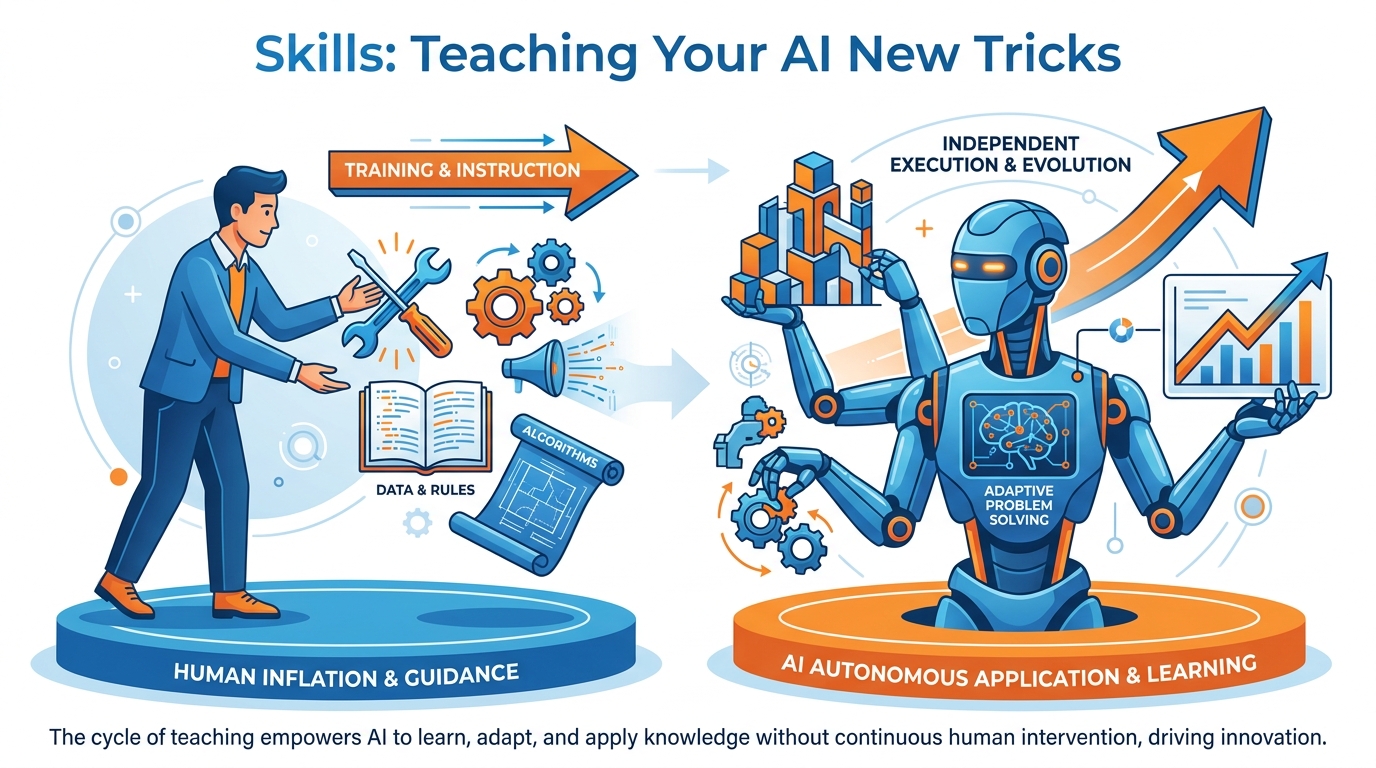
Figure 1:Skills — The difference between using AI and owning AI. One approach makes you good today. The other makes you unstoppable over time.
Here is something that almost nobody does.
Most people who use AI — even people who use it every single day — start from scratch every time. They open a chat window, type a question, get an answer, close the window. The next day, they open a chat window, type another question, get another answer, close the window.
Every conversation begins at zero.
Now imagine a different approach. What if the second time you asked your AI to analyze a competitor, it already knew exactly how you want that analysis structured — the format, the depth, what to include, what to leave out? What if the third time you needed a pre-call briefing, you just typed a name and got back a perfectly structured intelligence brief in under ten seconds? What if the fifteenth time you needed to process an incoming lead, your AI did it automatically, the same way, every time, without you explaining the process again?
That is what a skill does.
A skill is a saved, reusable AI capability. You define it once. You use it a thousand times. And unlike a one-time prompt — which lives in a chat window and disappears the moment you close it — a skill compounds. Every time you use it, it saves you time. Every time you refine it, it gets better. After a year of building skills, you do not have an AI tool. You have an AI workforce, custom-trained to your specific job.
This chapter teaches you how to build it.
The Difference Between a Prompt and a Skill
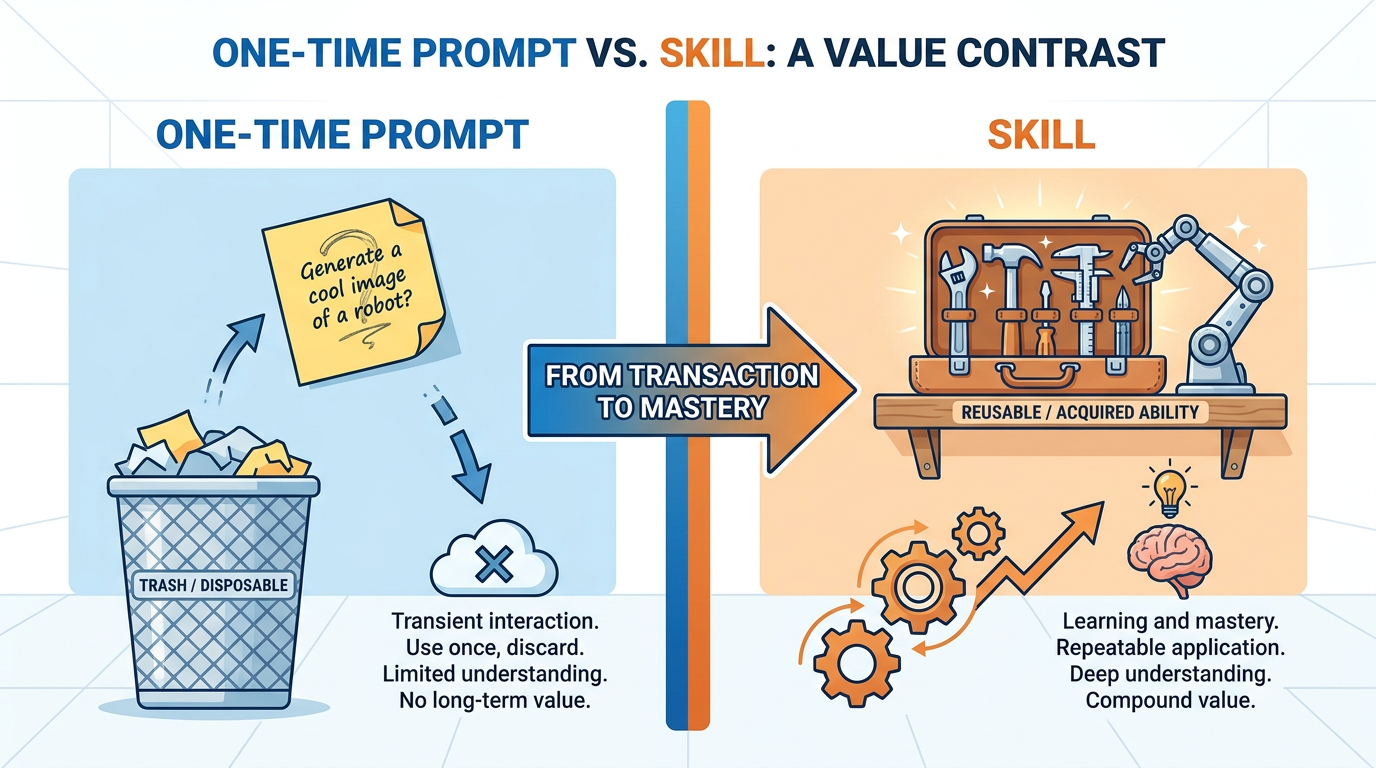
Figure 2:Prompt vs. Skill — A prompt is a sticky note. A skill is a power tool. Both get the job done today. Only one builds something permanent.
Most people think they are building skills when they are actually writing prompts.
The distinction matters enormously.
A prompt is a set of instructions you give an AI for a specific task, in a specific conversation. It gets the job done in the moment. When the conversation ends, the prompt ends with it. The next time you need the same result, you write the prompt again — from memory, slightly differently, probably less well than the first time.
A skill is a packaged, named, reusable capability. It has a consistent trigger — a phrase, a command, a name — that activates it. It has standing instructions that define how it behaves every time. It lives in your AI setup permanently, ready to run whenever you call it. You give it inputs. It gives you outputs. Same process, every time, automatically.
Here is the analogy that makes this clear.
Imagine you are a chef. Every time a customer orders pasta carbonara, you could stand at the stove and think through the recipe from scratch. What goes in? What temperature? How long? You could figure it out each time. You are smart enough. But a great chef writes the recipe down, standardizes it, trains their team on it, and executes it the same way every night. The dish is better because the process is consistent. And the chef’s mental energy is freed up for harder problems.
Your AI is the kitchen. Skills are your recipes. And right now, most people are improvising every single meal.
What a Skill Is Made Of
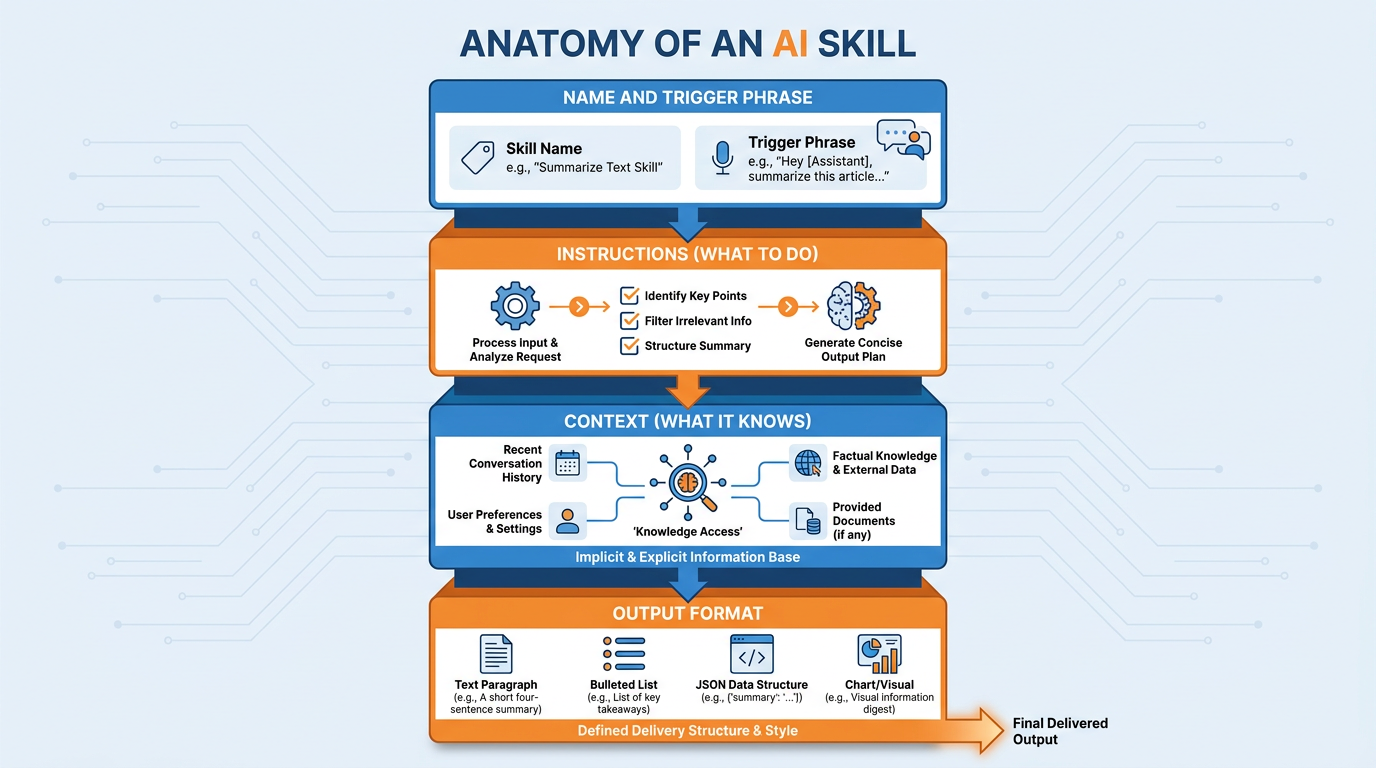
Figure 3:Skill Anatomy — Four components. Every great skill has all four. Missing any one of them and the skill underperforms.
A skill has four components. Every one of them matters.
A name and trigger. This is how you call the skill into action. It can be a keyword, a slash command, a Gem name, a project name — whatever your tool supports. The name should describe the action clearly enough that you know exactly what it does six months from now without having to open it. “Competitor Brief” is a name. “Thing 3” is not.
Instructions. This is the core of the skill — the standing prompt that tells the AI exactly what to do when it is invoked. Not a vague description. Specific, detailed instructions: what to analyze, how to structure the output, what to emphasize, what to ignore, what assumptions to make. The more specific the instructions, the more consistently excellent the output.
Context. This is what the skill knows about your world before you give it any input. Your industry. Your role. Your standards for quality. The kind of clients you work with. The tone your company uses. Context is what makes the difference between a skill that produces generic output and one that produces output that sounds like it came from someone who knows your business.
Output format. Every skill should have a defined output structure. Headers or no headers. Bullet points or prose. Short or detailed. The format should be specified explicitly — because an AI without format instructions will improvise, and improvised format is inconsistent format.
When all four components are in place, a skill becomes something remarkable: it is not just faster than doing the task manually. It is better. Because it applies the same clear thinking, the same standards, and the same structure every single time — without the cognitive drag that accumulates when a human does the same task repeatedly.
What Skills Can Actually Do
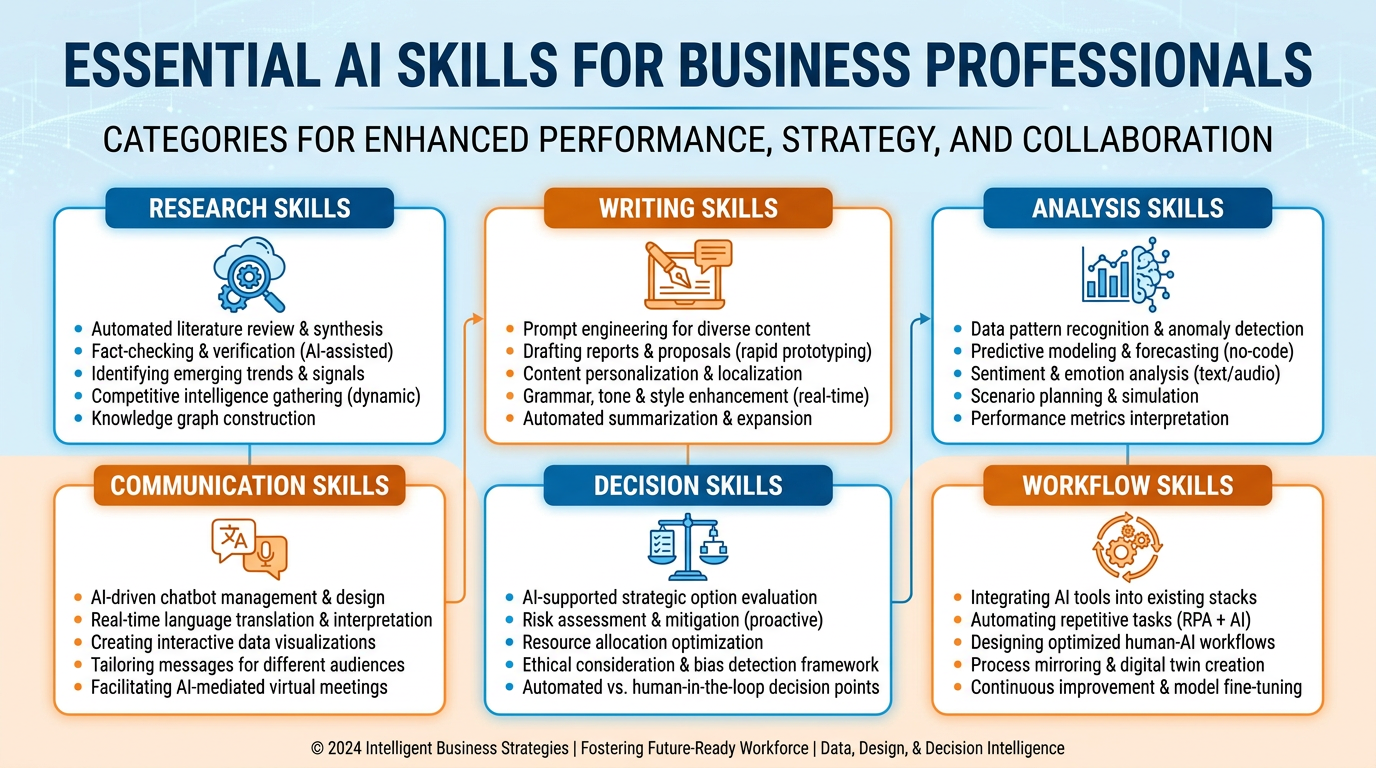
Figure 4:What Your Skills Library Becomes — Not a list of tools. A workforce. One that works while you sleep.
Let me show you what this actually looks like in practice. Not categories. Not labels. Real scenarios.
You get an email from a prospect you have never spoken to. You have a call with them in 45 minutes. You type their name and company into your Pre-Call Intelligence skill. In ten seconds you have: a one-page brief on who they are, what their company does, their recent news, their competitors, what they are likely worried about this quarter, and three opening questions calibrated to their situation. You walk into that call knowing more about them than they expect you to know. That changes the entire dynamic of the conversation.
You finish a sales call with messy notes and a head full of commitments. You paste your notes into your Call Debrief skill. Thirty seconds later you have: a formatted CRM entry ready to copy, a follow-up email drafted in your voice ready to send, a summary of every commitment made by both sides, and a flagged list of next steps with suggested timelines. What used to take 20 minutes of post-call admin takes 30 seconds. And it is more complete than anything you would have written yourself.
Someone sends you a 47-page contract. Your lawyer charges $500 an hour. You paste the contract into your Contract Scanner skill. In under a minute you have: a plain-English summary of the five most unusual clauses, the two places where your liability exposure is highest, specific questions to bring to your lawyer, and the three things you should push back on before signing. You walk into the legal review already knowing what matters. That meeting — which used to take two hours — takes forty minutes.
You have a board presentation in three days and a pile of operational data. You paste the data into your Board Narrative skill. It does not just summarize. It identifies the story in the numbers — the three things that improved, the two things that need attention, the one trend the board will definitely ask about — and structures it as a narrative with an executive opening, supporting data, and a clear ask. The presentation that used to take a full day to build takes two hours.
An angry client emails you at 7pm. It is long, emotional, and cc’d to your manager. You paste it into your Client Recovery skill. The skill reads the tone, identifies the actual complaint underneath the emotion, drafts a response that acknowledges the frustration without admitting liability, offers a concrete next step, and maintains the relationship. You review it, adjust one sentence, and send. What would have been a stress-filled evening of agonizing over every word becomes a fifteen-minute task.
You publish a blog post, a podcast episode, or a detailed report. You paste it into your Content Multiplier skill. It extracts: three LinkedIn posts with different angles, five tweet-length observations, a short email newsletter blurb, two questions for a follow-up discussion, and a one-paragraph summary for your website. One piece of content becomes eight. Every time. Automatically.
A new lead comes in from your website form. Name, company, email, a few sentences about what they need. You paste it into your Lead Qualifier skill. The skill cross-references their description against your ideal customer profile, scores the fit from one to ten, explains the reasoning, flags any red flags, and recommends either a fast-track or a nurture sequence. You stop spending 20 minutes researching every lead and start making faster, better decisions about where your time goes.
You are about to make a significant business decision — hiring someone, signing a contract, entering a new market, dropping a client. You describe the decision to your Decision Coach skill. It does not just list pros and cons. It asks what assumptions you are making that might be wrong. It identifies the second-order effects — the consequences of the consequences. It tells you what information you would need to be more confident. And it gives you a recommendation, with its reasoning, that you can agree or disagree with. You stop making important decisions alone.
That is eight skills. Eight workflows that used to eat hours of your professional life every week, reduced to minutes. Built once, running forever.
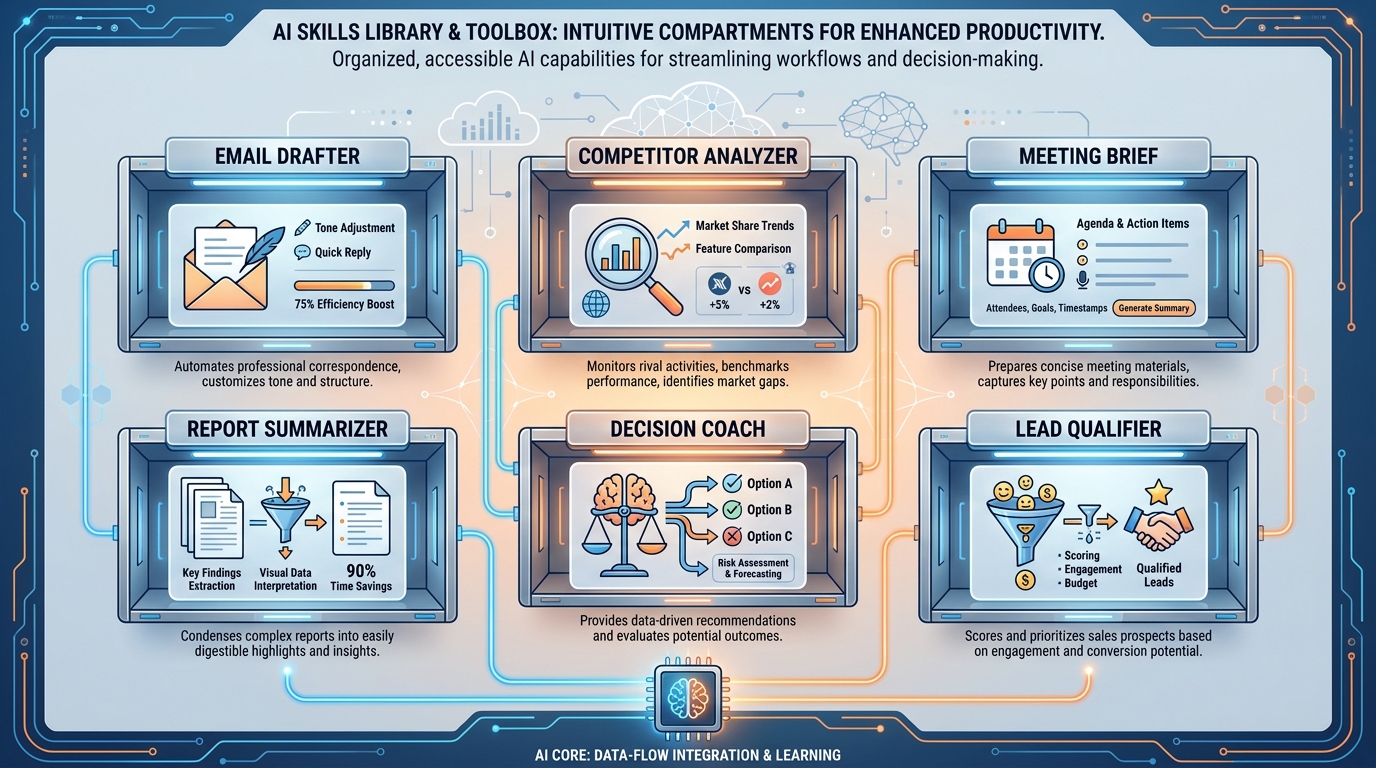
Figure 5:Your Skill Library — After six months of deliberate building, this is what you have. Not a tool you use. A system that works for you.
And here is what most people miss: the skills above are not advanced. They are not the ceiling of what is possible. They are the floor — the baseline capabilities available to anyone who spends a few hours building them. The ceiling is wherever your imagination and your specific professional context takes you.
The person who has spent a year deliberately building skills does not just work faster. They work in a way that is structurally different from everyone around them. They have converted their professional expertise — the stuff that lives in their head — into a system that executes that expertise consistently, at scale, without them having to be present for every instance of it.
That is not productivity. That is leverage.
How to Build a Skill
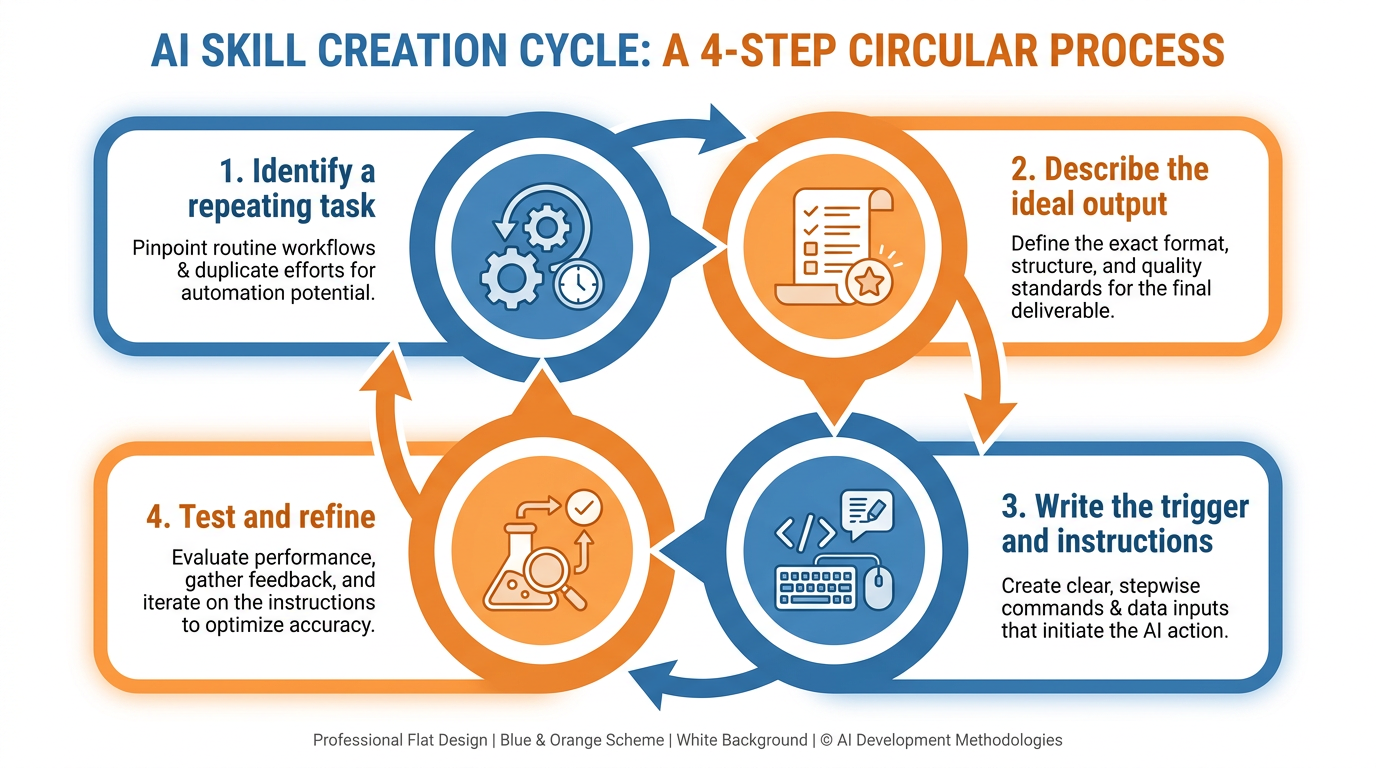
Figure 6:The Creation Process — Identify, describe, write, test. Done in under thirty minutes. Useful for years.
Building a skill is a four-step process. None of the steps are difficult. The whole thing takes less than thirty minutes the first time, and under ten minutes once you have done it before.
Step 1: Identify a repeating task. Pick one task you do at least three times a week that follows a recognizable pattern. Not a task you do occasionally. Not a task that is genuinely different every time. A task you find yourself doing on autopilot — where the main variable is the specific input, not the process.
Step 2: Describe the ideal output. Before you write any instructions, do this: find the best example of this task you have ever produced. The best analysis. The best email. The best brief. Study it. What made it good? What structure did it use? What did it include that lesser versions missed? You are going to teach your AI to produce that quality, every time.
Step 3: Write the skill instructions using Claude. This is where meta-prompting comes in again — because the fastest way to write a great skill is to have Claude write it for you. Open Claude Desktop and say:
“I want to build a reusable AI skill for [task description]. Here is an example of the ideal output: [paste your best example]. Based on this, write me a complete skill instruction set — including a trigger name, detailed instructions, the context the skill should have about my role, and the exact output format it should always use.”
Claude will produce a skill specification. Read it. Adjust anything that doesn’t match how you actually want the skill to behave.
Step 4: Test and refine. Run the skill on three real examples from your work. The first run will be good. After refinement, the third run will be excellent. Small edits to the instructions — tightening the format, adding a constraint, clarifying an ambiguity — compound into significantly better output over time.
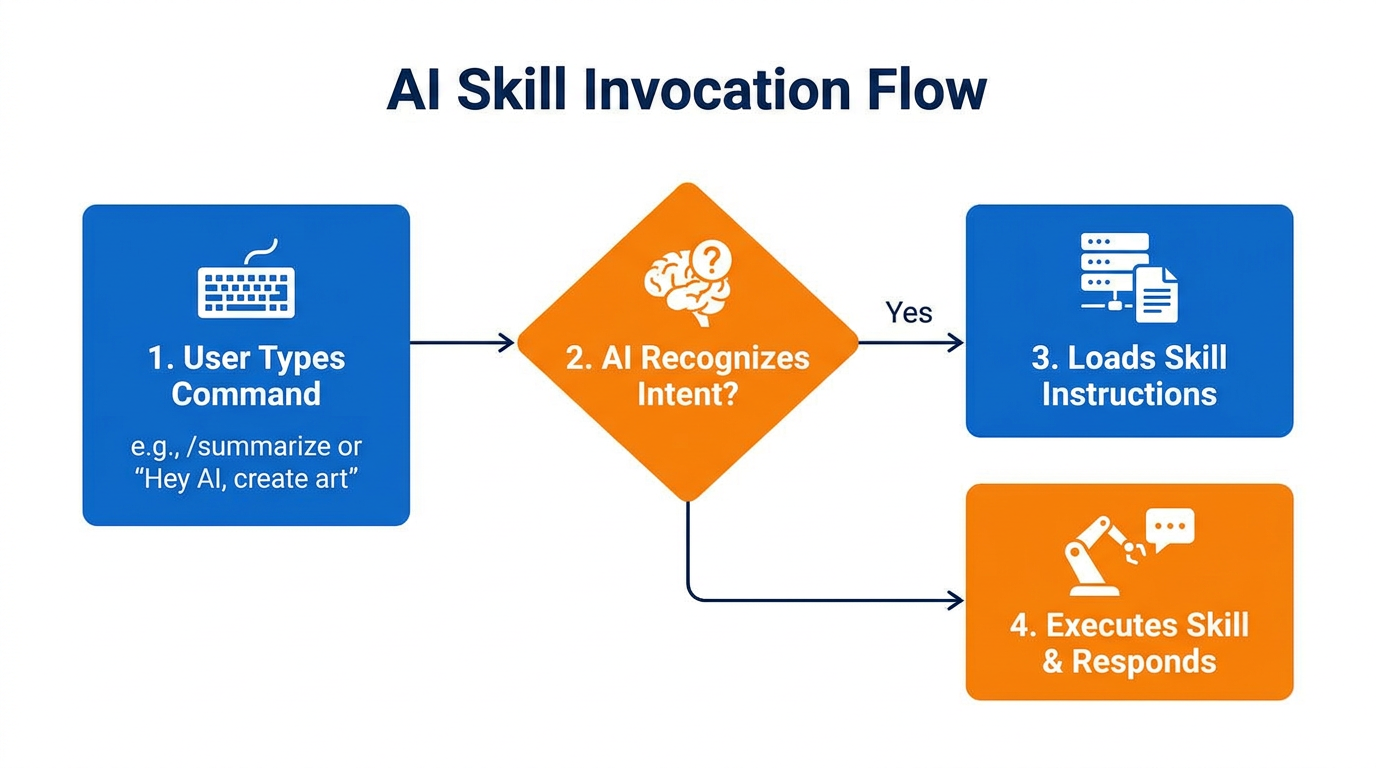
Figure 7:Triggering a Skill — One phrase. One input. One perfect output. Every time.
The Second Way to Build a Skill: Record Yourself Doing It
Everything above assumes you can describe your task. Sit down, articulate the steps, write the instructions — or have Claude write them from your description. That works beautifully for tasks you understand explicitly.
But here is an uncomfortable truth about expertise: the better you are at something, the worse you usually are at describing it.
Ask a veteran analyst how they triage a data room and they will give you four steps. Watch them actually do it and you will count thirty — the file they always open first, the number they instinctively cross-check, the formatting tell that makes them suspicious of a spreadsheet, the three things they glance at and dismiss without conscious thought. Psychologists call this tacit knowledge: the knowledge that lives in your hands and your habits rather than in words. It is precisely the knowledge that makes you valuable, and it is precisely the knowledge that never makes it into a written skill specification — because you do not know you have it.
This is why Record a Skill exists, and why it deserves equal billing with everything else in this chapter.
Record a Skill is a feature of Claude Cowork — the agentic mode of Claude Desktop you set up in Chapter 2 — launched by Anthropic in July 2026. The premise is disarmingly simple: instead of telling the AI how you do a task, you show it. You start a recording, you do the task on your screen the way you normally do it, you narrate your reasoning out loud as you go (“I always check the totals tab first because that’s where errors hide”), and you stop the recording. Claude watches the demonstration — your clicks, your navigation, your narration — and writes the skill itself: a structured, reusable SKILL.md file capturing your process, ready to run on the next input without further prompting.
Programmers have a name for this pattern: programming by demonstration. It is the difference between writing a recipe from memory and having an apprentice shadow you through one service in the kitchen, notebook in hand. The apprentice catches things the recipe never would.
Three things make this more than a convenience:
It captures what you cannot articulate. The instinctive cross-check, the habitual first-look, the quiet quality filter — the recording catches them because you did them, even though you would never have thought to write them down. Your narration explains the why; your actions supply the what.
It lowers the floor. The colleague who would never sit down to write a skill specification will happily do the task once while talking through it. Recording converts your least-documentable experts into your best skill authors.
It raises a question this book takes seriously. Every recorded skill converts a piece of human tacit expertise into an executable file. Multiply that across a firm and across a decade and you arrive at the training-ground paradox of Chapter 15: if the apprentice work that once built expert intuition is now performed by skills distilled from expert intuition, where does the next generation’s intuition come from? Hold that thought — you will meet it again. For now, notice that the person who does the recording still owns something the file does not capture: the judgment to know when the skill’s output is wrong.
One craft note before the activity: the generated skill is a first draft, not a finished product. Claude transcribes everything it saw — including your detours, your redundant clicks, and that moment you checked your email mid-recording. A recorded skill needs pruning the way a transcript needs editing. That pruning step is where you convert a faithful recording into a sharp tool, and the activity below makes you do it deliberately.

Figure 8:Record a Skill — You perform. You narrate. Claude writes the skill. Then you prune the draft into a tool.
Try It: Record a Real Workflow and Turn It into a Skill
This activity takes about 45 minutes: five minutes of recording, ten of reading, ten of pruning, and twenty of testing. You need Claude Desktop with Cowork (paid plan — Pro, Max, Team, or Enterprise) from Chapter 2.
Pick a real, recordable task. Choose a workflow you do at least weekly that takes about five minutes on screen and touches two or three applications or documents — processing an invoice, formatting a report from a template, triaging a folder of files, turning meeting notes into a CRM update. It must be a task where your process matters, not just the output. Avoid anything involving passwords or sensitive personal data on screen — the recording captures everything visible.
Open Claude Desktop and start a Cowork session. In the message box, switch the selector from Chat to Cowork (Chapter 2 covered this; if you do not see the selector, update the app via Help → Check for Updates).
Find Record a Skill. Click the + menu in the Cowork chat box and choose Record a skill (if you do not see it in the + menu, check the skills area under Settings → Capabilities, or type “record a skill” into the task box and Claude will surface the feature — the entry point may vary slightly by version). Claude will ask for screen-recording permission the first time; grant it (on Mac this opens System Settings → Privacy & Security → Screen Recording — toggle Claude on, then restart the app if prompted).
Start recording and do the task — while narrating out loud. Perform your workflow exactly as you normally would, at normal speed, and talk continuously: what you are doing, why you are doing it, what you are checking, what would make you stop and escalate. The narration is not decoration — it is half the input. Say the quiet parts: “I always sort by date first because the newest file is usually the right one.” If you make a small mistake and correct it, keep going and narrate the correction; that teaches error handling.
Stop the recording. Click the stop control in the recording interface. Claude processes the demonstration — you will see it working through what it observed — and then presents the generated skill: a named skill with instructions derived from your actions and narration.
Open and actually read the generated SKILL.md. Do not skip to testing. Read every line of the skill file Claude produced (Cowork will show it to you; you can also ask “Show me the full SKILL.md file you generated”). Notice three things: steps you never would have written down but definitely do; steps it captured too literally (specific filenames from your demo hard-coded as if they were the rule); and anything it captured that was noise (a stray window switch, an unrelated check).
Prune it. Tell Claude, in plain English, exactly what to fix: “Remove step 4 — checking Slack was not part of the task. Generalize step 2: the filename will be different every time; the rule is ‘the most recent PDF in the folder.’ Add a rule: if the total on the last page doesn’t match the summary, stop and flag it instead of continuing.” Have it regenerate the skill. Read it again. A well-pruned recorded skill is usually 30% shorter and twice as clear.
Test on three fresh inputs. Run the skill on three new real instances of the task — inputs that were not part of your recording. In the Cowork task box, invoke the skill by name and give it the fresh input. First run: check the output line by line against what you would have produced. Second and third runs: check whether the quality is consistent. If a run fails, that failure tells you exactly which tacit step is still missing from the file — narrate that step into a correction and update the skill.
Compare to Chapter 4’s other method. Ask yourself honestly: would you have written this skill by description? Would the described version have included the steps you noticed in Step 6 that you never knew you did? For most people, this comparison is the moment the tacit-knowledge argument stops being abstract.
Submit: The final pruned SKILL.md text, the three test outputs, and three sentences: (1) what you pruned and why, (2) one step the recording captured that you would never have written into a described skill, and (3) whether the third test output met your professional standard without edits.
Turning Any API into a Skill
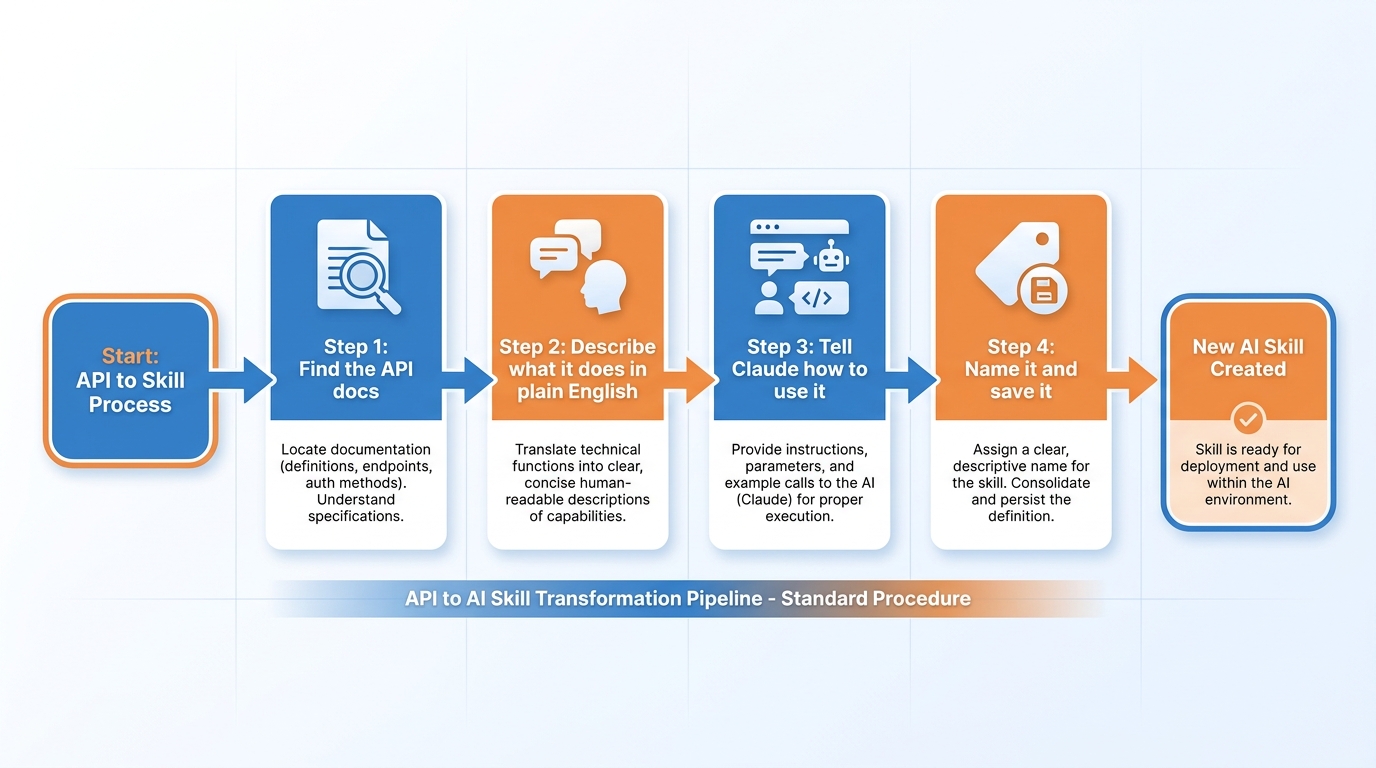
Figure 9:API to Skill — An API is a tool that does one thing very well. A skill is the instruction set that teaches your AI to use that tool on your behalf.
Here is where things get genuinely interesting — and genuinely powerful.
An API — Application Programming Interface — is how software talks to other software. When you look up the weather on your phone, your phone is calling a weather API. When a website processes your credit card, it is calling a payment API. APIs are everywhere, for everything, and most of them are either free or extremely cheap.
What most business people do not realize is this: your AI can use APIs. And a skill is the bridge that makes it happen.
Here is how it works. You go to a tool’s website and look for their documentation — usually under a section called “Developers” or “API.” You find the description of what the tool can do. You do not need to read the technical parts. You just need to understand the capability: what can this thing do, what do you give it, and what does it give back?
Then you open Claude Desktop and say:
“Here is the documentation for [tool name]. I want to build a skill that uses this API to [describe what you want it to do]. Write me the instructions for this skill, including what the AI needs to send to the API and how to present the results.”
Claude reads the documentation. Claude writes the skill. You test it.
Suddenly, a tool you could not have used six months ago — because it required a developer to integrate it — is available to you through a conversation. Your AI is not just reasoning about the world. It is acting on the world using tools built for that purpose.
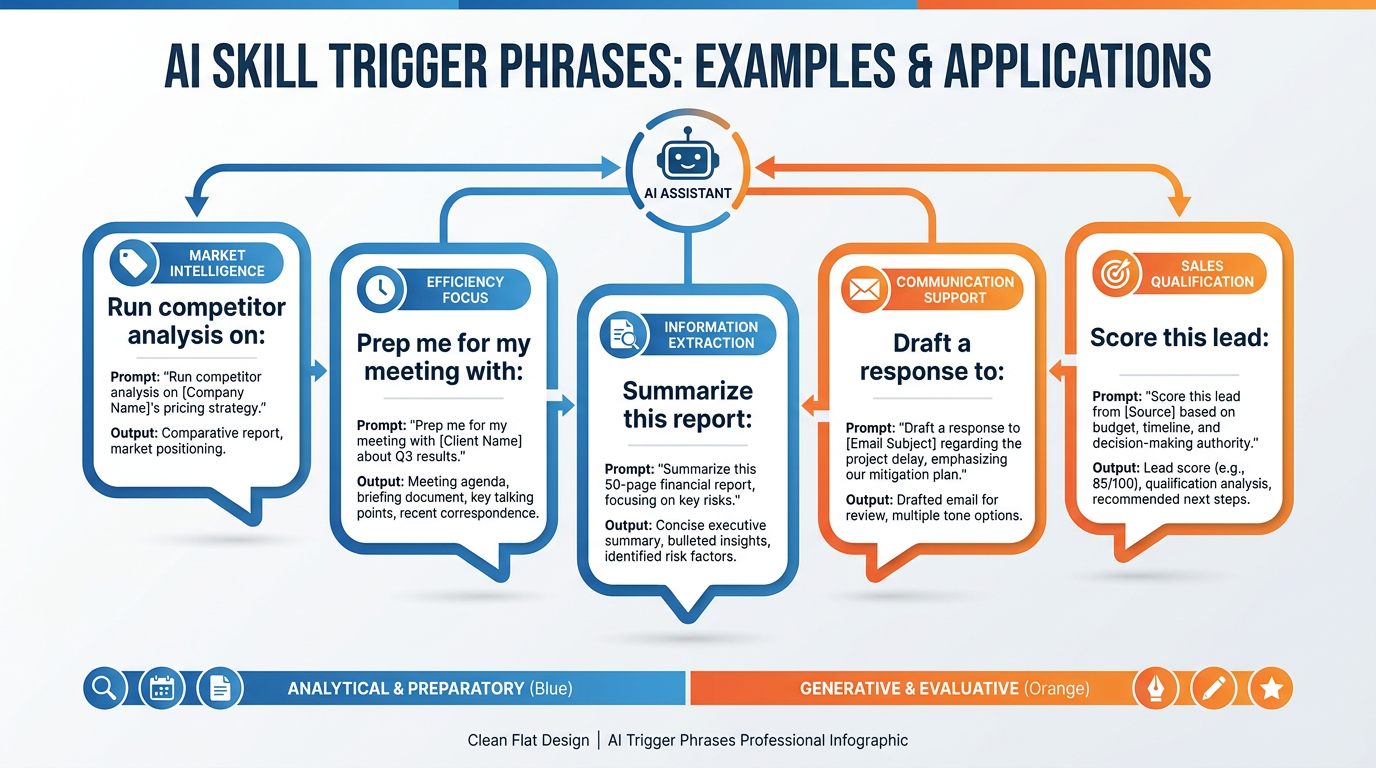
Figure 10:Trigger Phrases — The language of your skill library. Short, clear, unambiguous. You say these without thinking, and the work gets done.
Your Skills Are Files You Own: The Agent Skills Open Standard
Now for a question you should be asking, if you are paying attention: everything in this chapter has you investing hours into building a skill library. What happens to that investment if the AI vendor changes its pricing, sunsets a feature, or simply stops being the best tool for your work?
For most software, the honest answer is: you lose it. Your Gems live inside Gemini. A custom GPT lives inside OpenAI’s walls. The configuration is the vendor.
Skills, remarkably, escaped that fate — and the story of how is worth two minutes, because it changes what your skill library is.
In December 2025, Anthropic published the format underlying Claude’s skills as an independent open standard called Agent Skills, documented at agentskills.io. The core unit is almost embarrassingly simple: a folder containing a file named SKILL.md — plain Markdown with a small block of YAML metadata at the top (the skill’s name and a description of when to use it) followed by the instructions themselves, plus any supporting scripts or reference files sitting alongside it in the folder. That is the whole standard. No proprietary database. No binary format. No vendor account required to read it. A skill is a text file a human can open, read, edit, version-control, email to a colleague, or print.
Then the surprising part happened: the competitors adopted it. Within days, Microsoft and OpenAI announced support. By 2026 the standard was implemented across dozens of tools — OpenAI’s Codex, Microsoft’s agent platforms, Google’s Gemini CLI, Cursor, GitHub Copilot, VS Code, and a long tail of others. The same SKILL.md file that runs in Claude runs, unmodified or nearly so, in tools made by Anthropic’s direct rivals.
Pair this with what you will meet in Chapter 3: MCP, the open standard for connections — how your AI reaches your tools and data. These are the book’s two open standards, and together they answer the ownership question:
MCP standardizes the AI’s hands — the connections to your systems.
Agent Skills standardizes the AI’s training — your procedures, your judgment, your recipes.
Both are open. Both are portable. Which means the two most valuable things you build in this book — your connection setup and your skill library — are not locked inside anyone’s product. Your skills are files you own. If a better model ships next year from a different company, your recipe book walks across the street with you. The chef owns the recipes; the kitchen is negotiable.
This should also change how you store your skills. Treat them like the professional assets they are: keep your SKILL.md folders in a directory you control, back them up, and — when you are ready — version them the way developers version code. A skill library that exists only inside one vendor’s interface is a library on loan. A skill library in a folder you own is capital.

Figure 11:One File, Every Kitchen — SKILL.md is an open standard. Your skills run in Claude today and in a competitor’s tool tomorrow — because you own the file.
Try It: Open Your Skill as a File and Carry It Somewhere Else
This activity takes about 25 minutes. You need one skill you built earlier in this chapter (the recorded skill from the previous activity works perfectly) and access to a second AI surface — Claude Code in a terminal, Gemini CLI, Cursor, or even just a second chat product.
Find your skill on disk. In Claude Desktop, ask Cowork directly: “Show me the folder location of my [skill name] skill on disk.” Claude will tell you the path (skills typically live in a skills directory under your Claude configuration or in the folder you designated; the exact path varies by platform — the point of this step is that there is a path). Open that folder in Finder or File Explorer.
Look at what a skill actually is. Inside the folder you will find
SKILL.mdand possibly supporting files. Right-click SKILL.md and open it in any plain text editor — TextEdit, Notepad, VS Code. Read it top to bottom. Notice the structure: a YAML block at the top between---markers containingname:anddescription:, then Markdown instructions below. No magic. No code you cannot read. This is the entire skill.Verify against the standard. Open agentskills.io in your browser and find the specification (look for “Specification” or “Docs” in the site navigation). Compare the required fields in the spec to your file. Your skill conforms to a published, vendor-neutral standard — confirm that with your own eyes rather than taking this book’s word for it.
Copy the skill folder somewhere you own. Create a folder called
my-skillsin your Documents directory. Copy the entire skill folder (not just SKILL.md — the whole directory) into it. This copy is now yours in the fullest sense: no account, no subscription, no vendor required for it to continue existing.Carry it to a second surface. Pick whichever you have access to:
Claude Code (terminal): Place the skill folder inside your project’s
.claude/skills/directory (create it if needed: a folder named.claude, containing a folder namedskills, containing your skill folder). Start Claude Code in that project and ask it to perform the task — it discovers and uses the skill automatically.Cursor or another SKILL.md-compatible tool: Check the tool’s documentation for its skills directory (search its docs for “Agent Skills” or “skills folder” — locations vary by tool), place the folder there, and invoke the task.
Fallback — any AI chat tool: If you have no second agent tool installed, open any other AI chat product, paste the full SKILL.md text with the preamble “These are standing instructions for a task. Follow them exactly,” and give it a real input. This is not the standard working natively, but it proves the deeper point: the skill is legible instructions, executable by any competent model.
Run the same real input in both places. Take one fresh, real instance of the task. Run it through the skill in Claude, then through the skill on your second surface. Put the outputs side by side.
Note what transferred and what did not. The process and format should transfer nearly intact — that is the standard doing its job. The polish may differ — that is the model doing its job. Understanding which is which tells you what you own (the recipe) versus what you rent (the chef executing it).
Submit: The full SKILL.md text, the name of your second surface, both outputs from Step 6 side by side, and two sentences: (1) what carried over intact between surfaces and what changed, and (2) what it means for your year-long skill-library investment that this file runs outside the vendor you built it in.
Why Skills Compound
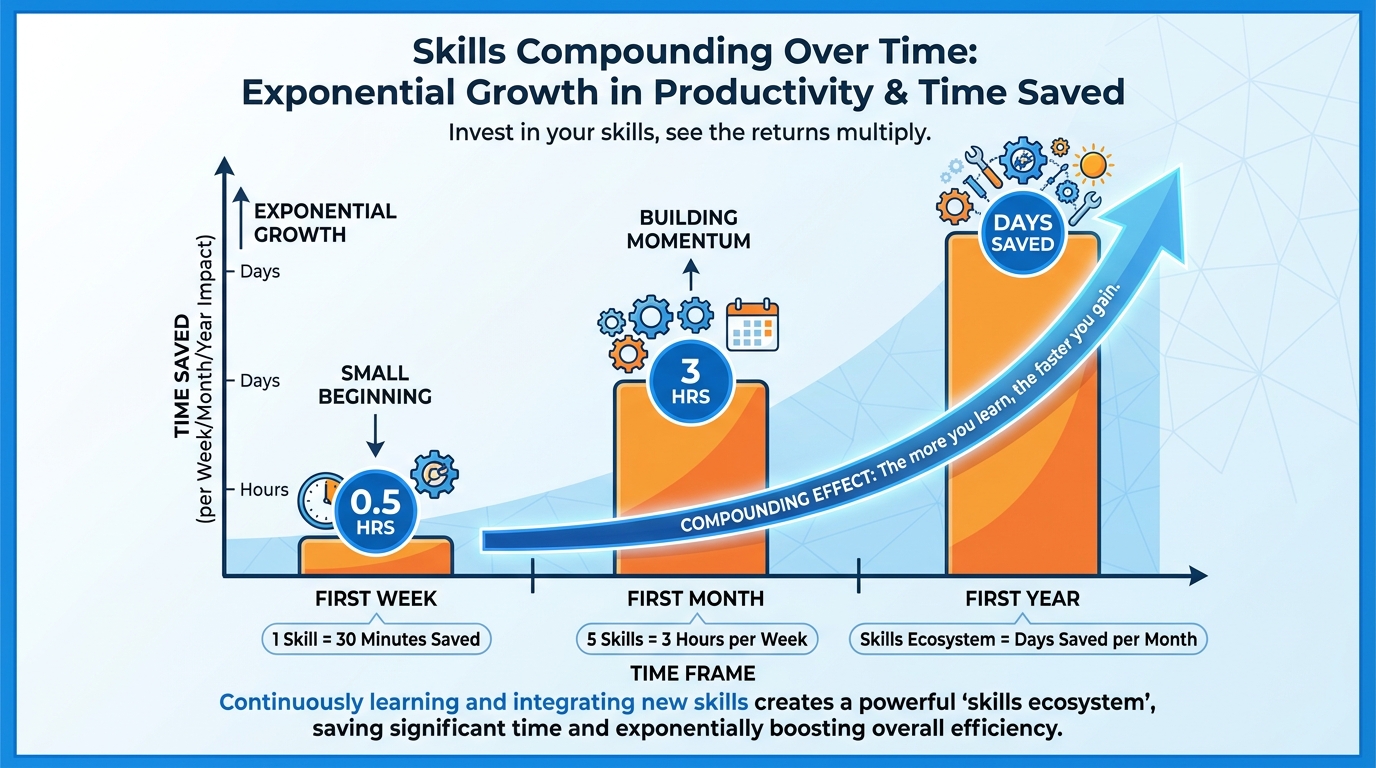
Figure 12:The Compounding Effect — The first skill saves you thirty minutes a week. By the end of the year, your skill library is saving you days.
Let me give you a number that should make you sit up.
If you build one skill this week that saves you thirty minutes, and you use it three times a week, that is ninety minutes saved this week. Ninety minutes you can spend on the 30% of your work that actually requires your best thinking.
Build five skills over the next month. Now you are saving six to eight hours a week.
Build a library of twenty skills over the next year — which is not aggressive, it is one new skill every two and a half weeks — and you have created something that has no good analog in the history of professional tools.
You have a system that does your routine work automatically, at a level of quality you defined yourself, releasing your time and attention for the problems only you can solve.
This is not productivity hacking. This is not a life hack.
This is a structural advantage. The kind that takes years to build — and that competitors cannot see, cannot copy, and cannot catch up to without putting in the same work.
The professional who has spent a year building and refining their skill library is not working harder than everyone else. They are working in a fundamentally different way.
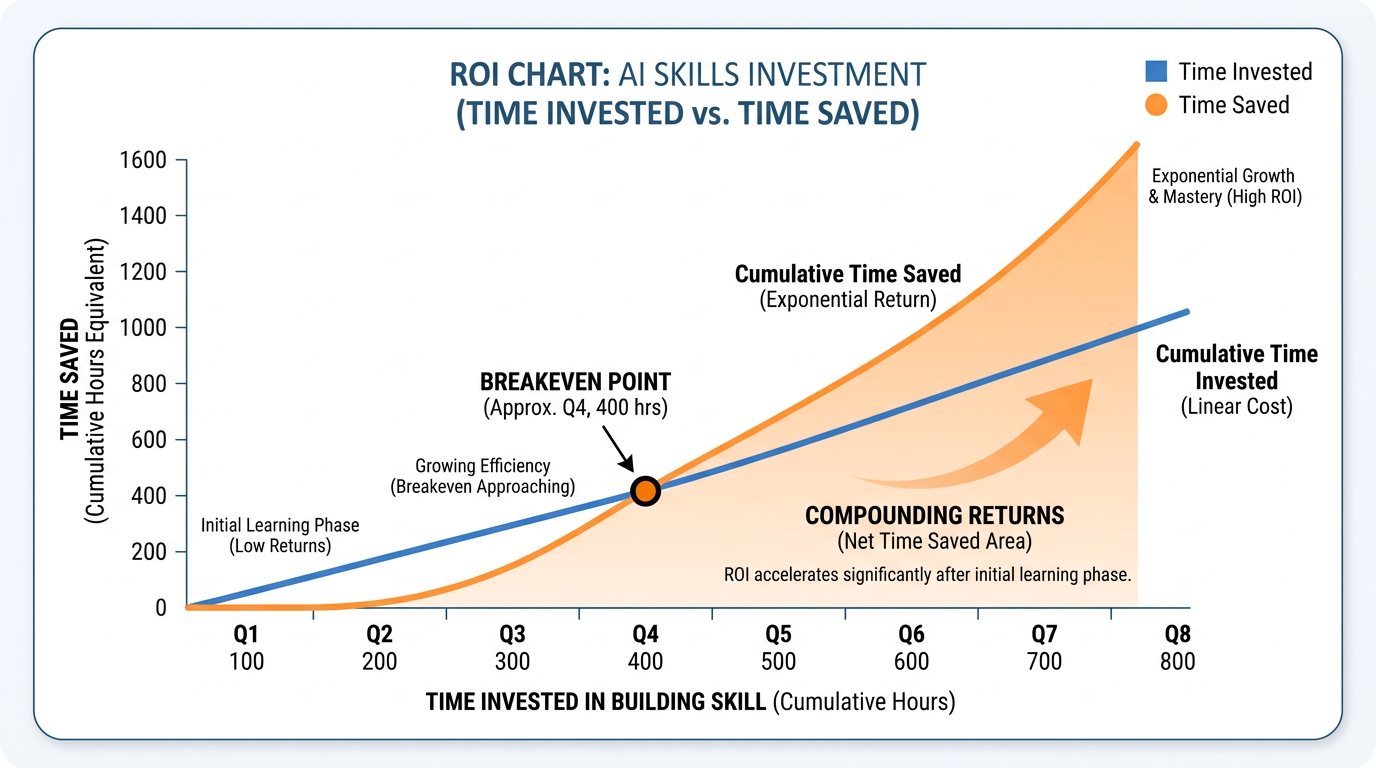
Figure 13:The ROI Curve — Every skill has a build cost and a use return. Most skills break even after two or three uses. Everything after that is pure gain.
Case Study: The Recipe Book and the Improv Kitchen — Meridian Capital Partners Builds a Skill Library
Background
Meridian Capital Partners is a mid-market private equity firm headquartered in Miami, Florida, with a portfolio of eleven operating companies spanning healthcare services, logistics, and technology-enabled B2B services. The firm employs forty-three professionals, including six senior associates and four managing directors. Like most firms at its scale, Meridian runs lean — deal teams are small, timelines are compressed, and the expectation is that a strong associate can hold five active workstreams simultaneously without dropping a thread. The firm’s competitive edge has historically come from analytical rigor and the speed with which it can move from an initial meeting to a signed letter of intent.
In early 2024, Managing Director of Portfolio Operations Rachel Osei began noticing a pattern she could not explain away. Two of Meridian’s most capable associates — both of whom had adopted AI tools aggressively — were producing dramatically different results. Marcus, a third-year associate, was consistently turning around deal memos, management prep packages, and post-LOI diligence summaries faster than anyone else on the team, with a level of structural consistency that made his work stand out in reviews. Priya, an equally talented second-year associate, was also using AI tools — and spending roughly the same amount of time doing it — but her outputs required more revision, more back-and-forth, and more of Rachel’s time to get to a finishable state. Both were working hard. The quality gap could not be explained by effort.
When Rachel sat down with both associates to understand their workflows, she discovered the difference. Marcus had spent three weekends building what he called his “recipe book” — a library of fifteen named AI skills covering every repeating task in his workflow: a deal screening skill, a management team assessment skill, a competitive landscape builder, a memo formatter, a red-flag summarizer for data room documents, and more. Each skill had a clear name, specific standing instructions, defined context about Meridian’s evaluation criteria, and a locked output format. When Marcus needed a competitive landscape, he typed four words and pasted a company description. When he needed to process a 200-page data room index, he ran it through his document triage skill. His AI behaved the same way every time, because it had been taught to. Priya, by contrast, was rewriting her prompts from scratch every session — good prompts, thoughtful prompts, but one-time prompts that vanished the moment she closed the chat window. She was improvising every meal in a kitchen that had no recipes.
Rachel brought the finding to the firm’s operating committee. The question was no longer whether AI was useful — everyone agreed it was. The question was whether Meridian should treat skill-building as an individual practice left to each associate’s initiative, or as an institutional investment: a formalized Meridian skill library, built collaboratively, maintained centrally, and available to every deal team member from day one.
The Situation
The operating committee faced a strategic decision that was fundamentally about the difference between prompting and systematizing. Building a centralized skill library would require an upfront investment: identifying the firm’s twenty most common analytical and communication tasks, writing rigorous skill specifications for each, integrating relevant external APIs (including access to market data providers and the firm’s CRM), and establishing a maintenance protocol to update skills as Meridian’s standards evolved. The estimated investment was forty hours of senior associate time spread over six weeks — a non-trivial cost during an active deal period. The alternative was to leave skill development to individuals, accepting the variance in quality and speed that currently existed across the team.
What complicated the decision was a competitive intelligence signal that arrived at the same time. A peer firm in Atlanta — similar size, similar deal focus — was rumored to have cut its average due diligence timeline by thirty percent over the previous twelve months. Sources suggested the firm had not hired additional staff. The operating committee could not confirm whether a systematized AI infrastructure was responsible, but the timing was notable. If structural AI capability was beginning to translate into deal speed — and deal speed in private equity translates directly into competitive positioning — then the cost of inaction was not forty hours of associate time. It was potentially the next three deals.
Discussion Prompt
Drawing on the chapter’s framework for what distinguishes a skill from a prompt — including the four components of a well-built skill (name and trigger, standing instructions, context, and output format) — analyze the strategic difference between Marcus’s approach and Priya’s approach at Meridian Capital Partners. If Rachel Osei asks you to advise the operating committee, how would you frame the case for or against building a centralized institutional skill library, and how does the chapter’s concept of compounding value and structural advantage inform that recommendation? What risks or limitations, if any, should the committee weigh against the potential gains?
Discussion Guidelines
Initial Post (due before class)
Minimum 400 words
Directly address the discussion prompt using concepts from this chapter
Include at least one APA-formatted citation — from the course text or a peer-reviewed source
Avoid summary; demonstrate analysis and original thinking
Peer Responses (minimum 2)
Minimum 250 words each
Each response must include at least one APA-formatted citation
Engage substantively — build on, challenge, or offer a contrasting perspective grounded in evidence
“I agree” or “Great post” responses do not meet the requirement
Maintain a professional and respectful academic tone
Applied Exercise: Build Your First Three Skills
This exercise ends with three skills installed and tested. Not concepts. Not plans. Actual working capabilities you will use starting tomorrow.
Track A — Claude Desktop
Before you begin: Spend five minutes writing down your answers to these three questions. Do not skip this — the quality of your skills depends entirely on the quality of your answers.
What task do you do most frequently that follows the same basic pattern every time?
What task produces the most value for your work when done exceptionally well?
What task do you dislike doing, not because it is hard, but because it is tedious?
Those three answers are your first three skills.
Building Skill 1: Your High-Frequency Task
Open Claude Desktop. Describe the task as specifically as you can — what triggers it, what you are given as input, what a perfect output looks like. Find your best-ever example of this task and paste it in. Ask Claude to write the skill specification.
Take Claude’s output. Create a Gem in Gemini with those instructions (for tasks connected to Google data) or save it as a Claude Project (for tasks that use files and documents). Name it clearly. Test it on three real examples.
Building Skill 2: Your High-Value Task
Repeat the process for the task that produces the most value when done exceptionally. This is the skill worth the most investment in getting right. Spend extra time on the instructions. Test it more carefully. Refine it until the output consistently meets your standard for “excellent,” not just “acceptable.”
Building Skill 3: Your Tedious Task
This one is often the most satisfying to build. Take the task you have been doing on autopilot — the one that eats your time and your energy without requiring your best thinking — and hand it to a skill permanently. You may find, after building it, that you feel a quiet and genuine sense of relief. That feeling is the correct reaction.
The Compounding Practice:
At the end of every week for the next four weeks, do a one-minute review: What task did you do this week that felt repetitive? Could a skill have handled it? If yes, build it before Monday.
Four weeks of this practice and you will have a skill library that is already working for you. A year of this practice and you will look back at how you used to work and wonder how you managed.
The skills are not the destination.
The freed time is.
Your Submission: Your submission is the skill you built — the full text of the Gem or Project instructions — plus a real output it produced on an actual task. Copy the skill instructions into a document, run the skill on something real from this week, and paste that output underneath. Write one sentence: what would this skill save you each week if you used it consistently? Submit the skill instructions + one real output + one sentence.
Track B — Claude Code inside Antigravity IDE
Open Antigravity 2.0 IDE → Editor surface → integrated terminal (Control+backtick) → Claude Code session (claude> prompt ready).
At the claude> prompt, type “/agents” and press Enter. The agents interface opens — you can see, create, and edit AI specialists here.
Select “Create new agent.” When asked for scope, choose “Personal” — this makes the specialist available in every project on your machine, not just the current folder.
When Claude Code asks how to configure the agent, choose “Generate with Claude.” Now describe your specialist in plain English. Be specific about: (a) what task it handles — one recurring task you do at least three times a week, (b) what you supply as input each time — the information you paste or type to trigger it, (c) what a perfect output looks like — format, length, tone, structure, (d) any rules it must never break — confidentiality, tone constraints, required disclaimers, (e) one real example of your best-ever output for this task type if you have one.
Claude Code generates the agent’s identifier, description, and full system prompt. Read every section carefully. If anything is wrong — wrong format, missing context, inaccurate role description — tell Claude Code exactly what to change and ask for a revision.
Save the agent when you are satisfied with the definition.
Test the agent immediately: invoke it with a real example of the task from this week — not a hypothetical, something you actually need. Review the output against your standard for this task.
Identify the single biggest gap between the output and your ideal. Go back to the agent definition and add one specific instruction that addresses exactly that gap. Save the updated definition.
Test again with a second real example. The output should be measurably closer to your standard.
Run a third real example. Three consistent, high-quality outputs from three different inputs confirms the specialist is built and calibrated.
Your Submission: Copy the full agent definition (identifier, description, and system prompt) into a document. Underneath it, paste the output from your third test run. Write two sentences: (1) what changed between your first and third test run and what specific instruction produced that improvement, and (2) what is the next specialist you want to build, and why? Submit the agent definition + third-run output + two sentences.
Track C — Antigravity 2.0 IDE Agent Manager
Open Antigravity 2.0 IDE and press CMD+E (Mac) or CTRL+E (Windows) to switch to the Agent Manager surface.
Click “New Project.” Name your project after the category of work this skill covers — not one specific task but a type: “Client Communications,” “Research and Analysis,” “Content Production,” “Sales Prep.”
In the Project Description field, write your skill specification in plain English. Use this structure: (a) Role — who the Agent is: “You are a [role] specializing in [specific domain],” (b) Output standard — what every output must include, its format, length, and structure, (c) Rules — what the Agent always does and never does, (d) Example — paste in one real example of your best-ever output for this task type if you have one, even a short excerpt. Aim for 200-350 words total in this description.
Save the Project. This description is the Agent’s standing brief — the skill definition that every task in this Project inherits.
Start your first Agent task inside the Project. In the task description box, give it a real example of the work — an actual task from this week, not a hypothetical. Write the input in plain English: the specific thing you need done, with any relevant context.
Submit the task. Watch the Agent Manager while the agent works. You will see it processing asynchronously — you can continue other work while it runs.
When the Artifact appears (typically 2-4 minutes), click into it and review the output carefully. Ask: does it match the standard I described in the Project Description? Specifically note any gap between what you got and what you described.
Go back to the Project Description. Add one specific instruction that directly addresses the gap you identified. Keep it concrete — “Always open with a one-sentence executive summary before any analysis” is better than “make it clearer.”
Run a second task with a different real example of the same task type. Compare the Artifact to the first run.
Run a third task with yet another real example. Three consistent, quality Artifacts from three different inputs means the skill is built and calibrated.
Your Submission: Copy the full Project Description (your skill definition) into a document. Underneath it, paste the Artifact from your third task run. Write two sentences: (1) what specific instruction you added between run one and run three and what improvement it produced, and (2) what this skill will save you each week going forward. Submit the Project Description + third-run Artifact + two sentences.
Reflection
Before closing this chapter, write three sentences:
Of your three skills, which one already saved you the most time this week, and how much?
Which surface — Claude Desktop Projects/Gems, Claude Code agents, or Antigravity Agents — felt most natural for the kind of work you do? Why?
What is the next task on your list that should become a skill before next Monday?