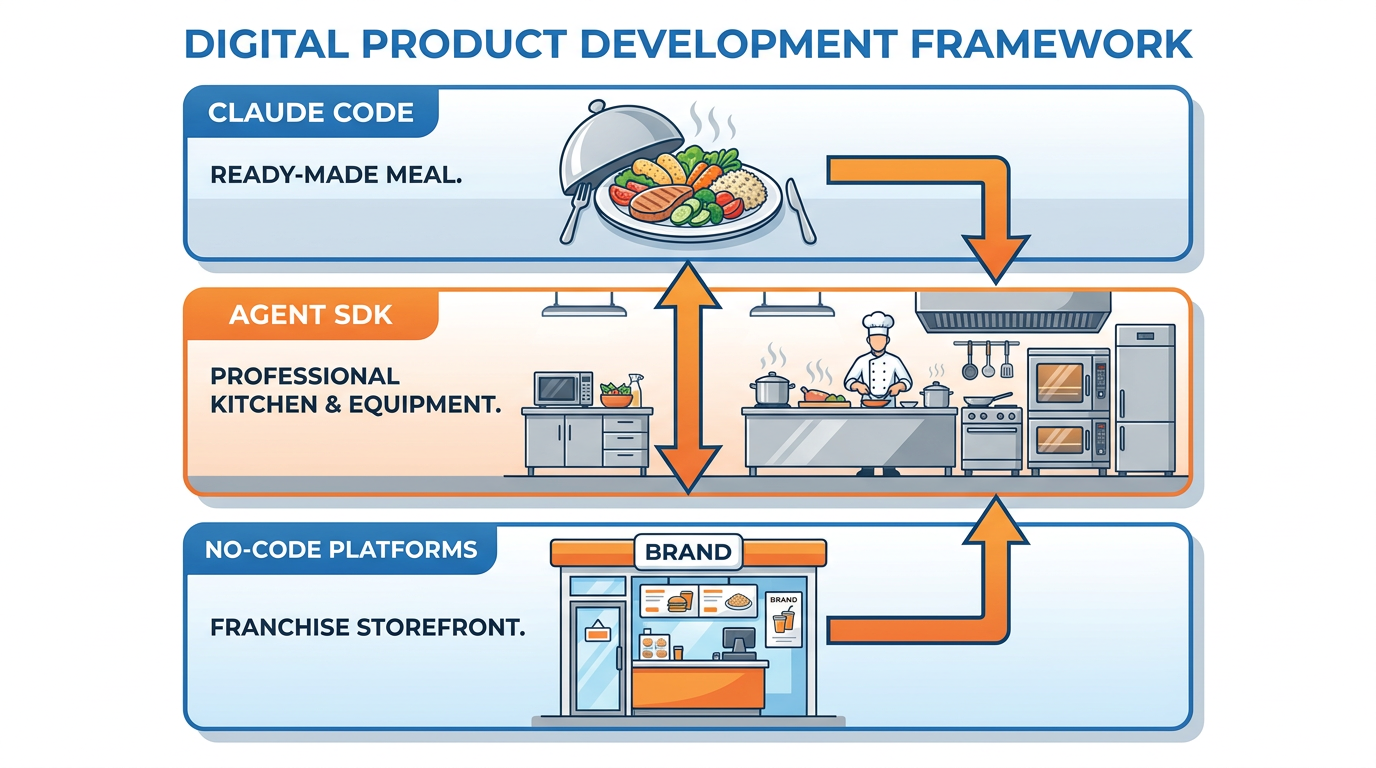
Figure 1:The Agent SDK — The same engine that powers Claude Code, packaged so your business can deploy it inside your own products, your own workflows, your own walls.
Picture Helena Vasquez, COO of a regional property and casualty insurance carrier in Tampa, sitting at her conference table on a Tuesday morning with three different proposals fanned out in front of her.
Her claims department processes about 9,000 first-notice-of-loss reports a year. Three analysts spend roughly two hours on each one before it gets routed to an adjuster. That is 18,000 human hours annually, vanishing into a process that is mostly reading PDFs, checking coverage, flagging anomalies, and writing a one-page summary.
Proposal one is from a national InsurTech vendor. They want $400,000 a year for an AI claims pre-screening platform. Slick demo. Long contract. Helena’s data leaves the building.
Proposal two is from Marcus, her lead engineer. He says his team can build something custom for around $80,000 — using something called “the Agent SDK” — and the data never leaves the building. He needs four months.
Proposal three is from a no-code platform her marketing director found. They claim they can stand the whole thing up in a week for $30,000 a year. Visual builder. No engineers needed.
Three numbers. Three timelines. Three completely different risk profiles. And every vendor in every pitch deck used the exact same words: “AI-powered claims automation.”
This chapter is about how Helena makes that call — and how you make the same kind of call inside your own organization. Not by learning to write code. By learning to read the landscape clearly enough to know what each option actually is, and which one fits the problem on your desk.
The key, it turns out, is understanding one thing Anthropic did that most people missed.
The McDonald’s Move
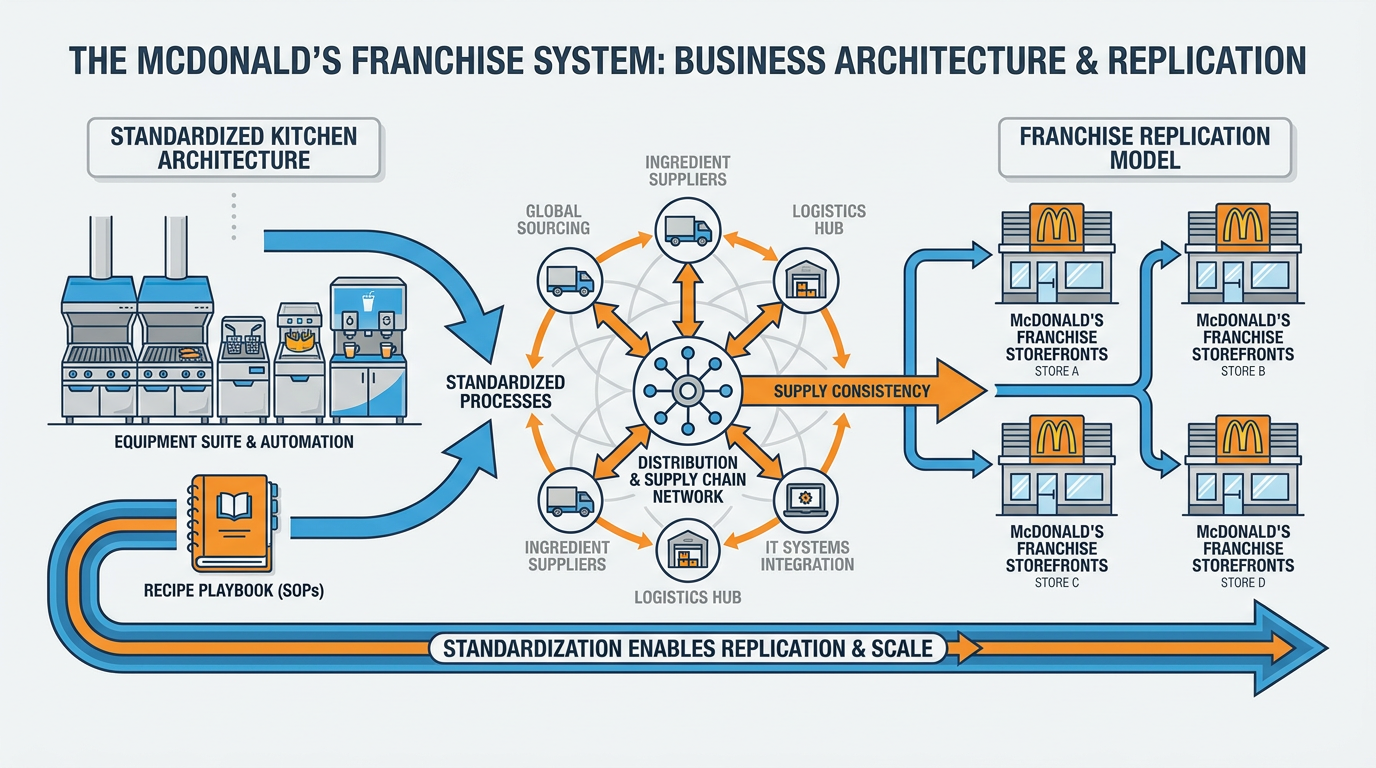
Figure 2:The McDonald’s Move — McDonald’s does not sell hamburgers. It sells the system for making hamburgers at scale. Anthropic just did the same thing with AI agents.
There is a famous insight about McDonald’s, popularized by Ray Kroc and revisited every few years by business writers who suddenly realize it again.
McDonald’s is not in the hamburger business. McDonald’s is in the system business.
What McDonald’s actually sells to its franchisees is not a sandwich. It is the entire apparatus that makes a sandwich at scale — the kitchen layout, the fryer specs, the supply chain, the operations manual, the training program, the brand. The hamburger is the output. The system is the product.
The reason this matters: the system is repeatable. The system can be installed in 40,000 locations. The system is the thing that can be franchised, licensed, embedded, and scaled. A single great hamburger cannot do any of that.
Anthropic, in 2024, made the McDonald’s move with AI.
For two years, the headline product was Claude Code — a brilliant AI coding assistant that engineers loved. That was the meal. Then Anthropic quietly released something called the Claude Agent SDK, and the whole strategic picture changed.
The Agent SDK is the kitchen that produces Claude Code. It is the engine — the agent loop, the tool orchestration, the context management, the permission system. Everything that makes Claude Code feel intelligent, autonomous, and trustworthy is in the SDK. Anthropic took the system they had built for themselves and made it available for any company to build their own products on top of.
That is a profoundly different business than selling a chat interface.
Think about what this means for your organization. You probably have employees using Claude or ChatGPT today. That is consumption. They are buying meals.
The companies that will pull ahead over the next three years are the ones that move from consumption to deployment — embedding AI agents directly into their products, their customer experiences, their back-office workflows. They will not become AI labs. They will not train their own models. They will take Anthropic’s kitchen and use it to cook their own meals — meals tailored to their specific business, their specific data, and their specific customers.
That is what the Agent SDK enables. And the question is no longer “should we use AI?” The question has quietly become: are we still buying meals, or are we ready to run our own kitchen?
Helena Vasquez, sitting in front of her three proposals, is making exactly that decision. So are you, whether you realize it or not.
When You Actually Need the SDK
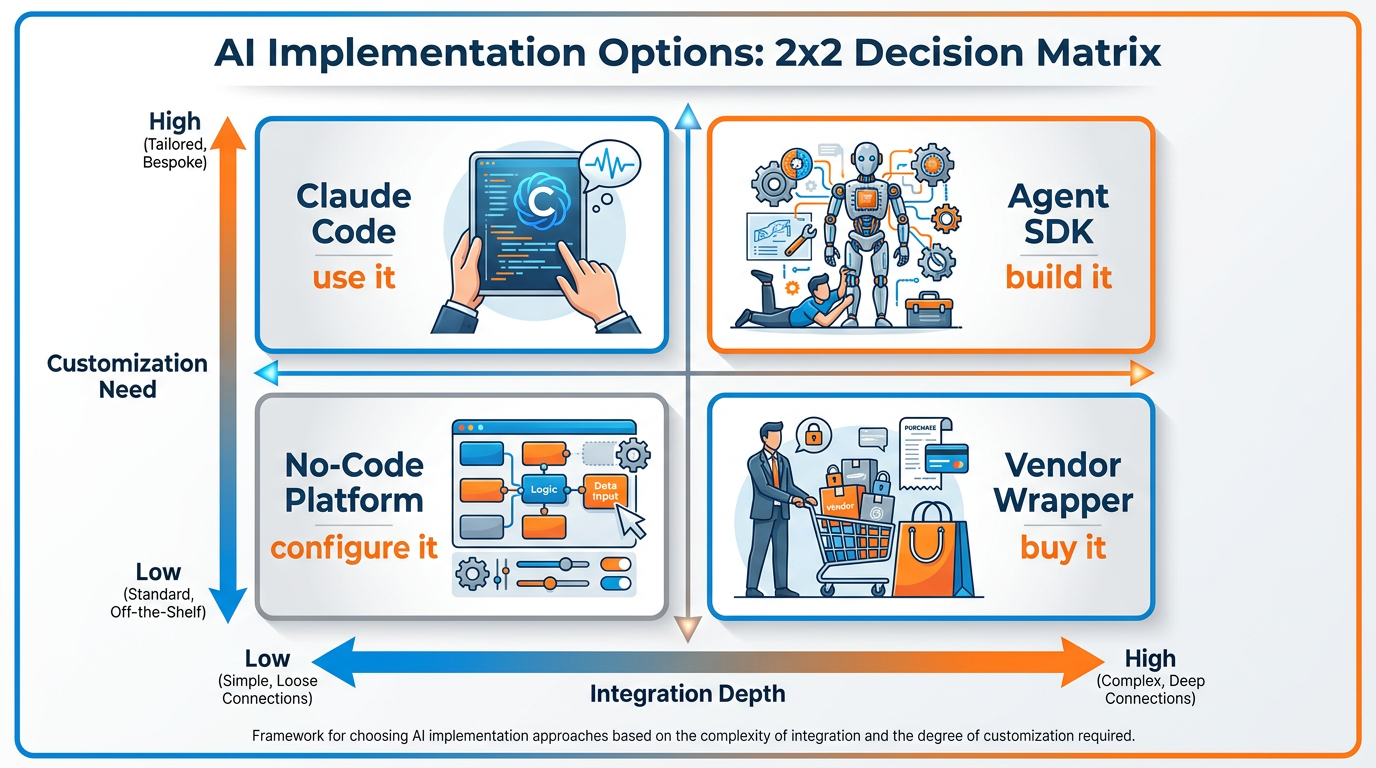
Figure 3:The Decision Matrix — Most teams default to “build it” or “buy it.” The right answer is almost always “match the option to the shape of the problem.”
Most leaders skip a step here. They hear “Agent SDK” and immediately ask their engineering team whether they could build something cool with it. The right first question is whether you need to build anything at all.
There are four reasonable answers to “we want to do this with AI.” Only one of them involves the SDK. Knowing which is which will save you months and hundreds of thousands of dollars.
Option one: Claude Code is enough. A surprising amount of internal work — drafting analyses, summarizing documents, building presentations, debugging spreadsheets, structuring research — can be done by your team using Claude Code (or Antigravity, or any equivalent agent IDE) as a daily tool. No deployment. No integration. No custom build. People just use it well. If the workflow lives entirely inside your own team and never needs to touch a customer, a database, or a product, Claude Code is probably the answer. Do not over-engineer this.
Option two: a vendor wrapper. Hundreds of vendors have already built AI products on top of the Agent SDK (or its competitors). They handle the engineering, the security, the maintenance, the user interface. You pay them a subscription. You get a finished product that solves a defined problem — meeting summarizers, sales assistants, customer-service copilots, claims pre-screeners. If the problem is common, a vendor has almost certainly already built for it. Buying from them is usually faster and almost always cheaper than starting fresh.
Option three: a no-code platform. Companies like Zapier, Make, Lindy, Relevance AI, and others have built visual interfaces that wrap the underlying agent technology. You drag boxes around. You connect them with arrows. You describe what should happen in plain English. The platform handles everything else. You get something that behaves like a custom-built agent without the months of engineering work.
Option four: a true SDK build. This is when your engineering team uses the Agent SDK directly to construct an agent that is fully embedded inside your own product, your own infrastructure, and your own data. It is more work, more cost, and more risk. But it gives you something none of the other three options can deliver: an AI capability that is yours — owned, controlled, differentiated.
The decision among these four is not a matter of taste. It depends on four questions.
Apply this to Helena’s situation. Claims pre-screening is customer-facing (sort of — it touches policyholder data). It is enormously sensitive (PII, claims history, financial data). It is strategic (her firm processes 9,000 of these a year — it is core to operations). And it is somewhat unique (her firm has specific policy language and coverage structures the vendor doesn’t know).
Customer-facing? Yes. Sensitive? Very. Strategic? Absolutely. Unique? Moderately.
That profile points hard toward “build” — but not hard enough to rule out a high-end no-code platform that allows custom data integration and stays within her firewall. The vendor option, despite being the most polished pitch, is actually the weakest fit. Her data leaves the building. Her customizations are limited. Her costs are highest. The shiny demo was a distraction.
This is the work of leadership in the agent era — not picking the most impressive demo, but matching the option to the actual shape of your problem.
One more nuance worth naming. The four options are not mutually exclusive. The most sophisticated organizations run all four simultaneously, with each one assigned to the workflows where it fits best. Internal research happens in Claude Code. Common back-office workflows run on no-code platforms. Specialized vertical needs come from vendor wrappers. And the one or two genuinely differentiated capabilities — the things that make your company distinctive — get the SDK build. Treating these as competing alternatives is a mistake. Treating them as a portfolio is the move.
What the SDK Actually Gives You
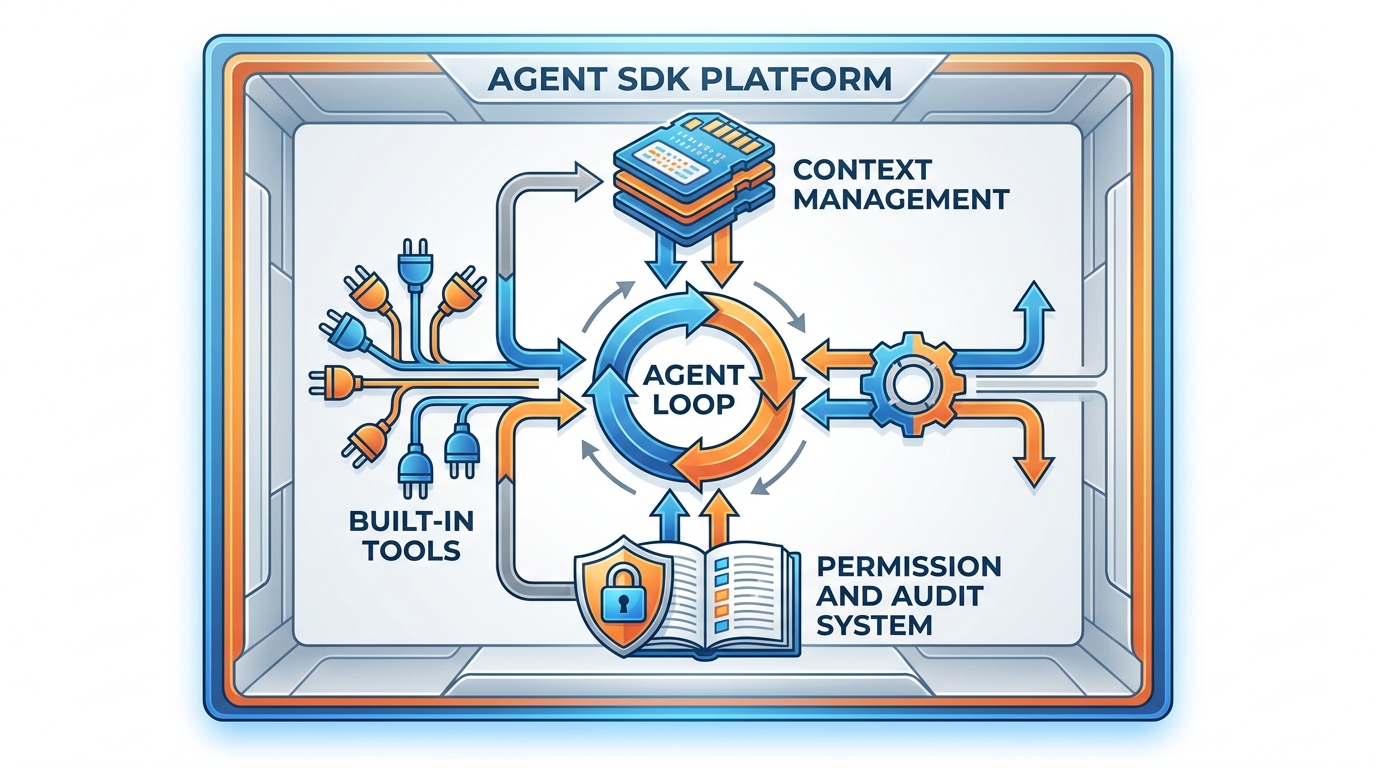
Figure 4:Inside the Kitchen — Four components do almost all the work. None of them require you to understand how they work to make a smart decision about whether to use them.
You do not need to write code to understand what the SDK provides. You only need to know what its four main components do — and why each one matters for your decision-making.
The built-in tools. The SDK comes with a standard set of capabilities every agent gets for free. Reading and writing files. Searching the web. Running queries against data. Editing documents. Sending and receiving emails. Triggering external systems. The reason this matters: when a vendor tells you they will “build a custom AI agent” for $400,000, ask how much of that quote covers things the SDK already provides for free. The answer is usually: most of it. Most “custom AI” today is just the SDK’s built-in tools wired together with a thin layer on top.
The agent loop. This is the thinking part. The SDK gives the agent a continuous cycle: read the situation, decide what to do, do it, evaluate the result, decide what to do next. Over and over until the task is done. Without this loop, AI is just a chatbot that answers one question at a time. With this loop, AI becomes an autonomous worker that can pursue a goal across many steps. Every “AI agent” you see in a vendor demo is using this loop, whether they admit it or not. The SDK gives your engineers the same loop without making them build it from scratch.
Context management. AI models have a limit on how much they can hold in their head at once. The SDK handles the problem of staying coherent across long tasks — what to remember, what to summarize, what to discard, when to compress, when to fetch fresh data. Your engineers do not have to invent any of this. Without context management, an agent forgets what it was doing halfway through a complex task. With it, the agent stays on task for hours.
Permissions and auditability. This is the part that matters most for business deployments and the part vendors talk about least. The SDK lets you specify exactly which tools an agent is allowed to use, which data it can touch, and which actions require human approval. Every action it takes can be logged. Every decision can be traced. For regulated industries — finance, healthcare, insurance, legal — this is the entire ballgame. If your AI cannot prove what it did and why, your compliance team will not let it deploy. The SDK gives you that proof.
There is a useful real-world parallel. A general contractor building a house does not manufacture lumber, fabricate windows, or smelt copper for the wiring. They source pre-made components and assemble them into something that fits your specific lot and your specific needs. The Agent SDK is the lumberyard, the window catalog, and the electrical supply house, all in one. Your engineers are the general contractor.
This reframing dramatically lowers the perceived complexity of an SDK project. You are not asking your team to invent AI. You are asking them to assemble a workflow using a set of standardized parts that already work.
A second-order implication: SDK projects are cheaper than they sound. The $80,000 estimate from Marcus, Helena’s engineer, is not buying him a research lab. It is buying four months of assembly work using components that already exist. That math is also why no-code platforms can charge so little — they have done the assembly once, and now they let you customize it for your specific use case at a fraction of the cost.
The SDK is not magic. It is leverage. And once you see it as leverage, you stop being intimidated by the technical language around it.
There is one more component worth naming, because vendors hide it deliberately. The SDK includes a mechanism called sessions — the ability for an agent to remember what it was doing across multiple conversations, pick up where it left off, and even branch into parallel explorations. For business workflows, this is the difference between an agent that handles one ticket and an agent that handles a customer relationship. Vendors who do not expose session control are limiting your agent to one-shot tasks. SDK builds (and the better no-code platforms) give you the full session model. Ask about it directly.
Briefing Your Engineering Team
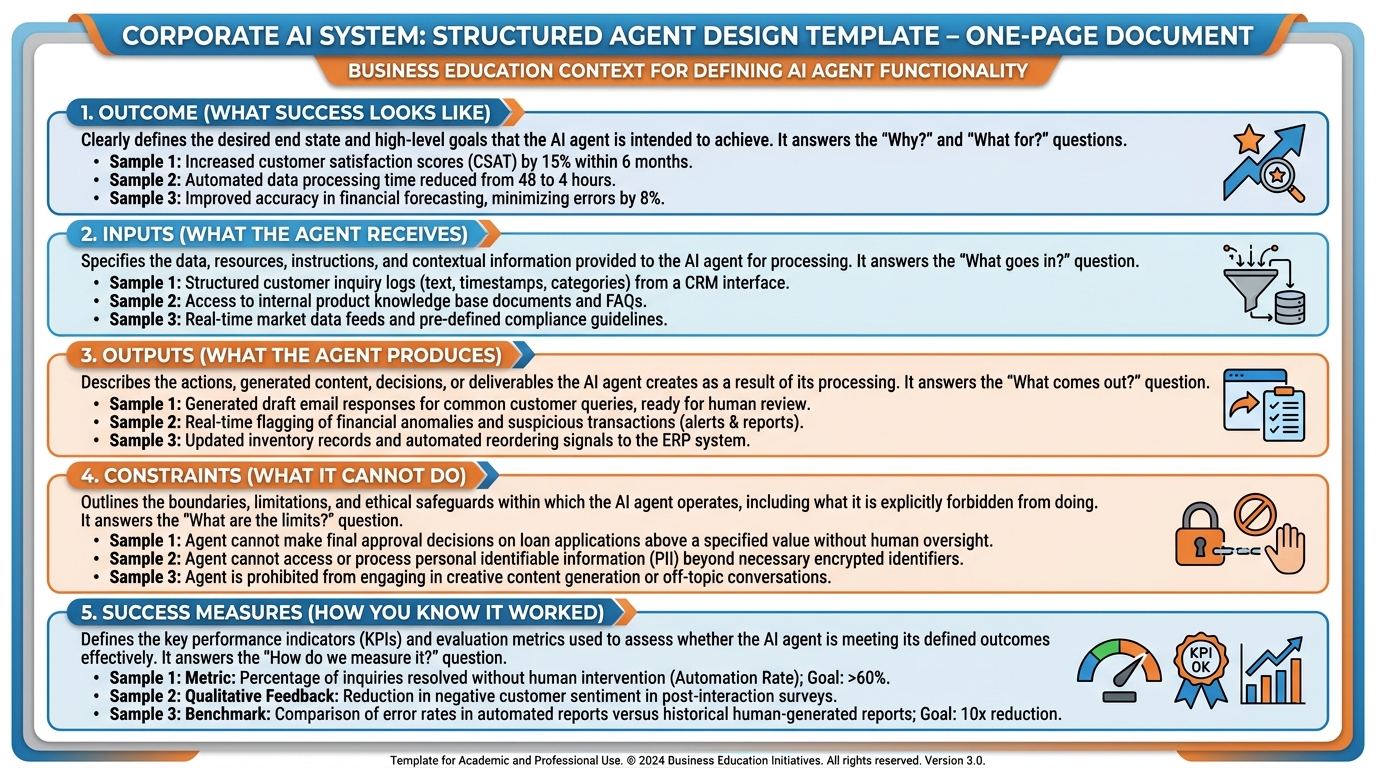
Figure 5:The Brief — Engineers can build almost anything. The trouble is they cannot read your mind. The right brief is short, specific, and full of business context — not technical instructions.
When you decide an SDK build is the right path, the next failure point is the handoff to engineering. This is where most business leaders go badly wrong — either by under-briefing (handing over a vague idea and hoping engineers fill in the gaps) or by over-briefing (trying to specify implementation details they do not understand).
A useful SDK project brief contains five sections, and nothing else.
Section one: the outcome. What does success look like in human terms? Not “build an AI claims pre-screener.” Try this instead: “Reduce the time analysts spend on first-pass claims review from 120 minutes to 15 minutes per claim, with a 95% accuracy rate compared to current manual reviews, while maintaining a full audit trail accessible to compliance.” That is an outcome. Engineers can work backward from it.
Section two: the inputs. What does the agent receive when it starts working? Where does that data live now? Who owns it? What format is it in? You do not need to describe how the agent reads it — only what exists for it to read. Be specific. “First notice of loss PDFs from our claims intake portal” is good. “Whatever data we have” is useless.
Section three: the outputs. What does the agent produce when it finishes? A summary document? An entry in a database? A flagged risk score? A notification to a human reviewer? Again — be specific about format and destination. The output is where the agent’s work touches the business, so this is where business context matters most.
Section four: the constraints. This is where you protect the organization. What regulatory rules apply? What data must never leave certain systems? What decisions must require human approval before they go live? What happens when the agent is unsure? These are not technical questions. They are business questions, and they need business answers. Engineers cannot guess them.
Section five: the success measures. How will you know whether this worked? What are you going to measure six weeks after deployment? Accuracy? Time saved? Cost per claim? User satisfaction? Write these down before the project starts, because they will shape every technical decision your team makes.
A small but important warning about scope. Engineers will frequently come back with a proposal twice the size of what you actually need, because the SDK makes adjacent features easy to add. Resist this. The most successful agent projects start narrow and deep, not broad and shallow. Helena does not need an “AI claims platform.” She needs an AI that reads first notices of loss and produces a structured pre-screening report. That is one job. Doing one job well is worth ten times more than doing six jobs poorly.
The pattern is universal: clear outcomes, specific inputs, specific outputs, hard constraints, measurable success. Get those right and your engineering team can ship in months. Get them wrong and you will spend two years and seven figures arriving nowhere.
The No-Code Path to SDK Power
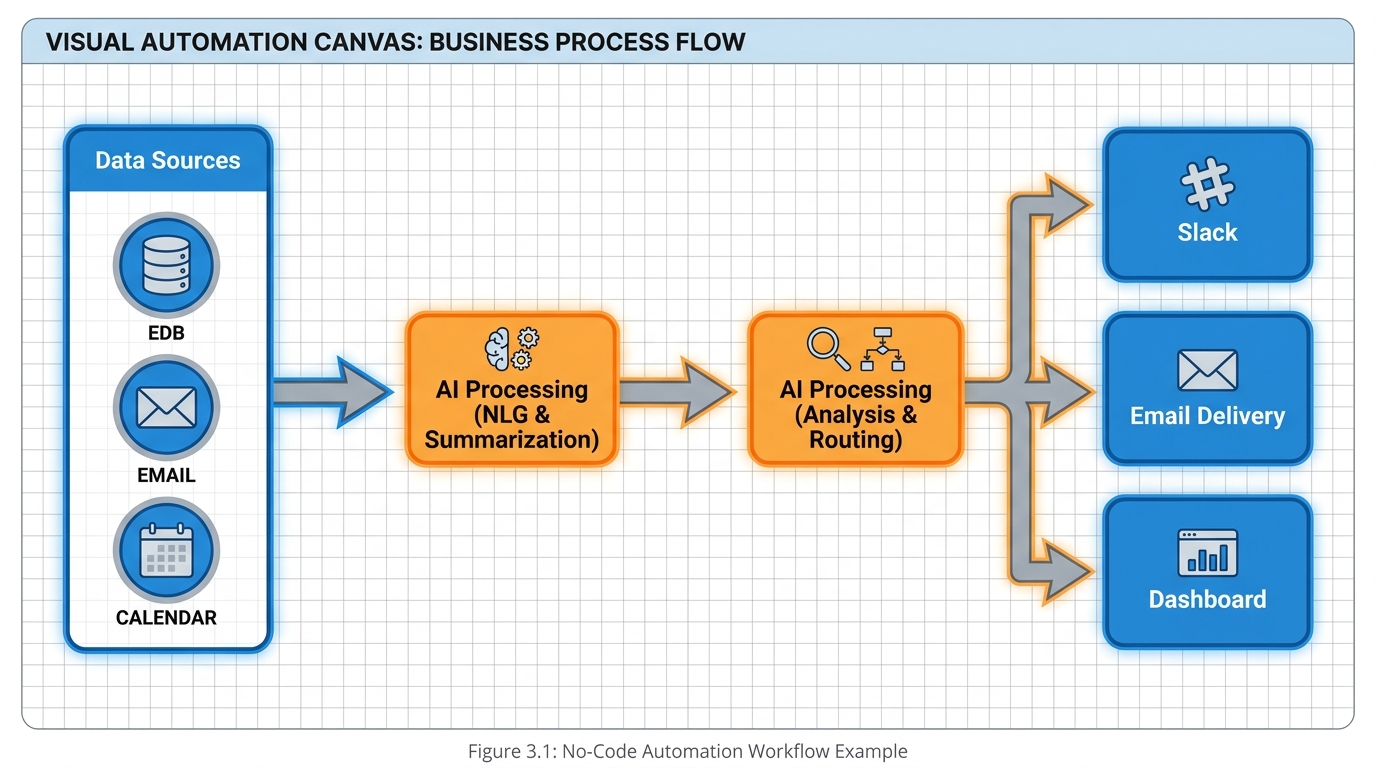
Figure 6:No-Code SDK Power — The same engine. The same capabilities. None of the engineering. The no-code platforms are not lesser — they are just a different doorway into the same room.
Here is the part that most business leaders miss entirely, and it is a financial gift if you understand it.
You can get SDK-level capability without writing a single line of code. There is now a robust category of platforms that have done the SDK assembly work for you and exposed it as a visual interface.
Zapier added agent capabilities to its automation platform — pulling in the Anthropic agent loop and exposing it as a drag-and-drop step inside the same workflow builder your operations team is already using. Make.com (formerly Integromat) did the same thing on its visual scenario builder. Lindy is a newer entrant built specifically around AI agents — you describe an “employee” in natural language, and the platform constructs an agent that can run autonomously across your tools. Relevance AI lets non-technical operators construct entire teams of agents through a visual canvas. There are dozens more, and the category is growing weekly.
What these platforms have in common: they wrap the same fundamental capabilities the SDK provides — the agent loop, the built-in tools, the context management, the permissions — into a visual experience that someone in your operations team can build with two hours of training instead of four months of engineering.
The tradeoff is depth, not capability. A no-code platform might let you build 80% of what a custom SDK build could do, but it will not let you embed an agent inside your own product, customize the most subtle behaviors, or fully own the infrastructure. For internal automation — claims pre-screening, lead enrichment, support ticket triage, vendor invoice review — no-code is almost always the right starting point.
Helena’s third proposal — the 400,000 vendor pitch. But she is buying SDK-equivalent capability for less than a tenth of the price, with custom data integration, inside her own firewall, in a week instead of four months.
The question is whether the platform can handle the regulatory burden — the audit trail, the data residency, the compliance reporting. If yes, this is almost certainly her best path. If no, she escalates to Marcus and the SDK build. The vendor proposal stays at the bottom of the pile.
Most leaders never think to put no-code in serious competition with vendor solutions. That is a mistake. The right framing is: vendor solutions are no-code platforms with worse economics. Cut out the middleman.
The Fifth Option: Managed and Hosted Agents

Figure 7:The Hosted Agent — You write the brief. Someone else’s infrastructure does the work. The convenience is real. So is the question of where your data just went.
The four options you just walked through — use Claude Code, buy a vendor wrapper, assemble on a no-code platform, build with the SDK — covered the landscape when this decision framework first took shape. Then a fifth option arrived, and it deserves its own seat at Helena’s conference table.
Call it the managed agent — or the hosted agent, depending on whose marketing you are reading. The premise: you do not run the agent at all. You write the brief, hand it over, and the agent executes on someone else’s infrastructure — the vendor’s servers, the vendor’s sandbox, the vendor’s browser, the vendor’s compute. You get the finished artifact back. No engineering team. No no-code canvas. No infrastructure of any kind on your side. Just a brief going out and work product coming back.
Two flavors of this option now exist, and they are worth naming explicitly.
The first flavor is the frontier lab’s own hosted offering. Anthropic launched Claude Managed Agents in April 2026 — the same agent loop, tool execution, and sandbox that the Agent SDK gives your engineers, except Anthropic runs all of it. Your application (or your operations team) sends a task; Anthropic’s infrastructure provisions the environment, executes the agent — long-horizon sessions, code execution, web browsing, file handling, MCP connections — and returns the result, with a session log. The comparison table in the Agent SDK documentation you will read at the end of this chapter treats Managed Agents as a first-class alternative: SDK when you want to run the kitchen, Managed Agents when you want the kitchen run for you. The trade is operational, not functional — who provisions the environment, who handles failures, who scales the machines.
The second flavor is the independent hosted agent. The most famous example is Manus — the general-purpose autonomous agent that debuted in spring 2025 with demos of an AI screening job candidates and planning itineraries end-to-end, became one of the most-discussed AI products of the year, and was acquired by Meta in December 2025. Manus-style services run the entire agent experience as a consumer-grade product: you describe the outcome in a chat box, the agent spins up its own cloud computer, browses, builds, and delivers. Dozens of competitors now occupy this category. What they share is the defining property: the work happens entirely on hosted infrastructure you neither see nor control.
Now — why does this deserve a separate section instead of a footnote under “vendor wrapper”?
Because the trade-off profile is genuinely different, and it cuts in both directions at once.
The convenience case is the strongest of any option in this chapter. Zero setup. Zero maintenance. Zero engineering. A hosted agent is productive in the time it takes to write a good brief — which, conveniently, is exactly the skill the previous section taught you. For a solo professional, a small team, or a fast experiment, nothing else comes close on time-to-value.
The compliance case is the weakest of any option in this chapter. Everything you learned about the SDK’s permissions and auditability — the data staying inside your cloud account, the audit trail your compliance team can inspect, the approval gates you control — inverts. Your data does not stay in the building; the entire task leaves the building. Your documents, your customer records, your half-formed strategy memo: all of it executes on infrastructure governed by someone else’s terms of service, someone else’s retention policy, someone else’s jurisdiction. When the vendor is a frontier lab with enterprise-grade trust commitments and published session logs, that may be an acceptable, well-documented risk. When the vendor is a fast-moving startup whose privacy posture fits on one page — or whose ownership just changed hands in an acquisition — the honest answer to “where is our data and who can see it?” may be nobody at our company knows. For regulated industries, that answer is disqualifying. Health-data compliance reviews of Manus-class services, to pick one concrete example, have repeatedly concluded they are not HIPAA-ready.
So where does the fifth option fit in the decision framework? Run it through the same four questions. Customer-facing? Hosted agents are almost always wrong — you cannot embed someone else’s consumer product into your product. Sensitive data? Hosted agents are wrong unless the vendor’s compliance documentation explicitly clears your bar, in writing. One-time problem? Hosted agents are excellent — this is their sweet spot: the market scan, the competitive teardown, the conference-prep research sprint that touches no confidential data. Strategic capability? Wrong again — a capability that lives entirely on a vendor’s infrastructure, under a vendor’s roadmap, is not a capability you own.
For Helena, the fifth option resolves quickly: FNOL documents are stuffed with policyholder PII, so a hosted agent is disqualified for the core workflow in the first minute of analysis. But notice what it is not disqualified for. When Helena wants a landscape scan of how twelve competing carriers describe their claims turnaround times on their public websites — a real research task that touches zero customer data — a hosted agent will do it before her next meeting, for the price of a lunch. The portfolio logic from earlier in this chapter applies here too: the fifth option joins the portfolio, assigned to the workflows where its profile fits. Which, for most organizations, means public-data research and disposable experiments — and nothing else until the compliance paperwork says otherwise.
Try It: Screen a Hosted Agent Against a Compliance Checklist
Estimated time: 25 minutes. You will evaluate one real hosted-agent offering the way a compliance officer would — entirely from its published documentation. No account, no purchase, and no admin rights required.
Pick your target offering. Choose one: (a) Claude Managed Agents (Anthropic’s hosted agent service), or (b) Manus (manus.im, the Meta-owned general agent). If your employer already uses a different hosted agent, you may substitute it — the steps are identical.
Print or copy the checklist. Open a blank document titled
hosted-agent-screen.mdand paste in these eight questions as a table with three columns: Question, Answer, Where I found it (URL):Where does the agent physically execute my task (whose cloud, which regions)?
How long is my task data retained after the task completes?
Is my data used to train the vendor’s models — and can I opt out?
Can I get a complete log of every action the agent took (a session log or audit trail)?
What security certifications does the vendor publish (SOC 2 Type II, ISO 27001)?
Will the vendor sign a HIPAA Business Associate Agreement or equivalent regulated-data addendum?
Who are the sub-processors — the other companies that touch my data along the way?
Can I require human approval before the agent takes actions on connected accounts?
Open the vendor’s trust documentation. For Manus, start at trust.manus.im (its Trust Center) and manus.im/privacy (its privacy policy). For Claude Managed Agents, start at trust.anthropic.com (Anthropic’s Trust Center) and the Managed Agents comparison section of the Agent SDK docs at code
.claude .com /docs /en /agent -sdk /overview. These pages are public — you will not be asked to log in. If a URL has moved, search the vendor’s site for “trust center” or “security.” Answer the checklist from the documents alone. Use the skimming discipline from this chapter’s final section: read headers, read tables, skip marketing prose. For each of the eight questions, record the answer and the exact URL where you found it. You should find clear answers to at least four questions within fifteen minutes.
Record every gap honestly. For any question you cannot answer from published documentation, write exactly this in the Answer column: “Could not determine from public documentation.” Do not guess and do not give the vendor the benefit of the doubt. In a real procurement review, an unanswerable question is itself the finding — it becomes the first question on the call with the vendor’s sales engineer.
Render the verdict. Below the table, write one paragraph (4–6 sentences) answering: Would you approve this hosted agent for (a) public-data research tasks and (b) tasks involving your organization’s internal data? The two answers will usually differ — explain why, citing specific rows of your table.
Submit: the completed eight-row checklist table (with URLs) plus your two-part verdict paragraph.
The Platforms Your Employer Will Actually Hand You

Figure 8:The Translation Map — Same concepts, different labels. Skills become topics and tools. Connections become connectors. Approval gates become governance policies. Learn the mapping once and every platform becomes readable.
Here is a prediction you can take to the bank: the first enterprise agent platform you touch at work will probably not be the one you learned in this book.
This book teaches on the Claude and Google stacks because they are the clearest expression of the ideas — skills as files you own, MCP as the universal connector, approval gates as the human checkpoint. But walk into the average mid-sized company and look at what IT actually administers, and you will find Microsoft 365. Outlook, Teams, SharePoint, Excel. Which means the agent platform your employer hands you on day one is most likely Microsoft’s — and if not Microsoft’s, then Google’s enterprise offering, which is not the consumer Gemini you may know.
This is not a problem. It is a translation exercise. Every concept in this book exists on those platforms under a different name, and once you hold the mapping, you can walk into any of them and be productive in an afternoon. Let me give you the map.
Microsoft Copilot Studio is Microsoft’s agent-building environment — the place where an employee (or an IT team) constructs custom agents that live inside Teams, Microsoft 365 Copilot, or a company website. In Copilot Studio’s vocabulary, an agent is assembled from instructions (the system prompt, in this book’s terms), knowledge sources (project knowledge — SharePoint sites, files, websites the agent can draw on), topics (pre-scripted conversation paths for scenarios you want handled a specific way), tools (the actions the agent can take — what this book builds as skills), and triggers (what this book covers as scheduled tasks and hooks in Chapter 13). The connective tissue is the connector — Microsoft’s Power Platform library of more than a thousand prebuilt integrations to business systems, playing the role MCP connections play in Chapter 3.
Microsoft Agent 365, announced at Microsoft Ignite in November 2025, is the layer above: a control plane for agents. If Copilot Studio is where agents get built, Agent 365 is where the organization registers, observes, and governs them — every agent gets an identity in the company directory (an “agent ID,” managed like an employee account in Microsoft Entra), IT sets access controls on what each agent may touch, and security teams get visualization and auditing across the whole agent fleet. Read that sentence again with this book’s glasses on: Agent 365 is approval gates and permission ladders, promoted from a personal discipline to corporate infrastructure. What you configured by hand for your own Cowork sessions in Chapter 2, an M365 shop configures once, centrally, for ten thousand employees’ agents.
Gemini Enterprise is Google’s answer, launched in October 2025 (it absorbed and replaced the earlier Agentspace product). It is a standalone enterprise platform — distinct from consumer Gemini — where employees chat with company data, run prebuilt agents, and build their own with Agent Designer, a no-code builder that will feel immediately familiar after this chapter’s no-code section. Gemini Enterprise’s prebuilt connectors (Google Drive, SharePoint, Salesforce, ServiceNow, Confluence, and more) are its MCP-equivalent tissue; its agents are shared across the organization under central governance policies that determine who may build, who may publish, and what data any agent may reach. In April 2026, Google extended the platform with the Gemini Enterprise Agent Platform for building and governing agents at scale — the same build-vs-govern split Microsoft draws between Copilot Studio and Agent 365.
Here is the mapping in one table — worth committing to memory, because it is the Rosetta Stone for your first week at an M365 or Google shop:
| This book’s concept | Microsoft (Copilot Studio / Agent 365) | Google (Gemini Enterprise) |
|---|---|---|
| Skills (Ch 4) | Topics and tools in Copilot Studio | Agent Designer agents and their instructions |
| Connections / MCP (Ch 3) | Power Platform connectors | Prebuilt connectors |
| Project knowledge (Ch 2) | Knowledge sources | Connected data stores |
| Approval gates & permissions (Ch 2, 6) | Agent 365 governance, agent IDs in Entra, Copilot Control System | Governance policies and sharing controls |
| Scheduled tasks & hooks (Ch 13) | Triggers | Scheduled and multi-step agents |
One practical note on standards, because it closes a loop from Chapter 4: the walls between these platforms are lower than the marketing suggests. Microsoft, Google, and OpenAI have all adopted the Agent Skills open standard (the SKILL.md format from Chapter 4), and MCP now lives under the neutral governance of the Agentic AI Foundation (Chapter 3). The concepts transfer because the industry is converging on the same primitives — the labels differ, the files increasingly do not.
Try It: Find the Book’s Concepts Inside Your Employer’s Platform
Estimated time: 30 minutes. You will locate the equivalent of three of this book’s concepts inside the enterprise platform your employer or school actually runs — using only public documentation. No admin rights, no license, and no installation required.
Identify your organization’s platform. Check which ecosystem your employer or school runs: if your work email is Outlook and meetings are Teams, you are an M365 shop — use the Microsoft track below. If your work email is Gmail and files live in Google Drive, you are a Google shop — use the Gemini Enterprise track. If you are unaffiliated or unsure, pick Microsoft (it is the statistically likelier employer stack).
Open a blank mapping document. Title it
platform-map.md. Create a table with four columns: Book concept, Platform equivalent (exact product term), Where it lives (which product surface/menu), Documentation URL.Start from the platform’s front-door documentation. Microsoft track: open learn
.microsoft .com /en -us /microsoft -copilot -studio /fundamentals -what -is -copilot -studio (the Copilot Studio overview). Google track: open cloud .google .com /gemini -enterprise (the product page), then follow its “Documentation” link. You will see an overview page with a left-hand navigation tree listing every feature area — that navigation tree is your map of the territory. Find the equivalent of a skill (Chapter 4). Microsoft track: in the left navigation, find the sections on topics and on tools (formerly “actions” — if you see “actions” in older pages, it is the same idea; Microsoft renamed it). Read just the first two paragraphs of each. Google track: search the docs for Agent Designer — the no-code builder where agents and their instructions are defined (direct URL to start from: docs
.cloud .google .com /gemini /enterprise /docs /agent -designer). Record in your table: the platform’s term, the surface where a user would build one, and the URL. Find the equivalent of a connection (Chapter 3). Microsoft track: find the connectors documentation (start from learn
.microsoft .com /en -us /microsoft -copilot -studio /copilot -connectors -in -copilot -studio). Note the scale — Power Platform ships over a thousand prebuilt connectors. Google track: find the connectors section of the Gemini Enterprise docs and list three named connectors you recognize (Drive, Salesforce, ServiceNow are all there). Record the row. Find the equivalent of an approval gate (Chapters 2 and 6). Microsoft track: read Microsoft’s Agent 365 announcement at microsoft
.com /en -us /microsoft -365 /blog /2025 /11 /18 /microsoft -agent -365 -the -control -plane -for -ai -agents/ and note the phrase “control plane” — then record where governance lives (Agent 365 / the Microsoft 365 admin center, with agent identities in Microsoft Entra). Google track: in the Gemini Enterprise docs, find the governance or admin section covering who may build and share agents and what data agents may access. Record the row. Fallback: if a blog URL has moved, search the vendor’s site for “Agent 365 control plane” or “Gemini Enterprise governance” — the documentation pages are stable even when blog posts move. Sanity-check the mapping against the book. For each of your three rows, write one sentence below the table: what is the same as the book’s version, and what is different? (Example of the level expected: “Copilot Studio topics are like skills, but they script the conversation path itself rather than just defining the capability — closer to a skill with a built-in workflow.”) If you cannot articulate a difference, re-read the doc page — every one of these mappings is close but not exact, and the differences are where transfer knowledge lives.
Submit: the three-row mapping table (with exact product terms and URLs) plus your three one-sentence comparisons.
Reading SDK Documentation Like a Business Person
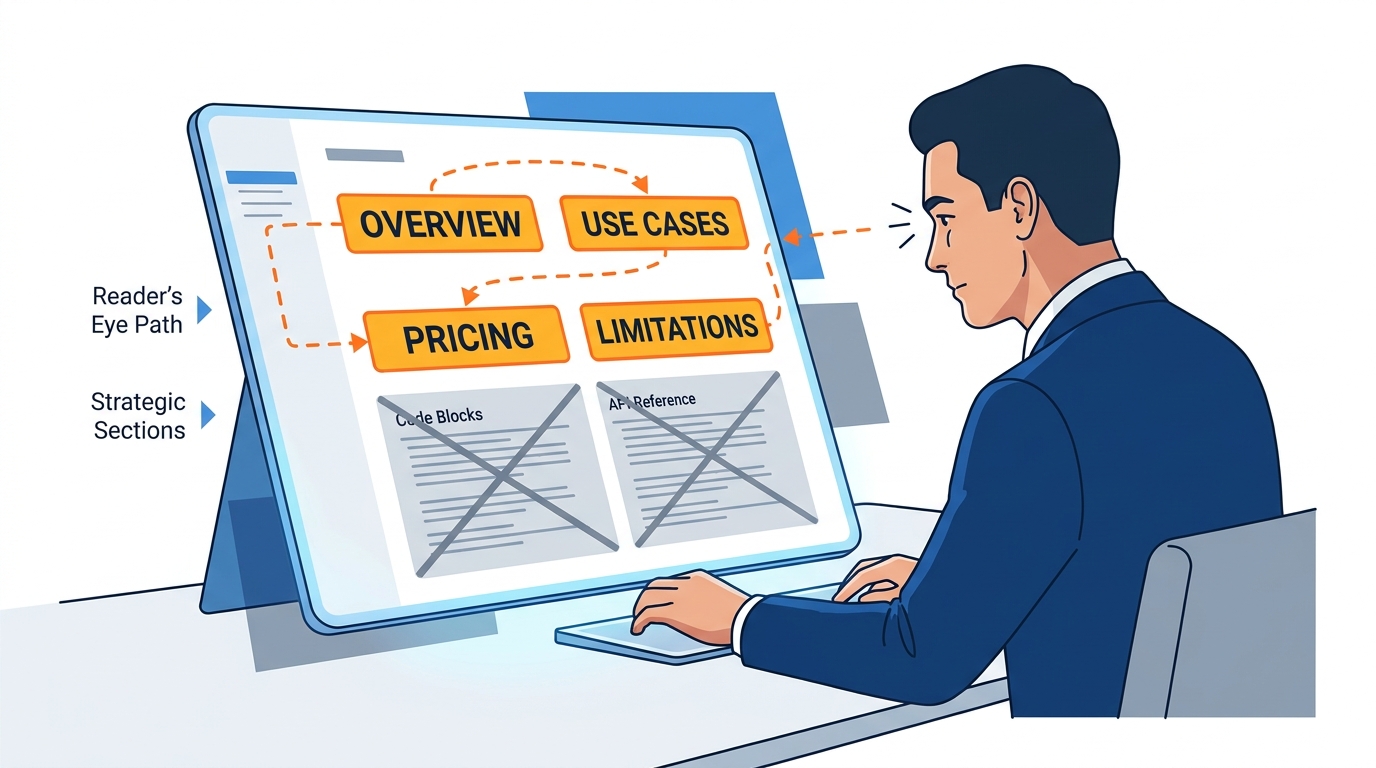
Figure 9:Skim, Don’t Read — Technical documentation is mostly code. The strategic information is hidden in the sections between the code, and it is shorter than it looks.
The last skill you need in this chapter is one that almost no business leader has been taught: how to read technical documentation without being a developer.
Most business leaders, when handed a link to the Agent SDK documentation, do one of two things. They forward it to engineering and ask for a summary (slow and lossy). Or they open it, see code, panic, and close the tab (still uninformed).
The right move is neither. The right move is to skim it directly for the strategic information — which is hidden in plain sight if you know where to look.
The Agent SDK documentation lives at code
Read the opening paragraphs only. The first 200 words of any well-written documentation page tell you what the tool does and why it exists. That is all you need to understand strategically. The opening paragraph of the Agent SDK overview says it gives you “the same tools, agent loop, and context management that power Claude Code, programmable in Python and TypeScript.” That single sentence tells you everything you need: same engine as Claude Code, accessible to engineers, dual-language support (which matters for hiring).
Read the “capabilities” headers, skip the code. The page will have a list of capabilities — built-in tools, hooks, subagents, MCP, permissions, sessions. Read just the names and the one-line descriptions. Every code block underneath is for engineers. Skip them entirely. You can understand 95% of what the SDK does by reading the headers.
Read the comparison tables. Any decent documentation includes comparisons — “this vs. that” or “when to use what.” Those tables are written for buyers, not builders. Read them carefully. The Agent SDK overview has comparisons to the Anthropic Client SDK, to the Claude Code CLI, and to Managed Agents. Each comparison tells you which tool is appropriate for which scenario. Memorize the table. It is the entire decision matrix in one place.
Read the “branding guidelines” or “license and terms” sections. This sounds like fine print, but it is where strategic constraints hide. The Agent SDK page, for example, has notes about what you can and cannot call products you build on the SDK. Those constraints affect product marketing and partner positioning. Your legal team will want to know.
The point is not to fake technical depth. The point is to be conversant — to ask good questions, to push back on weak claims, and to know when an engineer’s plan does not match the actual capabilities of the platform they are using.
Helena, doing this for the first time, would discover several things in the Agent SDK documentation that change her thinking. She would learn that the SDK has built-in permissions and audit logging — which directly addresses her compliance officer’s concerns. She would learn that the SDK supports running on Amazon Bedrock or Google Vertex AI — which means her data can stay inside her existing cloud infrastructure. She would learn that the SDK supports “subagents” — which means her Marcus could split the claims-screening workflow into specialized smaller agents instead of building one monolith. None of that required her to write a single line of code to understand.
That is what reading SDK documentation as a business person looks like. It is a skill, not a talent. And once you have it, you stop being a passive recipient of your engineering team’s recommendations and start being an active partner in the architectural decisions that will shape your organization for the next decade.
The Agent SDK is the kitchen. Now you can read the blueprint of the kitchen — and decide whether you want to install it, rent it, or buy your meals from someone else who already has.
That decision is the most important AI decision your organization will make this year. And you are now equipped to make it.
Case Study: The Three Proposals at Cypress Coastal Insurance
Background
Cypress Coastal Insurance is a regional property and casualty carrier headquartered in Tampa, Florida, with approximately 480 employees and roughly $720 million in annual written premium. The firm serves Florida homeowners and small commercial property clients across Florida, Georgia, and Alabama, with a particular concentration in hurricane-exposed coastal counties. In late 2025, Chief Operating Officer Helena Vasquez initiated a strategic review of the firm’s first-notice-of-loss (FNOL) process — the front-end claims workflow where every incoming claim gets reviewed, classified, and routed to an adjuster.
The numbers driving the review were straightforward. The firm receives roughly 9,000 FNOLs per year. Three claims analysts, working from a centralized intake queue, spend an average of two hours on each report before routing it. The work is heavy on document review — policy verification, coverage matching, anomaly flagging, and the writing of a one-page summary that goes to the assigned adjuster. The total annual labor allocation is approximately 18,000 hours, and Vasquez’s analysis suggests that 60–70% of that work follows a pattern repetitive enough to be automated.
Vasquez assembled a small evaluation committee — Marcus Liang, the firm’s senior software engineer; Priya Doshi, the Chief Compliance Officer; and Daniel Reyes, head of claims operations — to evaluate proposals. Three vendors were invited to pitch, and a no-code platform was added to the slate at Reyes’s suggestion after he saw a competitor demonstration at an industry conference.
The Situation
The first proposal came from ClaimsLogic AI, a venture-backed InsurTech vendor offering a fully managed claims pre-screening platform. Annual cost: $400,000. Implementation time: four months. Their pitch emphasized polish — pre-built integrations to common carrier systems, a slick analyst dashboard, vendor-managed model updates. The data tradeoff: FNOL documents would be transmitted to ClaimsLogic’s cloud environment, processed there, and returned to Cypress as enriched outputs. Compliance officer Priya Doshi flagged this immediately. Florida insurance regulations and Cypress’s reinsurance contracts impose data residency constraints that the ClaimsLogic architecture would only partially satisfy.
The second proposal came from Marcus Liang himself. His team, he argued, could build a custom claims pre-screening agent using the Claude Agent SDK, deployed inside Cypress’s existing AWS environment. Estimated build cost: 30,000 per year in API and infrastructure spend. Implementation time: four months. The agent would never send data outside the firm’s own cloud account, would log every decision for audit purposes, and would be modifiable by Liang’s small team as claims processes evolved. The tradeoff: Cypress would own the maintenance burden going forward, and Liang’s team — three engineers total — would be the only people who fully understood the system.
The third proposal came from RelayWorks, a no-code agent platform that operations head Reyes had identified. Their proposal claimed to deploy a working FNOL pre-screening agent within a week, using a visual workflow builder that Reyes himself could maintain. Annual cost: $30,000. Data residency could be controlled through RelayWorks’s enterprise tier, which kept all customer data within a dedicated tenant inside AWS. The tradeoff: less customization depth than a custom SDK build, and a platform dependency that worried Liang — what if RelayWorks raised prices, was acquired, or shut down?
Vasquez’s challenge was not picking the cheapest option or the most polished demo. It was matching the architectural choice to the strategic position of the firm — its compliance posture, its engineering capacity, its competitive timeline, and its tolerance for vendor risk. Three internal stakeholders, three different recommendations, and a decision that would shape the firm’s claims operations for the next five years.
Discussion Prompt
Apply the four-question build-vs-buy framework from this chapter to Helena Vasquez’s decision. Which option — vendor, custom SDK build, or no-code platform — best fits Cypress Coastal’s profile, and what specific factors from the case lead you to that conclusion? Then take the opposite position and argue for one of the other two options. What would have to be true about Cypress’s situation for the alternative path to be the correct choice? Finally, consider how Helena should sequence her decision: should she pick one path and commit, or run two paths in parallel to reduce risk, and what does the answer say about the broader leadership principle of “match the option to the shape of the problem”?
Discussion Guidelines
Initial Post (due before class)
Minimum 400 words
Directly address the discussion prompt using concepts from this chapter
Include at least one APA-formatted citation — from the course text or a peer-reviewed source
Avoid summary; demonstrate analysis and original thinking
Peer Responses (minimum 2)
Minimum 250 words each
Each response must include at least one APA-formatted citation
Engage substantively — build on, challenge, or offer a contrasting perspective grounded in evidence
“I agree” or “Great post” responses do not meet the requirement
Maintain a professional and respectful academic tone
Applied Exercise: Brief an SDK Project Without Writing a Line of Code
Estimated time: 25–30 minutes. You’ll produce a one-page SDK project brief you could hand to an engineering team — or take to a no-code platform — to build the automation you actually want.
Track A — Claude Desktop
The SDK is ultimately a decision-making exercise: do I build, buy, or keep doing this by hand? You can run that decision today, in a browser, in under ten minutes — without writing a line of code.
Open Claude Desktop (claude.ai/download) or claude.ai in your browser.
Describe your most painful recurring workflow — the one you do manually every week or every month that eats the most time. Be specific: how often, how long, what the inputs are, what the output looks like.
Paste this prompt: “Evaluate this workflow. Should I customize an AI specialist for this task, buy an off-the-shelf tool, or keep doing it manually? Give me a clear recommendation with reasoning — cost, time-to-value, switching cost, and how often the workflow changes.”
Read the recommendation. If Claude says build a specialist, paste this follow-up: “Draft the standing instructions for that specialist — what it does, what it does not do, what inputs it expects, what format the output takes, and how I should review its work.”
What you just produced is an SDK spec in plain English. Engineers wrap that spec in code. You wrote the part that actually matters — the part most teams skip.
Your Submission: Your submission is Claude’s build-vs-buy recommendation for your most painful recurring workflow, plus the plain-English standing instructions for the specialist (if Claude recommended building). Copy both into one document. Write one sentence: do you agree with Claude’s recommendation, and if not, what would change your mind? Submit the recommendation + standing instructions + one sentence.
Track B — Claude Code
Start by identifying a real workflow in your work that consumes too many hours. Not a hypothetical. A real one. Write down the name of the workflow and the approximate hours per week it consumes.
Open Claude Code. Reference the Agent SDK overview documentation at https://
code .claude .com /docs /en /agent -sdk /overview. You will not write code in this exercise — you will use Claude Code as your thinking partner to draft a project brief. Provide context. Paste the following into Claude Code: “I want to draft a business-grade Agent SDK project brief for an automation in my organization. I am not a developer — I am the business owner. I will describe the workflow in plain English, and I want you to help me structure a one-page brief that includes outcome, inputs, outputs, constraints, and success measures — using the framework from Chapter 11 of The Cognition Economy.”
Describe the workflow. Tell Claude Code, in plain English, what the workflow does today. Who does it? What inputs do they work from? What outputs do they produce? How long does it take? Where does it live (which tools, which systems)?
Ask for the brief. Prompt Claude Code: “Now draft the five-section project brief. Be specific. Make it short enough that an engineer could read it in five minutes.”
Stress-test it. Ask Claude Code: “What are the three red flags in this brief that an experienced AI engineer would push back on? What constraints am I likely missing?”
Save the artifact. Save the finished brief as a markdown file. This is what you would hand to your engineering team — or upload to a no-code platform — to start the project.
Your Submission: Your submission is the one-page Agent SDK project brief Claude Code helped you draft — outcome, inputs, outputs, constraints, and success measures. Copy the full brief into a document. Write two sentences: (1) who in your organization would need to review and approve this brief before development could begin, and (2) what is the most important constraint you included that you almost left out? Submit the brief + two sentences.
Track C — Antigravity 2.0 IDE
Open Antigravity 2.0 IDE. Press CMD+E (or CTRL+E on Windows) to switch to Agent Manager. Reference https://
antigravity .google /docs /ide -overview to confirm you are in the orchestration view, not the editor. Start a new agent task. In Agent Manager, create a new task with the prompt: “Help me draft a business-grade Agent SDK project brief for an automation I want to build. I am a business leader, not a developer.”
Observe the agent loop. Watch how the Antigravity agent works through the request — pulling context, structuring sections, producing artifacts. You are observing the same agent loop pattern that powers any SDK-based agent, including the one you would commission your engineering team to build.
Describe your workflow. Provide the same plain-English description of the workflow you would automate.
Review the artifacts. Antigravity will produce one or more markdown artifacts as it works. Open them, review them, and notice how the agent has structured your raw description into a usable project brief.
Refine and export. Ask the agent to tighten any section that feels weak, then export the final brief as a markdown file you can share.
Your Submission: Your submission is the Agent SDK project brief the Antigravity agent produced, plus your written agreement or disagreement with it. Copy the brief into a document. Underneath it, write one paragraph (75-100 words) either confirming the agent got the brief right or correcting the specific things it missed. Submit the brief + your one paragraph.
Reflection
Write two or three sentences about what you noticed. Where did the two tools handle the same task differently? Which felt more like a thinking partner, and which felt more like an autonomous worker? And — most importantly — could you imagine handing the brief you just produced to a real engineering team or a no-code platform on Monday morning?