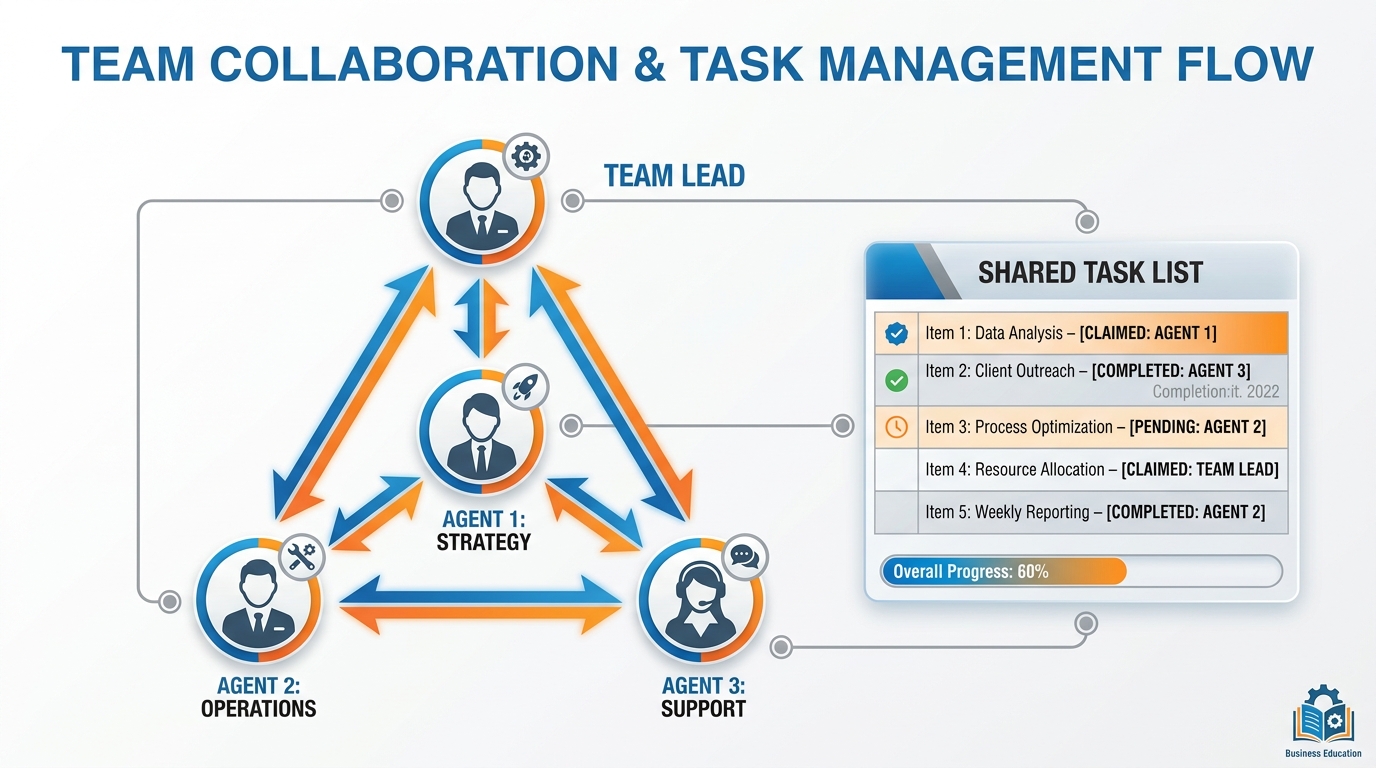
Figure 1:Agent Teams — One lead. Three teammates. A shared task list. Lateral conversation. The shape of work when the job is too big for one mind.
It is 8:14 a.m. on a Tuesday. The board meets at noon.
Priya Shankar, VP of Product at a B2B SaaS company in Austin, has been at her desk since six. Her phone shows the same fourteen unread Slack messages it showed an hour ago. She has not opened them. She is staring at a four-item list on a sticky note next to her monitor:
Competitor moves in the last 90 days
Customer feedback themes from Q3
Internal product gap analysis
One-page strategic brief for the board
Solo, with the tools she has used for the last five years, that list is twelve hours of work. She has under four. Her assistant has the flu. Two of her three analysts are on vacation. She is going to walk into that boardroom underprepared and the CEO is going to know.
She does not walk into that boardroom underprepared. By 11:43 a.m., the brief is printed, the supporting analysis is in a shared folder, and she has read every page twice. The work is not rushed. It is good.
What happened in those three and a half hours is not that Priya worked harder. She did not work harder. She worked differently. She stopped trying to be a brilliant solo analyst and started running a squad — three independent AI agents, each chasing a different angle, talking to each other in the background, while she did the one thing she alone could do: decide what mattered.
This is what agent teams do. They turn a four-item list that is impossible for one person into a four-item list that is normal for four. And the four are not human.
From Solo to Squad
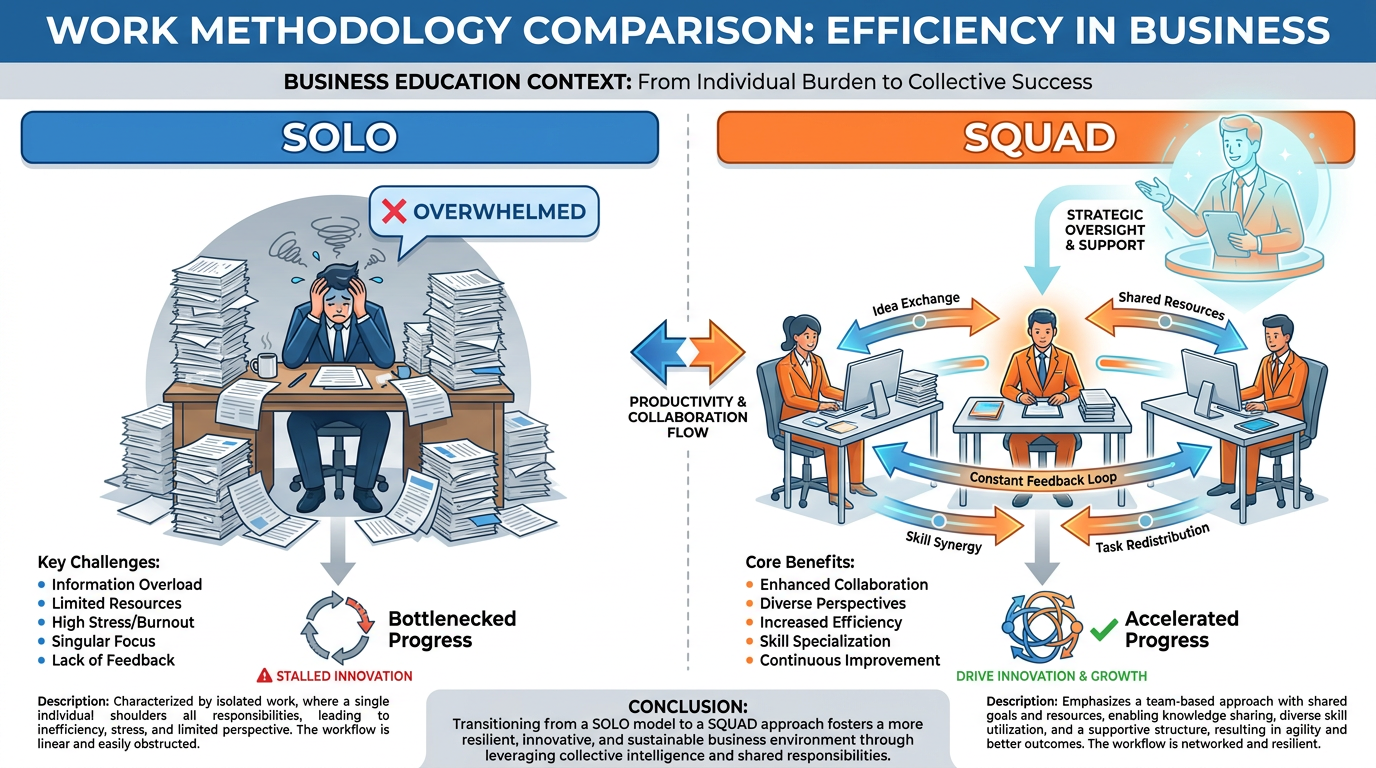
Figure 2:Solo vs. Squad — The brilliant lone analyst works sequentially. The squad works in parallel, and argues with itself.
Picture two equally smart analysts.
The first is a brilliant generalist. She works alone. She is methodical. She picks up a problem, takes it apart, sequences her investigation, finishes one thread, picks up the next. Her work is good. It is also linear. She can only think about one thing at a time, because she only has one brain.
The second is a team of three analysts of average intelligence. They split the problem into three angles. They work in parallel. And in the hallway, between meetings, they argue. One says, “I keep seeing this pattern in churn data.” Another says, “That doesn’t match what I’m finding in support tickets — show me.” A third says, “Both of you are missing the pricing change last quarter.”
The team is not just three times faster. The team is smarter. Not because each analyst is smarter than the solo generalist. They are not. They are smarter as a unit because they push back on each other. The solo analyst has no one to push back on her. She investigates a hypothesis, finds something that fits, and moves on. The team investigates three hypotheses simultaneously and the survivor is the one that holds up under attack.
This is the principle behind agent teams. You are not hiring one more capable assistant. You are hiring a small group of independent minds who can disagree.
For most of the AI tools you have used so far, the model has been one mind. A single context window. A single train of thought. When you needed parallel work, you opened a new tab and started a new conversation — but those two conversations could not see each other. The left hand did not know what the right hand was doing.
Agent teams change the architecture. Multiple AI instances, each with its own context, working on the same shared list of tasks, able to send messages directly to each other. One of them is designated the lead — your point of contact, the one synthesizing what comes back. The rest are teammates. They are not subordinates of each other. They are peers.
This is the most important shift in how AI is organized since the move from chatbot to agent. And it is exactly the kind of shift that, two years from now, will look obvious. Of course you would run a team. Of course they would talk to each other. Why would anyone ever have built a system where the AI workers could not?
Sub-Agents vs. Agent Teams
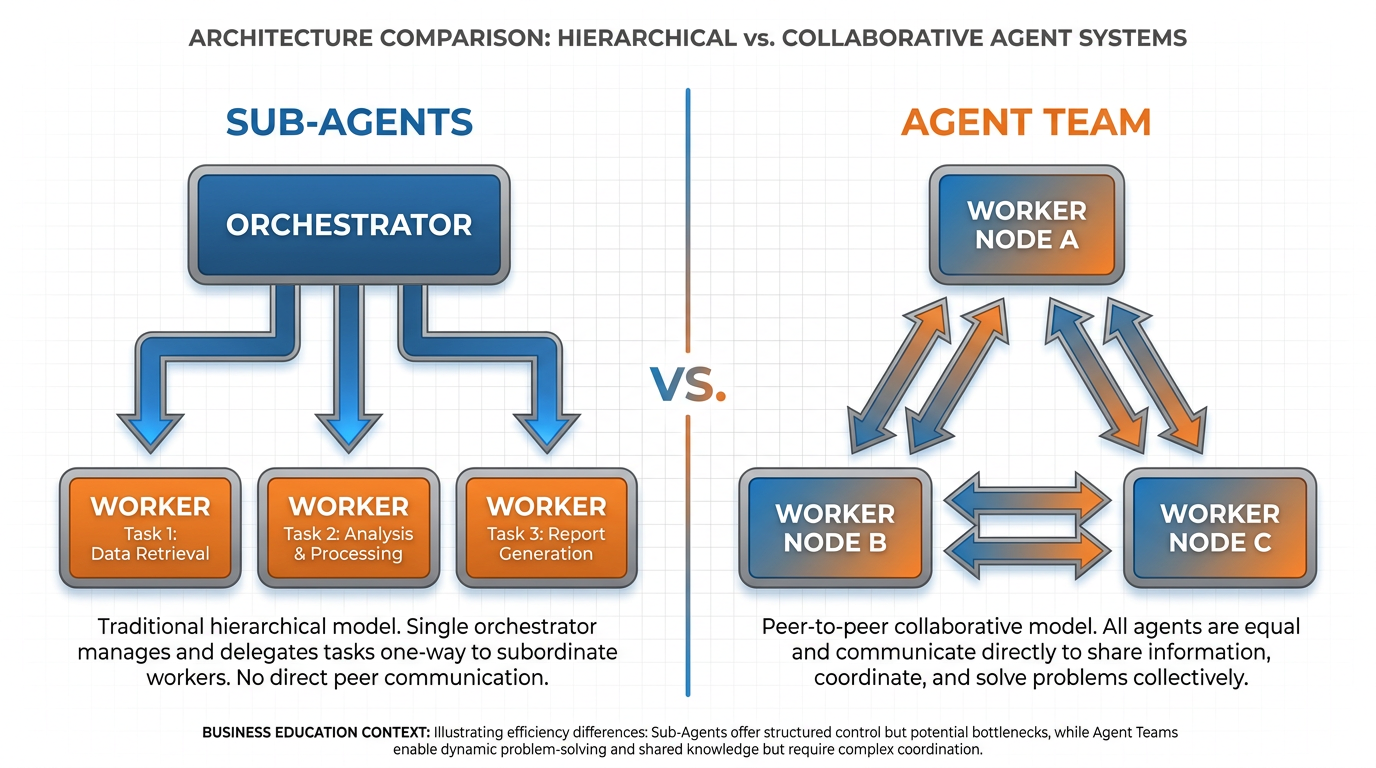
Figure 3:Two architectures, one critical difference — Sub-agents report up. Teammates talk sideways. That single arrow direction changes everything.
Here is the distinction that almost no one gets right on the first try.
In Chapter 9 you met sub-agents. A sub-agent is a helper your main AI spawns to do a focused task. Your main AI says, “Go research competitor X’s pricing.” The sub-agent goes off, does the work in its own context window, and comes back with a summary. The main AI reads the summary. Done.
Now picture three sub-agents working in parallel. Each one is doing its own thing. Each one reports back to the main AI when finished. The main AI is the only one who sees all three reports. The sub-agents do not see each other. They do not know each other exists. They produce three independent answers, and the main AI is the only place those three answers ever meet.
That is the sub-agent architecture. Workers report up. The boss synthesizes.
Agent teams flip one arrow. The teammates do not just report up. They talk to each other. Directly. By name. While the work is in progress.
Imagine the difference in a real scenario. Three sub-agents are researching a competitor. Teammate A finds that the competitor just raised a $50M round. Teammate B finds that they have lost two enterprise customers this quarter. In the sub-agent world, neither agent ever sees the other’s finding. Both reports land on the main agent’s desk an hour later, and only then does the main agent connect them: they raised a round because they’re losing enterprise. In the team world, the moment Teammate A sees Teammate B’s churn finding, A messages B: “That’s interesting — does the churn timeline match the funding announcement?” The connection happens during the work, not after.
So when do you use which?
Use sub-agents when the work splits cleanly into independent pieces and the synthesis happens at the end. You want three separate research dives. You want three pieces of code reviewed against three different criteria. The pieces are independent, the answer is the sum of the pieces, and you only need one mind looking at all the pieces at the end. Sub-agents are lean. They use less context. They are easier to manage. They are the right tool when the work decomposes cleanly.
Use agent teams when the work has overlap, when teammates need to know what each other is finding, when the value comes from disagreement and synthesis-in-motion, not synthesis at the end. You want competing hypotheses to argue with each other. You want a front-end change and a back-end change to be coordinated as they happen. You want one teammate to surface something that changes the question the others are answering.
The simple rule: if your three workers would have benefited from sharing a Slack channel while they worked, you want a team. If they would have been fine working in isolation and dropping their reports in a shared folder at the end, you want sub-agents.
Most professionals will use both. Sub-agents for the bulk of parallel work. Teams for the high-stakes, ambiguous problems where you need the hallway argument.
When a Team Beats a Solo
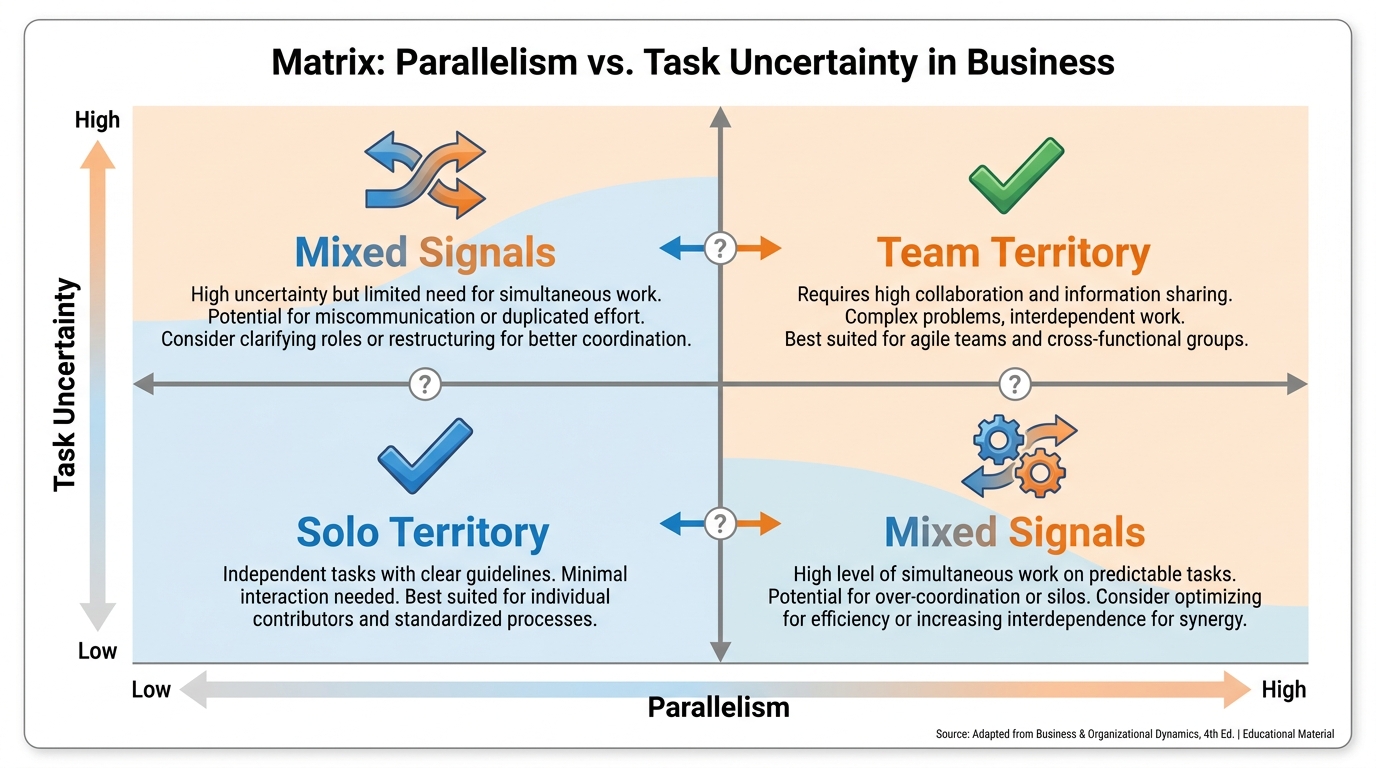
Figure 4:Where teams win — Not everywhere. In the upper right corner — where the work is genuinely parallel and the answer is genuinely uncertain — a team will outperform a solo every time.
A team is not always better. A team is sometimes wasteful. You have to know the difference.
A team beats a solo when three conditions hold at the same time.
The work is genuinely parallel. Three pieces that can be investigated simultaneously without waiting on each other. If the second piece depends on what the first piece finds, you cannot parallelize, and a team will only slow you down. Real parallel work has clean boundaries: competitor A, competitor B, competitor C. Or: frontend, backend, tests. Or: security review, performance review, test-coverage review. Each teammate owns a lane that does not require waiting on another lane.
The answer is genuinely uncertain. If you already know the answer and you just need help executing, you do not need three independent minds. You need one careful executor. Teams shine when the problem is open-ended and the right answer benefits from competing perspectives. The single biggest wasted use of agent teams is to assign three teammates to a task where the answer is already known. You are paying triple cost for no incremental insight.
There is value in the disagreement. A team is most valuable when you want hypotheses to compete. When a single agent investigating alone would have anchored on the first plausible explanation and stopped looking. When you need the second teammate to say, “I don’t think that’s right — here is what I am seeing.” The official Claude documentation describes this perfectly: “With multiple independent investigators actively trying to disprove each other, the theory that survives is much more likely to be the actual root cause.”
The best business use cases follow these three conditions naturally.
Competitive landscape analysis. You have four competitors. Each teammate takes one. They share a task list, surface findings as they go, and the lead synthesizes — but along the way, when one teammate finds that two competitors just announced the same feature in the same month, the others adjust their investigation.
Customer research with competing hypotheses. Customer churn is up. Why? One teammate investigates pricing. One investigates product gaps. One investigates the recent UX redesign. The hypotheses do not just get reported — they get argued. The losing hypotheses lose because the other teammates produced stronger evidence against them.
Strategic brief preparation. The board meeting Priya faced is the canonical case. Competitor moves. Customer feedback. Internal gaps. Each is its own lane. None of them depends on the others starting first. The findings inform each other. The brief at the end is the synthesis.
The flip side: a team will lose to a solo when the work is sequential, when context cost is high, or when one agent has already absorbed the right context and the team would have to re-load it. We will come back to this in the last section. For now, hold this principle: parallel structure plus genuine uncertainty plus value in disagreement equals team territory. Anything else is probably solo territory.
Coordinating Your Team
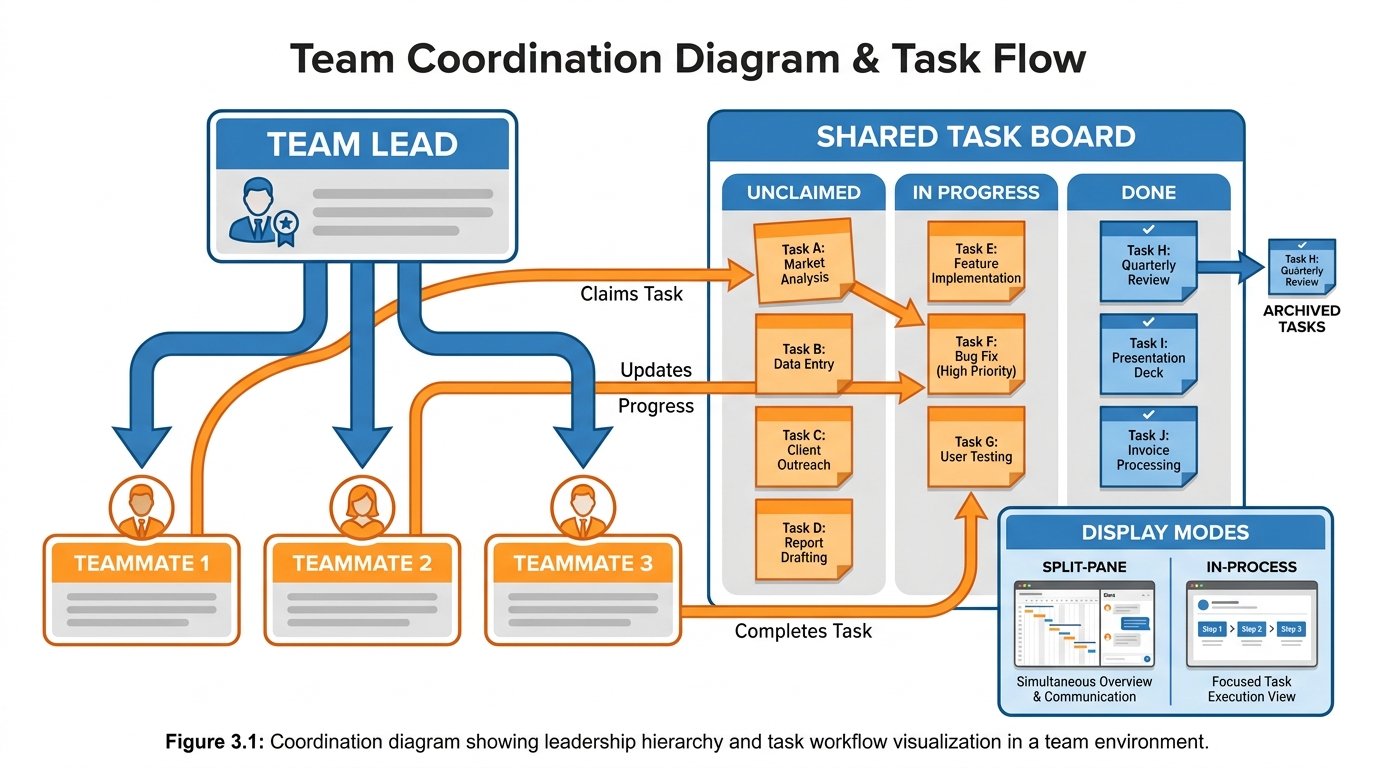
Figure 5:Coordination, in plain English — A team lead. A shared task list. Teammates who can claim, complete, or hand off. You do not manage the machinery — you direct it in plain language.
Once you decide a team is the right tool, the question becomes how you actually run it. The answer is closer to managing a small team of human analysts than to operating a piece of software.
The team has a lead. The lead is the agent you speak to. You give the lead the overall objective, you tell it how many teammates you want, and you describe what each teammate should focus on. The lead spawns the teammates, assigns initial tasks, and serves as your single point of contact for steering.
The team has a shared task list. The list is visible to everyone — every teammate can see every task. Each task has a state: pending, in progress, completed. Tasks can also depend on other tasks; a task that depends on something else cannot be picked up until the dependency clears. Teammates either receive tasks from the lead or claim them themselves when they finish what they had. The list is the team’s organizing artifact. It is also the artifact that lets you check in on what is happening without interrupting anyone.
The team has a mailbox. Teammates can send messages directly to each other by name. The lead can message any teammate. You can message any teammate. Messages arrive automatically — no one is polling, no one is checking — and the teammates use this messaging the way a real team uses Slack.
You can run the team in two display modes, and the choice matters more than it sounds. In in-process mode, all teammates run inside your main terminal, and you cycle through them with a keyboard shortcut to see what each is doing. This works anywhere. It is the default for most people. In split-pane mode, each teammate gets its own pane on screen, and you can see all of them at once. This feels much more like running a real team — you watch four conversations happen in parallel, click into one when you want to intervene, and otherwise let them run. Split panes require a more advanced terminal setup. For a business user, the in-process default is fine. Just know that the option exists.
There are two delegation patterns worth knowing.
Lead-assigned delegation. You tell the lead what each teammate should do. The lead splits the task list accordingly and hands out initial assignments. This works well when you have a clear mental model of how the work splits.
Self-claim delegation. The lead creates the task list, and teammates claim the next available task when they finish what they have. This works better when the work is more uniform — many similar items in a backlog — and you do not need to pre-assign by specialization.
Most real teams use both. Initial assignments come from the lead. As teammates finish, they self-claim the next thing without waiting. You stay in the loop by watching the task list, not by micromanaging each teammate.
For complex or risky work, you can require teammates to plan first. The teammate works in a read-only mode, produces a plan, and submits it to the lead for approval. The lead approves or sends it back with feedback. This pattern is for when the cost of doing the wrong thing is high — when you want a checkpoint before action. It mirrors how a real team would behave on high-stakes work: nothing happens until the plan is signed off.
The final coordination piece is cleanup. When the work is done, you ask the lead to clean up the team. Teammates are dismissed. The shared resources are released. The team goes away. This is not a small detail. A team left running is a team consuming tokens. Always close the team when the work is done.
The /goal Command
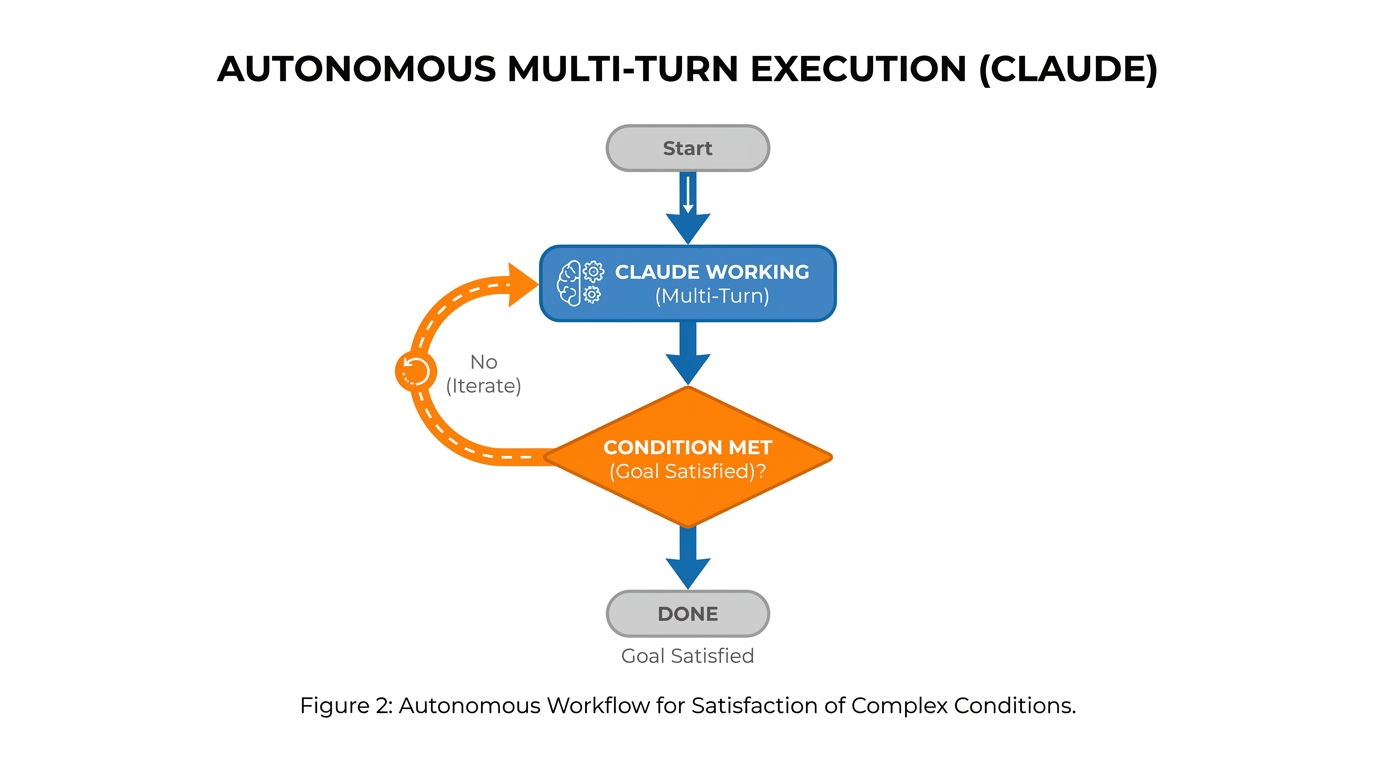
Figure 6:The /goal pattern — You set a finish line. The model keeps working across turns until a separate evaluator confirms the finish line has been crossed.
Now meet the other half of this chapter’s idea — the one that pairs with teams more naturally than anything else in the toolkit.
Picture this. You have just briefed your team on three workstreams. You know the work will take a couple of hours. You also know that in the middle of that work, the team will hit moments where it would normally stop and ask you, Are we done? Each stop costs you. You have to read where things are, decide whether to continue, send a “keep going” message, and wait for the next stop. Across a long task, you can end up being the bottleneck in your own automation.
The /goal command removes you from that loop.
You give the model a completion condition — a sentence describing what “done” looks like. The model starts working. After each turn, a separate small fast model is automatically called as an evaluator. The evaluator reads the conversation, checks the condition, and answers a single yes-or-no question: is the goal met?
If the answer is no, the model keeps working without you. Another turn starts, with the evaluator’s reason for “not yet” included as guidance.
If the answer is yes, the work stops. The condition is cleared. You are notified.
This is the “leave it running” pattern.
You set a goal. You walk away. You come back. The work is done.
The conditions you write should be specific and verifiable from the conversation itself. The evaluator does not have its own tools — it cannot go look at a file or run a command independently. It can only read what the model has already surfaced. So a condition like “the strategic brief is finished” is too vague. “The strategic brief is written to the shared document and contains sections on competitor moves, customer themes, and internal gaps, each with at least three specific findings backed by sources” is something the evaluator can actually check, because the model will have produced exactly that artifact in the conversation.
The pairing with agent teams is natural. You spin up a team. You give the lead a goal: the brief is complete and reviewed by every teammate, and the task list is empty. You walk away. You come back ninety minutes later. The brief is done. The task list is empty. The team has cleaned up after itself.
A goal that runs against a team is the closest thing in current AI tooling to handing a real team a deadline and a deliverable and letting them figure out the rest.
A few practical guardrails worth setting. Bound the goal with a stop clause if you do not want it running indefinitely — “or stop after twenty turns” is a perfectly valid part of the condition. Keep the condition focused on one measurable end state, not a checklist of fifteen items. Trust the evaluator to be strict; if it keeps saying “not yet,” it is usually because the condition is genuinely not met, not because the evaluator is being picky.
You will know /goal is working when you have a session where the model worked for forty minutes, you read three lines at the end, and the entire job is done.
When NOT to Use a Team
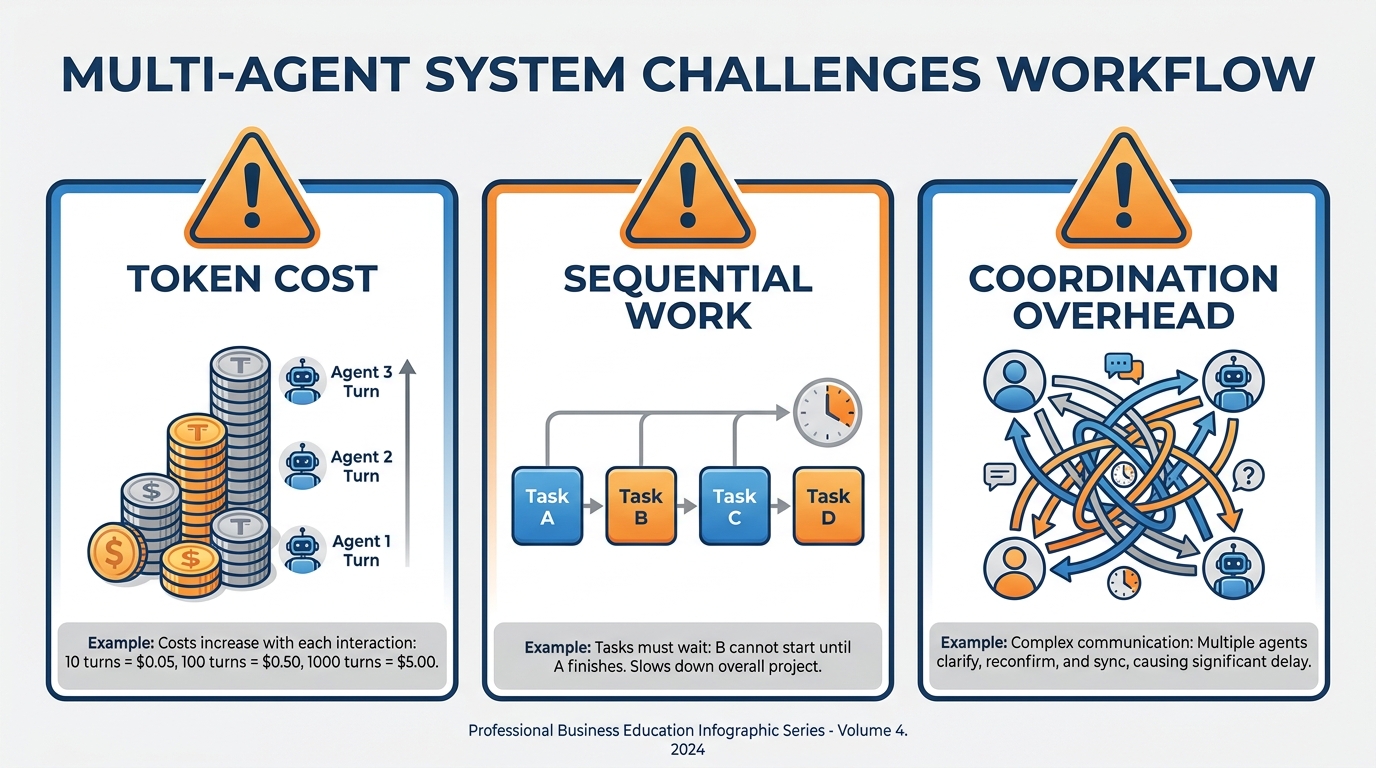
Figure 7:The traps — A team is not always the answer. Knowing when to stay solo is a sign of maturity, not weakness.
A team is a power tool. Power tools cut things faster. They also cut things they should not cut, when used in the wrong place.
Three traps to know.
Token cost scales with teammates. Each teammate is a full, independent AI instance. Each one has its own context window. Each one is consuming tokens. A team of four is roughly four times the cost of a single session for the same wall-clock time. For a high-stakes board meeting, that is fine — the cost of the team is trivial compared to the value of being prepared. For routine work that could have been done by a single session, you have just paid four times more for the same outcome. Do not run a team because it sounds impressive. Run a team because the work justifies it.
Coordination overhead is real. More teammates means more messages flying around, more task management, more places where two teammates accidentally touch the same artifact. A team of three is manageable. A team of seven is a project. The official guidance is to start with three to five teammates and only scale up when the work genuinely benefits. Most professionals find that three is the sweet spot for almost everything: enough parallelism to feel the speedup, few enough teammates that the coordination stays simple.
Sequential work is solo work. If step two depends on step one, and step three depends on step two, you cannot parallelize. A team will not be faster. It might be slower, because the teammates will sit idle waiting for dependencies. The classic mistake is to assign a team to a task that looked parallel on the surface but is actually a chain. Before you spin up a team, sketch the work on paper. If the items must happen in order, do not split them across teammates.
There are a few other warning signs that you are reaching for a team when you should not. Same-file edits across teammates — if two teammates are going to be writing to the same artifact, you have a coordination problem disguised as a team problem. Tasks with heavy shared context — if every teammate needs the same long brief loaded at the start, you are paying for that brief three times. Quick, focused tasks — if a single competent solo agent could have finished in fifteen minutes, the time spent setting up a team is a net loss.
The maturity arc looks like this. Stage one: you only use solo agents. Stage two: you discover teams and use them for everything, learning the hard way which work justifies them. Stage three: you settle into a default of solo, with teams reserved for the handful of high-stakes parallel problems where the math actually works. The third stage is where the professionals operate.
Priya, at the start of this chapter, used a team because the work was genuinely four-headed: three independent investigations and a synthesis. If her task had been “tighten the wording of an existing brief,” she would have used a single session, finished in twenty minutes, and gone back to her morning. The skill is knowing the difference.
There is one more trap worth naming, because it catches almost everyone the first time. The team starts doing work that the lead should have done. You spawn three teammates. The lead, instead of coordinating, starts investigating one of the angles itself. Now you have four agents in a four-lane race, three of them coordinated and one of them off doing solo work in the lead’s seat. The fix is a single explicit instruction at spawn time: “Wait for your teammates to finish their tasks before doing any investigative work yourself. Your job is to coordinate and synthesize, not to investigate.” That sentence, added once, prevents the most common failure mode of agent teams.
Another trap: the unused team. You spin up a team for a problem that genuinely warranted it, and then you forget about them. Forty minutes later, two teammates have completed their work and are sitting idle, burning small amounts of context just by existing. The discipline here is the same as managing a real team: check in periodically, redirect when needed, and close the team the moment the work is done. A team that stays open past its usefulness is a team that quietly costs you money for no return.
Agent teams do not replace solo sessions. They are a tool you reach for when the work is too big, too contested, or too time-constrained for a solo mind to handle well. Most days, you will still work solo. The days you reach for the team will be the days where, without the team, the work would not have gotten done at all. And on those days, the speedup is not incremental. It is categorical — the difference between walking into the boardroom prepared and walking in apologizing.
Case Study: The Board-Meeting Sprint at Lumenax Health
Background
Lumenax Health is a 280-person B2B SaaS company headquartered in Austin, Texas, building patient-engagement software for mid-sized hospital networks. Founded in 2017, the company crossed $42M in annual recurring revenue in late 2024 and entered 2025 with a clear strategic question: should it continue investing in its existing core platform, or accelerate development of a new AI-driven patient-outreach product its founders believed would be the company’s next growth engine? The board, which meets quarterly, scheduled a strategic review for the second Tuesday of May 2026 — a single 90-minute slot at noon, with one item on the agenda: where does Lumenax go next.
Priya Shankar, Lumenax’s VP of Product, was responsible for the briefing materials. Her team had been preparing for the meeting for two weeks. Then, on the Friday before, her analytics lead caught the flu, two of her three analysts left for a pre-scheduled offsite, and Priya found herself at 8 a.m. Tuesday with four discrete pieces of work outstanding: a 90-day competitor sweep, a synthesis of Q3 customer feedback across 1,400 NPS responses, an internal gap analysis comparing Lumenax’s roadmap to three named competitors, and a one-page strategic brief that the CEO had asked to review before noon.
Solo, Priya estimated each piece at three to four hours of focused work. She had under four hours total. The CEO had been clear: he did not want a hand-waved version. He wanted real analysis, with sources, ready to defend in the room.
The Situation
Priya had used Claude Code’s agent teams feature once before, for a smaller research task three weeks earlier. She had also used the /goal command twice for unattended overnight tasks. The board sprint was a different scale of problem. Three workstreams ran in parallel — competitor moves, customer feedback, and internal gaps — and the strategic brief at the end was a synthesis of all three.
She spun up a three-teammate team with a lead. She named them deliberately: Casey on competitors, Devi on customer feedback, Marc on the internal gap analysis. She gave each teammate a clear initial brief and the same access to the company’s research drive. She told the lead that Casey and Devi’s findings should inform Marc’s gap analysis as they emerged, not at the end. She set a /goal condition: the one-page strategic brief is written, sourced, and reviewed by every teammate; the shared task list is empty; the team is cleaned up.
The tension Priya faced was not whether to use a team. She knew the work was genuinely parallel. The tension was structural. Should Casey, Devi, and Marc be peers reporting to a lead, with lateral messaging between them? Or should they be sub-agents reporting up to her main session, with no lateral communication? The peer model promised richer synthesis — Marc’s gap analysis would benefit from seeing Casey’s competitor findings as they arrived, not in a packaged report at the end. The sub-agent model promised lower token cost and simpler coordination. With 90 minutes until the CEO’s pre-read window opened and four pieces of work in flight, every decision about structure had a cost.
By 10:47 a.m., Casey had identified two competitor pivots that materially changed the gap analysis, and Marc — who had received Casey’s interim findings via direct message at 10:31 — had restructured his analysis around them. By 11:30 a.m., Devi’s customer feedback synthesis had pulled out three themes that Casey’s competitor sweep had not surfaced, and the lead had folded those into the brief. At 11:43 a.m., the goal evaluator confirmed the condition was met, the team cleaned itself up, and Priya read the final brief twice before walking into the conference room at 11:55 a.m.
Discussion Prompt
Using this chapter’s distinction between sub-agents and agent teams, evaluate Priya’s decision to use the agent-team architecture rather than the sub-agent architecture for the board-meeting sprint. What specific moments in the case justified the lateral communication a team provides? Conversely, identify one element of Priya’s situation where a sub-agent approach might have been equally effective or even superior. Then analyze the role of the /goal command in this scenario: how did the goal condition change Priya’s ability to manage the team, and what risks would she have faced if she had relied on manual prompting between turns instead? Conclude with a framework — three to five criteria — that a manager should apply before deciding to spin up a team for time-constrained strategic work, and explain how each criterion would have applied to Lumenax.
Discussion Guidelines
Initial Post (due before class)
Minimum 400 words
Directly address the discussion prompt using concepts from this chapter
Include at least one APA-formatted citation — from the course text or a peer-reviewed source
Avoid summary; demonstrate analysis and original thinking
Peer Responses (minimum 2)
Minimum 250 words each
Each response must include at least one APA-formatted citation
Engage substantively — build on, challenge, or offer a contrasting perspective grounded in evidence
“I agree” or “Great post” responses do not meet the requirement
Maintain a professional and respectful academic tone
Applied Exercise: Run Your First Agent Team
Estimated time: 25–30 minutes. You’ll produce a short comparative-research brief and a working /goal session.
The point of this lab is to feel the difference between solo work, sub-agent work, and team work — in one sitting, on a problem you actually care about. Pick a real research question from your work before you start. Something with at least two angles that could be investigated in parallel: two competitors, two customer segments, two strategic options. The exercise loses its value if you use a made-up topic.
Track A — Claude Desktop
You do not need parallel agents to feel what a team does. You can simulate the choreography — parallel briefs, then synthesis — in a single Claude Desktop window.
Open Claude Desktop (claude.ai/download) or claude.ai in your browser.
Describe a real project on your plate that naturally breaks into three workstreams. A product launch is the cleanest example: marketing, operations, and finance. A hiring push works too: sourcing, interviewing, onboarding.
Paste this prompt: “Break this project into three parallel tracks. For each track, write a one-paragraph brief addressed to the person who will lead it — what they own, what ‘done’ looks like, what they need from the other two tracks.”
Read the three briefs. Then paste a follow-up: “Now act as the project lead. Synthesize those three briefs into a single coordinated plan with sequencing, dependencies, and the first three actions for each track.”
You just ran a team. One Claude played three roles, then put on a fourth hat to coordinate them. That is exactly what a multi-agent system does — only the system does it in parallel, in separate workspaces, without you holding the thread.
Your Submission: Your submission is Claude’s full output from the team simulation — the three parallel workstream briefs and the coordinated synthesis. Copy all four parts into one document. Write two sentences: (1) which team brief was most useful and why, and (2) how does the synthesized plan differ from what you would have produced working on one workstream at a time? Submit the four-part output + two sentences.
Track B — Claude Code
Update Claude Code to the latest version. Confirm you are on version 2.1.32 or later. Open Claude Code’s settings file and enable agent teams by adding the
CLAUDE_CODE_EXPERIMENTAL_AGENT_TEAMSflag set to1. The official setup guidance lives at https://code .claude .com /docs /en /agent -teams. Restart Claude Code so the setting takes effect. Open a new session. Tell Claude in plain English: “Create a two-teammate agent team to investigate [your research question]. Name them Alex and Sam. Alex investigates [angle one]. Sam investigates [angle two]. Have them message each other when one of them finds something the other should know about. The deliverable is a one-page comparative brief.”
Watch the team start. You will see the lead spawn Alex and Sam. The shared task list will appear. Each teammate will start their investigation in parallel. Use the keyboard shortcut to cycle through teammates and watch what each is doing. Do not interrupt for the first five minutes.
After five minutes, message one teammate directly with a sharpening question. Something like, “Alex, what specific evidence supports your strongest finding so far?” Notice that the message goes only to Alex, not to Sam. This is the lateral channel in action.
Set a goal to finish the work without you having to prompt for the rest of it. Type
/goal the one-page comparative brief is complete, includes findings from both Alex and Sam with at least three specific data points each, and the task list is empty. Reference https://code .claude .com /docs /en /goal for the full syntax. Walk away for ten minutes. Come back. Read the brief. Ask the lead to clean up the team. Save the brief as your artifact.
Your Submission: Your submission is the synthesis document the agent team produced — the final briefing after the parallel investigations were combined. Copy the full synthesis into a document. Write two sentences: (1) what did the parallel investigation approach surface that a sequential single-agent approach would have missed, and (2) what real research or strategy task in your work would benefit most from running as a parallel team? Submit the synthesis + two sentences.
Track C — Antigravity 2.0 IDE
Open Google Antigravity 2.0 IDE. Press
CMD+E(Mac) orCTRL+E(Windows) to switch into the Agent Manager surface. This is the birds-eye view Google designed for managing multiple parallel agents across workspaces. The official documentation is at https://antigravity .google /docs /ide -overview. From Agent Manager, start two new agent tasks in two separate workspaces. Workspace one: “Investigate [angle one] of [your research question]. Produce findings with sources.” Workspace two: “Investigate [angle two] of [your research question]. Produce findings with sources.” The Agent Manager view will now show both agents working in parallel — this is the visual equivalent of the team you ran in Track A, just expressed differently.
Watch the Agent Manager dashboard. Each agent will create Artifacts as it works — the documents, notes, and outputs the agents produce. Click into either agent’s tile to see what they are doing in detail, the same way you would tab into a teammate’s pane in Claude Code.
When both agents have produced initial findings, start a third agent in a synthesis workspace. Give it both prior workspaces as context and ask it to produce the one-page comparative brief.
Review the Artifacts. Save the brief.
Your Submission: Your submission is all three Artifacts from your Agent Manager workspaces — the two parallel investigation Artifacts and the synthesis that combined them. Copy all three into one document. Write two sentences: (1) what was different about the two parallel investigations and how did the synthesis reconcile them, and (2) name one recurring project in your work that you could restructure as a parallel agent team and what the two parallel workstreams would be. Submit three Artifacts + two sentences.
Reflection
Write two or three sentences answering: Where did the lateral communication in Track A produce something the parallel-but-isolated structure of Track B did not? And where, if anywhere, did Track B’s visual workspace separation produce clarity that Track A’s terminal-cycling did not? The honest answer to those two questions is the foundation of knowing when to reach for which tool.
The bigger lesson: agent teams and parallel workspace orchestration are not the same shape, but they solve overlapping problems. The professional skill is recognizing which shape fits the work in front of you, and using the right one — not because it is the trendy choice, but because it is the right tool for the job. Solo, sub-agent, team, goal. Four moves. Use them deliberately.