What Is a Large Language Model, Really?
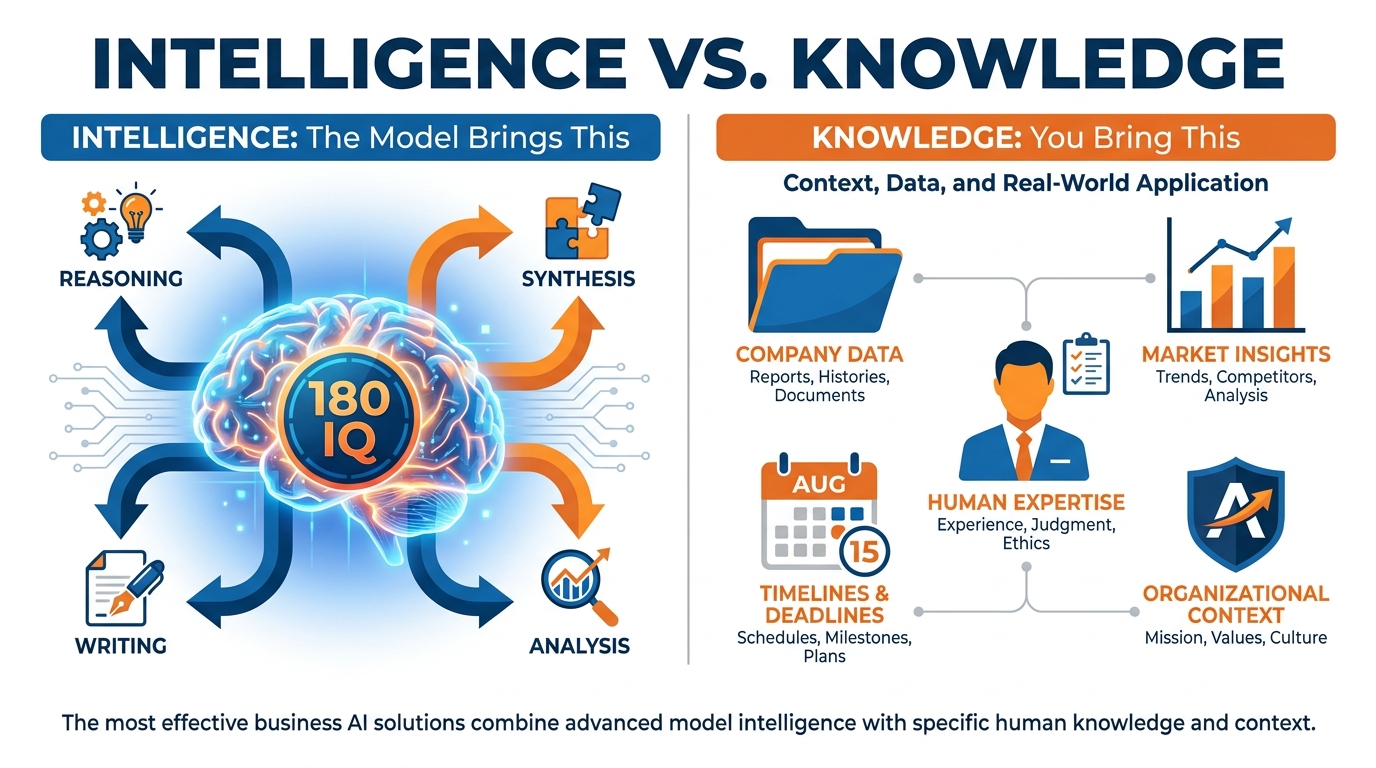
Figure 1:The Intelligence vs. Knowledge divide — what the model brings, and what only you can provide.
Here is a question nobody asks.
If you could hire the most brilliant analyst who ever lived — someone with an IQ of 180, who has read every business book, every legal brief, every medical journal, every line of code ever published — how much would you pay them?
Millions. Obviously.
Now here is the part that should stop you cold.
You already have access to exactly that. For twenty dollars a month.
That is a large language model. Not a chatbot. Not a glorified autocomplete. A reasoning engine trained on an almost incomprehensible slice of human knowledge, available to you right now, on the device in your pocket.
But there is a catch. And this catch is everything.
This analyst — brilliant as they are — walks into your office on their first day knowing absolutely nothing about your company, your customers, your competitors, or what you actually need done today. They are extraordinary at thinking. They are completely in the dark about your world.
This is not a flaw. It is the design. And once you understand it, everything about AI becomes clear.
The Most Important Concept in This Entire Book
Stop here for a second.
Intelligence is the ability to reason, synthesize, compare, explain, generate, and solve. The LLM brings this in extraordinary abundance.
Knowledge is the specific information needed to apply that intelligence to a real problem. The LLM brings general knowledge from training — but it does not have your knowledge: your company’s strategy, your client’s history, today’s date, your industry’s current dynamics, or your personal goals.
The moment you internalize this distinction, AI tools stop being mysterious and start being manageable. Poor outputs are almost never caused by a “dumb” model. They are caused by a well-informed model being asked to operate in the dark.
What the Model Has
A large language model is trained on a massive corpus of text — books, websites, code repositories, academic papers, and more. Through that training, it develops:
| Capability | What It Means for You |
|---|---|
| Language understanding | Reads and interprets any text you give it, including ambiguous, complex, or jargon-heavy content |
| Reasoning | Can follow multi-step logic, identify contradictions, make inferences |
| Generation | Produces fluent, well-structured text in nearly any format or style |
| Pattern recognition | Recognizes analogies, structures, genres, and common business frameworks |
| World knowledge | Has broad familiarity with history, science, business, law, medicine, and technology up to its training cutoff |
This is genuinely remarkable. You are not using a glorified autocomplete (we will address that characterization shortly). You are interacting with a system that has compressed an enormous slice of human knowledge into a high-dimensional reasoning engine.
What the Model Does NOT Have
Just as critical is what the model lacks. And this list is predictable — which means it is fixable.
This is not a flaw in the technology. It is a design boundary. The model was trained on general-purpose text; it was not trained on your organization. Closing that gap is exactly what this book teaches you to do.
Why “Autocomplete” Is Technically Correct and Emotionally Misleading
You may have heard critics dismiss LLMs as “just autocomplete.” This is technically accurate at a very low level: models do predict the next most likely token given prior tokens. But calling a large language model “just autocomplete” is like calling a commercial aircraft “just controlled falling.” It is technically defensible and practically useless as a description.
The emergent behavior of predicting tokens across billions of parameters, trained on trillions of words, produces something that functions — in every practical sense — as genuine reasoning. It drafts arguments it has never seen before. It adapts to new constraints mid-task. It recognizes when a question is ambiguous and asks for clarification.
Use the autocomplete framing to understand the underlying mechanics if you find it helpful. But do not let it lower your expectations of what these systems can do. The evidence of what they produce speaks louder than the metaphor.
The Vague Question Problem
Here is a simple demonstration of the intelligence vs. knowledge gap in action.
Ask an LLM: “What should I do with my business?”
You will receive a thoughtful, well-structured, completely generic answer. It may discuss reviewing your value proposition, analyzing your customer segments, or revisiting your pricing strategy. All of it will be reasonable. None of it will be actionable for your specific situation.
Now give the model context: your industry, your current revenue, your biggest challenge, the decision you are trying to make this week. Ask the same question.
The output transforms. Same intelligence. Radically different result. The only thing that changed was the knowledge you provided.
This pattern — intelligence applied to supplied knowledge — is the engine behind every practical use case in this book.
The Model Tiers: Not All 180 IQs Are Equal
Different models from the same provider are trained differently and optimized for different tasks. Think of them the way you think of smartphone tiers: Pro Max, Pro, and Standard. Each runs the same underlying architecture but with different levels of capability, speed, and cost.
The strongest “frontier” models (Claude Opus 4.7, GPT-5.5, Gemini 3.1 Pro) are your heavyweight reasoners — best for complex analysis, nuanced writing, and multi-step problem solving. Faster, lighter models (Claude Haiku, Gemini Flash) are optimized for speed and volume. Chapter 1.3 gives you the full tour.
For now, understand that even the most capable model is limited not by its intelligence ceiling but by the quality of what you give it to work with.
Summary
The Flashlight Theory: Why Context Is Everything
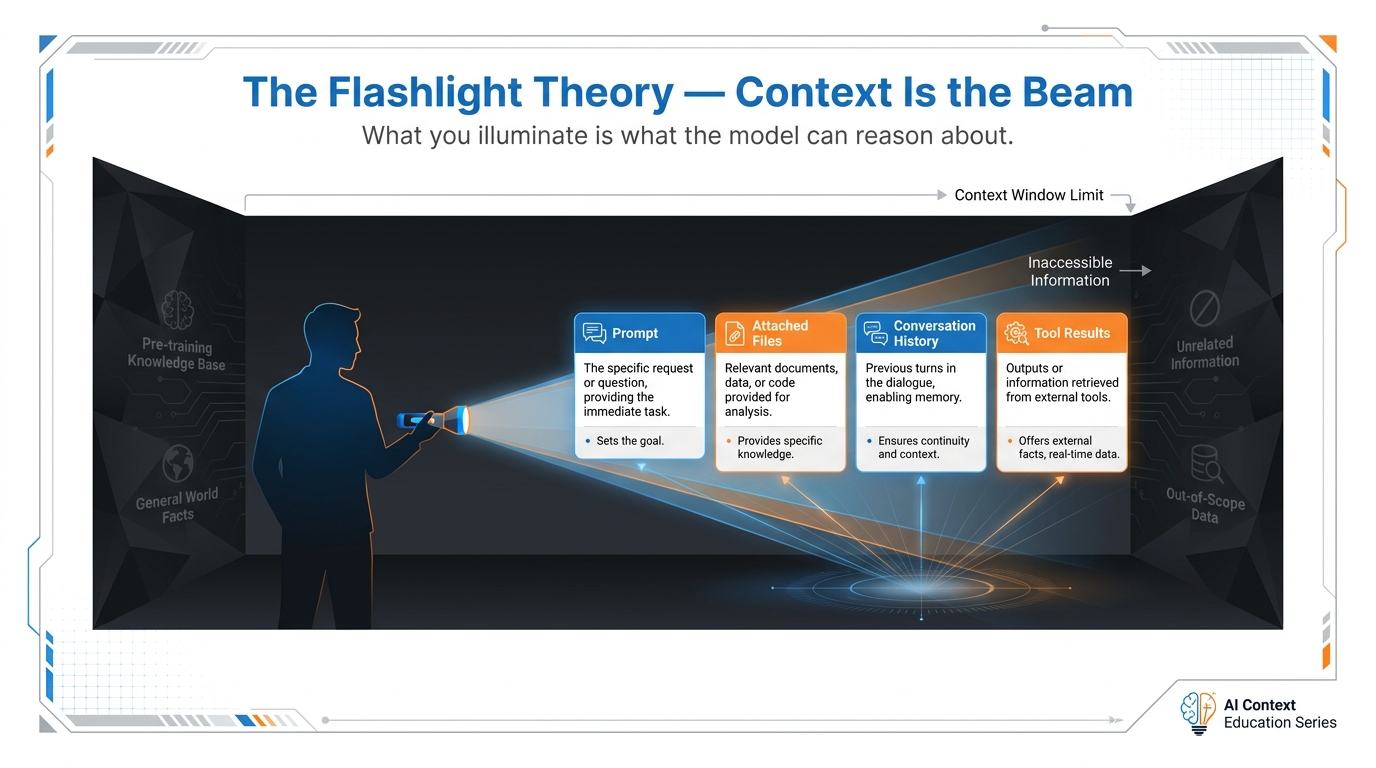
Figure 2:The Flashlight Theory: context is the beam. What you illuminate determines what the model can reason about.
Picture a 180-IQ mind locked in a pitch-dark room. No windows. No light. The mind is extraordinary — it can reason about anything, synthesize any information, answer any question — but only about what it can see. Now you hand it a flashlight.
Whatever that flashlight illuminates, the mind can work with brilliantly. Whatever stays in the dark might as well not exist. The quality of the mind is fixed. The quality of your results depends entirely on where you aim the beam.
This is the Flashlight Theory, developed by Matty Squarzoni, and it is the most useful mental model for understanding how to work with AI. Context is the flashlight. Every technique in this book — every strategy, pattern, and framework — is a way to aim the beam more precisely.
The Room Is Dark by Default
When you open a new conversation with an AI, the room is dark. The model has its training — its 180-IQ intelligence, its general world knowledge — but it has no visibility into your specific situation.
Your flashlight starts empty. You have to build the beam.
Each of these is a surface the flashlight can sweep over. The more relevant surfaces you illuminate, the more precisely the model can reason.
Why “The AI Is Bad at This” Is Almost Always Wrong
When an AI gives you a poor output, the first instinct is often to blame the model. It doesn’t understand my industry. It gives generic answers. It missed the point.
The Flashlight Theory dissolves this complaint almost entirely.
The model isn’t bad at your task. The room is dark.
When an AI gives a generic answer, it’s because it received a generic prompt with no illumination of your specific context. When it “misses the point,” it’s because the point was not inside the beam. When its advice doesn’t apply to your situation, it’s because your situation was never made visible.
This reframe is powerful because it moves you from a passive stance (“the AI failed me”) to an active one (“I need to aim the flashlight better”). That shift in agency is where productivity gains live.
The Page-and-Prompt Pattern
The single most effective basic technique in this book follows directly from the Flashlight Theory. We call it the page-and-prompt pattern.
The pattern is simple:
Find the page — identify the relevant document, reference, data, or text that the model needs to see
Paste it in — place it in the conversation before your question
Ask your question — now the model has both the illuminated reference and your specific task
You: “What does Claude’s API documentation say about rate limits?”
Result: A general answer based on the model’s potentially outdated training knowledge.
You: [Paste the actual documentation page] “Based on this documentation, what rate limits apply to my use case if I’m sending batch requests?”
Result: A precise, accurate, specific answer grounded in the actual current documentation.
The page-and-prompt pattern works because you are literally expanding the flashlight beam to include the exact information the model needs.
What Lives Inside the Beam Right Now
At any moment in a conversation, the flashlight beam contains everything that has been loaded into the context window — the model’s working memory for this session. Here is a practical map of what can be in that beam:
The Flashlight Beam: What Can Be Illuminated
Source | What It Contains | How to Add It |
|---|---|---|
System prompt | Standing instructions, persona, rules for this session | Set at session start (in tools like Claude Projects) |
Your messages | Questions, tasks, instructions you have typed | Type them in |
Attached files | Documents, spreadsheets, PDFs, images | Attach or paste |
Conversation history | Everything said so far in this session | Accumulates automatically |
Tool results | Search results, database queries, API responses | Via connected tools (RAG, MCP) |
Pasted documentation | Reference pages, specs, guidelines | Copy-paste directly |
Mastery of this book means learning to populate each of these sources intelligently — knowing what to include, what to exclude, and in what order.
The Hierarchy of the Beam
Not everything in the context window carries equal weight. Research on how models process long contexts suggests a rough hierarchy:
Recency bias — content near the end of the conversation tends to be weighted more heavily
Explicit instruction — direct, clearly stated instructions outweigh implied ones
Specificity — specific information tends to be prioritized over general background
Repetition — things stated multiple times across the context get more attention
This has a practical implication: if something matters, say it clearly, say it near your question, and say it specifically. Don’t bury the most important instruction three messages ago in a long paragraph of background.
Applying the Theory: The Claude Documentation Example
One of the best demonstrations of the Flashlight Theory is with technical documentation. AI models are often criticized for giving outdated or inaccurate information about rapidly evolving tools. This is a flashlight problem.
The model’s training has a cutoff date. Anything that changed after that date is in the dark. But if you paste in the current documentation — you have solved the problem.
Claude’s developer documentation lives at https://
This is the flashlight in action: you extended the beam to include today’s documentation, and the model’s intelligence went to work on accurate, current information.
Summary
Meeting the Models: A Tour of the Family
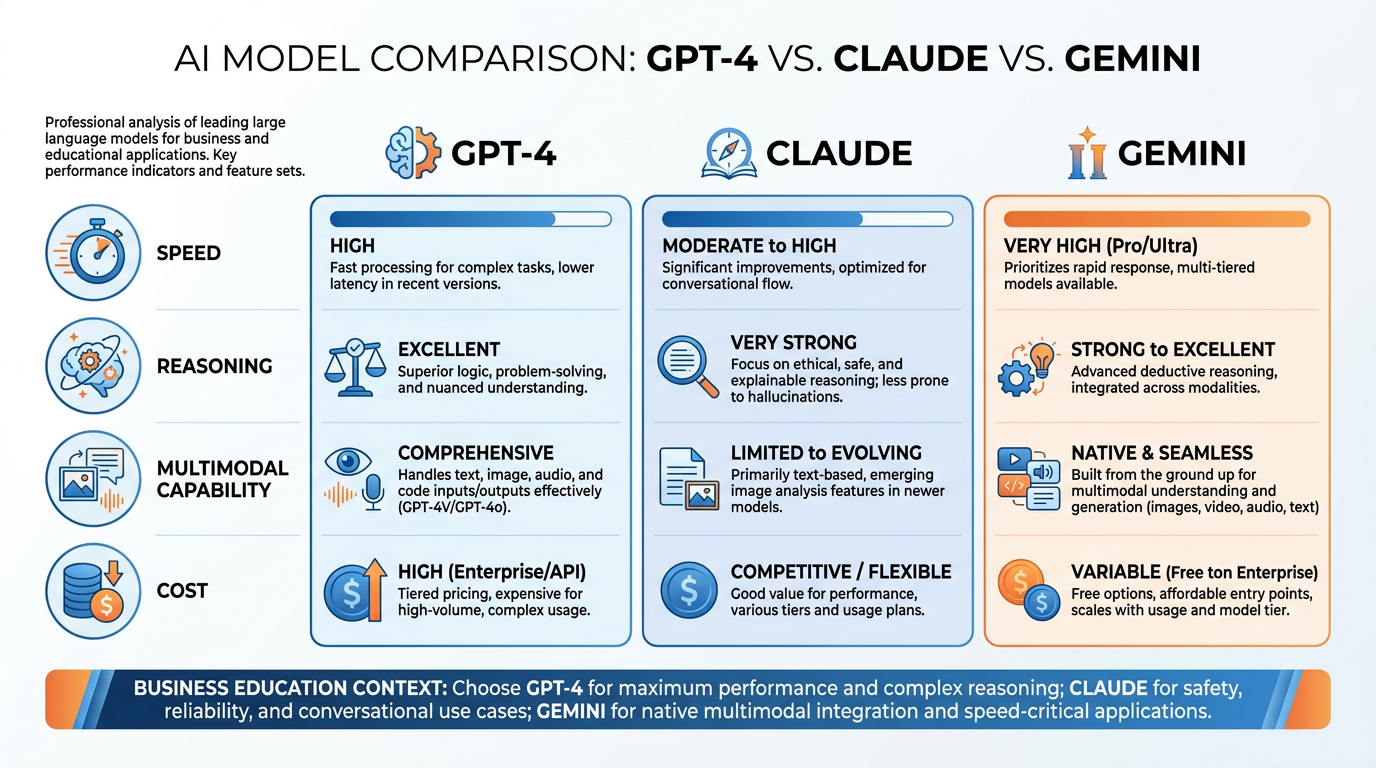
Figure 3:The AI model landscape: major families, capability tiers, and when to reach for each.
All frontier AI models have extraordinary intelligence. But they are not identical. Just as two people with the same IQ can have very different personalities, cognitive styles, and areas of strength, different models have different temperaments — different tendencies in how they reason, what they emphasize, and where they shine.
Choosing the right model for a task is not a technical decision. It is a practical one. Understanding the landscape helps you reach for the right tool without overthinking it.
A Note on Version Numbers
Before we go any further: the specific model versions named in this chapter will be outdated within months. AI providers release new versions constantly, and the version numbers you see here — Opus 4.7, Gemini 3.1, and others — will have successors by the time you read this.
The principles do not change. The versions do.
For the current model map — including which models are available today, what they cost, and which are recommended for which tasks — visit drleee.io. That resource is maintained in real time.
Read this chapter for the framework of how to think about model selection. Use drleee.io for the current roster.
The Smartphone Analogy
Think of model tiers the way you think about smartphone lines. Apple sells the iPhone Pro Max, the iPhone Pro, and the standard iPhone. All three make calls and run apps. But the Pro Max has more capability, more processing power, and a higher price. You do not reach for the Pro Max for every task — you use the standard model for most things and the Pro Max when the stakes justify the cost.
AI models work the same way. Every major provider offers a tiered lineup:
| Tier | Analogy | Use Case |
|---|---|---|
| Frontier / Max | iPhone Pro Max | Complex reasoning, nuanced writing, deep analysis |
| Balanced / Pro | iPhone Pro | Daily professional work, most business tasks |
| Fast / Standard | iPhone Standard | High volume, quick lookups, speed-sensitive tasks |
The Claude Family (Anthropic)
Claude is built by Anthropic with a strong emphasis on careful reasoning, nuanced instruction-following, and long-context performance. It is widely regarded as the best model for complex writing, structured analysis, and tasks requiring sustained coherence across long documents.
Access: claude.ai — Free tier available; Pro plan ($20/month) unlocks Sonnet and Opus.
The Gemini Family (Google)
Gemini is Google’s flagship model family, deeply integrated with Google Workspace. If you live in Google Docs, Sheets, Gmail, or Drive, Gemini has native access to that ecosystem in ways that other models currently do not.
Access: gemini.google.com — Free tier available; Gemini Advanced ($20/month) in Google One.
Differentiator: If you already pay for Google Workspace Business, Gemini may be included. Check your organization’s plan before subscribing separately.
The GPT Family (OpenAI)
OpenAI’s GPT series is the lineage that launched the current AI wave. GPT-5.5 is the current flagship — multimodal (text, images, audio), fast, and deeply capable. OpenAI also operates the world’s largest ecosystem of third-party plugins and integrations.
Access: chatgpt.com — Free tier (GPT-5.5 limited); Plus plan ($20/month).
Grok (xAI)
Grok is Elon Musk’s xAI model, trained with a distinctive voice — direct, sometimes irreverent, with real-time access to X (formerly Twitter) data. This makes it uniquely suited for tasks involving social media trends, current events on X, or contexts where a more candid, unfiltered tone is appropriate.
Access: x.ai/grok or within the X platform.
When the Model Picks the Model: Routing
Everything you have read so far assumes that you choose the model. Increasingly, that is only half true.
The flagship products from the major providers are no longer single models. They are routed systems — a family of sub-models sitting behind one name, with a real-time router that examines each request and decides which family member should handle it. Ask a simple question and the router hands it to a fast, cheap sibling. Ask something genuinely hard and it escalates to the deep reasoner, sometimes visibly “thinking” for seconds or minutes before answering.
OpenAI pioneered this at consumer scale: when you use the default model in ChatGPT, a behind-the-scenes router decides — based on the conversation type, complexity, and even explicit phrases like “think hard about this” — whether your request goes to the fast variant, the reasoning variant, or a mini version of either. Google’s Gemini app and Anthropic’s Claude apps have moved in the same direction: the default setting in each is increasingly “let the system decide,” with manual model selection preserved as an option.
Why providers do this: most requests do not need frontier reasoning, and serving every “what’s a good subject line?” query with the heavyweight model wastes enormous compute. Routing lets providers give you flagship quality when it matters and flagship speed when it doesn’t.
How this changes the advice in this chapter: it doesn’t invalidate it — it adds a layer. The model-selection framework you just learned still governs two decisions that routing cannot make for you:
Which provider’s family to use — the router only routes within its own family. Choosing Claude vs. Gemini vs. GPT is still your call, and the temperament differences are real.
When to override the router — routers optimize for the average user. When you know your task is deceptively hard (it looks like a quick question but requires careful multi-step reasoning), pinning the heavyweight model explicitly is still the professional move. Most interfaces let you do this: the model picker is still there, even when a routed default sits on top of it.
Try It: Routed vs. Pinned — Same Prompt, Two Paths
Time: 10 minutes. You will run one prompt through a routed flagship and then through a manually pinned model, and observe the difference in how the system handles it.
Go to chatgpt.com and sign in (a free account works for this exercise).
Look at the top-left of the chat screen — you will see the current model name (e.g., “GPT-5.5”). This default is the routed system: a router is deciding which sub-model answers you. Leave it as is for now.
Start a new chat and paste this prompt exactly:
“A retailer buys a product for $60 and marks it up 40%. During a sale, the price is discounted 25%, and then a 10% loyalty coupon is applied to the discounted price. What is the final price, and what is the retailer’s profit margin on the sale? Show your reasoning.”
Watch what happens before the answer appears. If the router escalated your request to a reasoning model, you will see a “Thinking…” indicator (sometimes with a expandable summary of its reasoning). If it judged the question easy, the answer streams immediately. Note which happened, and roughly how many seconds it took.
Now click the model name at the top-left of the screen. A dropdown opens listing specific models — look for a heavyweight reasoning option (labeled something like “GPT-5.5 Thinking”; the exact label may vary — if you don’t see it, look under a “More models” or “Other models” submenu). Select it. You have now pinned a model: the router is out of the loop.
Open a new chat (important — a fresh conversation, so no history carries over) and paste the exact same prompt.
Compare the two runs on three dimensions: time to first word, length and structure of the reasoning shown, and whether the final numbers match. (They should match — it’s arithmetic — but the path and presentation often differ visibly.)
Optional third run: pin the fastest model in the dropdown (a “mini” or “Instant” variant) and run the prompt a third time. This is what the router protects you from on hard tasks — see if the fast model cuts corners.
If you use Claude instead: at claude.ai, the model picker is in the chat input area (click the model name near the send button); the same experiment works with Claude’s default setting vs. explicitly selecting Claude Opus 4.7.
Deliverable: a short table — one row per run — with columns: model setting, thinking indicator (yes/no), seconds to answer, final price given, correct (yes/no). Plus two sentences: when would you trust the router, and when would you pin?
Open-Weight Models (Run Locally or via API)
A growing class of models are released with open weights — meaning the underlying model parameters are publicly available. This allows them to be run on your own hardware, customized for specific domains, or deployed without sending data to a third-party cloud.
Major Open-Weight Families
Family | Provider | Notable Strength |
|---|---|---|
Llama | Meta | Broad capability; widely supported; runs locally |
Mistral | Mistral AI (France) | Efficient; strong for European language tasks |
Qwen | Alibaba | Strong multilingual; excellent for East Asian language tasks |
Phi | Microsoft | Small but capable; optimized for edge/local deployment |
Open-weight models are most relevant for organizations with strict data privacy requirements, developers building customized applications, or power users who want to run AI without subscription costs.
When a Business Actually Chooses Open-Weight
For most readers of this book, the frontier cloud models are the right choice — better reasoning, zero infrastructure, twenty dollars a month. But there are three business situations where open-weight models stop being a curiosity and become the correct answer, and you should be able to recognize them:
Data cannot leave the building. Healthcare records, defense work, attorney–client material, unreleased financials. When policy or law forbids sending data to a third-party cloud, a model running on hardware you control is not a preference — it is the only compliant option. A hospital running Llama on its own servers can analyze patient notes that it could never paste into a cloud chat.
Cost at scale flips the math. Per-token pricing is negligible for a person and very real for a pipeline. If your product classifies two million support tickets a month, the subscription-model economics invert: paying for your own GPUs (or renting them) and running an open-weight model can cost a fraction of frontier API fees — especially since classification-type tasks rarely need frontier intelligence anyway.
Offline or edge operation. Field equipment, ships, factory floors with air-gapped networks, apps that must work without connectivity. Small open-weight models (Phi, small Llama and Mistral variants) now run on a laptop — some on a phone.
The trade you accept: open-weight models generally trail the frontier on raw reasoning, and you own the operational burden — hardware, updates, safety filtering, monitoring. That is why the decision is almost always driven by the three constraints above, not by capability.
The tool most people meet first in this world is Ollama (ollama.com) — a free application that downloads and runs open-weight models locally with a single command. You do not need it for this book, but you should know it exists: it is the twenty-minute proof that serious AI can run entirely on a machine you own.
Try It (Optional): See Local AI Without Installing Anything
Time: 5 minutes. Observation only — no installation required.
Go to ollama.com in your browser.
Click Models in the top navigation. You are looking at the catalog of open-weight models that anyone can download and run locally — you will recognize the families from the table above (llama, mistral, qwen, phi).
Click on any llama entry. Look at the size variants listed (e.g., 8b, 70b — the “b” is billions of parameters). Note that the small variants are a few gigabytes — the size of a movie file. That is a functioning AI model.
Notice what is absent from this page: no subscription, no API key, no account requirement to run the model, no data leaving your machine once it is downloaded.
Deliverable: two sentences — one business scenario from your own world where the “data cannot leave the building” rule would apply, and which model family you would investigate first.
The Models You Cannot Have: Restricted Frontier Tiers
One honest note before we leave the roster, because you will encounter references to it: the most capable model variants at each lab are not always the ones on the public price list.
Frontier labs routinely operate gated tiers — model versions or capability levels available only to select enterprise customers, government agencies, and research partners, sometimes under specific safety agreements. The versions have specialized variants for classified and government work (Anthropic and OpenAI both ship government-specific offerings, and models cleared for U.S. national-security use run in dedicated environments). Some capabilities — certain agentic functions, some biology-adjacent knowledge, very long autonomous operation — are deliberately constrained in consumer products even when the underlying model can do more.
Governments are also now involved in when and how frontier models are released. Under evolving frameworks in the U.S., U.K., and EU, the largest labs share pre-release access with government AI-safety institutes for evaluation, and release timing for the most capable systems increasingly reflects those reviews. This is not conspiracy material — it is published policy, and the labs discuss it openly — but it means two things worth knowing as a business reader:
The public frontier is not the absolute frontier. The gap is generally believed to be modest, but “the best model money can buy” and “the best model that exists” are no longer the same sentence.
Release schedules are partly regulatory events. When a long-anticipated model ships later or more conservatively than expected, safety review — not just engineering — is often part of the reason.
For the practical work in this book, none of this changes your decisions: you work with the public tiers, and they are extraordinary. But when you read that a lab “has something better internally,” you now know the honest framing: probably true, probably modest, and increasingly mediated by governments as well as by the labs themselves.
Where to Compare Models Side by Side
The fastest way to develop model intuition is to run the same prompt through multiple models simultaneously.
arena.ai — The best current platform for side-by-side model comparison. Run the same prompt through two or more models at once and compare outputs instantly. No setup required; free to use.
Use Arena to:
See which model handles your specific task better
Develop personal intuition about tone and reasoning style differences
Quickly benchmark a new model you haven’t used before
How to Choose
For most business professionals, the decision is simpler than it looks:
Use Claude Sonnet or Opus for anything requiring nuanced reasoning, long-document work, or careful writing.
Use Gemini when your work lives in Google Docs, Sheets, or Gmail — native integration is the differentiator.
Use Haiku or Flash when you need fast, lightweight processing of many small tasks.
Summary
Beyond Text: Multimodal Work as a Daily Workflow

Figure 4:One reasoning engine, four doors: PDFs, images, video, and voice are inputs — not special features.
Everything in this chapter so far has assumed the input is text. That assumption is now obsolete, and the professionals who notice this first have a real edge.
The frontier models are multimodal: they accept images, PDFs, audio, and (in Gemini’s case, natively) video as input, and reason over them with the same intelligence they apply to text. This is not a gimmick bolted onto a chatbot. Each modality is a workflow — a category of daily work that used to require manual transcription, retyping, or a specialist tool, and now requires a drag-and-drop.
Here is what each one actually replaces:
Multimodal Inputs as Business Workflows
Modality | The Workflow It Replaces | Real Examples |
|---|---|---|
PDF upload | Reading, extracting, and retyping from documents | Contract review, invoice data extraction, comparing two vendor proposals, pulling every deadline out of a 60-page RFP |
Image / photo | Manual transcription of anything visual | Photograph a whiteboard after a meeting and get structured notes; photograph a chart in a printed report and get the underlying numbers; screenshot an error message and get a diagnosis |
Video | Watching and note-taking | Drop a recorded meeting or training video into Gemini and get a summary with timestamps; extract every action item from an hour-long webinar |
Voice mode | Typing itself — and note-taking while mobile | Talk through a problem on your commute in the ChatGPT, Claude, or Gemini mobile app’s live voice mode; debrief after a client call while it’s fresh |
Two practical notes before the activity. First, modality support varies by product: Claude and ChatGPT handle PDFs and images natively; Gemini additionally handles video and audio files natively, which is a genuine differentiator for meeting-heavy work. Second — and this matters — extraction from images is reading, not measuring. When a model pulls numbers off a photographed chart, it is interpreting pixels, exactly as your eye would. It is very good and occasionally wrong, which is why the activity below ends with a hand-verification step. That step is not busywork; it is the habit this entire chapter is building toward.
Try It: Extract Tables from a PDF and a Chart Photo — Then Verify by Hand
Time: 15 minutes. You will extract structured data from two non-text sources and catch (or fail to catch — that’s the lesson) any extraction errors.
Part A — The PDF
Find any PDF with at least one table of numbers in it. If nothing is at hand, use a public one: go to https://
www .berkshirehathaway .com /letters /letters .html and download any recent shareholder letter (they contain performance tables). Go to claude.ai and click New chat.
Click the paperclip / plus icon in the chat input area (bottom of the screen; if you don’t see a paperclip, look for a + button next to the input field) and select Upload from device. Choose your PDF.
You will see the file appear as an attachment chip above or inside the input field. Now paste this prompt and send:
“Find the main data table in this document. Reproduce it as a clean markdown table, preserving every row and column exactly. Then tell me the page number where you found it.”
What you should see: a formatted table in the response, with a page reference. If the model says it can’t find a table, reply: “List every table or set of tabular figures in the document with its page number” and pick one.
Part B — The Chart Photo
Take a photo with your phone of a chart on paper or on a screen — a bar or line chart from a printed report, a magazine, a textbook, or even a chart displayed on your monitor. Imperfect angle and lighting are fine (that’s realistic).
Get the photo to your computer (AirDrop, email to yourself) — or simply do this step in the Claude mobile app, where you can tap the + button and choose Camera directly.
In a new chat, upload the photo the same way as the PDF, and send:
“This is a photo of a chart. Extract the underlying data into a table: one row per data point, with the category/date and the value as you read it from the chart. If you are estimating a value from the visual, mark it with a tilde (~). State what the chart’s title and axes say.”
What you should see: a table of values, some possibly marked as estimates, plus the title/axis text.
Part C — The Verification Step (do not skip this)
Pick one number from each table the model produced. Go back to the original PDF and the original chart, and check those numbers yourself, by eye.
For the PDF: the number should match exactly. If it doesn’t, you have just caught an extraction error — note it.
For the chart photo: expect the model’s reading to be close but possibly not exact (charts encode values in pixels; ~5% off on a bar chart read is normal). Ask yourself: would that error have mattered if I’d forwarded this table to my boss without checking?
Deliverable: both extracted tables, plus a three-sentence note: which number you verified in each, whether it matched, and one workflow from your own job where this replaces retyping.
Tokens: The Atoms of Machine Language
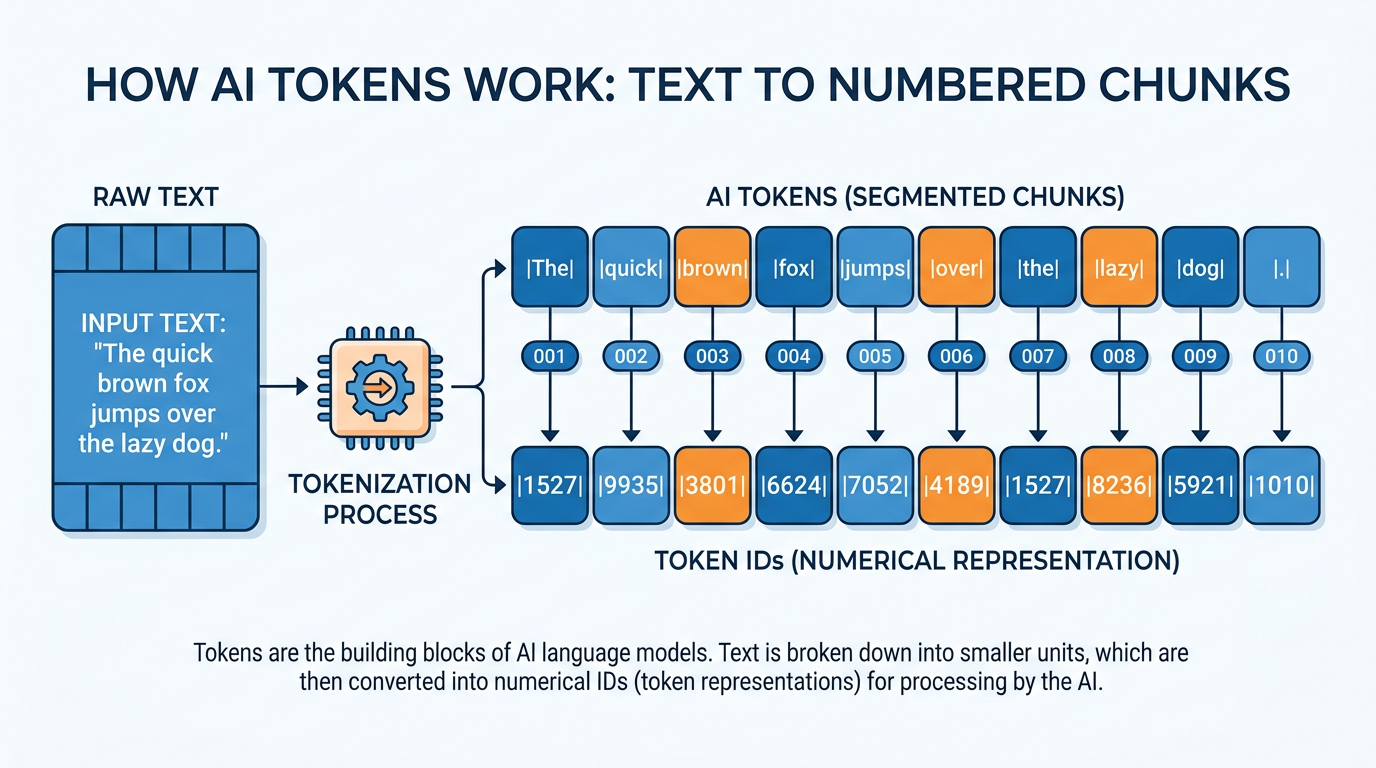
Figure 5:Tokens are the atoms of machine language: not words, not characters, but chunks that models actually process.
The word “understanding” does not mean anything to a language model. Neither does “business” or “strategy.” What the model actually processes is a sequence of numbers — each number representing a small chunk of text called a token.
This distinction sounds technical, but it has immediate, practical consequences for how you write prompts, estimate costs, and understand what the model is doing when it responds to you.
What a Token Is
A token is roughly 3–4 characters of text, on average. That works out to approximately three-quarters of a typical English word. It is not a word. It is not a letter. It is a statistical chunk that the model’s vocabulary was trained to recognize as a meaningful unit.
In practice, common words tend to be single tokens. Unusual, long, or compound words often split into multiple tokens. Punctuation, spaces, and special characters each consume tokens too.
Here is a rough rule of thumb that will serve you throughout this book:
This approximation will not be exact for every document — code, tables, and non-English text tokenize differently — but it is close enough for planning and cost estimation.
The Strawberry Problem
For a period, language models famously failed a simple test: counting the letters in the word “strawberry.” A model would confidently state that “strawberry” contains two R’s when it contains three.
This was a tokenization artifact. The model does not read “s-t-r-a-w-b-e-r-r-y” as individual letters. It reads it as one or two tokens — a chunk — and was not directly processing the character-level content the way a human would when counting.
Modern frontier models have improved significantly on character-level tasks, partly through chain-of-thought reasoning that effectively makes the model “spell out” what it is analyzing. But the underlying tokenization architecture remains.
Why Tokens Are Your Business Unit
Tokens are how AI providers measure and charge for usage. You are not paying per question. You are paying per token — for every token sent to the model (input) and every token the model generates in response (output).
This reframes how you think about your prompts. A prompt is not just a question — it is an expenditure. A conversation is not just a dialogue — it is a running tab.
Token Cost Awareness — Rough Reference Points
Content | Approximate Words | Approximate Tokens |
|---|---|---|
A tweet | 30 | 40 |
A business email | 200 | 270 |
A one-page brief | 500 | 670 |
A 10-page report | 2,500 | 3,300 |
A full book chapter | 5,000 | 6,700 |
A typical contract (15 pages) | 7,500 | 10,000 |
None of these figures should alarm you — at current pricing, even 10,000 tokens costs less than a dollar. But the pattern matters as your usage scales, and understanding the unit helps you make informed decisions about prompt length, document inclusion, and conversation management.
Tokens Across Languages
One important nuance: tokenization is not language-neutral. English text is typically the most efficient — it was heavily represented in the training data that shaped most tokenizers. Other languages, particularly those with non-Latin scripts (Chinese, Arabic, Japanese, Korean), often require more tokens to represent the same amount of information.
A sentence in English might consume 15 tokens. The equivalent sentence in Japanese might consume 30–50 tokens, depending on the model and tokenizer.
If you are doing significant work in non-English languages — or with multilingual documents — factor this into your token estimates. The cost per unit of meaning will be higher.
Seeing Tokens in Action
The fastest way to build an intuition for tokenization is to see your own text broken apart. OpenAI’s tokenizer tool lets you paste any text and watch it get chunked in real time — with each token highlighted in a different color.
This is not an abstract exercise. Once you have seen how your own sentences tokenize, you start to develop a feel for what makes prompts efficient — and which habits (unnecessary preambles, redundant restatements, verbose throat-clearing) are burning tokens without adding value.
Summary
The Token Economy
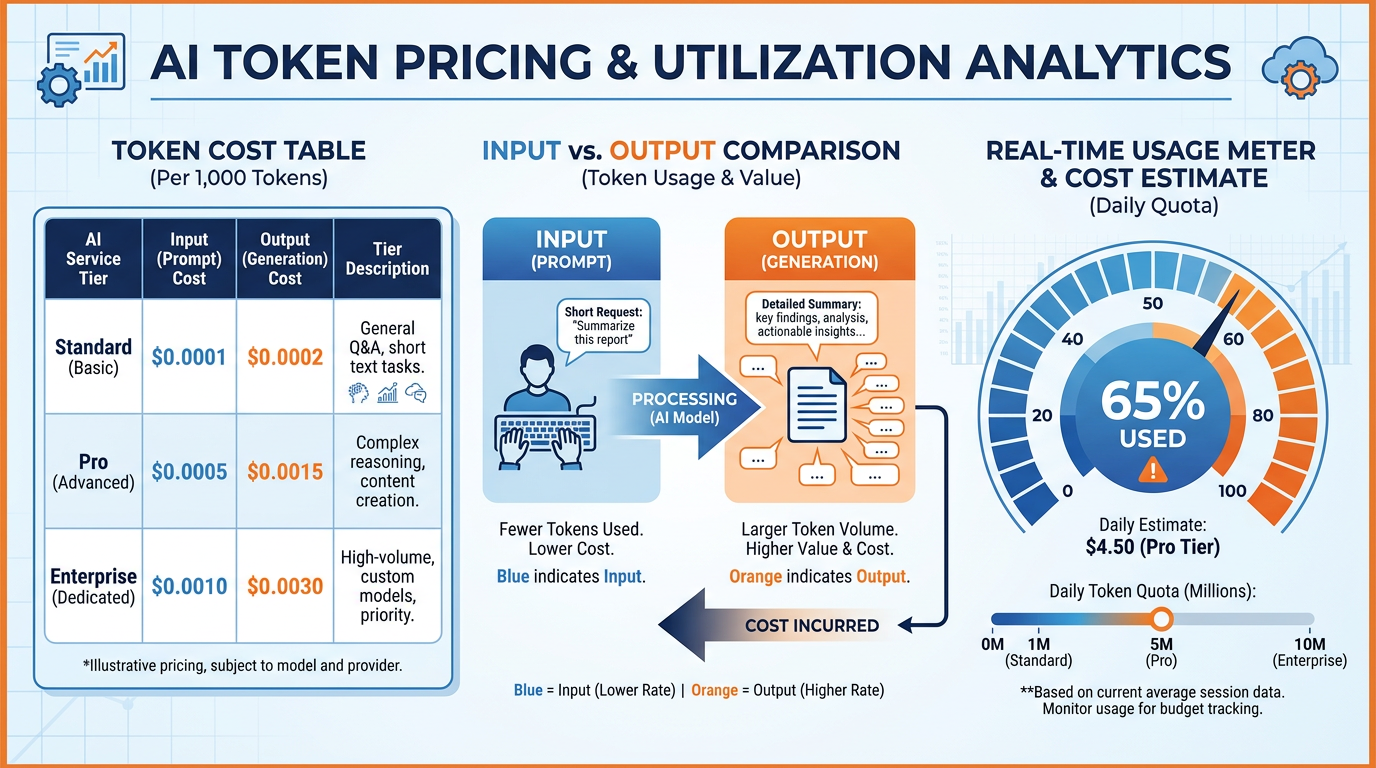
Figure 6:The token economy: think Uber, not a movie ticket — you pay per mile of text processed, not per conversation started.
Think of AI pricing like a taxi meter, not a flat fare. The meter starts running the moment the trip begins. Every mile — every token — adds to the total. You are not paying for the question; you are paying for the processing.
This changes how you think about conversations, prompt length, and the business economics of working with AI at scale.
Input Tokens vs. Output Tokens
The most important pricing distinction in AI is one most new users miss: input tokens and output tokens cost different amounts, and output tokens are consistently more expensive.
Why? Generating text is computationally more intensive than reading it. When the model processes your prompt (input), it runs a single forward pass through the network. When it generates a response (output), it runs a separate, iterative generation process — one token at a time — which is significantly more resource-intensive.
This asymmetry is your cost lever. If you want to reduce AI costs at scale:
Write efficient prompts — be specific, not verbose; eliminate throat-clearing preambles
Constrain output length — instruct the model to be concise when you don’t need depth
Use cheaper models for output-heavy tasks — when you need a lot of generated text and the task doesn’t require frontier reasoning, use a faster, cheaper model
The Re-Send Problem
Here is the most counterintuitive fact about how AI conversations work: every message you send re-sends the entire conversation history.
When you are ten messages deep into a chat, and you type message eleven, the model does not receive just message eleven. It receives the full transcript — messages one through ten, plus your new message — all over again. Every. Single. Turn.
This happens because language models are stateless. They have no persistent memory between API calls. Each call is a fresh inference — and to have any sense of conversational continuity, the entire prior context must be included in each new request.
The practical consequence: long conversations become expensive quickly, because the input token count grows with every exchange. A 20-message conversation does not cost 20× a single message — it costs much more, because each message carries the full preceding history as its input.
The Three Cost Levers
Once you understand how tokens work, three practical habits make your usage more efficient:
Write tight prompts. Cut preambles like “I was wondering if you could help me with...” Just state the task. Every unnecessary word is a real — if tiny — cost.
Tell the model how much output you need. “In three bullet points” or “In under 200 words” meaningfully reduces generation cost and often improves quality.
For distinct tasks, start fresh conversations rather than continuing a long thread. This resets the re-send accumulation. Use long conversations only when continuity genuinely adds value.
When to Be Verbose, When to Be Efficient
Cost efficiency does not mean always being brief. Sometimes more context — more tokens — is worth it. The decision depends on the task:
Verbose vs. Efficient: When Each Wins
Situation | Approach | Why |
|---|---|---|
Complex analysis requiring nuance | Verbose context — provide all relevant background | The model needs the full picture; skimping on context produces shallow output |
Routine, well-defined task | Efficient prompt — minimal context, clear instruction | The task doesn’t benefit from extra tokens; you’re just running up the meter |
Output is long by necessity (report, draft) | Accept the output cost; consider a cheaper model tier | Output length may be unavoidable; optimize the model, not the output |
Quick lookup or simple question | Short prompt + short output constraint | Both sides of the cost equation can be minimized here |
The professional discipline is knowing which situation you are in before you start typing.
Practical Cost Awareness
At current pricing for frontier models (~$15 per million output tokens), here is what various tasks actually cost:
Drafting a 500-word email: less than $0.01
Analyzing a 10-page report and generating a summary: $0.05–$0.15
Processing 100 customer emails with response drafts: $1–$3
Running a complex multi-document research task: $0.50–$2.00
For individual professional use, AI costs are almost negligible compared to the productivity gains. The economics only become materially significant at scale — thousands of automated tasks, large document corpora, or high-frequency batch processing.
Knowing this helps you calibrate: don’t be so obsessed with token efficiency that you hobble your prompts. At $20/month for a pro subscription, you have substantial capacity before usage caps become a concern.
Summary
Past the Meter: Caching, Schemas, and Token Budgets
The token economy you just learned is the retail view: tokens in, tokens out, pay the meter. Three mechanics sit one level deeper. You will meet all three the moment you (or your team) move from chatting with AI to building with it — and two of them are useful in the chat window today.
Prompt Caching: Pay Once for the Boilerplate
Recall the re-send problem: every message re-sends the entire conversation. Providers noticed the obvious waste — the same system prompt, the same reference documents, the same long context being reprocessed on every single turn — and built prompt caching: the model keeps a processed copy of the repeated prefix, and subsequent requests that start with the same content pay a small fraction of the normal input price for the cached portion (on Anthropic’s API, cached reads cost roughly a tenth of normal input tokens; check anthropic
Why a business reader should care, even without touching an API:
It explains product economics. Claude Projects, custom GPTs, and Gemini Gems can afford to prepend your project knowledge to every message because caching makes the repeated prefix nearly free after the first send.
It rewards stable context. Caching only works when the repeated content is identical and sits at the front of the request. This is a second, independent reason for the habit this book keeps teaching: put your standing context (your brief, your documents) up front and leave it untouched, then vary only your question at the end. You have been designing cache-friendly prompts since Chapter 1.2 without knowing it.
At scale it is the difference between viable and not. A workflow that sends a 50,000-token policy manual with each of 10,000 monthly requests is 50× cheaper with caching than without. Build-vs-buy decisions in Chapter 11 quietly depend on this arithmetic.
Structured Output: Ask for a Shape, Not Just an Answer
By default, a model answers in prose — fluent, variable, and mildly different every time. That is fine when a human reads the output. It is a disaster when the output feeds a system: a spreadsheet, a database, a script, another AI. Systems need every response in the same shape.
Structured output is the fix: you specify the exact format — typically a JSON schema (a formal list of fields and their types) or a fixed table layout — and the model fills in the shape. The major APIs now enforce this mechanically (the model literally cannot emit a response that violates the schema), and you can get most of the benefit in a chat window just by stating the schema in your prompt.
The deeper point: a schema is a contract, and contracts change behavior. When you demand {"risk_level": "high" | "medium" | "low", "reason": "one sentence"}, the model must commit to a classification instead of hedging across a paragraph. Vagueness has nowhere to hide in a fixed field. You will feel this yourself in the activity below.
Token Budgeting: Deciding Spend Before You Prompt
The third mechanic is a discipline, not a feature. Professionals who run AI at any scale set a token budget the way they set a time budget for a meeting — before it starts, not after it runs long:
Budget the output. “Respond in under 300 words” or “a table with at most 10 rows” is a cost control and a quality control — constrained outputs are usually sharper.
Budget the context. Before pasting a 40-page document, ask: does the model need all 40 pages, or the 2 pages that matter? (This is Chapter 1.8’s signal-to-noise rule, expressed in dollars.)
Budget the model. Route the task to the cheapest tier that can do it well — Haiku/Flash for extraction and formatting, Sonnet-class for analysis, Opus-class when the reasoning is genuinely hard. A team that runs everything through the frontier tier is paying Pro Max prices for phone calls.
Budget the reasoning. Reasoning models bill their thinking as output tokens; several APIs let you cap “thinking effort” per request. More thinking budget for real problems, less for routine ones.
Try It: Schema vs. Freeform — Same Analysis, Two Shapes
Time: 10 minutes. You will request the same analysis twice — once free-form, once against an explicit schema — and compare which output you could actually use.
Pick a short real document you can paste: a vendor email, a product review, a paragraph from a contract, or a meeting-notes excerpt (5–15 sentences is ideal). Nothing confidential.
Go to claude.ai and click New chat. Paste the document and this prompt:
“Analyze this text. Tell me the overall sentiment, the key issues raised, how urgent this is, and what I should do next.”
Read the response. It will be good prose — note how long it takes you to find the urgency call, and whether the model committed to a single urgency level or hedged.
Open a new chat (fresh conversation — this matters, so no context bleeds over). Paste the same document with this prompt instead:
"Analyze this text and respond ONLY with a JSON object in exactly this schema, no other text: { “sentiment”: “positive” | “neutral” | “negative”, “key_issues”: [up to 3 short strings], “urgency”: “low” | “medium” | “high”, “urgency_reason”: one sentence, “recommended_action”: one sentence, “confidence”: “low” | “medium” | “high” }"
What you should see: a compact JSON block and nothing else. (If the model adds commentary around it, reply: “JSON only, no surrounding text.”)
Now compare the two outputs against three questions:
Scanability: in which version can you find the urgency verdict in under two seconds?
Commitment: did the free-form version hedge (“somewhat urgent, depending on…”) where the schema forced a choice?
Reusability: imagine 200 of these documents. Which output could drop straight into a spreadsheet? (That is the entire case for structured output at scale.)
Optional: paste the JSON into a new cell in Google Sheets or Excel and notice how close it already is to data.
Deliverable: both outputs side by side, plus three sentences answering the scanability / commitment / reusability questions. Keep your schema — you will reuse this pattern constantly from Chapter 3 onward.
Context: The Working Memory of the AI
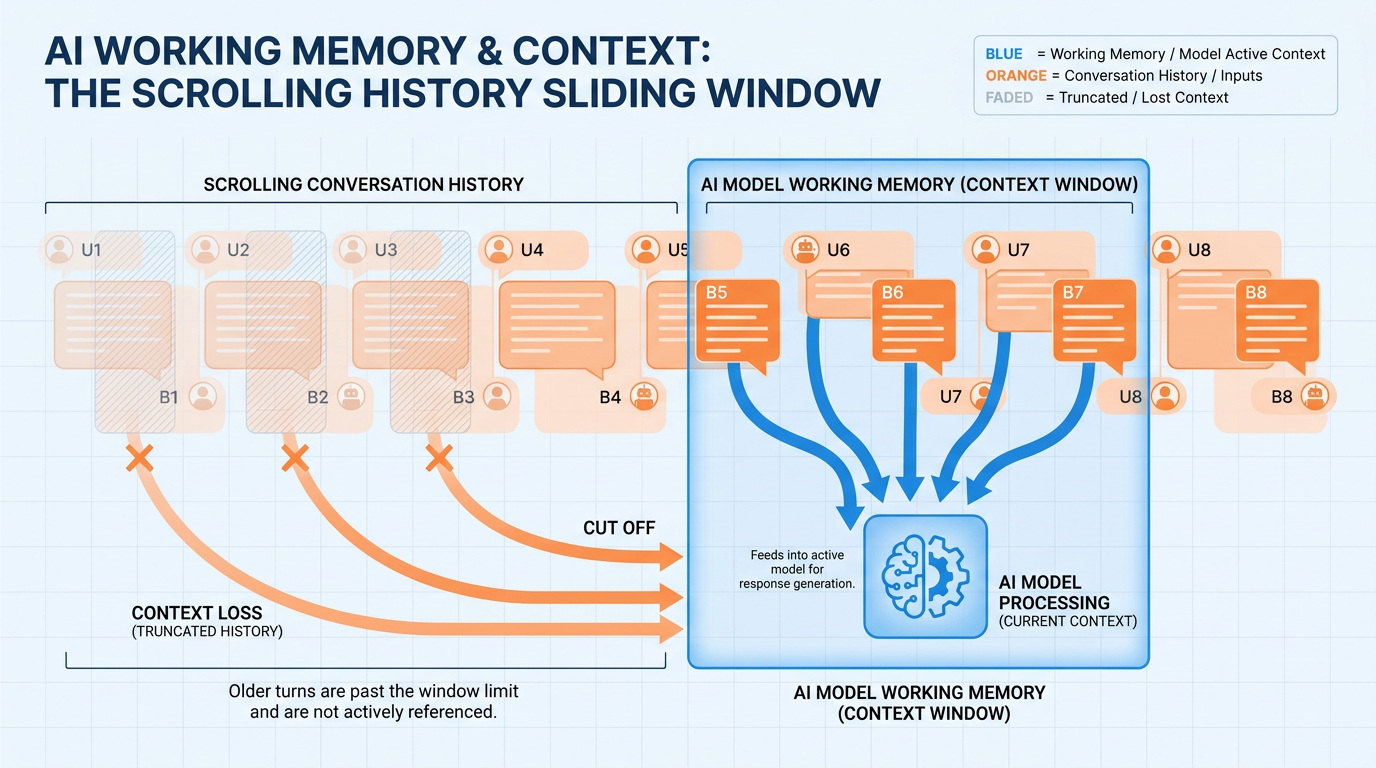
Figure 7:Context is the AI’s working memory: everything the model can see right now, structured in layers.
In Chapter 1.2, you met the Flashlight Theory — context is the beam, and the model can only reason about what the beam illuminates. Now it is time to open the flashlight and look inside.
Context is not a vague concept. It is a specific, structured collection of information that gets loaded into the model’s working memory for a given session. Understanding what it contains — and what controls each layer — is what separates casual users from professionals.
The Model Does Not Remember. It Re-Reads.
This is the most important thing to understand about how AI memory works: the model has no persistent memory between sessions. When you close a conversation and open a new one, the model starts with a completely blank slate.
What feels like memory — the model knowing what you discussed earlier in a conversation — is not memory in the human sense. It is re-reading. Every time you send a message, the model reads the entire conversation history from the beginning, as if seeing it for the first time.
This has a practical implication that most users miss: context is not automatic continuity. It is deliberate construction.
What Lives Inside the Context
At any given moment in a conversation, the model’s context contains some combination of the following layers:
Standing instructions that set the model’s role, behavior, tone, and rules for the session. In tools like Claude Projects or custom GPTs, this is set once and persists across all conversations in that project. You don’t see it in the chat, but the model does.
Everything that has been said in the current session — your messages and the model’s responses — in sequence. This grows with every exchange.
Documents, spreadsheets, PDFs, images, or code files you have explicitly added to the conversation. These are parsed and added to the context in full.
When the model has access to external tools — search, database queries, connected services via MCP — the results of those tool calls are also injected into the context.
Everything in this list is part of the beam. Everything outside it is darkness.
A Practical Example: The Analyst and the Report
An analyst is preparing a quarterly business review. She needs the model to reason about her company’s Q3 performance data. Without context, the model knows nothing — it has no access to her company’s numbers, her industry benchmarks, or her internal targets.
She uploads the Q3 report (50 pages, pasted as text into the conversation). Immediately, the model can reason about Q3 data. She also pastes in a competitor’s public earnings release. Now the model can compare. She adds a note specifying that her audience is the executive team and that she needs the tone to be direct and data-forward.
The context now contains:
Her role and the output goal (typed instruction)
The Q3 internal report (attached file)
The competitor earnings release (pasted text)
The audience and tone specification (explicit instruction)
The output she receives is specific, comparative, and appropriately styled — because the flashlight beam is fully illuminated.
The Hierarchy of Context: What Gets Prioritized
Not all context elements carry equal weight in how the model processes them. Research and practical experience suggest a rough priority order:
Context Priority Hierarchy
Priority | Element | Practical Implication |
|---|---|---|
Highest | Explicit instructions stated clearly and near the current message | Put your most important requirements close to your question |
High | System prompt (if set) | Use project-level system prompts for standing rules and role definitions |
Medium | Recent conversation history | Recency matters — things said recently carry more weight than messages far back |
Lower | Early conversation history and large attached documents | Critical information buried in the middle of long contexts may be underweighted |
Variable | Tool results | Depends on placement and how the tool result is formatted in context |
This hierarchy is not absolute — frontier models are increasingly sophisticated about long-context processing — but it is a reliable guide for structuring important information in your prompts.
Context as a Design Problem
Here is the shift that changes how you work: stop thinking of a conversation as a dialogue and start thinking of it as a document you are constructing for the model to read.
When you design a conversation this way, different questions arise:
What does the model need to see to give me the best output?
Is the most important information near the top, or buried in a long preamble?
Have I specified my role, my goal, and my constraints explicitly?
Are the documents I’ve included actually relevant, or am I cluttering the beam?
This design mindset — the editor’s mindset — is the subject of Chapter 1.8 (Context Engineering). For now, hold the core idea: context is something you construct, not something that happens automatically.
Summary
The Context Window
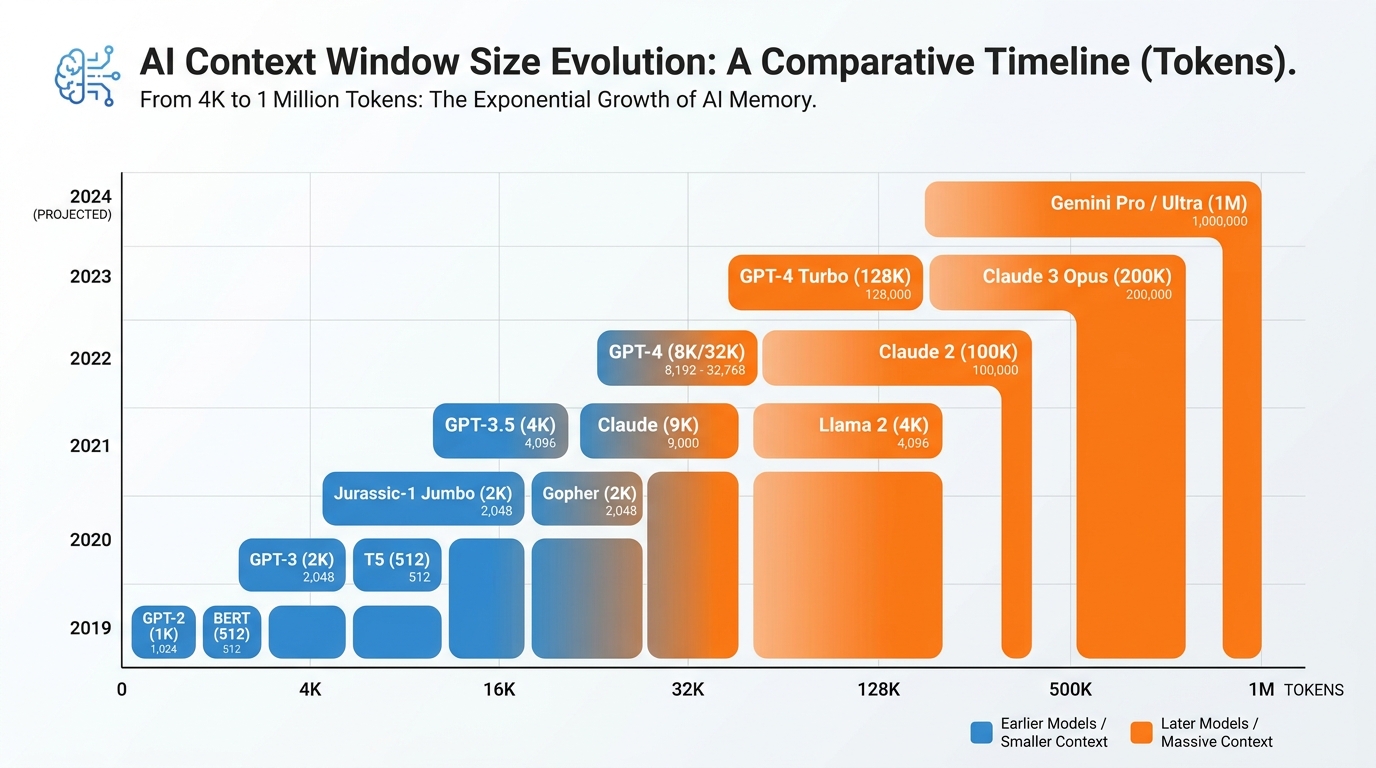
Figure 8:The context window as a desk: finite surface area, with attention clustering at the edges and fading in the middle.
Imagine your desk at work. It has a finite surface area. You can spread out documents, notes, and reference materials — but only so many before things start falling off the edges or getting buried under other papers. Whatever is on the desk is what you can work with. Whatever is not on the desk might as well be in storage.
The context window is the AI’s desk. It is the maximum amount of information the model can hold in working memory at one time — measured in tokens.
The Hard Ceiling
Every model has a maximum context size — a hard ceiling on how many tokens can exist in a single conversation before the model can no longer process the entire history. When that ceiling is hit, one of two things happens: either the model begins silently dropping the oldest content (a rolling window), or the system returns an error.
Current frontier models have dramatically larger context windows than even two years ago:
Context Window Sizes — Representative Current Models
Model | Context Window | Real-World Equivalent |
|---|---|---|
Claude (extended context) | Up to 1,000,000 tokens | Roughly the entire Lord of the Rings trilogy |
Gemini 3.x | Up to 2,000,000 tokens | Multiple full-length novels simultaneously |
GPT-5.5 | 128,000 tokens | ~96,000 words — a full business book |
Claude Haiku / Sonnet (standard) | 200,000 tokens | ~150,000 words — a long novel |
These numbers represent extraordinary progress. For almost any individual business task, you will never approach the ceiling. But “the ceiling is high” does not mean “more is always better.”
Size Is Not the Whole Story: Lost in the Middle
Here is a counterintuitive finding from AI research: models do not attend equally to all parts of a long context. They tend to weight content near the beginning and near the end more heavily than content in the middle.
This phenomenon is sometimes called the “lost in the middle” problem. If you paste a 200-page document into a conversation and ask a question that depends on information in chapter 11 — roughly the middle — the model may give you a weaker answer than if that same information were at the beginning or end.
This finding also explains why context engineering (Chapter 1.8) matters even when the context window is large enough to hold everything. You are not just managing capacity — you are managing attention.
The Edges Have More Weight
Think of the context window like a piece of paper being read by someone in a hurry. They read the top closely, skim the middle, and read the bottom closely before responding.
This is a useful — if simplified — mental model for prompt design:
Put your most important instructions at the top (the beginning of the conversation or the beginning of your message)
Put your most critical document section near the end of what you paste in, just before your question
Avoid burying key information in long preambles or in the middle of a large document paste
The model will “see” everything in the window — but seeing and attending to are different.
What Happens When the Window Fills
When a conversation grows long enough that older content begins to fall outside the effective attention range, quality degrades in predictable ways:
The model repeats itself, forgetting it already covered a topic
It contradicts instructions given early in the conversation
It loses track of the original goal stated at the start
It begins making assumptions based on recent context rather than the full picture
These are all symptoms of context rot — a related problem covered in detail in Chapter 1.9. For now, recognize them as signals that the desk has gotten too crowded.
When Size Matters
There are genuine tasks where large context windows provide enormous value:
Full-document analysis — reviewing an entire contract, report, or manuscript for issues
Codebase review — examining a full codebase for architectural problems
Multi-document synthesis — comparing several long documents simultaneously
Long project continuity — keeping a detailed project brief active across a long working session
For these use cases, Claude’s extended context is a genuine differentiator. Being able to paste an entire 200-page report and reason across the whole thing — without chunking, summarizing, or losing continuity — is a significant capability advantage over approaches that require breaking documents into pieces.
Summary
Context Engineering
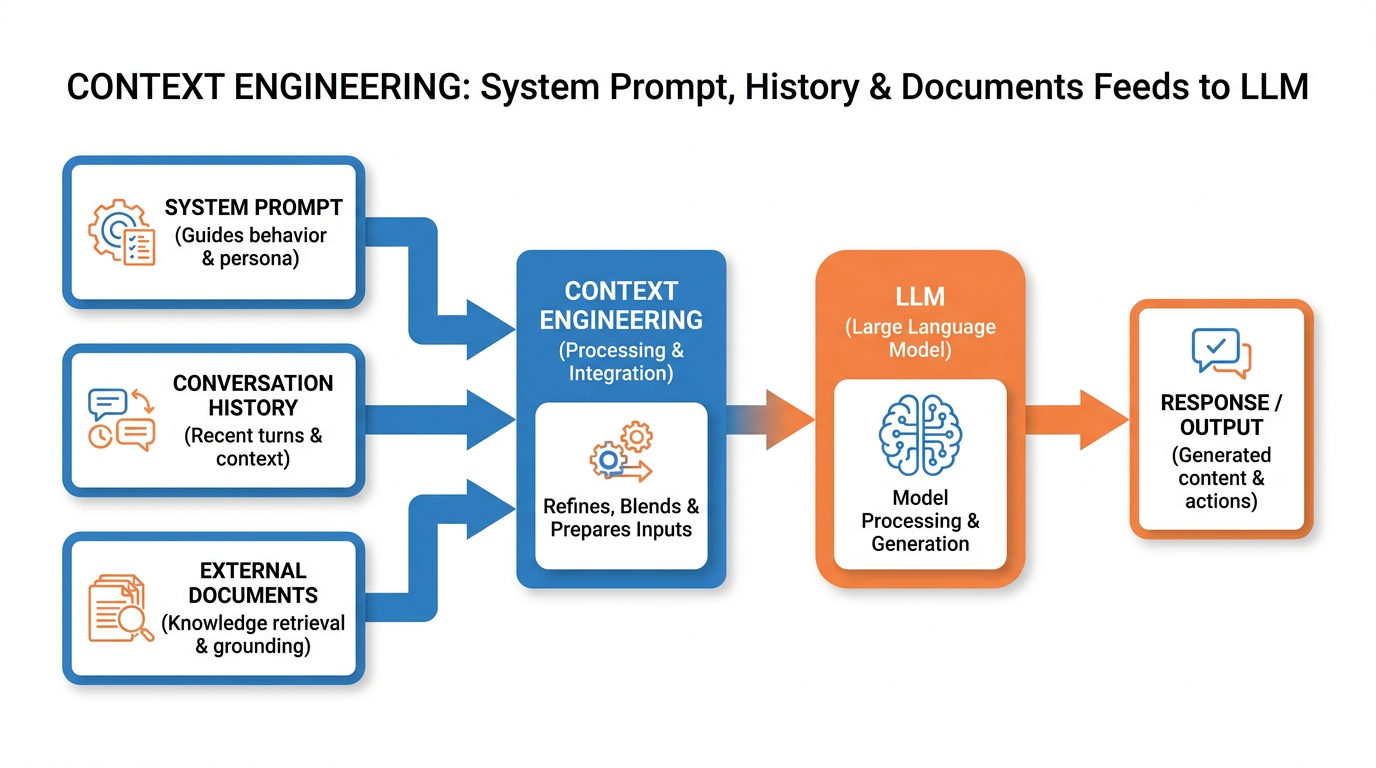
Figure 9:Context engineering: signal-to-noise curation, the three rules, and the editor’s mindset.
Everyone focuses on the prompt. The better leverage is in everything around the prompt.
Prompt engineering — crafting clever, well-structured questions — is a real skill. But it is downstream of something more important: what information you have placed in the context before asking. You can write the world’s best question and still get a mediocre answer if the model is looking at the wrong documents, missing your constraints, or drowning in irrelevant background.
Context engineering is the discipline of deciding what goes in, what stays out, and in what order — before you even start typing your question.
The Signal-to-Noise Problem
Adding more context is not the same as adding better context. The model has to process everything you put in front of it. Irrelevant, redundant, or poorly organized material does not just fail to help — it actively dilutes the quality of the response by competing with what actually matters.
The goal is high signal-to-noise ratio. Every element in the context should be there for a reason. If you cannot articulate why a document or paragraph is included, cut it.
The Three Rules of Context Engineering
These three principles will improve the quality of your AI outputs immediately. Apply them before any complex or important task.
The most important information — your goal, your constraints, the most critical section of a document — goes first. Not after a long preamble. Not buried. First.
If a document, paragraph, or background section would not meaningfully change your own understanding of the task, it will not meaningfully help the model either. Remove it.
State what success looks like before you dive into background. The model should know where it is going before it starts reading.
These rules map directly to the lost-in-the-middle findings from Chapter 1.7. The model attends most strongly to what appears early and what appears close to the question. Structure your context accordingly.
The Editor vs. the Prompter
Here is the most useful reframe in this entire chapter:
The person who gets the best AI outputs is not the best prompt writer. It is the best editor.
An editor does not just know how to ask good questions. An editor knows what to include, what to cut, and how to organize material so that the most important things are visible. An editor reads the full context before sending it, the way you would read a brief before handing it to a colleague.
The checklist takes 30 seconds. For important tasks, it routinely produces better outputs than any prompt-engineering trick.
A Practical Rewrite
Here is a before-and-after that demonstrates the three rules in action.
“Hi! I’m working on a strategic planning document for my company. We’re a mid-size SaaS company in the HR tech space. We’ve been around for about 7 years. We have about 85 employees. Last year was tough because of the market. Anyway, I was wondering if you could help me think through some things. Here is a very long document I’ve been putting together... [2,000 words of disorganized notes]. Based on all this, what should my Q4 priorities be?”
"Goal: I need clear Q4 strategic priorities for my SaaS HR tech company.
Context: 85 employees, 7-year-old company, difficult 2024 due to market contraction.
Constraints: Output should be three priorities max, written for the executive team, with one-sentence rationale for each.
Below is the relevant section of our current strategy doc:
[Excerpt: the 300 most relevant words, not the full 2,000]*
Given this, what are the three highest-leverage Q4 priorities?"
Same underlying information. Dramatically different quality of output — because the context is curated, ordered, and constrained.
When Context Engineering Is Worth the Effort
For quick, simple tasks — “summarize this paragraph” or “fix the grammar in this sentence” — context engineering is overkill. Just ask.
For tasks that matter — strategic documents, important communications, complex analysis, anything you would normally spend significant time on — the investment in context engineering pays dividends. Five minutes of curation before a complex prompt often saves thirty minutes of iterating on mediocre outputs.
The rule of thumb: if you care about the output quality, spend time on the input quality first.
Summary
Context Rot
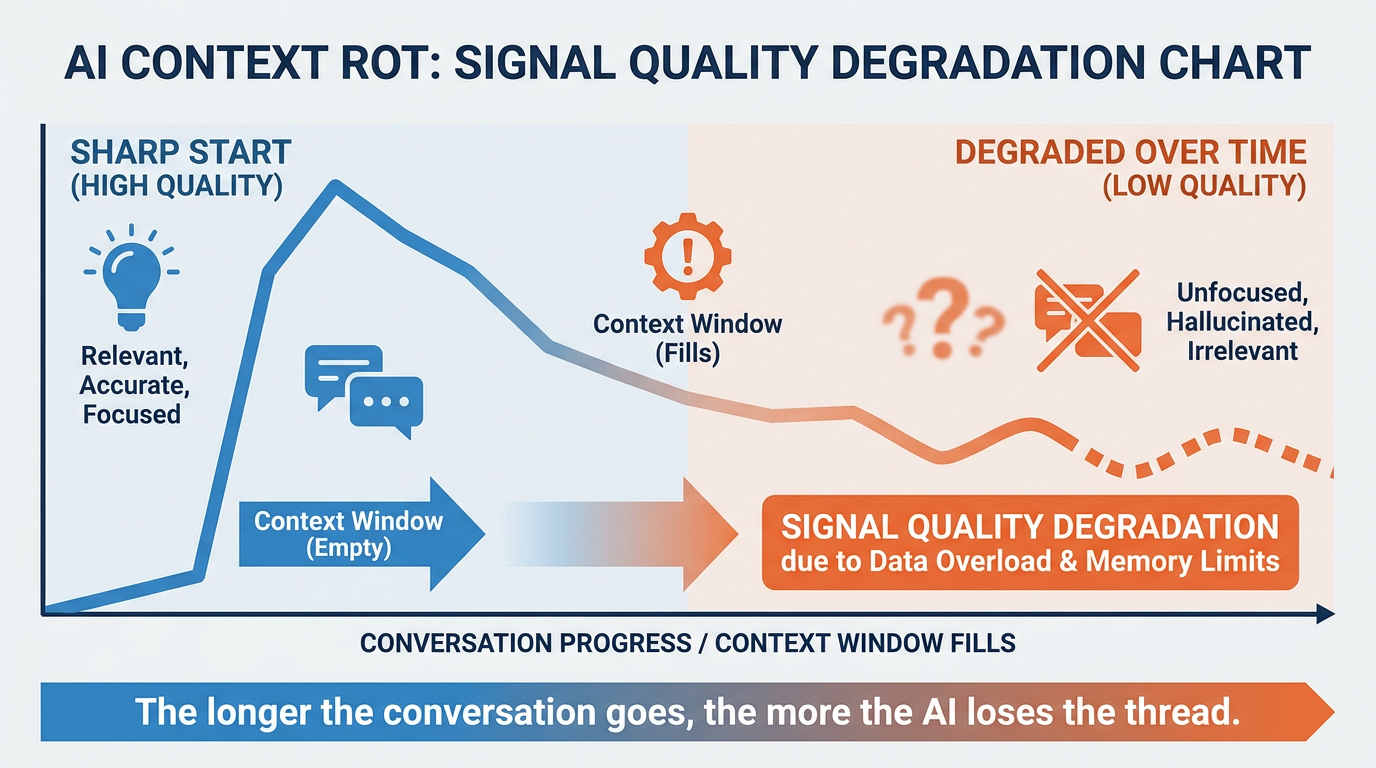
Figure 10:Context rot: as the whiteboard fills up, readability collapses — knowing when to erase and start fresh is a core professional skill.
Imagine a whiteboard in a busy conference room. Early in the session, it is clean and organized — the key points are clear, the structure is legible. As the meeting goes on, someone adds more notes. Then more. Then someone writes over old material. By the end, the board is covered in overlapping text, crossed-out sections, and notes that contradict each other.
Nobody can read it anymore. But everyone is still trying to use it.
This is context rot.
What Context Rot Is
Context rot is the gradual degradation of output quality that occurs as a conversation grows longer. It is not a bug in the model. It is a predictable consequence of how context accumulates over a long session.
Here is what happens mechanically:
Attention dilution — the longer the context, the more tokens the model must attend to with each generation step. Critical early instructions compete with a growing volume of later content.
Accumulated assumptions — early in a conversation, you and the model establish a shared frame. As the conversation evolves, new assumptions layer over old ones, sometimes inconsistently.
Conflicting instructions — you may have specified your tone or format in message one, then shifted requirements in message twelve. The model now has two different instructions and must guess which takes precedence.
Goal drift — long conversations often start with one objective and gradually shift to another. The model’s understanding of what you want becomes a blurry average of all the objectives, rather than a clear focus on the current one.
Warning Signs That Rot Has Set In
Context rot does not announce itself. You have to recognize it from symptoms. These are the most reliable indicators:
The model starts repeating itself — offering the same suggestions it already gave, re-explaining things it explained earlier. It has lost track of what has already been covered.
The model gives advice that directly contradicts something it said, or something you specified, earlier in the conversation. Conflicting instructions are producing inconsistent outputs.
The model’s responses no longer seem aligned with your actual current goal. It is reasoning toward an older objective, or producing an average of several objectives.
Responses get noticeably shallower, more generic, or less precise — even for questions that were producing excellent outputs earlier in the conversation.
When you see two or more of these symptoms together, the whiteboard is too crowded. It is time to erase.
The Fresh Conversation Discipline
The professional response to context rot is simple: start a new conversation.
This feels counterintuitive. You have built up a long conversation with a lot of useful context — why throw it away? But “starting fresh” does not mean losing everything. It means distilling.
Before closing a rotted conversation, spend two to three minutes writing a clean summary of:
The current goal — what you are actually trying to accomplish right now
The key decisions made — what has been established so far that matters
The relevant constraints — your requirements, your audience, your format
Open a new conversation. Paste that summary at the top. You now have a clean whiteboard with all the essential context, none of the noise, and a fresh attentional slate.
Rot vs. Depth: Knowing the Difference
Not every long conversation has context rot. Some tasks genuinely benefit from extended dialogue — exploring a complex problem, iterating on a document across many drafts, building up a nuanced understanding of a situation over time.
The question is not “how long is this conversation?” but “is the quality still high?”
A well-managed long conversation stays high quality because the participants (you and the model) are maintaining a clear current goal, and the context remains coherent and well-organized. A rotted conversation loses quality not because of length but because of accumulated noise and drift.
If you are regularly refreshing the explicit goal statement — “To be clear, what I need right now is X” — and the model is still producing sharp outputs, you do not have rot. You have depth.
The Professional Habit
High-performing AI users develop a simple discipline: they open a new chat when the quality drops.
They do not keep pushing on a rotted conversation hoping it will get better. They do not try to “fix” it with increasingly complex prompts. They distill, reset, and restart.
This habit is surprisingly hard to build, because there is a psychological cost to “losing” a long conversation. It feels like throwing away work. In practice, you are not throwing away the insights — you are discarding the noise that was obscuring them.
The two minutes you spend writing a clean summary are almost always returned tenfold in the quality of the fresh session.
Summary
Hallucination and the Verification Discipline

Figure 11:Fabrication is fluent: the model fills gaps with plausibility, not truth — which is why verification is a discipline, not a feature.
Now for the chapter’s most important warning — and it belongs here, after you understand context, because hallucination is the dark side of everything you just learned.
A language model hallucinates when it states something false with complete fluency: a statistic that was never measured, a court case that was never filed, a paper that was never written, a quote its “author” never said. Not garbled output — polished, confident, well-formatted falsehood. That polish is exactly what makes it dangerous to a busy professional.
Why Models Fabricate
Hallucination is not a bug being slowly patched out. It follows directly from what you learned in the tokens section: the model generates the most plausible next token given its context — and plausible is not the same as true.
Three mechanics drive it:
The model is a compression, not a database. Training compressed an enormous corpus into statistical patterns. Common knowledge survives compression well. Rare, specific facts — an obscure regulation, a niche academic literature, a small company’s history — survive as texture without substance. Ask about them and the model reconstructs what such facts typically look like. The result reads exactly like a real answer, because that is precisely what it is optimized to resemble.
The training process rewarded answering. Models were largely trained in settings where producing an answer scored better than admitting ignorance — like a student who never leaves an exam question blank. Frontier models have gotten markedly better at saying “I’m not sure,” but the gravitational pull toward a confident answer remains.
The dark room, again. By now this is familiar: when the flashlight doesn’t illuminate the answer — it isn’t in your context and isn’t solidly in training — the model doesn’t see a void. It sees a shape suggested by everything around the gap, and describes that shape fluently.
Notice where the risk concentrates: specific, checkable claims — names, numbers, dates, citations, quotes, URLs. The model’s reasoning over material you supplied (the flashlight pattern) is far more reliable than its recall of specific facts you didn’t supply. This is one more argument for everything this chapter has taught: models grounded in provided context hallucinate far less than models asked to remember.
The Three Verification Habits
Habit 1 — Citation checking. Citations are the highest-risk output a model produces, because they are maximally specific and effortless to fake: fabricated citations pair real researchers with plausible titles in journals that exist, and the format is always immaculate. The rule: a citation you have not opened is not a citation — it is a hypothesis. Paste the title into Google Scholar (scholar.google.com) or a search engine. Real sources surface in seconds; fabricated ones return nothing, or return a real paper that says something different. The same applies to quoted statistics, legal cases, and URLs.
Habit 2 — Confidence probing. You can ask the model to audit itself, and it is meaningfully (not perfectly) honest when asked directly. After any output containing factual claims, send:
“Review your answer above. For each specific factual claim, label it HIGH confidence (well-established, widely documented), MEDIUM (probably right but worth checking), or LOW (I may be reconstructing this). Flag anything that could be fabricated.”
Models will frequently downgrade or retract claims under this probe — fabrications they produced fluently one message earlier. Not catching everything, this still filters the worst cases at a cost of one message. A related probe: ask the same factual question in a fresh chat. Real knowledge is stable across runs; fabrications tend to mutate.
Habit 3 — The verify-before-forward rule. The bright line that makes the first two habits operational:
None of this is a reason to avoid these tools — it is the price of using them like a professional. You already apply this discipline to human sources: an eager new analyst’s memo gets checked before it goes to a client. The model is that analyst: brilliant, tireless, and never to be forwarded unread.
Try It: Elicit a Hallucination, Then Audit It
Time: 15 minutes. You will deliberately push a model into fabrication territory, then verify every citation it gives you and log real vs. fabricated. Doing this once inoculates you better than any warning.
Go to claude.ai or chatgpt.com and open a new chat. (If the interface has a web-search or “search the web” toggle visible near the input field, turn it off — you want the model’s bare recall, not live search. If you can’t find a toggle, proceed; note that search-augmented answers may give you real citations, which is itself a lesson.)
Paste this prompt — it asks for citations on a topic obscure enough that fabrication is likely:
“I’m writing a literature review on the adoption of activity-based costing in mid-sized Scandinavian furniture manufacturers during the 1990s. Please give me 5 academic citations (authors, year, title, journal) that I should include, with one sentence on what each paper found.”
(Feel free to substitute an equally narrow topic from your own field — the recipe is: real methodology + hyper-specific industry + specific region + specific decade.)
What you will likely see: five immaculate citations — real-sounding authors, plausible titles, real journals like Management Accounting Research — each with a tidy finding. It looks like a finished literature review. That feeling of “great, done” is the exact moment of danger.
Now audit. Open scholar.google.com in another tab. For each of the five citations, paste the title in quotation marks into the search box and press Enter.
Log each result in a table with columns: citation given | found on Scholar? (yes / no / similar-but-different) | verdict (REAL / FABRICATED / DISTORTED). “Similar-but-different” — a real paper with a different title, year, or authors than claimed — counts as DISTORTED, and is arguably the most dangerous category, because a spot-check might miss it.
Go back to your chat and run the confidence probe from Habit 2 on the same answer:
“Review the 5 citations you gave me. For each, label your confidence HIGH, MEDIUM, or LOW that it is a real, correctly-cited publication. Be honest about which ones you may have constructed.”
Compare the model’s self-audit against your Scholar findings. Did it correctly flag its own fabrications? (Often it flags some — which proves the probe is worth one message — and misses others, which proves the probe is not a substitute for checking.)
If everything checked out as real: you either got a search-augmented answer (see step 1) or a genuinely well-covered topic. Re-run with a narrower prompt — add a more specific sub-question or a smaller region — until you catch at least one fabrication. It will not take long.
Deliverable: your five-row audit table, plus a three-sentence reflection: how convincing did the fabricated citations look, what did the confidence probe catch and miss, and what is your personal verify-before-forward line from now on?
Voice Changes Everything
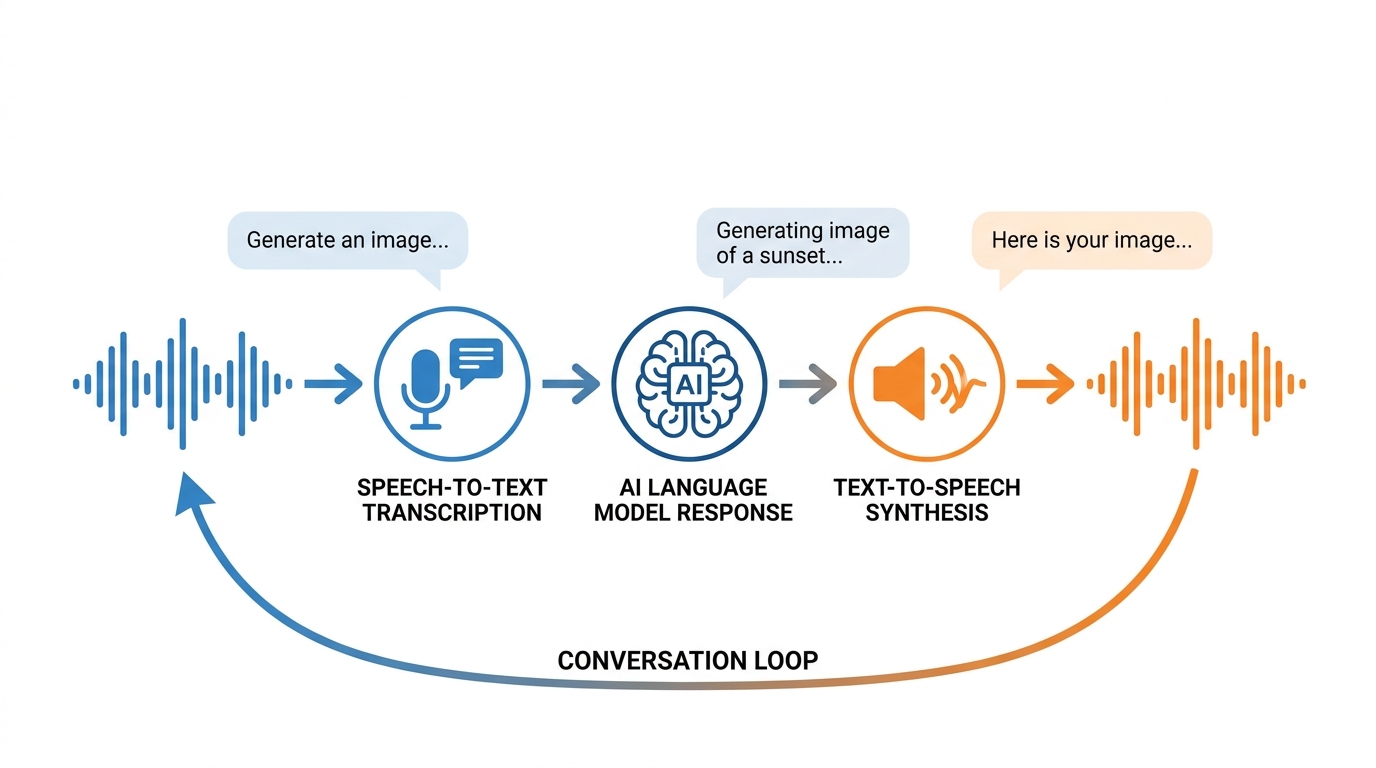
Figure 12:The voice-to-AI loop: speak naturally, transcribe instantly, receive expert-level responses — the fastest input method for serious AI work.
Something shifts when you stop typing your questions and start speaking them.
It is not just speed — although the speed difference is significant. It is something subtler: the quality of your thinking changes when you talk through a problem rather than type through it. Spoken language carries tone, emphasis, and the natural flow of thought in ways that typed prompts rarely do. When you dictate to an AI, you think differently — and you often ask better questions.
This chapter is about closing the gap between how you think and how you interact with AI.
Why Voice Changes the Dynamic
There is a well-documented phenomenon in professional communication: people who dictate tend to produce longer, richer, more nuanced content than people who type. This was true for business executives decades before AI — it is the reason dictation tools have existed since the 1900s. The constraint of typing slows thinking and compresses expression. Voice removes that constraint.
Applied to AI, this has a concrete benefit: your prompts get better when you voice them.
There is also the anthropomorphization effect. When you speak to something, you naturally communicate with it more the way you would communicate with a person — with context, with tone, with the implicit assumption that your interlocutor needs to understand your situation. This instinct produces richer prompts.
Anthropomorphization of AI tools is often treated as a cognitive bias to be corrected. For the purpose of productive AI work, it is a feature. Speaking to the model as if it is a thinking partner produces more natural, more useful interactions than treating it as a search interface you are filling out a form for.
The Tools: SuperWhisper and Wispr Flow
Two tools dominate the voice-to-AI workflow for business professionals. Both work by capturing your voice, transcribing it with high accuracy in near-real-time, and routing the text wherever your cursor is — into any application, browser, or text field.
A macOS-native voice transcription app powered by OpenAI’s Whisper model. Best-in-class accuracy for English. Activates with a keyboard shortcut — press it, speak, release, and your text appears wherever your cursor is. Works in any app including Claude, ChatGPT, Gemini, and your email client.
Best for: Mac users who want a dedicated, always-available voice layer over their entire workflow.
A cross-platform voice input tool with AI-powered clean-up — it transcribes your speech and also lightly formats and cleans up filler words and false starts. Available on Mac and Windows.
Best for: Users who want polished transcription output without editing, or who need Windows support.
Both tools are designed for the same use case: making voice input as frictionless as typing, but faster and more expressive.
Setting Up the Voice-to-AI Loop in Under Five Minutes
Here is the complete setup process:
Step 1: Download either SuperWhisper (superwhisper.com) or Wispr Flow (wisprflow.ai). Both have free tiers sufficient for daily use.
Step 2: Follow the two-minute setup — grant microphone access, set your activation shortcut.
Step 3: Open Claude, ChatGPT, or any AI interface in your browser.
Step 4: Click in the chat input field, activate your voice tool (keyboard shortcut), and speak your prompt.
Step 5: Release the shortcut — your spoken words appear as text in the chat. Review and send.
That is the entire loop. From setup to first voice prompt: five minutes or less.
Voice as a Thinking Tool
The most underrated use of the voice-to-AI loop is not prompt delivery — it is thinking out loud.
Complex problems benefit from verbalization. There is strong cognitive science evidence that speaking through a problem activates different reasoning processes than writing it down silently. When you dictate a problem to an AI — not asking for an answer yet, just narrating the situation, the constraints, and what you are trying to figure out — you often achieve clarity before the model even responds.
The model’s role in this mode is reflective: it listens to your narration, identifies the key tensions you described, and reflects them back in a structured form. This is a fundamentally different — and often more valuable — interaction pattern than query-and-response.
The Speed Case
Speaking is roughly three to five times faster than typing for most people. For a 200-word prompt that takes two minutes to type, voice takes under 45 seconds. For a daily professional who is interacting with AI tools dozens of times per day, this compounds to a meaningful time savings.
But the deeper benefit is not time saved — it is that the lower friction means you prompt more. Users who type every interaction tend to be selective about what they bring to the AI, compressing and simplifying to reduce the effort of typing. Voice users tend to bring more of their actual, nuanced thinking — and get better results for it.
Summary
Case Study: The Analyst Who Knew Everything — Except What Mattered
Background
Meridian Advisory Group is a mid-sized management consulting firm headquartered in Atlanta, Georgia, with 340 employees and annual revenue of approximately $62 million. The firm specializes in operational efficiency engagements for regional healthcare systems and mid-market manufacturing companies. In early 2025, Meridian’s Managing Partner, Dr. Camille Vance, approved a firm-wide initiative to integrate large language models into the consulting workflow — beginning with the research and deliverable-drafting functions performed by its analyst and associate teams.
The initiative was championed by Jordan Elias, Director of Knowledge and Innovation, who had spent the prior year piloting AI tools with a small group of senior associates. Jordan’s hypothesis was straightforward: if Meridian’s analysts could use AI to accelerate the research synthesis and slide-drafting phases of an engagement, the firm could serve more clients simultaneously without proportionally increasing headcount. Initial pilot results were encouraging. The senior associates who worked with Jordan reported 30–40% reductions in time spent on first drafts.
The firm rolled out access to Claude Sonnet 4.6 across all analyst-level staff in February 2025. Each analyst received a two-hour orientation covering basic prompting, file attachment, and output review. Within six weeks, however, Dr. Vance began receiving complaints from engagement managers. The pattern was consistent: analyst-generated AI drafts were starting strong — well-organized, grammatically polished — but were producing outputs that felt generic, misaligned with the specific client, or simply “wrong in ways that are hard to explain.” One engagement manager described it bluntly: “It reads like a McKinsey deck written for a company that doesn’t exist.”
Jordan audited a sample of twenty analyst conversations with the AI tool. What he found was instructive. Most analysts were using the AI the way they might use a search engine — asking short, general questions without supplying client-specific documents, strategy memos, or engagement context. In several cases, analysts had been using the same ongoing conversation thread for work across multiple different clients, treating the AI as a persistent assistant rather than a session-based reasoning tool. In other cases, conversations had grown to forty or fifty exchanges long, with early client-specific instructions buried beneath layers of accumulated turns. The tool was performing exactly as designed. The workflows surrounding it were not.
The Situation
Jordan now faces a strategic decision that is as much architectural as it is managerial. The AI tool itself is not the problem — its reasoning capability is genuine. The problem is structural: analysts are deploying a powerful reasoning engine without systematically supplying the knowledge it needs to apply that reasoning to real clients. The flashlight is on, but nobody is aiming it. Conversations that started with a specific purpose have drifted — context has accumulated without curation, and early client-specific instructions are competing with dozens of later turns for the model’s attention. In several cases, Jordan suspects that the model’s outputs reflect a blurry average of multiple clients rather than the sharp focus of one.
The firm must now decide how to redesign analyst workflows to address three distinct failure modes simultaneously: the absence of adequate client context in prompts, the degradation of output quality in long, multi-purpose conversations, and the lack of any systematic discipline around when to start a fresh session versus continue an existing one. Jordan has proposed a “Context Brief Protocol” — a structured, client-specific template that every analyst would populate at the start of each engagement and paste as the opening message of any new conversation. Dr. Vance is supportive but concerned about adoption friction and whether the protocol addresses all of the underlying issues. The engagement managers want better outputs; the analysts want a workflow that does not add significant overhead.
Discussion Prompt
Drawing on the intelligence vs. knowledge distinction, the Flashlight Theory, context engineering principles, and the concept of context rot as developed in this chapter, analyze the core failure modes in Meridian’s analyst workflow and evaluate Jordan’s proposed Context Brief Protocol as a solution. Does the protocol address the structural causes of output degradation, or does it treat symptoms while leaving deeper workflow problems intact? What specific design principles from this chapter would you incorporate into a more comprehensive redesign of Meridian’s AI workflow — and what trade-offs would that redesign require the firm to accept?
Discussion Guidelines
Initial Post (due before class)
Minimum 400 words
Directly address the discussion prompt using concepts from this chapter
Include at least one APA-formatted citation — from the course text or a peer-reviewed source
Avoid summary; demonstrate analysis and original thinking
Peer Responses (minimum 2)
Minimum 250 words each
Each response must include at least one APA-formatted citation
Engage substantively — build on, challenge, or offer a contrasting perspective grounded in evidence
“I agree” or “Great post” responses do not meet the requirement
Maintain a professional and respectful academic tone
Chapter 1 Applied Exercise: Build Your Personal Context Brief
Estimated time: 25–30 minutes. You will produce one reusable artifact: a context brief that instantly illuminates every AI conversation you open from this point forward.
Step 1 — Compare Three Models Side by Side (5 minutes)
Go to arena.ai in your browser. No account required.
Click Battle Mode in the top navigation (the head-to-head comparison interface).
Select three models from the dropdowns — use Claude, GPT-5.5, and Gemini 3.1 Pro if available.
In the shared prompt box, type exactly:
“I’m a business professional with no AI background. In three bullet points, what would you need to know about me to give genuinely useful advice — not generic advice — about my work?”
Click Send to run the same prompt through all three simultaneously.
Read the responses. Note which model asked the sharpest, most specific questions. That model’s instinct about what context matters is directly relevant to Step 3.
Step 2 — Map Your Intelligence vs. Knowledge Gap (5 minutes)
Open a blank document or notes app. Answer these three questions in writing — one to three sentences each:
What does the AI already know that applies to my work? (Industry norms, common frameworks, writing conventions in my field)
What does the AI NOT know that I will need to supply every time? (My role, my company, my current projects, my audience, my constraints)
What is one task I do at least weekly that involves reading, summarizing, comparing, or drafting — and that currently takes longer than it should?
Your answer to question 2 is the raw material for your context brief.
Step 3 — Write Your Personal Context Brief (10 minutes)
In the same document, write a 150–250 word context brief. Use this exact structure — fill in the brackets:
## Who I Am
[Your role, industry, and what your work actually involves day-to-day — 2 sentences]

## What I'm Currently Working On
[Your main project or focus right now — 2–3 sentences]

## My Communication Style
[How you prefer outputs: formal or direct, short or thorough,
bullet points or prose, specific format preferences]

## My Standing Constraints
[Who your audience typically is; any non-negotiable requirements
— e.g., "always appropriate for executive review"]

## What I Need Most From AI
[Your 2–3 most common use cases — e.g., drafting, analysis, decision support]
Write this as if briefing a highly capable new colleague on their first day.
Step 4 — Test the Flashlight (5 minutes)
Go to claude.ai. Sign in or create a free account if you do not have one. (Free tier is sufficient for this exercise.)
Click New chat to open a fresh conversation.
Paste your completed context brief into the message field as the very first message. Do not add anything else yet — just send the brief.
After Claude acknowledges it, send this follow-up in the same conversation:
“Based on everything I just shared, suggest three specific AI-assisted workflows that would save me meaningful time each week. Be concrete — name the task, the tool, and what I would actually do.”
Read the response. Then open a second new chat — do not paste the brief — and ask the exact same follow-up question with no prior context.
Compare the two responses. The difference in specificity is the flashlight in action.
Step 5 — Tokenize Your Brief (5 minutes)
Go to platform
.openai .com /tokenizer in your browser. The tool loads directly — no login required. Paste your context brief into the text field. The token count updates live as you type.
Note the number. This is the “entry cost” — in tokens — every time you start a conversation with this brief.
Now open claude.ai/pricing in a new tab. The current Pro plan is $20/month (billed monthly) or $17/month (billed annually). A free tier is also available.
Mental math: at current API pricing for Claude Sonnet (roughly $3 per million input tokens as of this writing — verify current rates at anthropic
.com /pricing), a 200-token context brief costs approximately $0.0006 per conversation. You can start 1,600 contextualized conversations for $1.
Step 6 — Set Up Voice Input (5 minutes)
Choose one tool based on your device:
If you are on macOS or Windows:
Go to superwhisper.com and download the free version.
Install and open it. Grant microphone access when prompted.
In the app, note your activation shortcut (default is typically
⌘ + Shift + Spaceon Mac).Open Claude in your browser. Click in the chat input field.
Hold your activation shortcut, speak one sentence about your work, release the shortcut. Your words appear in the field.
That is the full loop. Push to talk → speak → release → text appears.
If you prefer cross-platform (Mac/Windows/iOS/Android):
Go to wisprflow.ai and download Wispr Flow.
Follow the same setup: install, grant microphone access, set your activation shortcut.
Wispr Flow automatically removes filler words and cleans up false starts — the output is polished text, not raw transcript.
Test it: Dictate the following prompt into Claude using your voice tool (do not type it):
“Based on my context brief, what’s the single highest-leverage thing I could start doing differently with AI this week?”
Notice the length and naturalness of what you spoke versus what you would have typed.
Deliverable
Save your context brief somewhere you can access it in one click — a pinned note, a text snippet app, or a clipboard manager. Every time your work focus shifts, update it. This document is your flashlight. Everything in the chapters ahead teaches you to aim it better.
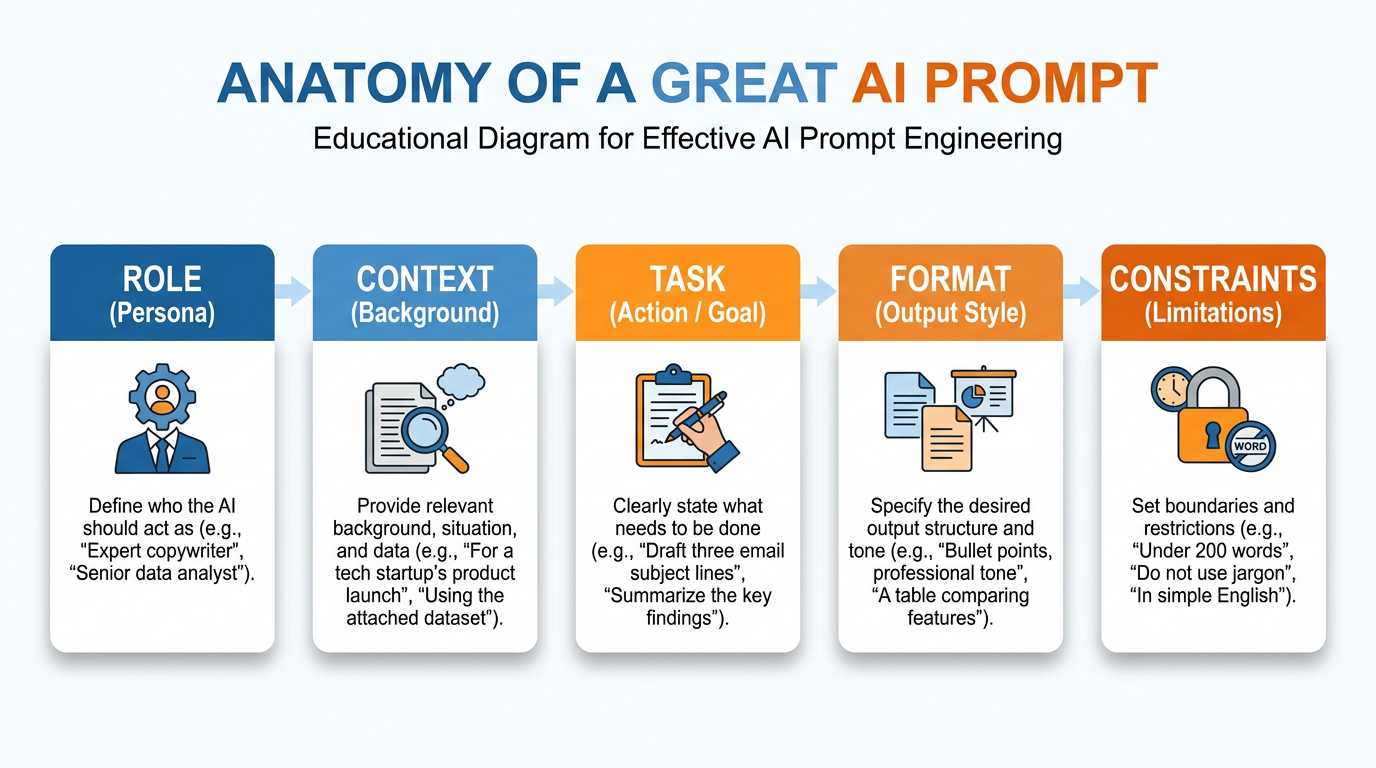
Figure 13:Prompt Anatomy — Role, context, task, format, constraints: the five parts of a prompt that works.
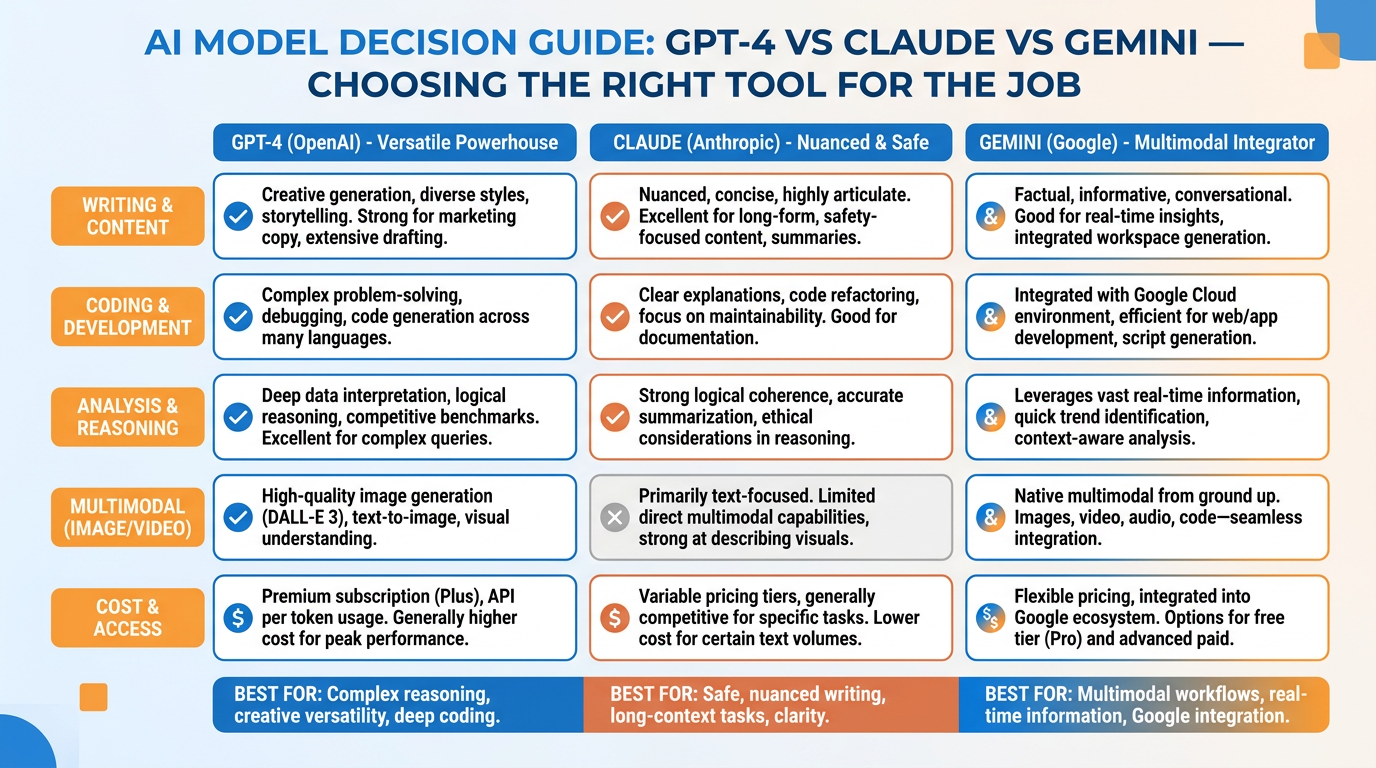
Figure 14:Choosing Your Model — GPT-5.5, Claude Opus 4.7, and Gemini 3.1 Pro compared across the tasks that matter to business people.