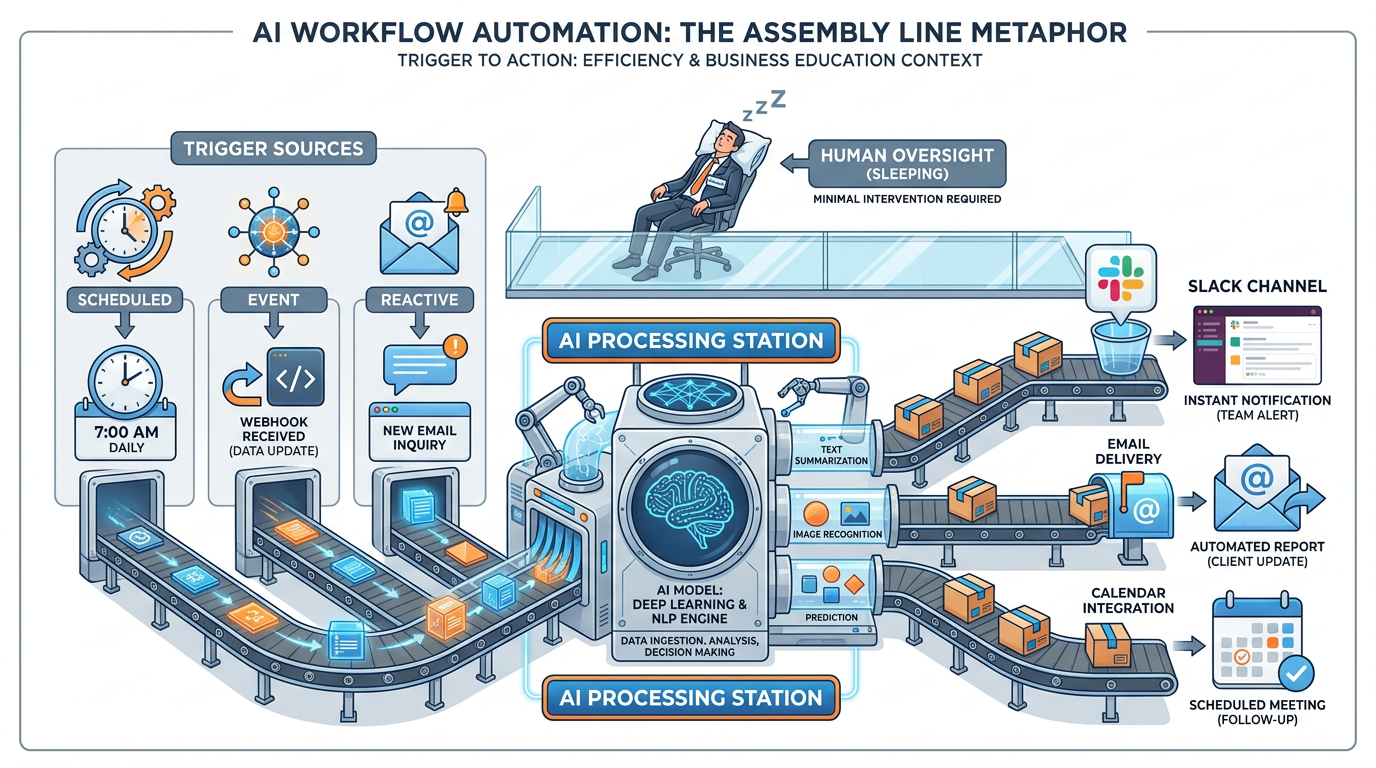
Figure 1:Hooks, Channels, and Automations — Triggers fire your AI. Channels deliver the result. You wake up to finished work, not to a queue.
Picture Renee Ostrowski, the operations director at a sixty-attorney law firm in Cleveland. It is 7:42 on a Tuesday morning. She has not yet opened her laptop.
Her phone buzzes. A new message in the firm’s Slack workspace. Subject line: New matter intake — Bradford Holdings v. Sentinel Logistics — draft summary ready for partner review. She taps it open. Inside is a clean two-page brief: the client, the opposing party, the nature of the claim, a flag noting that the firm has no conflict in the matter, three relevant precedent cases the firm has worked on, and a suggested initial response timeline.
Forty-five minutes earlier, a prospective client filled out the intake form on the firm’s website. No human at the firm has touched the matter yet. By the time Renee opens her laptop, the work that used to take a paralegal forty minutes is already done — sitting in the channel where her partners read everything that matters.
That is the shift this chapter is about.
You have spent the last twelve chapters learning to use AI well when you are driving. You sit at the keyboard. You ask a question. The AI answers. You evaluate. You ask again. This is the reactive mode — and it is genuinely powerful. But it is also where ninety percent of professionals stop.
The other ninety percent of the value lives in proactive AI. AI that fires without being asked. AI that runs on a schedule. AI that watches for an event, does the work, and delivers the result to the place you already look.
Hooks. Channels. Scheduled tasks. Three concepts. One outcome: your AI works while you sleep.
From Reactive to Proactive — The Shift Most People Miss
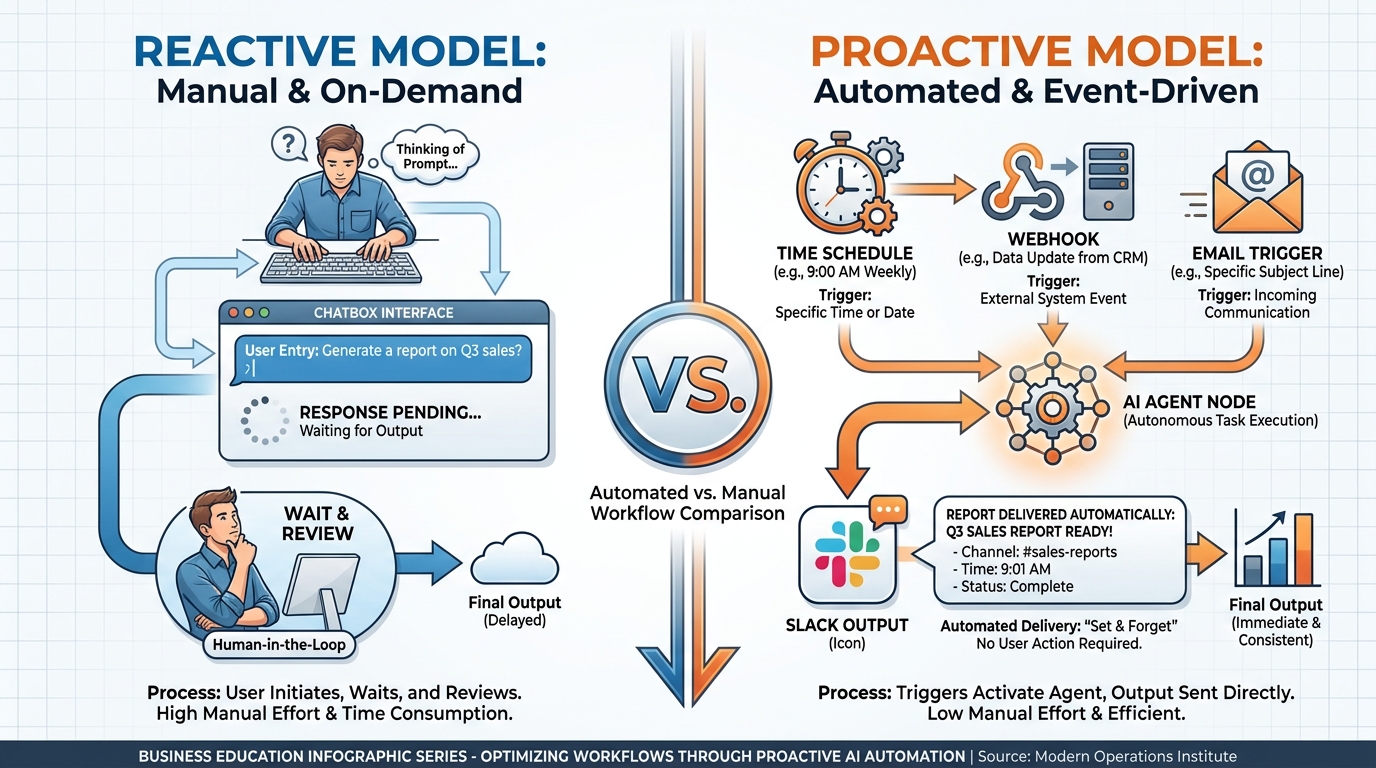
Figure 2:Reactive vs. Proactive AI — Same intelligence. Radically different leverage.
Reactive AI is a conversation. You type. It types back. You think. You type again. Useful, but bounded by your attention.
Proactive AI is a factory. The line runs whether you are watching it or not. You are no longer the input. You are the customer of the output.
Here is the analogy Arvin Ash might use. Imagine a factory floor in 1980. Every step requires a human operator standing at a station, watching, adjusting, deciding when to move the part to the next station. Production is real. The factory makes things. But the throughput of the entire line is gated by how many humans you can put on it and how long they can stay alert.
Now imagine the same factory in 2024. The line moves on its own. Sensors detect when a part arrives. Robotic arms execute the steps that used to require a human. Quality cameras catch defects without anyone looking. The humans are still there — but they are at the control room, watching dashboards, making the judgment calls that actually need judgment. Not watching parts move.
That is the difference between reactive AI and proactive AI.
Most people use AI in 1980 mode. They sit at the chat window. They watch the parts move. They get genuine value — but they are the bottleneck, and they do not know it.
The people who pull ahead are running the 2024 factory. Their AI fires when an email arrives. It fires every morning at eight. It fires when a deal closes in the CRM. It fires when a document is updated. They are not asking AI to do things. They are designing systems where AI does things on its own, and they are reviewing the output.
This sounds like it requires engineering. It does not. The tools you already use — Claude Code, the Antigravity 2.0 IDE, the major workflow platforms — all expose this capability to non-technical users. What you need is not technical skill. It is a shift in how you think about the work.
The business example is unmistakable. A 2025 internal study by a global consulting firm tracked how its consultants used AI across six months. The bottom quartile averaged 4.1 hours per week of AI-assisted work — almost entirely reactive chat sessions. The top quartile averaged 6.8 hours — but more revealingly, sixty-one percent of their AI work happened without them initiating it. Briefings showed up in their inbox. Draft client memos appeared in their project channels. Meeting prep was waiting for them when they opened their calendar. The top quartile was not working harder. They had designed a system that worked without them.
What separated the two groups was not access to better tools. They used the same tools. What separated them was a single insight: every recurring task in a professional’s week is a candidate for automation. The status update you send every Monday. The summary you draft after every client call. The competitive scan you do before every pitch. The recap you send your team at the end of every quarter. Each of these is a workflow. Each workflow has a trigger, a body of work, and a delivery channel. The top quartile saw those three components everywhere they looked, and they wired up the connections one at a time.
That is the move. That is what the rest of this chapter teaches you to make.
What a Hook Actually Is
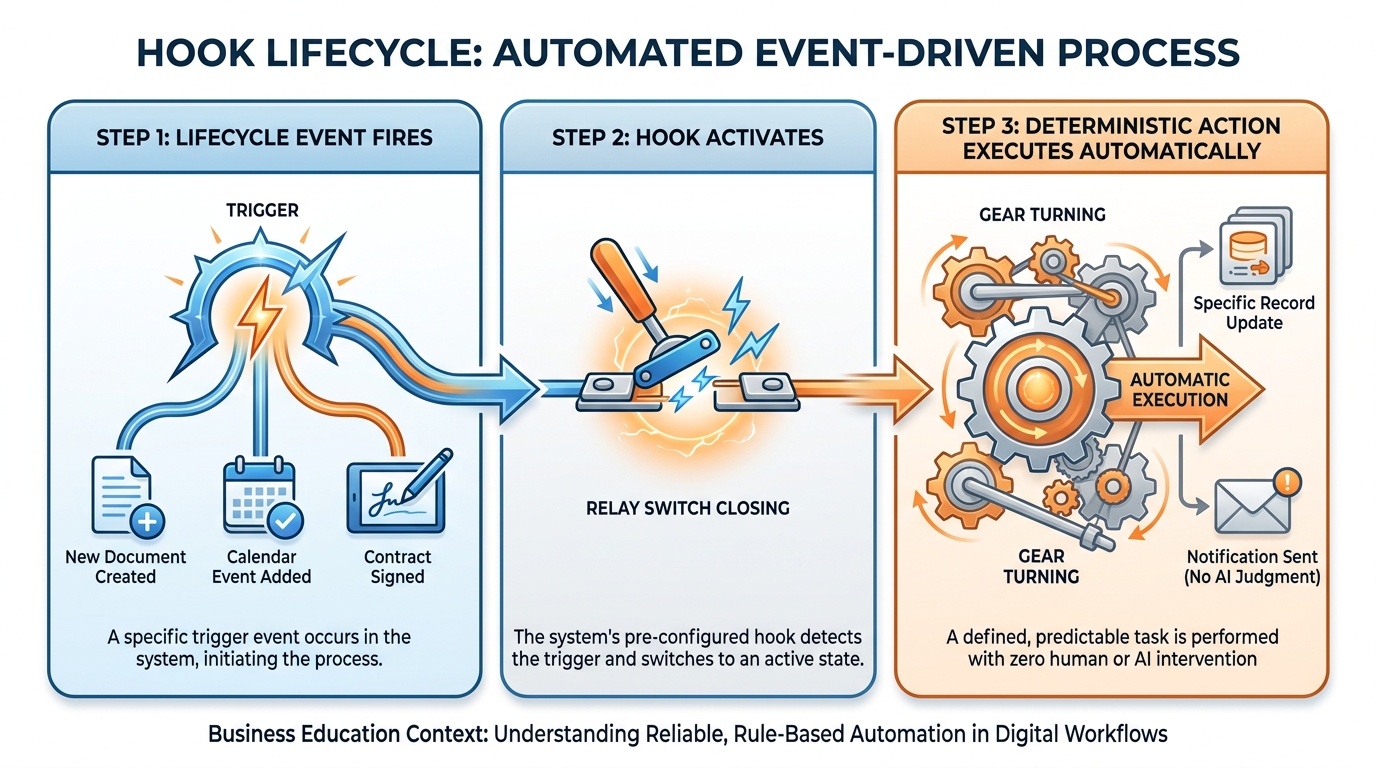
Figure 3:A Hook — A trigger fires. A rule runs. No judgment required. Every time.
A hook is the simplest piece of the automation puzzle, and the one most people overcomplicate.
A hook is a trigger. Something happens — a file is saved, a message arrives, a session ends, a tool is about to execute — and the hook fires. When it fires, it does one specific, predefined thing.
That is it. That is the whole concept.
The thing the hook does is not AI judgment. It is a deterministic rule. “Whenever a file in this folder is saved, run a quality check on it.” “Whenever the AI is about to delete something, ask me first.” “Whenever a coding session ends, post a summary to the team’s Slack channel.” The hook does not decide whether to fire. It always fires. The behavior is predictable, repeatable, and audit-trail-clean.
This predictability is the whole point. Most professional work has rules that should never bend. The conflicts database must always be checked before a new matter is opened — every time, no exceptions, regardless of how the AI is feeling that day. A draft going to a client must always be reviewed by a partner — every time. A financial report must always have its figures cross-checked against the source ledger — every time. These are the “always” rules of your business. Hooks are how you encode them into your AI workflow.
Picture the difference. Without a hook, you are trusting the AI to remember to check the conflicts database when it is the right moment to do so. The AI is generally pretty good at this — but “generally pretty good” is not what you want for a regulatory requirement. With a hook, the check happens whether the AI thinks to do it or not. The system fires the rule. The AI just does its job inside the boundaries the rule creates.
Claude Code documents over twenty different hook events you can attach behaviors to — moments like session start, before a tool runs, after a tool runs, when a notification is sent, when the AI needs your input, when a subagent completes its work, when a file changes on disk, when the working directory changes. Each of these is a moment in the lifecycle of an AI session where you can say “when this happens, also do this.”
The most useful patterns for business users are the simple ones. Notify me when the AI is waiting for my input — so I do not have to babysit the terminal. Block edits to certain protected files — so the AI cannot accidentally modify the master client list. Re-inject important context after the conversation has been compacted — so the AI does not forget the firm-specific terminology halfway through a long working session. Log every command the AI runs to an audit file — so the compliance team has a record.
The mid-size financial services firm Lattice Wealth Partners uses hooks for exactly this purpose. Every time one of its analysts runs an AI-assisted portfolio review, a hook fires before the AI is allowed to access client data — it checks the analyst’s credentials against the firm’s permissions database and logs the request to the compliance audit trail. The AI does the analytical work. The hook handles the regulatory work. Neither is trying to do the other’s job, and the firm’s compliance officer sleeps better as a result.
A useful test, when you are deciding whether something belongs in a hook, is to ask: Would I be comfortable explaining this to a regulator? If the answer is “yes, because it always happens this way,” it is a hook. If the answer is “well, it depends on the situation,” it is judgment, and the AI handles it. Regulators and auditors care about determinism. Clients care about judgment. Your workflow should reflect both, with the right tool doing the right job.
Channels — Meeting AI Where You Already Live
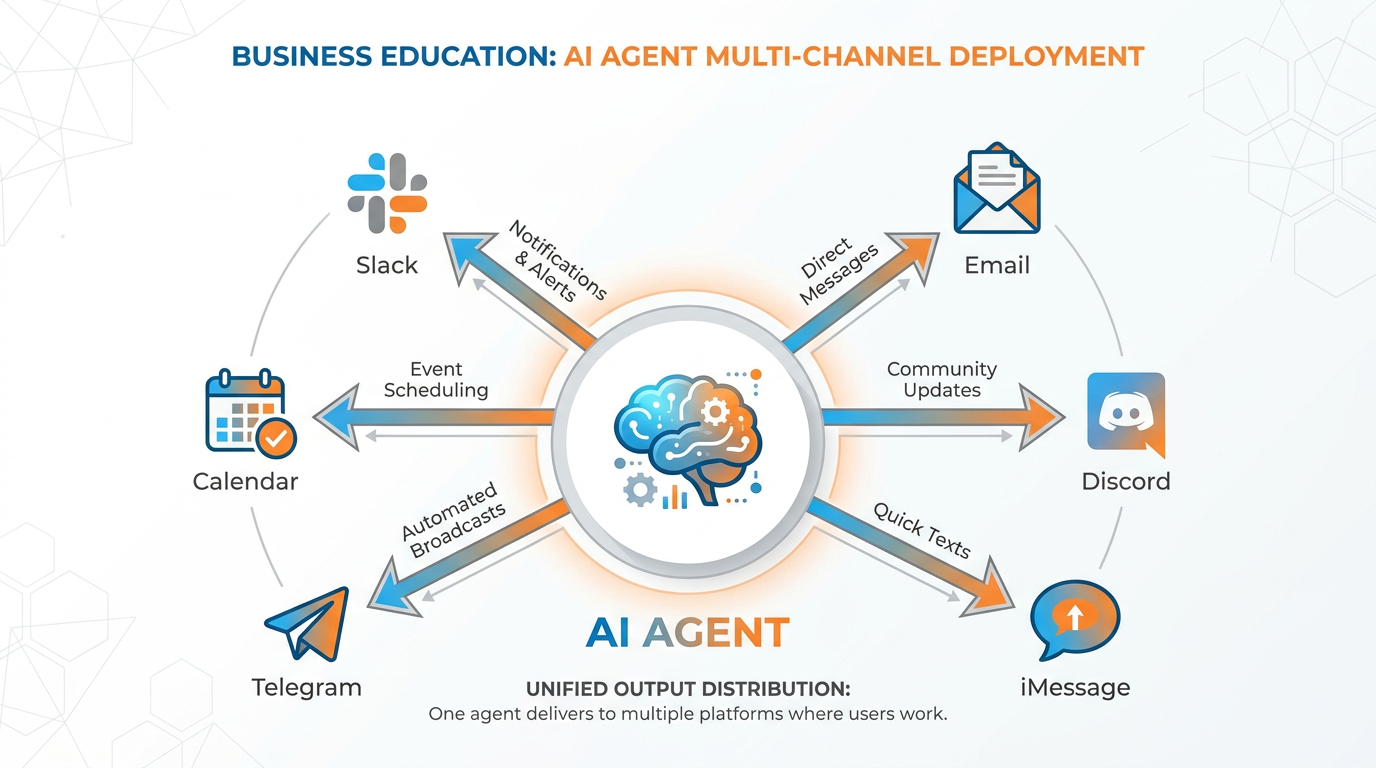
Figure 4:Channels — The output of your AI does not have to live in a chat window. It can live where you already read.
Here is a quiet revolution that almost nobody talks about.
For the first two years of consumer AI, every conversation with an AI happened inside the AI’s own interface. You opened the app. You typed in its box. You read its response in its window. The AI was a destination. You had to go to it.
Channels invert that relationship. The AI comes to you. It posts in your team’s Slack channel. It sends a message to your phone via Telegram. It appears in your iMessage thread. It delivers its work to whatever surface you already check a hundred times a day.
This change is more significant than it sounds. The reason most professionals abandon their best AI workflows after a month is not that the AI got worse. It is that they got tired of going to the chat window. Every additional step between “I need the result” and “the result is in front of me” is a step where the workflow can die. Channels collapse those steps to zero.
Claude Code calls this concept by its literal name: a channel is a path that pushes events into a running AI session and delivers replies to the platform the user already uses. The currently supported channels in the research preview are Telegram, Discord, and iMessage — but the model generalizes. Any place where your team already reads — Slack, Microsoft Teams, your email, your project dashboards — can become an output channel for AI.
Think about what this changes for the law firm in the opening scene. The intake form fires a workflow. The AI does its job. The draft summary appears in the firm’s Slack channel where partners already read everything important. No partner has to log into a separate AI dashboard. No paralegal has to email a draft. The work shows up where work shows up.
The pattern works in both directions, too. Claude’s iMessage channel lets the user text the AI from their phone, the AI does the work on their actual machine with access to their actual files, and the reply comes back as an iMessage. The user never has to be at their computer. They can be in a cab. They can be at lunch. The work happens in the channel.
Sapient Bio, a 90-person genomics startup in Boston, made this choice deliberately. Their R&D team runs three AI-assisted experiments most days. The early version of their workflow posted results to a custom internal dashboard the engineering team built. Adoption was poor — scientists logged in once, then forgot. The team rebuilt the workflow to post the same results to a Slack channel called #experiment-updates. Adoption jumped from twenty percent to ninety-four percent of the team in three weeks. The intelligence did not change. The location of the intelligence did.
There is a deeper point hidden in that story. The value of an AI output is not just its content — it is the probability that the right human will actually read it. A brilliant briefing posted to a dashboard nobody opens has zero value. A merely decent briefing posted to a channel everyone reads has enormous value. When you design a workflow, your single most important channel decision is not technical. It is behavioral. Where does the person who needs this output already spend their attention? That is the channel. Anything else is wishful thinking.
Scheduled Tasks and the Daily Briefing Agent
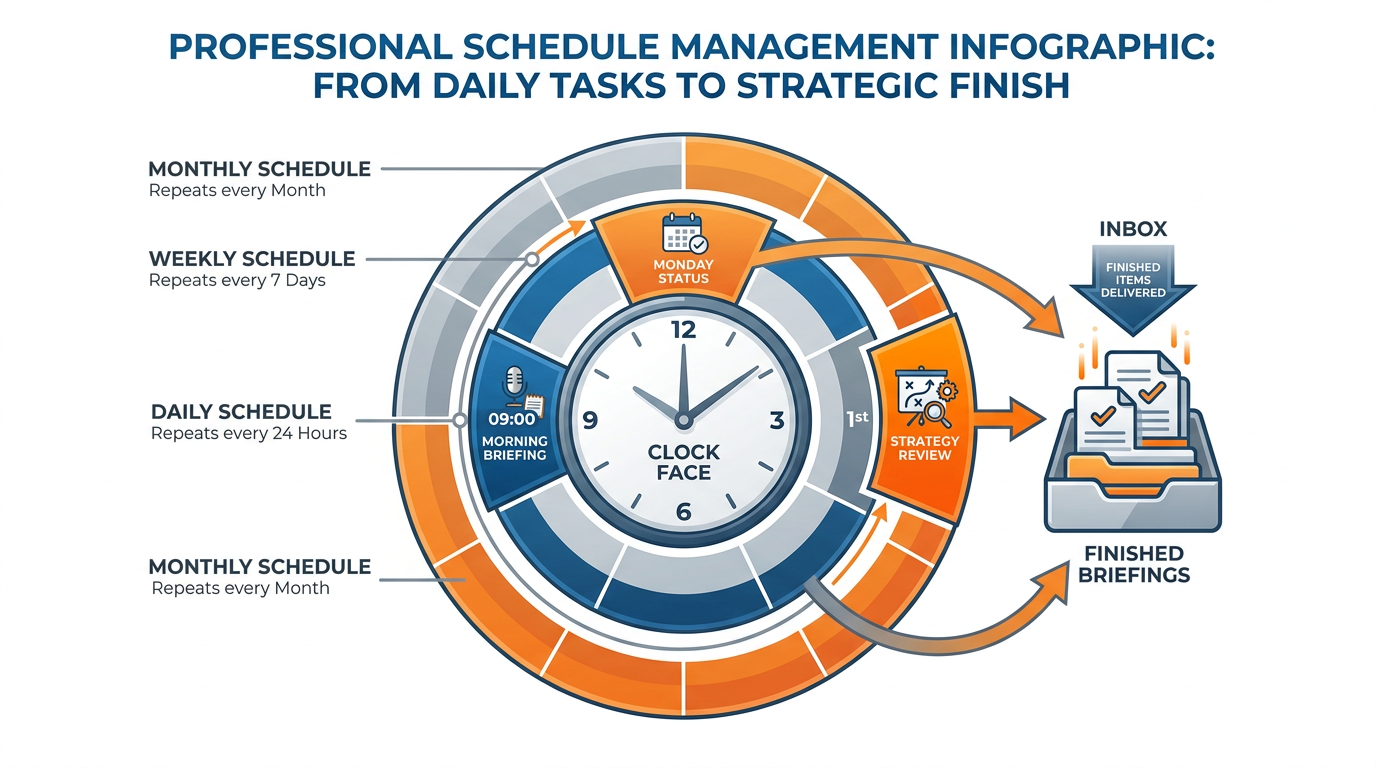
Figure 5:Scheduled Tasks — Cron for AI. Your morning briefing arrives before you wake up. Your Friday week-in-review writes itself.
If hooks are about events, scheduled tasks are about time. They are the steady metronome underneath everything else.
A scheduled task is an AI workflow that runs on a clock. Every weekday at 7:00 AM. Every Friday at 4:00 PM. Every hour, on the hour, during the trading day. Cron, in the old engineer’s term — except instead of running a script that pings a server, you are running an AI agent that produces useful work.
The single most life-changing scheduled task most professionals can build is the morning briefing agent.
Here is how it works in plain language. Every weekday at 7:00 AM, an AI agent wakes up. It checks your calendar for today’s meetings. It pulls the most recent emails from your three most important clients. It checks your project tracker for tasks that are overdue or due today. It scans the news for stories about your top five accounts. It composes all of this into a clean, scannable briefing — maybe a page, maybe a page and a half. It posts the briefing to your designated channel — your email inbox, your Slack, your phone. By 7:15, before you have had your first sip of coffee, the briefing is waiting.
What used to take you the first forty-five minutes of your day is now waiting for you. Not because the AI is doing magic. Because the AI is doing the same thing you used to do, just earlier, and to a schedule.
The pattern generalizes. The Friday week-in-review agent fires every Friday at 4:00 PM. It pulls everything you logged that week — meetings attended, decisions made, deals advanced — and produces a short summary you can paste into your weekly status update. The pre-meeting briefing agent fires fifteen minutes before every meeting on your calendar. It checks who the meeting is with, pulls the relevant client history, and surfaces the three things you most need to remember. The end-of-month financial roll-up agent fires on the last business day of every month and produces a draft of the financial commentary that used to consume your CFO’s Sunday afternoon.
Each of these is the same pattern. A schedule. A workflow. A channel. No human triggering it. No human watching it.
The marketing leadership team at Northwind Industries, a $1.4B industrial supplier, runs a 7:30 AM briefing agent that pulls campaign performance from four different ad platforms, summarizes the previous day’s pipeline movement from Salesforce, and flags any sudden changes in keyword performance from their SEO tooling. The briefing replaces what used to be a thirty-minute morning ritual for each of six team members — the equivalent of fifteen recovered work-hours per week, before anyone has done a single meeting.
One subtle point about scheduled tasks deserves emphasis. The schedule is the discipline. A briefing that arrives every weekday at 7:00 AM becomes part of the rhythm of the day in a way that a briefing you have to remember to ask for never does. The recurrence is what builds the habit, and the habit is what compounds into real change. Most professionals dramatically underestimate the leverage of a small piece of intelligence delivered at a consistent time. They overestimate the leverage of a brilliant piece of intelligence delivered irregularly. Get the schedule right and the content will earn its place. Get the schedule wrong and even the best content will get ignored.
The Automation Stack — When the Department Runs Without the Manager
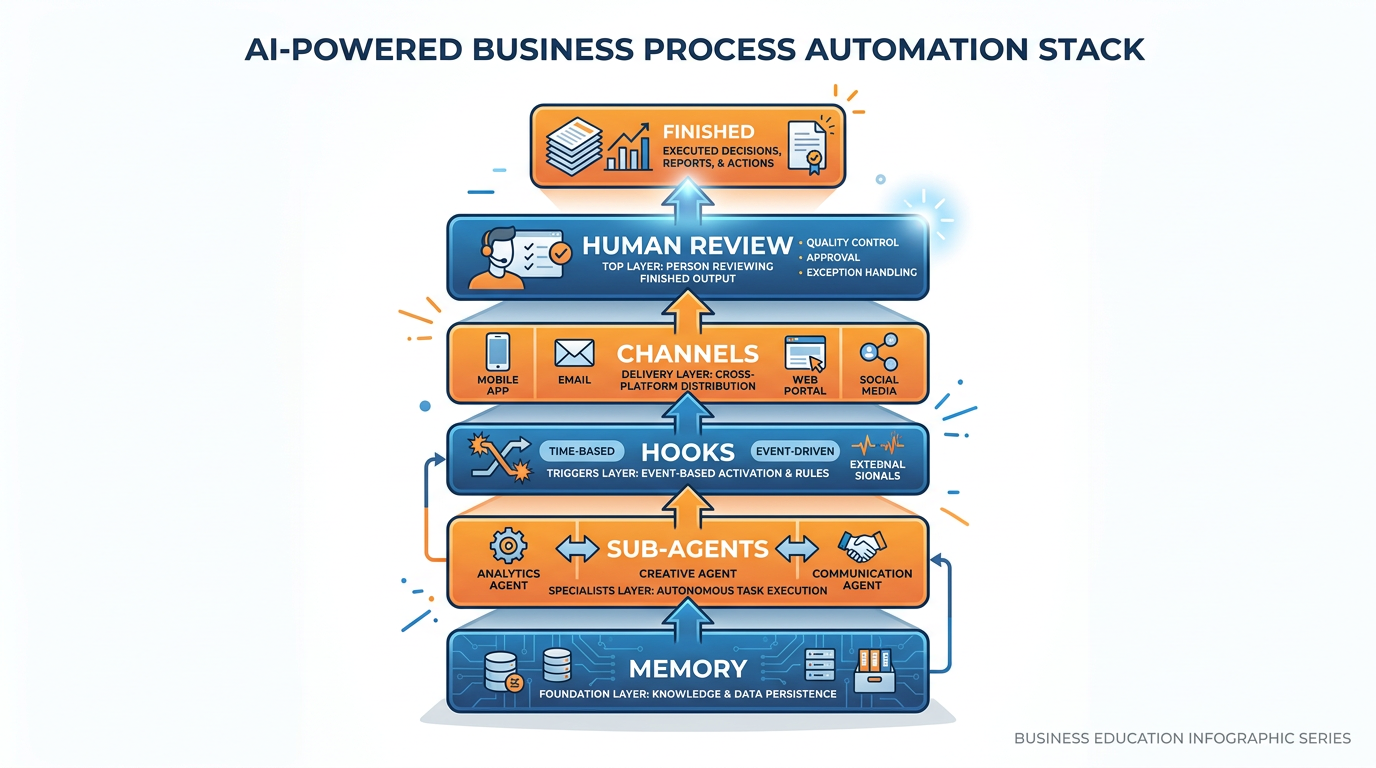
Figure 6:The Automation Stack — Memory remembers. Sub-agents execute. Hooks enforce rules. Channels deliver. You review.
So far we have looked at hooks, channels, and scheduled tasks as individual pieces. The leap forward comes when you compose them.
Imagine a manager who built a small department. She hired three people. She trained them well. She wrote down the standard operating procedures. She set up the routing of incoming work, the rules for who handles what, the format of the reports they produce, and the channels they post to.
After six months, the department runs without her watching. Work comes in. The right person picks it up. The procedures are followed. The reports go to the right places. She reviews the output, makes judgment calls on the hard cases, and intervenes when something looks off. But she is not in the loop for every step.
That is the automation stack.
Memory is what the department knows — the institutional knowledge of how things are done at this firm, in this industry, for this client. It is what makes the work feel native instead of generic. (Chapter 7 covered this.)
Sub-agents are the workers — specialized AI agents that handle particular kinds of work. The intake summarizer. The legal researcher. The financial cross-checker. The competitive intelligence analyst. Each one is a focused worker who knows one domain deeply. (Chapter 9 covered this.)
Hooks are the standard operating procedures — the rules that fire whether or not anyone remembers them. The conflicts check. The compliance log. The auto-formatter that ensures every memo looks consistent. These are deterministic. They do not require judgment.
Channels are the report distribution — the system that ensures the right output gets to the right person in the right place. Drafts to the partner. Briefings to the leadership team. Alerts to the on-call analyst’s phone.
Scheduled tasks are the calendar — the recurring rituals that keep the department’s rhythm. The 7:00 AM briefing. The 4:00 PM week-in-review. The end-of-month roll-up.
Put it all together and you have a self-running workflow. Work arrives — by event, by schedule, or by request. The right sub-agent picks it up. The hooks enforce the rules. The memory provides the context. The channel delivers the result. You — the manager — review the output and make the calls that actually require you.
This is what proactive AI looks like at full strength. It is not a chatbot. It is a department.
Crestmoor Logistics, a regional trucking and warehousing operator based in Memphis, built its automation stack one piece at a time over a single quarter. They started with a single scheduled task — a 6:00 AM daily ops briefing for their dispatch manager. Once that was working, they added a hook that fired whenever a high-priority shipment was delayed, posting an alert to the dispatcher’s phone. Then they added a sub-agent that handled customer status inquiries by reading the shipping system and drafting responses for human approval. By the end of the quarter, the dispatch desk — which had been one of the most chronically overwhelmed in the company — was operating with one fewer person on overnight shift and producing better service metrics than before. The manager who built it described the result simply: “It feels like I hired three people who never sleep and never quit. I just review what they did.”
Guardrails — Knowing What Should Be a Rule and What Should Be Judgment
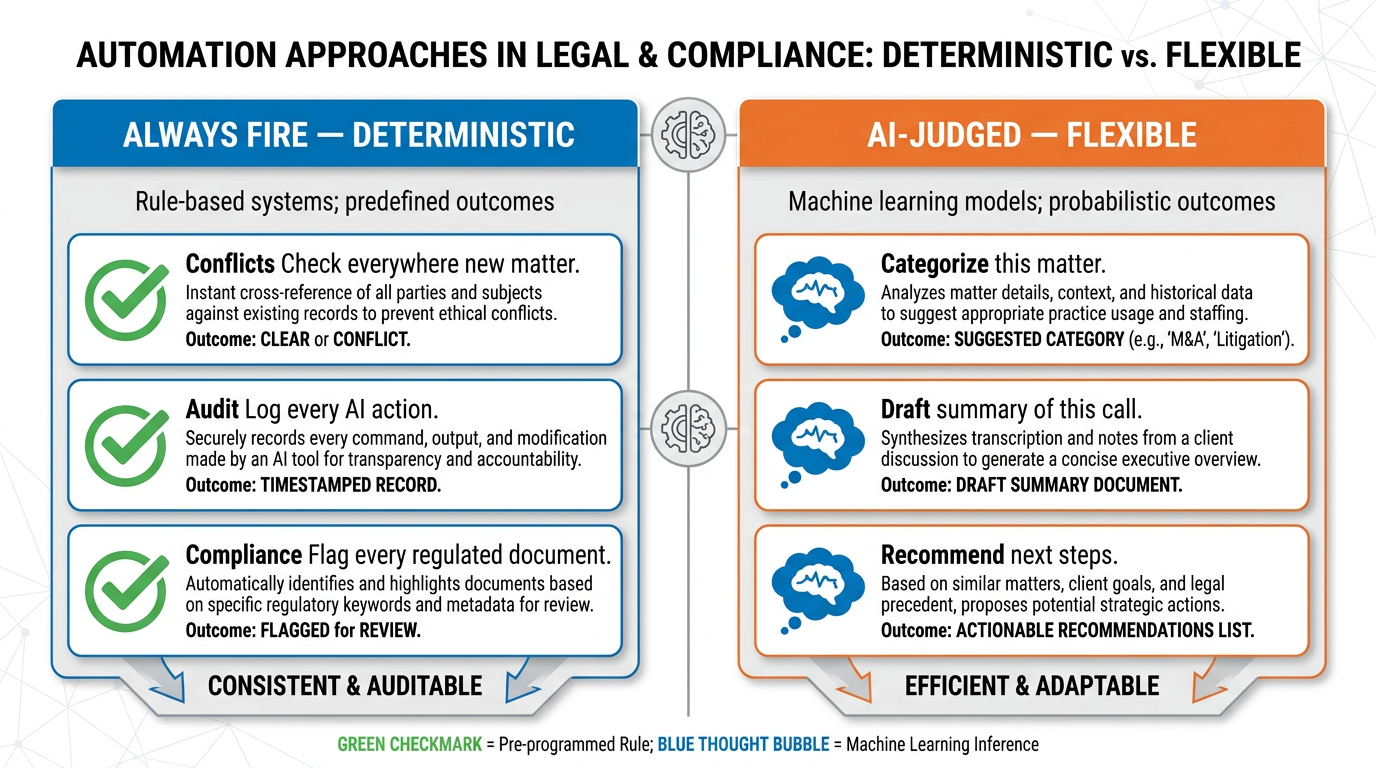
Figure 7:Guardrails — Some things should always happen. Some things require judgment. Knowing the difference is the whole game.
Now we return to the question Renee Ostrowski asked at the law firm. Of all the steps in the intake workflow, which should be hard rules — always fire, never bend — and which should be AI judgment calls?
This is the most important question in automation, and most teams answer it wrong on first attempt.
The principle is simple. Anything with a regulatory, compliance, or “must always happen” character belongs in a hook. Anything that requires interpretation, categorization, or context-sensitive choice belongs to the AI. The boundary between the two is exactly where most automation failures live.
In the law firm example, the conflicts check is a hard rule. There is no scenario — none — where the firm wants to open a new matter without checking the conflicts database. So that is a hook. It fires whenever a new matter intake form is submitted. It does not ask the AI’s opinion. It just checks.
The matter categorization is a judgment call. Is this intake a contract dispute, a tort claim, an employment matter, a regulatory action? The answer depends on reading the form carefully and applying domain knowledge. That is AI work. The AI reads, decides, and proposes a category. The partner reviews and approves.
The audit log is a hard rule. Every AI action in the workflow gets logged with a timestamp and the user’s credentials. No exceptions. Hook.
The draft of the matter summary is judgment. It requires synthesizing the facts, identifying the relevant precedents, and writing in the firm’s voice. AI work.
The notification to the assigned partner is a hard rule. Once a matter is opened, the partner gets notified. Always. Hook.
The recommendation on which partner should take the matter is judgment. It requires reading the matter’s complexity, the partners’ current workloads, and the relevant expertise. AI work — surfaced to the operations director for the final call.
See the pattern? Hooks handle the things that must always happen. AI handles the things that require thinking. Hooks are the steel rails. AI is the train.
The most common failure mode in real-world AI automation is not technical. It is the moment a team puts something into a hook that should have been AI-judged, or — more often — puts something into an AI prompt that should have been a hard rule. The conflicts database check that “the AI mostly remembers” is a lawsuit waiting to happen. The matter categorization that is hard-coded into a rigid rule will misroute the unusual case that genuinely needed a human eye.
Get the boundary right and your automation runs cleanly for years. Get it wrong and you will spend months debugging an automation that you can never fully trust. The discipline is to ask, for every step in your workflow: Is this a “must always happen” thing, or is this a judgment thing? And then design accordingly.
The law firms, the consultancies, the operations teams, the trading desks — the organizations that are pulling ahead in proactive AI are not the ones with the most sophisticated technology. They are the ones with the clearest discipline about which parts of their work are rules and which parts are judgment. That clarity is what makes the automation feel inevitable rather than fragile.
That clarity, more than any tool, is what lets your AI work while you sleep.
Case Study: Hooks and Judgment at Bradford & Wynne LLP
Background
Bradford & Wynne LLP is a sixty-attorney commercial litigation firm headquartered in Cleveland, Ohio, with secondary offices in Columbus and Pittsburgh. Founded in 1983, the firm specializes in complex contract disputes, employment litigation, and regulatory defense for mid-market clients across the Midwest. Total billings for fiscal year 2024 reached $42.6 million, with a partner-to-associate ratio of roughly one to four. Renee Ostrowski, the firm’s Director of Operations since 2019, has overseen a steady modernization of the firm’s intake, billing, and matter management infrastructure. In January 2025, Ostrowski launched what she internally called the “Front-Door Project” — a focused effort to automate the firm’s new-client intake workflow.
The motivation was specific and measurable. The firm’s existing intake process consumed an average of forty-two minutes of paralegal time per new matter, from the moment a prospective client submitted an inquiry form to the moment a partner received a one-page matter summary for review. With the firm receiving an average of fourteen new-client inquiries per week, the intake workflow was burning roughly twenty paralegal hours weekly — time the firm’s two intake paralegals could be spending on substantive case support. More importantly, the lag between inquiry and partner review averaged seven business hours, which was costing the firm an estimated one in eight prospective clients who took their business to faster-responding competitors.
Ostrowski’s Front-Door Project assembled a cross-functional team: her two intake paralegals, the firm’s Chief Compliance Officer Marcus Tellman, a senior partner from the litigation group, and an outside consultant the firm had retained to help design the AI workflow. The team committed to a ninety-day pilot.
The Situation
The proposed workflow was straightforward in concept. When a prospective client submitted the intake form on the firm’s website, an automated sequence would fire: the AI would extract structured data from the form, check the firm’s conflicts database for any conflicts of interest, categorize the matter type, draft a one-page matter summary, and post the result to a dedicated Slack channel that the firm’s partners already monitored throughout the day. Each step compressed work that a paralegal had previously done manually.
The architectural debate, however, exposed a deeper tension. Marcus Tellman, the compliance officer, insisted that several steps in the workflow be implemented as deterministic hooks — rules that would always fire, regardless of what the AI judged or did not judge. Specifically, he required that the conflicts check always run on every intake, that every AI action in the workflow be logged to an immutable audit trail, and that any matter involving a regulated industry (healthcare, financial services, energy) automatically be flagged for senior partner review. The consultant pushed back that hard-coding too many rules would make the workflow brittle and unable to handle edge cases. The senior partner argued for the opposite — that the firm’s reputation depended on never missing a conflict, never failing to log a substantive client action, and never letting a regulated-industry matter slip through without proper attention. Ostrowski found herself in the middle, trying to design a workflow that was fast enough to deliver the speed benefits her business case promised, rigorous enough to satisfy compliance, and flexible enough to handle the genuinely unusual matters that arrived a few times a month and rarely fit a clean category. The team agreed they needed a framework — a clear rule for deciding which parts of the workflow belonged in hooks and which belonged in AI judgment — before they wrote a single line of the configuration.
Discussion Prompt
Using the distinction this chapter develops between deterministic hooks (rules that must always fire) and AI-judged steps (decisions that require interpretation), evaluate Bradford & Wynne’s proposed intake workflow. Which specific steps should be implemented as hooks and which as AI judgment, and why? How should the firm handle the accountability question — when an automated intake produces an incorrect categorization or misses a subtle conflict, who is responsible, and what review structure should the firm build to make that accountability genuine rather than nominal? Finally, consider the trade-off between speed and rigor: how should the firm decide which compromises are acceptable, and what signals would tell Ostrowski that the workflow is drifting in either direction?
Discussion Guidelines
Initial Post (due before class)
Minimum 400 words
Directly address the discussion prompt using concepts from this chapter
Include at least one APA-formatted citation — from the course text or a peer-reviewed source
Avoid summary; demonstrate analysis and original thinking
Peer Responses (minimum 2)
Minimum 250 words each
Each response must include at least one APA-formatted citation
Engage substantively — build on, challenge, or offer a contrasting perspective grounded in evidence
“I agree” or “Great post” responses do not meet the requirement
Maintain a professional and respectful academic tone
Applied Exercise: Design Your Daily Briefing Agent
Estimated time: 25–30 minutes. You’ll produce a complete written specification for a daily briefing agent — the trigger, the work, the format, and the delivery channel — that you can hand to either Claude Code or Antigravity 2.0 IDE to set up for you.
The goal is not to build the automation yourself. The goal is to design it clearly enough that an AI tool can build it from your description. Both tracks below use the same specification you write — they just differ in how that specification becomes a working agent.
Before starting either track, if you have never used Claude Code before, work through the official quickstart at https://
Track A — Claude Desktop
Estimated time: under 10 minutes. No tools to install, no agents to configure. Just a conversation.
This is the business-friendly default. You will not build an automated hook. You will build the manual version of one — a briefing you pull on command. The output is the same; only the trigger is different.
Open Claude Desktop (download from claude.ai/download) or just go to claude.ai in your browser.
Write a Daily Briefing Prompt. Tell Claude your role, your two or three current top priorities (a specific deal, a hiring round, a launch), and ask it to produce a briefing covering three things: (a) what you should focus on today, (b) one thing to prepare for, (c) one risk worth watching. Keep it tight — one short paragraph of context is enough.
Run it. Read the briefing. Notice how the structure forces clarity.
Save that prompt somewhere you will find it every morning — a sticky note, a pinned chat, the top of your notes app. Set a phone alarm called “AI Briefing” for the same time each weekday.
That alarm IS your hook. The difference between Track C and Tracks A and B is that yours fires when you pull it, not automatically. The output is the same. Most of the value of an automation is the discipline of the artifact, not the cron job.
Your Submission: Your submission is your Daily Briefing prompt — the one you saved and will actually use — plus the first briefing it produced. Copy both into one document. Write two sentences: (1) what does this briefing tell you that you would not have thought to check on your own, and (2) describe one other proactive briefing you want to build using the same pattern. Submit the briefing prompt + first output + two sentences.
Track B — Claude Code
In a plain text editor, write a one-page specification for your daily briefing agent. Include: what time it should fire, what sources it should check (calendar, email, news, project tracker — pick three), what format the briefing should take (length, tone, structure), and what channel it should deliver to (email, Slack, Telegram, iMessage). Be concrete. “Pull my three most important client emails from the last twenty-four hours” is better than “check email.”
Open Claude Code. In your session, ask: “Based on the specification I am about to paste, write me a hook configuration that fires this briefing at the scheduled time and delivers the result to the channel I specified.” Paste your specification.
Claude will produce a hook configuration in plain English describing what it does. Read it. If anything does not match what you wanted, ask Claude to adjust. Reference the official hooks guide at https://
code .claude .com /docs /en /hooks -guide if you want to understand which lifecycle events are available. To choose where the briefing gets delivered, review the channels documentation at https://
code .claude .com /docs /en /channels and pick one that matches where you already read. Ask Claude to update your specification to include the chosen channel. Save the final specification to a file named
briefing-spec.md. This is your artifact — you will use it in production or hand it to your IT team to deploy.
Your Submission: Your submission is the hook specification Claude Code produced — what it triggers on, what sources it checks, what format it produces, and what channel it delivers to — plus the first briefing output the hook generated. Copy both into one document. Write one sentence: what is the practical difference between pulling this briefing yourself every day and having it pushed to you automatically? Submit the specification + first output + one sentence.
Track C — Antigravity 2.0 IDE
Open Antigravity 2.0 IDE. Press
CMD+E(Mac) orCTRL+E(Windows) to switch to the Agent Manager surface — the “no-code” orchestration view that is the business-user entry point. Reference the IDE overview at https://antigravity .google /docs /ide -overview if you need orientation. In the Agent Manager, start a new task. In the task description box, paste the same one-page specification you wrote in Track A’s step 1. At the top of the task, add a sentence: “This task should run as a recurring background agent every weekday at 7:00 AM and deliver its output to the channel I specify below.”
Watch the agent work asynchronously. The Agent Manager will produce artifacts as the agent executes — markdown drafts of the briefing, a configuration summary, and the actual delivery to the channel you specified.
Review the artifacts. Open the markdown draft and read it as if it were your real morning briefing. Ask yourself: is this what you would actually want to read at 7:00 AM? If not, return to the Agent Manager and refine the task description.
Save the final task as a recurring background agent. The Agent Manager will fire it on the schedule you specified, asynchronously, without further input from you.
Your Submission: Your submission is the recurring Agent Manager task configuration — the full task description with schedule and channel — plus the first Artifact it produced. Copy both into one document. Write two sentences: (1) what three sources does your daily briefing pull from and why did you choose those three, and (2) what is the one thing you most want it to surface that you currently have to find manually every day? Submit the task configuration + first Artifact + two sentences.
Reflection
Write two to three sentences capturing what you noticed about how the two tools handled the same specification. Did one feel more like writing a contract with the AI and the other more like delegating to a team member? Which surface do you think your team would actually adopt, and why?
The deeper lesson of this exercise is not the briefing itself. It is what happens when you stop thinking of AI as something you ask and start thinking of it as something you design. The briefing is a starting point. The mindset is the destination.